
1. Product Overview
The ZERTRAN 10.33-inch QLED/IPS Touchscreen Car Navigation Stereo is an advanced multimedia player designed to enhance your in-car experience. It features a high-resolution 1600x720 display, offering a wide viewing angle and vibrant colors. This system seamlessly integrates with both iOS and Android devices through CarPlay and Android Auto, providing convenient access to navigation, music, communication, and other applications.
Key Features:
- CarPlay & Android Auto: Seamless integration for iOS and Android devices, enabling voice control for safer driving.
- 10.33" QLED/IPS Touchscreen: Full HD 1600x720 display for superior visual clarity and responsive touch operation.
- Plug & Play Installation: Designed for easy installation with compatible original car plugs.
- Comprehensive Functions: Includes navigation, video playback, music, Bluetooth connectivity, Wi-Fi, steering wheel control, and Digital Sound Processor (DSP).
- Expandable Android System: Offers extensive expansion capabilities beyond standard OEM equipment, connecting your vehicle to the internet.
2. Package Contents
Please verify that all items listed below are included in your package:
- 1x Car Android Head Unit (10.33 Inch)
- 1x GPS Antenna
- 1x Power Cable
- 2x USB Port Cables
- 1x RCA Expand Cable
- 1x RCA Connector for Backup Camera
- 1x Canbus Decoder
- 1x AHD Reverse Camera (Bundled)
- 1x External Mic (Bundled)
- 1x Crowbar (Bundled)

This image displays the complete set of components included in the ZERTRAN 10.33-inch car navigation stereo package, including the main head unit, various cables, and accessories like the GPS antenna and optional reverse camera.
3. Installation Guide
This product is designed for a 'Plug & Play' installation. If you possess basic DIY skills and can safely remove your original car equipment, you may be able to install this unit yourself. This can help save on installation costs.
Important Considerations Before Installation:
- Original Car Amplifier: If your vehicle is equipped with an original car amplifier (e.g., Bose, Harman Kardon), please contact the seller before proceeding with the purchase or installation. Specific wiring or adapters may be required.
- Wire Harness Compatibility: If the provided wire harness does not fit your vehicle, take clear photos of your original unit's front and back interfaces. Send these photos to the seller along with your car's full name and year for assistance.
- Audio Issues After Installation: If you experience no audio after installation, especially with premium sound systems, try setting the CANBUS decoder first. If the problem persists, contact the seller for further troubleshooting.

This image highlights critical information regarding installation, including steps to take if the wire harness does not fit or if audio problems occur after installation.

This image illustrates the visual transformation of the car's dashboard, showing the original setup on the left and the integrated ZERTRAN 10.33-inch stereo on the right.
4. Operating Instructions
4.1. CarPlay & Android Auto
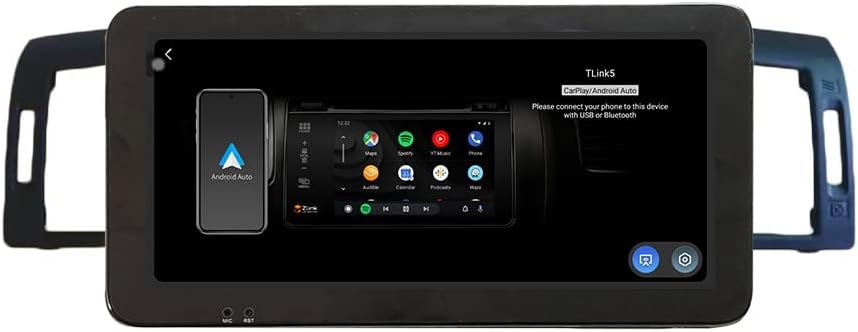
The system supports both Apple CarPlay and Android Auto, allowing you to connect your smartphone for navigation, music, calls, and messages directly on the stereo's display. Connect your phone via USB or Bluetooth as prompted by the system.

This image displays the Apple CarPlay interface, demonstrating how iOS apps are presented on the stereo screen for easy access.

This image displays the Android Auto interface, showing how Android apps are presented on the stereo screen for seamless integration.
This image illustrates the connection of a smartphone to the car stereo, highlighting the CarPlay and Android Auto features in action.
4.2. Navigation
The unit includes GPS functionality and supports various navigation applications. You can download and use your preferred navigation apps directly from the Android system.

This image displays a selection of navigation applications compatible with the ZERTRAN car stereo, indicating broad support for mapping services.

This image shows the icon representing the FM radio function.
4.3. Multimedia Playback
Enjoy your favorite music and videos through the integrated multimedia player. The system supports various audio and video formats.

This image illustrates the music player interface, showing controls for playback, track skipping, and volume.
4.4. Bluetooth Function
Connect your phone via Bluetooth for hands-free calling and audio streaming. Access your contacts and dial directly from the stereo screen.

This image displays the Bluetooth interface, highlighting options for phone calls and audio streaming.
4.5. FM Radio
Tune into your favorite radio stations with the built-in FM tuner. Scan for stations and save presets for quick access.

This image illustrates the FM radio interface, showing the current frequency, available presets, and controls for tuning.
4.6. Digital Sound Processor (DSP)
Customize your audio experience with the integrated DSP. Adjust equalizer settings, sound effects, and bass filters to suit your preferences.
This image displays the DSP interface, allowing users to fine-tune audio settings such as equalization and sound modes.
4.7. Steering Wheel Control
The unit supports integration with your vehicle's steering wheel controls, allowing you to manage audio, calls, and other functions without taking your hands off the wheel.

This image illustrates the interface for configuring steering wheel controls, enabling customization of button functions.
4.8. Rear View Camera (Optional)
If an optional rear view camera is connected, the system will automatically display the camera feed when the vehicle is in reverse, aiding in safer parking and maneuvering.

This image demonstrates the rear view camera display, complete with parking guidelines, as shown on the stereo screen.
4.9. Dual Screen Display
The system supports a dual-screen display feature, allowing you to run two applications simultaneously, such as navigation and music playback.

This image illustrates the dual-screen functionality, showing two applications running side-by-side on the stereo display.
5. Maintenance
To ensure the longevity and optimal performance of your ZERTRAN car navigation stereo, follow these maintenance guidelines:
- Cleaning the Screen: Use a soft, lint-free cloth to gently wipe the touchscreen. For stubborn smudges, slightly dampen the cloth with water or a screen-safe cleaner. Avoid harsh chemicals or abrasive materials.
- Software Updates: Periodically check for software updates to ensure you have the latest features and bug fixes. Refer to the system settings for update options.
- Avoid Extreme Temperatures: Do not expose the unit to extreme heat or cold for extended periods, as this can affect its performance and lifespan.
- Protect from Liquids: Prevent any liquids from entering the unit, as this can cause damage to internal components.
- Cable Management: Ensure all cables are securely connected and not pinched or damaged, which could lead to connectivity issues.
6. Troubleshooting
If you encounter any issues with your ZERTRAN car navigation stereo, please refer to the following common troubleshooting steps:
- No Power: Check all power connections to ensure they are secure. Verify the vehicle's fuse related to the stereo.
- No Audio Output:
- Ensure the volume is not muted or set to minimum.
- If your car has an original amplifier (e.g., Bose, Harman Kardon), try setting the CANBUS decoder first.
- Verify all audio cables are correctly connected.
- Wire Harness Not Fitting: Take photos of your original unit's front and back interfaces and send them to the seller with your car's full name and year for a solution.
- Touchscreen Unresponsive: Try restarting the unit. If the issue persists, ensure the screen is clean and free of debris.
- GPS Signal Issues: Ensure the GPS antenna is properly installed and has a clear line of sight to the sky.
- Bluetooth Connectivity Problems: Ensure Bluetooth is enabled on both the stereo and your phone. Try unpairing and re-pairing the devices.
For any other problems or if the above steps do not resolve your issue, please contact the seller for support.
7. Product Specifications
| Feature | Specification |
|---|---|
| Item Weight | 5.5 pounds |
| Package Dimensions | 16.93 x 13.78 x 5.91 inches |
| Display Size | 10.33 Inches |
| Voice Command | Touch Pad, Touchscreen with Stylus Support |
| ASIN | B0BJPH4Y8P |
| Date First Available | October 24, 2022 |
| Brand | ZERTRAN |
| Vehicle Service Type | Car |
| Screen Size | 10.33 Inches |
| Special Feature | Bluetooth, Touchscreen |
| Connectivity Technology | Bluetooth, Wi-Fi |
| Map Type | Road |
| Audio Output Mode | Stereo |
| Mounting Type | Dashboard Mount |
| Operating System | Android |
8. Warranty and Support
ZERTRAN products are designed for reliability and performance. For specific warranty details, please refer to the documentation provided with your purchase or contact the seller directly.
If you have any questions, require technical assistance, or encounter any issues not covered in this manual, please do not hesitate to contact the seller for prompt support. Your satisfaction is important, and the seller is available to assist you with any inquiries.