
1. Introduction
This manual provides comprehensive instructions for the assembly, operation, maintenance, and troubleshooting of your IKIFLY Kitchen Pantry Rattan Storage Cabinet. Please read this manual thoroughly before assembly and use to ensure proper function and longevity of your product. Keep this manual for future reference.
2. Safety Information
- Read all instructions: Familiarize yourself with all assembly and usage instructions before beginning.
- Keep children and pets away: During assembly, keep small parts and packaging materials away from children and pets to prevent choking hazards.
- Use appropriate tools: Ensure you have the correct tools for assembly as specified in the instructions.
- Assemble on a soft, clean surface: To prevent scratches or damage, assemble the unit on a carpeted or soft, clean surface.
- Secure the unit: For stability and safety, especially in homes with children, consider securing the cabinet to a wall using anti-tip hardware (if included or recommended).
- Electrical safety: When using the integrated power outlets and USB ports, ensure all connected devices are within the specified voltage and current limits. Do not overload the outlets. Keep liquids away from electrical components.
- Weight limits: Adhere to the specified weight limits for the tabletop and shelves to prevent structural damage or collapse.
3. Package Contents
Before beginning assembly, verify that all components listed in the packaging are present and undamaged. If any parts are missing or damaged, please contact customer support.
- All wooden panels (top, bottom, side, back, shelves, doors)
- Metal legs
- Rattan door inserts
- Hardware pack (screws, dowels, cam locks, hinges, door pulls)
- Integrated power outlet unit with USB ports and power cord
- Assembly instructions manual
4. Assembly Instructions
Assembly typically requires two adults and can take approximately 2-3 hours. Follow the numbered steps provided in the included assembly guide. Ensure all parts are correctly oriented before tightening screws.
4.1 Overview of Components

4.2 Step-by-Step Assembly (General Guide)
- Unpack and Identify Parts: Carefully unpack all components and lay them out on a soft, clean surface. Refer to the parts list in your included manual to identify each piece.
- Assemble the Base Frame: Attach the metal legs to the bottom panel of the cabinet using the provided hardware. Ensure they are securely fastened.
- Construct the Lower Cabinet: Attach the side panels and back panel to the bottom panel. Insert the adjustable shelves as desired.
- Install Lower Doors: Attach the hinges to the lower cabinet doors and then to the cabinet frame. Adjust hinges for proper alignment.
- Assemble the Upper Cabinet: Construct the upper cabinet section similarly to the lower, attaching side and back panels.
- Install Upper Doors: Attach hinges to the upper cabinet doors and then to the upper cabinet frame.
- Attach the Countertop: Secure the main countertop surface between the upper and lower cabinet sections.
- Install Power Outlet Unit: Carefully insert the power outlet and USB port unit into the designated cutout on the countertop or back panel, following the specific instructions for electrical components.
- Attach Door Pulls: Fasten the door pulls to all cabinet doors.
- Final Adjustments: Check all connections for tightness. Adjust door hinges if necessary to ensure doors close smoothly and align properly.

5. Operating Instructions
5.1 Storage Compartments
The cabinet features an upper storage section with two doors, an open countertop area, and a lower storage section with two doors and internal shelves. Utilize these compartments to organize kitchen items, pantry staples, or other household goods. The rattan doors provide ventilation and a distinct aesthetic while concealing contents.

5.2 Integrated Power Outlets and USB Ports
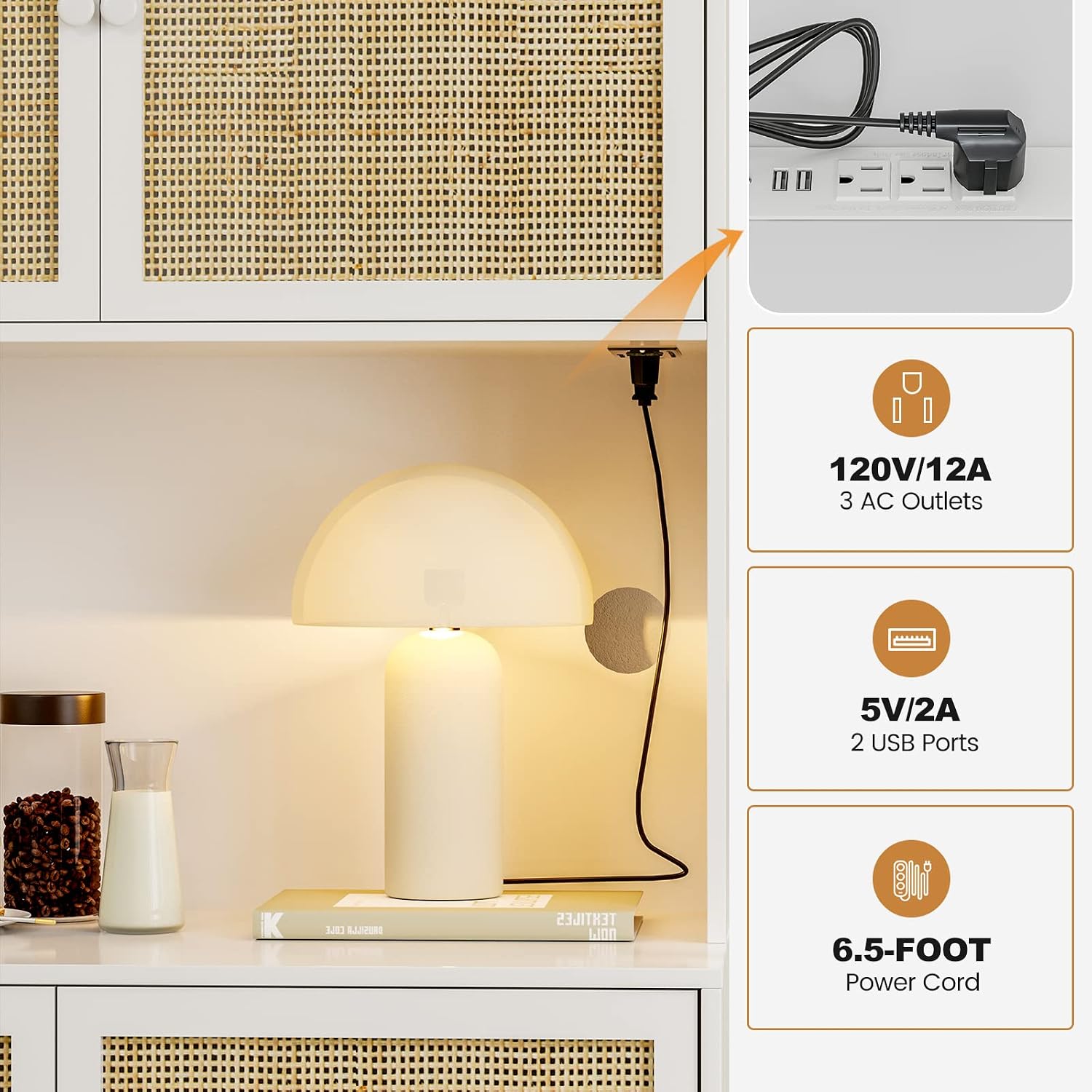
Your IKIFLY cabinet is equipped with a convenient power strip featuring 3 AC outlets (120V/12A) and 2 USB ports (5V/2A), connected via a 6.5-foot power cord. This allows for easy powering of small kitchen appliances or charging of electronic devices directly on the countertop.
- Connect to Power: Plug the cabinet's power cord into a standard wall outlet.
- AC Outlets: Use the 3 AC outlets for appliances such as coffee makers, toasters, blenders, or other kitchen electronics. Ensure the total wattage of connected devices does not exceed the cabinet's rated capacity.
- USB Ports: Use the 2 USB ports to charge smartphones, tablets, or other USB-powered devices.
- Cable Management: The design includes provisions for neatly routing appliance cables to maintain a tidy appearance.
6. Maintenance
- Cleaning: The cabinet's painted surface is designed for easy cleaning. Wipe surfaces with a soft, damp cloth. Avoid abrasive cleaners or harsh chemicals that could damage the finish.
- Rattan Care: For the rattan doors, gently dust with a soft brush or cloth. Avoid excessive moisture.
- Hardware Check: Periodically check all screws and fasteners to ensure they remain tight. Retighten as needed to maintain stability.
- Electrical Components: Ensure the power outlet unit remains dry and free of debris. Do not attempt to disassemble or repair the electrical components yourself.
7. Troubleshooting
| Problem | Possible Cause | Solution |
|---|---|---|
| Cabinet is wobbly/unstable. | Loose fasteners; uneven floor. | Ensure all screws are tightened. Use shims under legs if the floor is uneven. Consider wall anchoring. |
| Doors do not align or close properly. | Hinges are misaligned or loose; cabinet frame is not square. | Adjust the hinges using a screwdriver. Ensure the cabinet is assembled squarely. |
| Power outlets/USB ports are not working. | Power cord not plugged in; circuit breaker tripped; faulty device. | Check if the power cord is securely plugged into a wall outlet. Reset the circuit breaker if necessary. Test with a different device to rule out a faulty appliance. |
| Damage (e.g., chipped paint, dings) upon arrival. | Shipping damage; manufacturing defect. | Inspect all parts upon delivery. Contact customer support immediately with photos of the damage for assistance. |
8. Specifications
| Feature | Detail |
|---|---|
| Brand | IKIFLY |
| Model | B0BJNS9FWW |
| Color | White |
| Product Dimensions | 15.75"D x 31.5"W x 62.7"H |
| Material | Handmade Rattan, MDF Board, Metal Legs |
| Special Features | Handmade Rattan, Power Outlet (3 AC, 2 USB), Storage Cabinet |
| Mounting Type | Floor Mount |
| Installation Type | Freestanding |
| Assembly Required | Yes |
| Tabletop Weight Capacity | Up to 100 lbs |
| Shelf Weight Capacity | Up to 50 lbs per shelf |
9. Warranty and Support
For warranty information, missing parts, or any product-related inquiries, please refer to the contact information provided with your purchase or visit the official IKIFLY website. Customer support is available to assist you with any issues or questions you may have.