
1. Product Overview
The Cecotec DrumFit Cycle Compact Pro is a versatile mini exercise bike designed for convenient leg and arm workouts. Its ultra-compact size and intuitive operation make it suitable for various users, including those with reduced mobility. The device features manually adjustable resistance levels, an LCD display for tracking workout metrics, and a remote control for ease of use.
Key Features:
- Compact design for easy storage and transport.
- Manual resistance adjustment for varied intensity.
- High-visibility LCD display showing time, speed, calories, distance, mode, and RPM.
- Remote control for convenient operation without bending.
- Silence Fit system for quiet operation.
- Anti-slip mat and pedals with straps for safety and comfort.
- Supports user weight up to 100 kg.
2. Important Safety Instructions
Before using the Cecotec DrumFit Cycle Compact Pro, please read and understand all safety instructions. Failure to follow these instructions may result in injury or damage to the product.
- Consult a physician before starting any exercise program, especially if you have pre-existing health conditions.
- Place the exercise bike on a flat, stable surface. Use the included anti-slip mat to prevent movement during use.
- Ensure adequate space around the device during operation.
- Keep children and pets away from the device during use.
- The maximum user weight supported is 100 kg. Do not exceed this limit.
- Wear appropriate athletic footwear during use.
- Do not operate the device if it is damaged or malfunctioning. Contact customer support for assistance.
- Always secure your feet or hands with the pedal straps to prevent slipping.
- Stop exercising immediately if you feel pain, dizziness, or shortness of breath.
- Unplug the device from the power source when not in use or before cleaning.
3. Product Components
Familiarize yourself with the main parts of your DrumFit Cycle Compact Pro:
- Main Unit: Houses the motor, resistance mechanism, and display.
- Pedals with Straps: For securing feet or hands during exercise.
- LCD Display: Shows workout data.
- Control Panel: Buttons for manual operation and settings.
- Remote Control: For convenient adjustment of settings.
- Anti-slip Mat: Provides stability and protects flooring.
- Power Adapter: Connects the unit to an electrical outlet.

Image: Close-up view of the main unit's LCD display and control buttons.

Image: The remote control for the exercise bike, showing power, mode, and resistance buttons.
4. Setup Guide
The DrumFit Cycle Compact Pro requires minimal setup to get started.
- Unpack: Carefully remove all components from the packaging. Retain packaging for future storage or transport.
- Position: Place the anti-slip mat on a flat, stable surface where you intend to exercise. Position the main unit on the mat.
- Connect Power: Plug the power adapter into the designated port on the exercise bike, then plug the other end into a suitable electrical outlet.
- Adjust Straps: Ensure the pedal straps are adjusted to comfortably and securely fit your feet or hands.
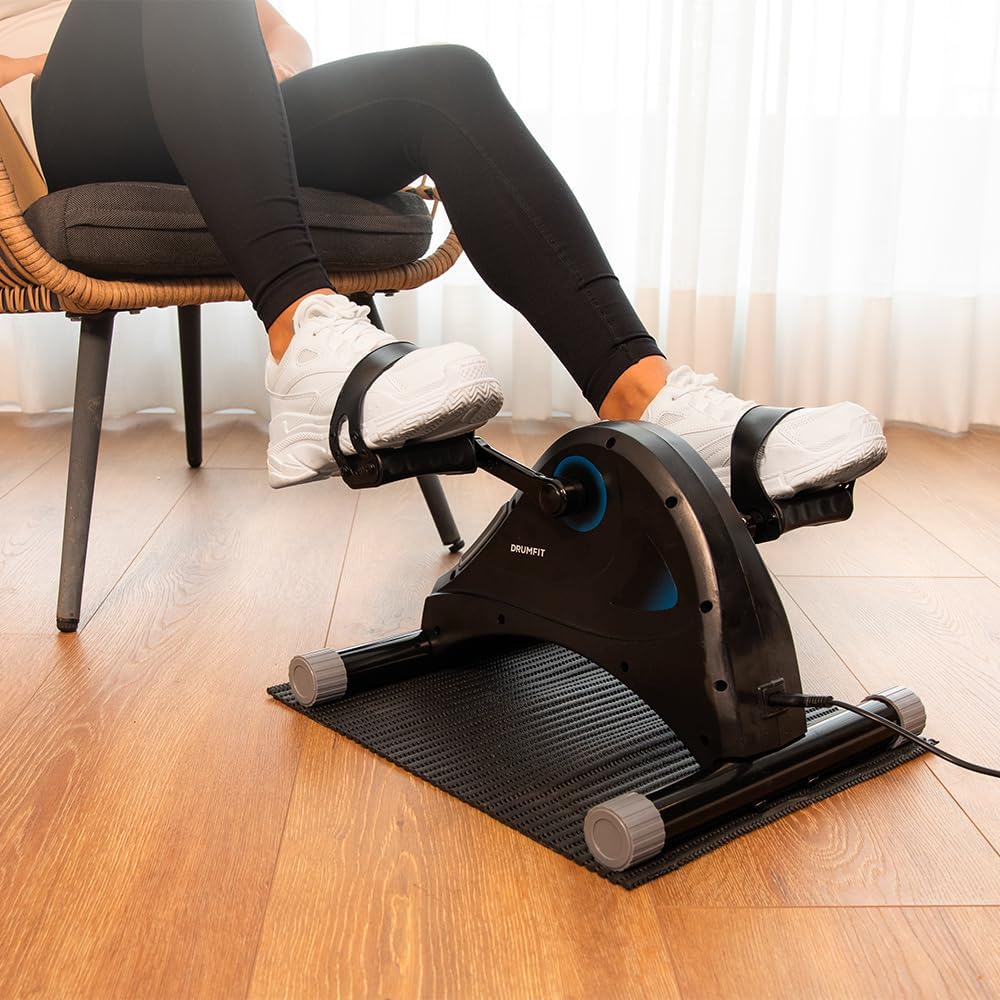
Image: Proper setup for a leg workout, showing the bike on the anti-slip mat.
5. Operating Instructions
5.1 Starting a Workout
- Power On: Press the power button on the main unit or the remote control. The LCD display will illuminate.
- Position Yourself: For leg exercises, sit comfortably in a chair and place your feet securely in the pedal straps. For arm exercises, place the unit on a stable table and secure your hands in the pedal straps.
- Select Mode: Use the 'MODE' button on the control panel or remote to cycle through display functions (Time, Speed, Calories, Distance, RPM).
- Adjust Resistance: Use the '+' and '-' buttons on the control panel or remote to increase or decrease the resistance level. There are 5 levels of resistance.
- Begin Exercise: Start pedaling smoothly. The display will begin tracking your workout metrics.
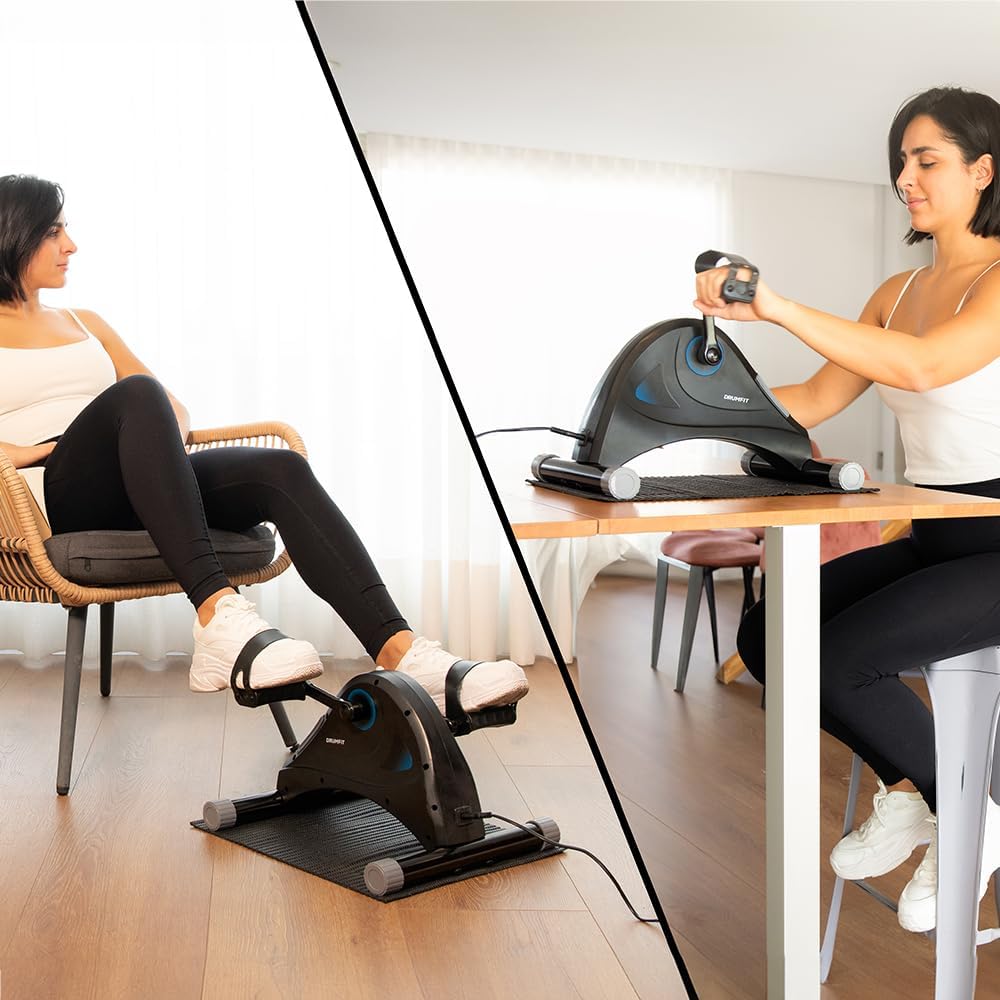
Image: Demonstrates both leg and arm exercise positions with the device.
5.2 LCD Display Functions
The LCD display provides real-time feedback on your workout:
- TIME: Duration of your current workout session.
- SPEED: Current pedaling speed.
- CALORIES: Estimated calories burned during the session.
- DISTANCE: Estimated distance covered.
- RPM: Revolutions Per Minute, indicating pedaling cadence.
- SCAN: Automatically cycles through all display functions.
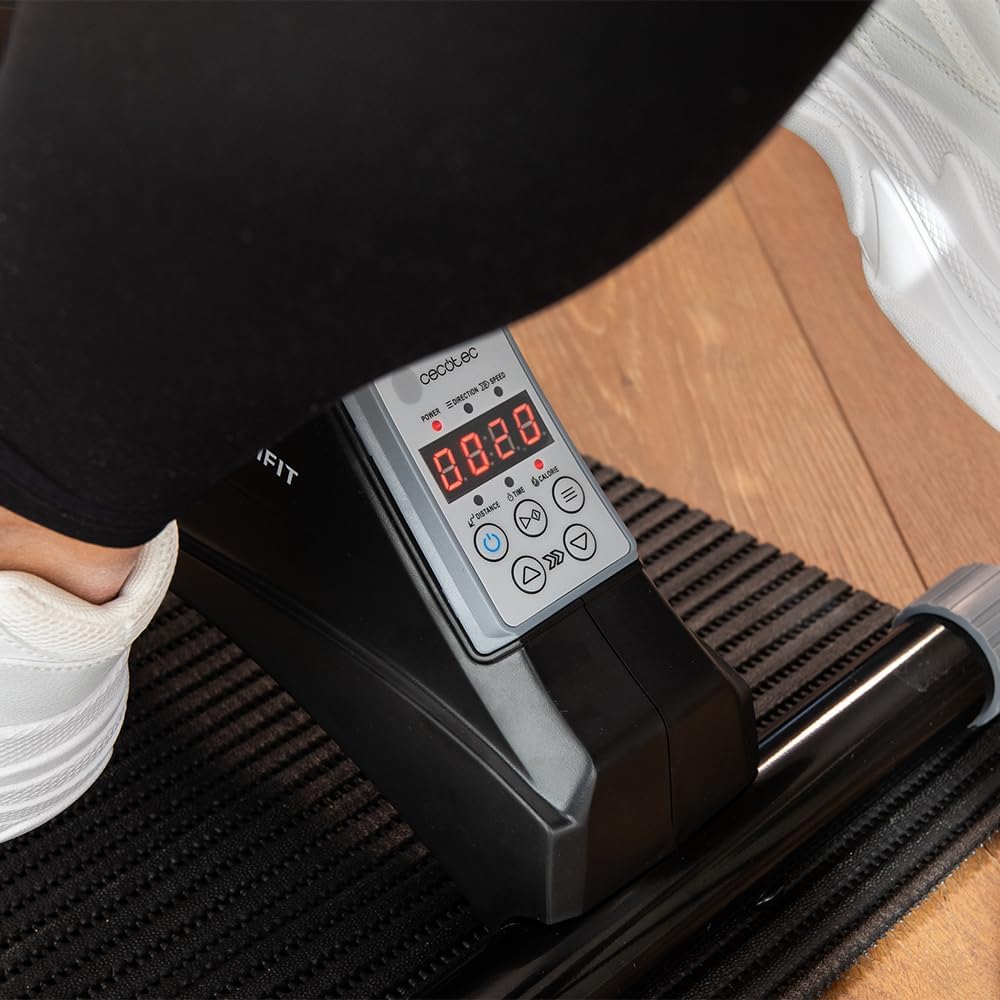
Image: Detailed view of the LCD screen displaying various workout data points.
5.3 Using the Remote Control
The remote control allows you to adjust settings without reaching down to the unit:
- Power Button: Turns the unit on/off.
- Mode Button: Changes the displayed metric on the LCD.
- '+' / '-' Buttons: Adjusts the resistance level.
6. Maintenance
Regular maintenance ensures the longevity and optimal performance of your exercise bike.
6.1 Cleaning
- Always unplug the device before cleaning.
- Wipe the unit with a soft, damp cloth. Do not use abrasive cleaners or solvents.
- Avoid getting moisture into the display or control panel.
6.2 Storage
- Store the exercise bike in a cool, dry place, away from direct sunlight and extreme temperatures.
- If storing for an extended period, cover the unit to protect it from dust.
7. Troubleshooting
If you encounter issues with your DrumFit Cycle Compact Pro, refer to the following common problems and solutions:
| Problem | Possible Cause | Solution |
|---|---|---|
| Unit does not power on. | Power adapter not connected or faulty outlet. | Ensure power adapter is securely plugged into the unit and a working electrical outlet. |
| Display is not showing data. | Unit is not powered on or sensor issue. | Press the power button. Ensure you are pedaling to activate sensors. |
| Resistance adjustment not working. | Remote control battery low or internal mechanism issue. | Try adjusting resistance using the buttons on the main unit. Replace remote batteries if necessary. |
| Unit moves during exercise. | Not placed on anti-slip mat or uneven surface. | Ensure the unit is placed on the anti-slip mat on a flat, stable surface. |
If the problem persists after attempting these solutions, please contact Cecotec customer support.
8. Technical Specifications
- Model Number: 07155
- Brand: Cecotec
- Maximum Recommended Weight: 100 Kilograms
- Control Type: Remote Control
- Display Type: LCD
- Number of Resistance Levels: 5
- Operating Mode: Manual
- Power Source: Manual (via pedaling) / Electrical (for display/motor assistance)
- Main Material: Aluminum
- Color: Black
- Product Dimensions (L x W x H): 40 x 39 x 30 cm
- Item Weight: 5 Kilograms
9. Warranty and Support
Cecotec products are manufactured to high-quality standards. This product comes with a standard manufacturer's warranty. Please refer to your purchase documentation for specific warranty terms and conditions.
Spare Parts Availability:
Spare parts for this model are available for up to 10 years within the EU.
Customer Support:
For technical assistance, warranty claims, or inquiries regarding spare parts, please contact Cecotec customer service through their official website or the retailer where the product was purchased. Please have your model number (07155) and proof of purchase ready.