
1. Introduction
This manual provides detailed instructions for the assembly, operation, and maintenance of your GreenForest 55-inch Computer Home Office Desk. Please read these instructions carefully before beginning assembly and retain this manual for future reference.

Figure 1: GreenForest 55-inch Computer Home Office Desk.
The GreenForest Computer Home Office Desk is designed to provide a functional and organized workspace. It features a built-in monitor stand and reversible two-tier storage shelves, offering flexibility to suit various office layouts and user preferences.
2. Safety Information
- Weight Limit: Do not exceed the maximum weight recommendation of 45 pounds (approximately 20.4 kg) for the desktop. Exceeding this limit may compromise the desk's stability and structural integrity.
- Assembly: Ensure all components are correctly assembled and tightened according to the instructions. Improper assembly can lead to instability and potential hazards.
- Placement: Place the desk on a flat, stable surface to prevent wobbling.
- Cleaning: Use a dry cloth for cleaning. Avoid abrasive cleaners or harsh chemicals that could damage the finish.
- Children: Keep small parts and packaging materials away from children during assembly to prevent choking hazards.
3. Package Contents
Before assembly, verify that all parts are present and undamaged. If any parts are missing or damaged, please contact customer support.
- Desktop Panels
- Metal Frame Components (Legs, Support Beams)
- Monitor Stand Components
- Storage Shelf Panels
- Assembly Hardware (Screws, Bolts, Washers, Allen Wrench)
- Instruction Manual
4. Setup and Assembly
Assembly typically requires one person and can be completed in approximately 30 minutes. All necessary tools are included.
4.1 General Assembly Steps
- Unpack all components and lay them out on a clean, soft surface to prevent scratches.
- Identify each part using the provided labels and the parts list in the instruction manual.
- Follow the step-by-step diagrams in the included manual to connect the metal frame components.
- Attach the desktop panels to the assembled frame.
- Install the monitor stand and storage shelves as described in the following sections.
- Ensure all screws and bolts are securely tightened.

Figure 2: Desk dimensions and component layout.
4.2 Reversible Storage Shelves
The two-tier storage shelves can be installed on either the left or right side of the desk to best suit your space and usage habits. Refer to the diagrams for guidance on positioning.

Figure 3: Two-way setup for storage shelves.
4.3 Removable Middle Shelf
The middle shelf within the storage unit is removable. This feature allows for increased vertical space, ideal for accommodating larger items such as a computer tower.

Figure 4: Removing the middle shelf for larger items.
4.4 Monitor Stand Installation
The built-in monitor stand is designed to help maintain a comfortable sitting posture. It measures 18.89 inches by 7.87 inches. The monitor stand features adjustable screw pads, allowing you to fine-tune its position on the desktop.

Figure 5: Adjustable screw pads for monitor stand positioning.
5. Operating and Features
The GreenForest desk is designed for versatility and ergonomic comfort.
5.1 Workspace Optimization
The monitor stand elevates your screen, promoting better posture and freeing up valuable desktop space for other items like laptops, keyboards, and accessories.
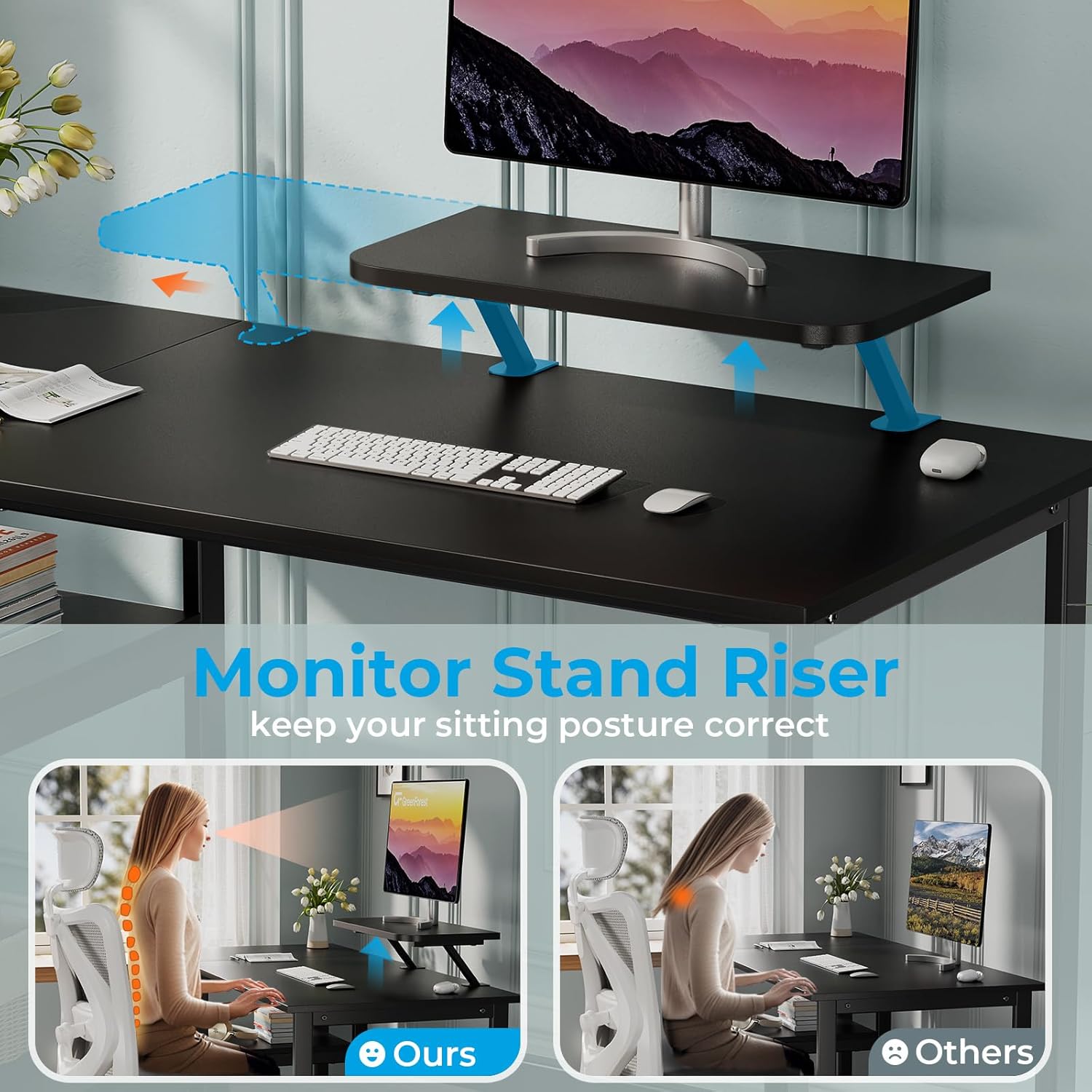
Figure 6: Ergonomic benefits of the monitor stand.
The two-tier open shelves provide convenient storage for books, storage boxes, and other office essentials, helping to keep your workspace tidy.

Figure 7: Desk with monitor, laptop, and organized storage shelves.
5.2 Sturdy Construction
Constructed with a 40mm premium metal frame and thick particleboard, the desk offers stability and durability for daily use in a home office, study, or gaming setup.

Figure 8: Desk demonstrating sturdy construction and PC tower storage.
6. Maintenance
To ensure the longevity and appearance of your GreenForest desk, follow these simple maintenance guidelines:
- Cleaning: Wipe the desk surfaces with a dry, soft cloth regularly to remove dust and debris. For spills, use a slightly damp cloth and dry immediately.
- Avoid Harsh Chemicals: Do not use abrasive cleaners, solvents, or harsh chemicals, as these can damage the desk's finish.
- Heat and Moisture: Avoid placing hot items directly on the desktop. Use coasters for drinks to prevent water rings and moisture damage.
- Sunlight Exposure: Prolonged exposure to direct sunlight may cause fading or discoloration of the desk surface.
- Hardware Check: Periodically check all screws and bolts to ensure they remain tight. Re-tighten if necessary to maintain stability.
7. Troubleshooting
If you encounter any issues with your GreenForest desk, refer to the following common troubleshooting tips:
- Desk Wobbles:
- Ensure the desk is placed on a level surface.
- Check that all assembly screws and bolts are fully tightened.
- Verify that the adjustable foot pads (if present) are properly adjusted to compensate for uneven floors.
- Missing Parts:
- Carefully re-check all packaging materials to ensure no small parts were overlooked.
- Refer to the package contents list in this manual. If parts are genuinely missing, contact GreenForest customer support.
- Assembly Difficulties:
- Review the assembly diagrams and instructions step-by-step.
- Ensure you are using the correct hardware for each step.
- Do not force components together; if parts do not fit, re-examine the instructions for correct orientation.
8. Specifications
| Feature | Detail |
|---|---|
| Brand | GreenForest |
| Model Number | Noir |
| Product Dimensions (L x W x H) | 55.12"D x 19.69"W x 29.53"H (140cm D x 50cm W x 75cm H) |
| Color | Black |
| Style | Modern |
| Base Material | Alloy Steel |
| Top Material Type | Engineered Wood |
| Special Feature | Built-in Monitor Stand, Reversible Storage Shelves |
| Room Type | Office |
| Recommended Uses | Gaming, Working, Writing |
| Item Weight | 34.61 Pounds (15.7 kg) |
| Maximum Weight Recommendation | 45 Pounds (20.4 kg) |
| Number Of Shelves | 2 |
| Required Assembly | Yes |
| Recommended Number of People for Assembly | 1 |
9. Warranty and Support
GreenForest products are manufactured with quality and customer satisfaction in mind. For specific warranty information, details on returns, or assistance with any product-related issues, please refer to the documentation included with your purchase or contact GreenForest customer support directly through their official channels.
When contacting support, please have your product model (Noir) and purchase information readily available.