
Ascaso Steel DUO PID (DUAL White)
Ascaso Steel DUO Espresso Machine User Manual
Model: Steel DUO PID (DUAL White)
Brand: Ascaso
Introduction
Welcome to the comprehensive user manual for your Ascaso Steel DUO Espresso Machine. This guide provides detailed instructions for setting up, operating, maintaining, and troubleshooting your machine to ensure optimal performance and longevity. Please read this manual thoroughly before first use.
Setup
1. Unboxing and Initial Placement
Carefully remove all packaging materials. Place the machine on a stable, level, and heat-resistant surface, ensuring adequate ventilation around the unit. Keep the machine away from direct sunlight and heat sources.

Figure 1: Front view of the Ascaso Steel DUO Espresso Machine in white.
2. Initial Cleaning
Before first use, wipe the exterior of the machine with a damp cloth. Remove the water tank and drip tray, wash them with warm soapy water, rinse thoroughly, and dry. Do not immerse the main unit in water.
3. Filling the Water Tank
The Ascaso Steel DUO features a convenient side-fill water reservoir. Remove the water tank from the side of the machine. Fill it with fresh, filtered water up to the 'MAX' line. Reinsert the tank securely into its position.
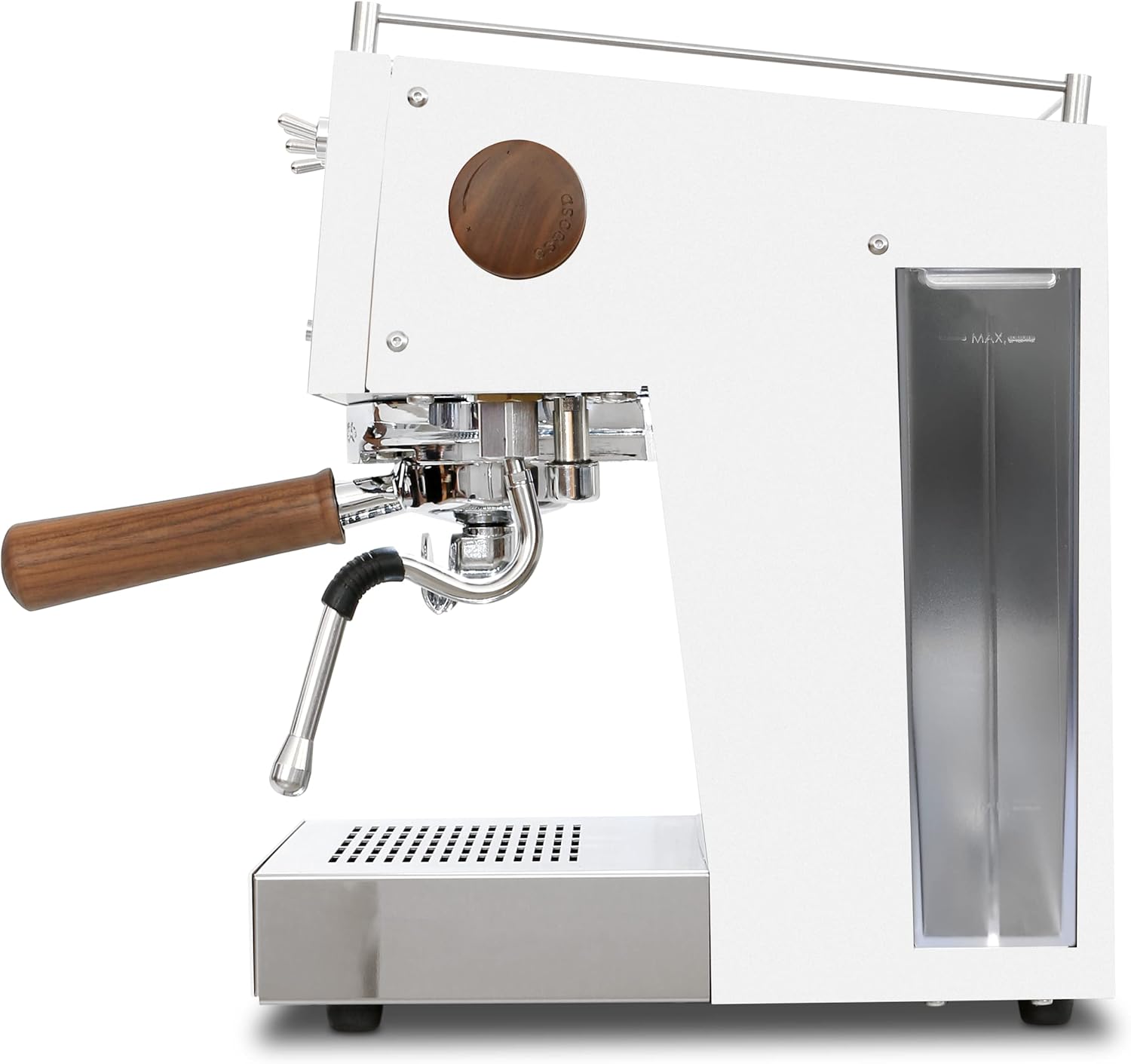
Figure 2: Side view of the Ascaso Steel DUO Espresso Machine, highlighting the water reservoir.
4. Power Connection
Plug the machine into a grounded 120V electrical outlet. Ensure the power switch is in the 'OFF' position before plugging in. Turn on the main power switch to begin the heating process.
Operation
1. Espresso Preparation
- Pre-heating: Allow the machine to fully heat up. The PID display will show the target temperature, and the brew light will indicate readiness.
- Grinding Coffee: Grind fresh coffee beans to an espresso-fine consistency.
- Dosing and Tamping: Dose the appropriate amount of ground coffee into the 58mm professional portafilter. Tamp evenly with firm pressure.
- Locking Portafilter: Insert the portafilter into the group head and twist firmly to lock it into place.
- Brewing: Place your cup(s) under the portafilter spouts. Activate the brew switch. The volumetric controls allow for programmable single or double shots.
- Monitoring: Observe the pressure gauge during extraction for optimal brewing pressure (typically 9-10 bar).

Figure 3: Angled view of the Ascaso Steel DUO Espresso Machine, showing the side and front.
2. Steaming Milk
- Activate Steam: Turn on the steam switch. Allow the machine to reach steaming temperature, indicated by the PID display.
- Purge Steam Wand: Briefly open the steam valve to purge any condensed water from the wand.
- Frothing Milk: Immerse the tip of the no-burn steam wand just below the surface of cold milk in a stainless steel pitcher. Open the steam valve fully.
- Texturing: Lower the pitcher slightly to introduce air for aeration, then raise it to create a swirling vortex for texturing. Continue until desired temperature and texture are achieved.
- Clean Wand: Immediately after steaming, wipe the steam wand with a damp cloth and briefly purge steam again to clear any milk residue.
3. PID and Volumetric Controls
The PID (Proportional-Integral-Derivative) temperature control allows for precise temperature adjustments in one-degree increments, ensuring consistent espresso extraction. The volumetric controls enable programming for pre-infusion, single shot, double shot, and auto-standby, enhancing shot consistency and ease of use. Refer to the machine's display and buttons for specific programming instructions.
Maintenance
1. Daily Cleaning
- Drip Tray: Empty and clean the drip tray daily to prevent overflow and bacterial growth.
- Portafilter and Baskets: Rinse the portafilter and filter baskets after each use. Backflush the group head regularly using a blind basket and espresso machine cleaner.
- Steam Wand: Always wipe and purge the steam wand immediately after use to prevent milk buildup.
- Exterior: Wipe down the exterior of the machine with a soft, damp cloth.
2. Descaling
Regular descaling is crucial to prevent mineral buildup in the thermoblocks and water lines, which can affect machine performance and lifespan. The frequency depends on your water hardness. Use a descaling solution specifically designed for espresso machines and follow the product's instructions carefully. The machine features a programmable automatic cleaning mode to assist with this process.
3. Portafilter Care
The 58mm professional portafilter with its walnut wood handle should be handled with care. Avoid immersing the wooden handle in water for extended periods. Clean the metal parts thoroughly after each use.
Troubleshooting
| Problem | Possible Cause | Solution |
|---|---|---|
| No water flow from group head | Empty water tank, clogged group head, pump issue. | Refill water tank. Perform a backflush. Contact support if pump is faulty. |
| Weak or no steam | Steam wand clogged, insufficient heating. | Clean steam wand hole with a pin. Allow machine to fully heat for steam. |
| Espresso extracts too fast/slow | Grind size incorrect, tamping pressure. | Adjust grind finer (too fast) or coarser (too slow). Adjust tamping pressure. |
| Machine not heating up | Power issue, thermoblock malfunction. | Check power connection. Contact support. |
Specifications
| Feature | Detail |
|---|---|
| Brand | Ascaso |
| Model Name | Steel Duo |
| Color | White |
| Product Dimensions | 12.5"D x 10.5"W x 15"H |
| Item Weight | 35 pounds |
| Voltage | 120 Volts |
| Coffee Maker Type | Espresso Machine (Semi-Automatic) |
| Special Features | PID Temperature Control, Volumetric Programmable Settings, Dual Thermoblock, Adjustable OPV, Electronic Steam Control, No-Burn Steam Wand, Automatic Cleaning Mode |
| Portafilter Size | 58mm |
| Country of Origin | Spain |
Warranty & Support
The Ascaso Steel DUO Espresso Machine comes with a manufacturer's warranty. For specific warranty terms and conditions, please refer to the warranty card included with your product or visit the official Ascaso website. For technical support, spare parts, or service inquiries, please contact Ascaso customer service or your authorized dealer. Keep your proof of purchase for warranty claims.
Related documentsSteel DUO PID (DUAL White)


Ask a question about this manual
Ask about setup, troubleshooting, compatibility, parts, safety, or missing instructions. Manuals+ will review the question and use this page’s manual context to help answer it.