
Introduction
The QearFun Dinosaur Bluetooth Headphones AH-906R are designed to provide a safe and enjoyable audio experience for children. These headphones feature an 85dB volume limit to protect young ears, versatile connectivity options including Bluetooth 5.2 and a 3.5mm wired mode, and a built-in microphone for clear communication. Their foldable design and comfortable ear pads make them suitable for extended use at school, during travel, or at home.
Key Features
- 85dB Hearing Protection: Engineered with a strict 85dB volume limit to safeguard sensitive young ears.
- Built-in Microphone: Ensures crystal-clear voice transmission for online classes, video calls, and gaming.
- 3-in-1 Play Modes: Supports Bluetooth 5.2 wireless connection, 3.5mm wired audio, and TF memory card playback (card not included).
- Stable Bluetooth 5.2: Provides a reliable and fast wireless connection.
- All-Day Comfort: Features pillow-soft, skin-friendly ear pads and an adjustable headband for a pressure-free fit.
- Fold-and-Go Design: Lightweight and foldable for easy portability and storage in backpacks.
- Fast Charging: Quick charging capability for minimal downtime.
What's in the Box
- QearFun Dinosaur Bluetooth Headphones (AH-906R)
- 3.5mm Audio Cable
- USB Charging Cable
- User Manual
- Bonus Dinosaur Toys (4 pieces, dispatched randomly)
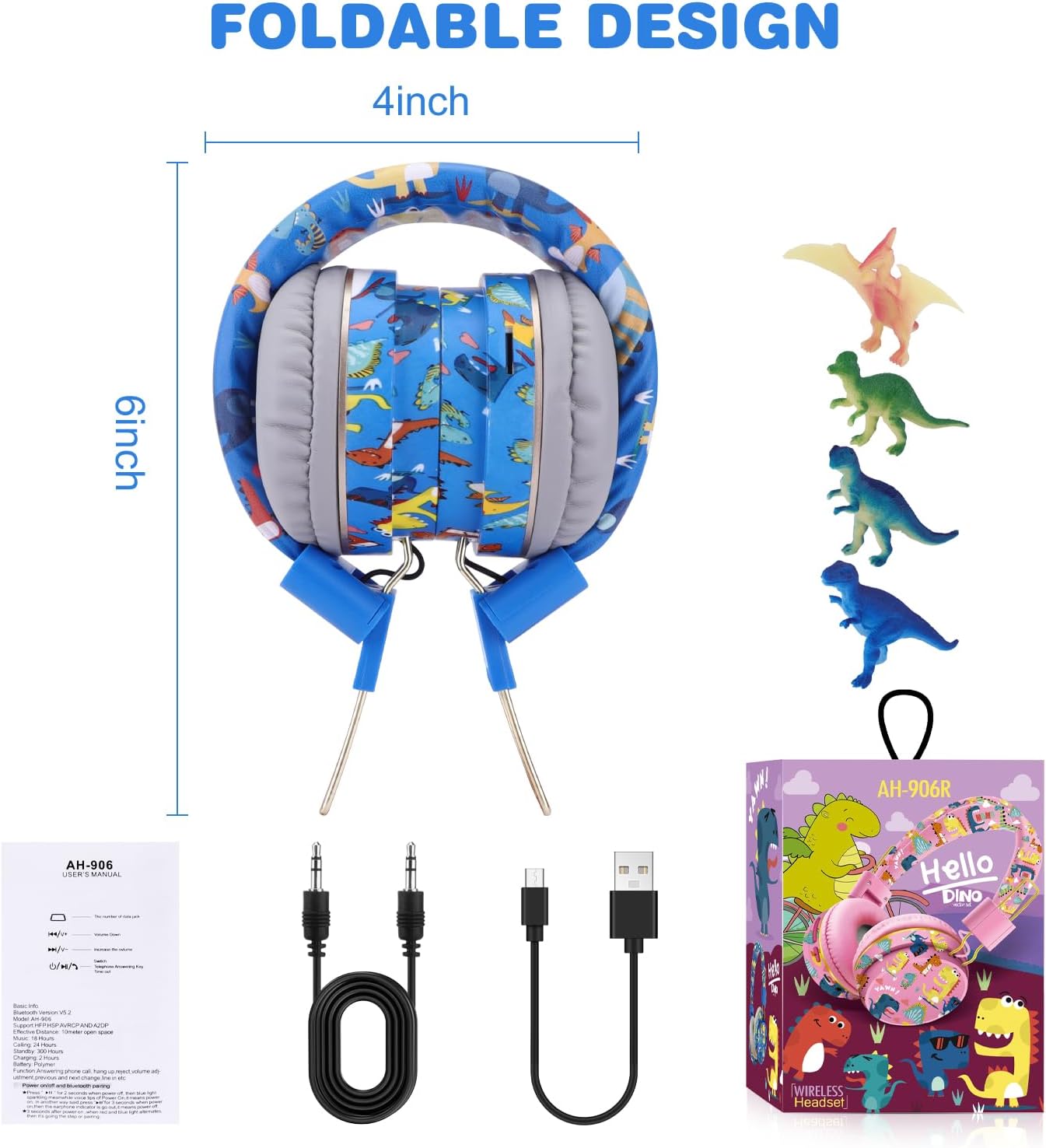
Image: The package contents, showing the foldable headphones, 3.5mm audio cable, USB charging cable, and bonus dinosaur figures.
Setup
1. Charging the Headphones
Before first use, fully charge the headphones. Connect the provided USB charging cable to the charging port on the headphones and the other end to a USB power source (e.g., computer, wall adapter). The LED indicator will show charging status. A full charge typically takes 1-2 hours.
2. Powering On/Off
To power on, press and hold the multi-function button (often labeled with a phone icon) for a few seconds until the LED indicator lights up. To power off, press and hold the same button until the LED indicator turns off.
3. Bluetooth Pairing
- Ensure the headphones are powered off.
- Press and hold the multi-function button until the LED indicator flashes blue and red alternately, indicating pairing mode.
- On your device (smartphone, tablet, laptop), enable Bluetooth and search for available devices.
- Select "AH-906R" or "QearFun Dinosaur" from the list.
- Once connected, the LED indicator will flash blue slowly.
4. Wired Connection
For wired listening, plug the 3.5mm audio cable into the audio jack on the headphones and the other end into your audio device. The headphones will automatically switch to wired mode, conserving battery life.
5. TF Card Playback
Insert a TF (MicroSD) memory card (not included) with your desired audio files into the designated slot on the headphones. The headphones will automatically detect the card and begin playing music.

Image: Overview of headphone features including control buttons for volume, track navigation, power/answer call, and modes for charging, plug-in, and TF card.
Operating Instructions
Controls Overview
- Multi-function Button: Press and hold to power on/off. Short press to play/pause music or answer/end calls. Double press to redial the last number.
- Volume Up (+): Short press to increase volume. Long press for next track.
- Volume Down (-): Short press to decrease volume. Long press for previous track.
Making/Receiving Calls
- Answer Call: Short press the multi-function button.
- End Call: Short press the multi-function button during a call.
- Reject Call: Long press the multi-function button.
- Redial: Double press the multi-function button.

Image: A child enjoying media with the headphones, highlighting the built-in microphone for communication and Bluetooth 5.2 connectivity.
Adjusting the Headband
The headband is adjustable to fit various head sizes. Gently slide the earcups up or down along the metal frame until a comfortable fit is achieved. The soft padding ensures comfort during prolonged use.

Image: Detailed view of the headphones, emphasizing the dinosaur design and the adjustable, soft headband for a comfortable fit.
Maintenance
- Cleaning: Use a soft, dry cloth to wipe the headphones. Do not use liquid cleaners or abrasive materials.
- Storage: When not in use, fold the headphones and store them in a cool, dry place away from direct sunlight and extreme temperatures.
- Cable Care: Avoid sharp bends or excessive pulling on the cables to prevent damage.
Troubleshooting
| Issue | Possible Solution |
|---|---|
| Headphones won't turn on | Ensure the headphones are fully charged. |
| Cannot pair via Bluetooth | Make sure headphones are in pairing mode (flashing blue/red). Turn off and on Bluetooth on your device. Move closer to the device. |
| No sound in wired mode | Check if the 3.5mm audio cable is securely plugged into both the headphones and the audio source. Test with another cable if available. |
| Low volume | Adjust volume on both the headphones and the connected device. Remember the 85dB volume limit for hearing protection. |
Specifications
- Brand: QearFun
- Model Number: AH-906R
- Connectivity Technology: Wireless (Bluetooth 5.2), Wired (3.5mm Jack)
- Ear Placement: Over Ear
- Audio Driver Size: 40 Millimeters
- Impedance: 32 Ohms
- Frequency Range: 20 Hz - 20,000 Hz
- Bluetooth Range: 10 Meters
- Battery Charge Time: Approximately 2 Hours
- Battery Average Life: Up to 24 Hours (Music/Calling)
- Standby Time: Up to 300 Hours
- Control Type: Button Control
- Additional Features: Adjustable Headband, Fast Charging, Microphone Included, TF Card Slot
- Material: Faux Leather, Plastic
Warranty and Support
QearFun provides a 30-day, no-questions-asked money-back guarantee for your purchase. For any product-related inquiries, technical support, or warranty claims, please contact QearFun customer service through the retailer where the product was purchased. Please retain your proof of purchase for warranty validation.
Product Videos
Video: Official QearFun video showcasing the Cool Dinosaur Bluetooth Headphones. This video highlights the product's design and features.