
1. Introduction
Thank you for choosing the VIHELM DT-82 Pocket Anemometer. This device is designed for measuring air velocity (wind speed) in various units. Its compact size and ease of use make it suitable for a wide range of applications, from environmental monitoring to HVAC system checks. Please read this manual thoroughly before operating the device to ensure correct usage and to maintain its optimal performance.
2. Safety Information
- Always handle the device with care. Avoid dropping or subjecting it to strong impacts.
- Do not expose the device to extreme temperatures, high humidity, or corrosive environments.
- Keep the device away from strong magnetic fields.
- Ensure correct battery polarity when installing batteries. Remove batteries if the device will not be used for an extended period to prevent leakage.
- Do not attempt to disassemble or modify the device. Refer all servicing to qualified personnel.
- Keep out of reach of children.
3. Product Overview
The VIHELM DT-82 Pocket Anemometer features a compact design with an integrated impeller for accurate air velocity measurements. Key components include the impeller, LCD display, power button, and MAX/AVG function button.
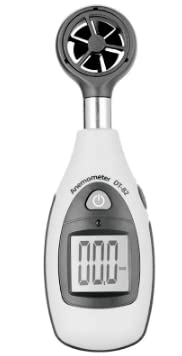
Figure 3.1: Front view of the DT-82 Anemometer. This image displays the device from the front, highlighting the digital LCD screen and the main power button.
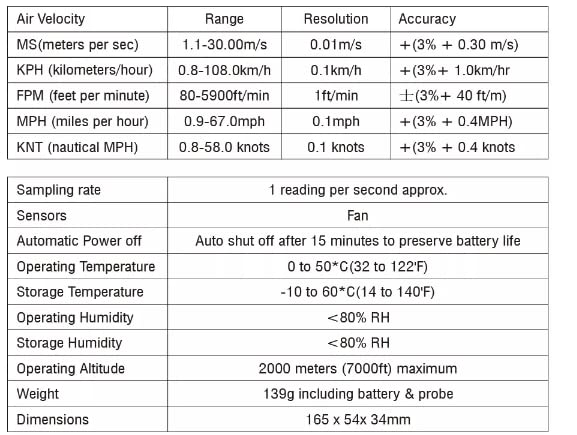
Figure 3.2: Side view of the DT-82 Anemometer. This image shows the side profile of the device, clearly indicating the 'MAX AVG' button for function selection.
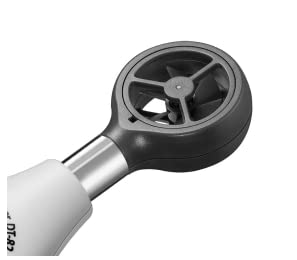
Figure 3.3: Close-up of the impeller. This image provides a detailed view of the rotating fan blades responsible for measuring air velocity.
4. Setup
4.1 Battery Installation
- Locate the battery compartment cover on the back of the device.
- Slide or gently pry open the battery compartment cover.
- Insert one 9V battery, ensuring the correct polarity (+ and - terminals match the markings inside the compartment).
- Replace the battery compartment cover until it clicks securely into place.
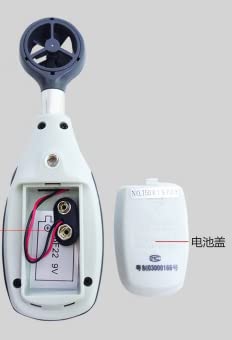
Figure 4.1: Battery installation. This image shows the back of the anemometer with the battery cover removed, illustrating where to insert the 9V battery.
5. Operating Instructions
5.1 Power On/Off
- To power on the device, press the Power button (usually marked with a power symbol) located on the front of the unit. The LCD display will illuminate.
- To power off the device, press and hold the Power button for a few seconds until the display turns off.
- The device features an automatic power-off function after 15 minutes of inactivity to conserve battery life.
5.2 Taking Measurements
- Ensure the device is powered on.
- Hold the anemometer so that the impeller faces directly into the airflow you wish to measure. For best accuracy, ensure the airflow passes freely through the impeller.
- The current air velocity reading will be displayed on the LCD screen.
5.3 MAX/AVG Function
- Press the MAX/AVG button (located on the side) to cycle through different measurement modes.
- One press typically displays the Maximum (MAX) air velocity recorded since the device was powered on or the function was reset.
- A subsequent press typically displays the Average (AVG) air velocity recorded over a specific period.
- Pressing the button again will return to the real-time measurement mode.
5.4 Unit Selection
The DT-82 supports multiple units for air velocity measurement. While specific button presses for unit selection are not detailed, typically this function is integrated with the MAX/AVG button or a separate dedicated button. Refer to the display for the active unit (e.g., m/s, km/h, FPM, MPH, KNT).
6. Maintenance
6.1 Cleaning
- Wipe the device casing with a soft, dry cloth. Do not use abrasive cleaners or solvents.
- Gently clean the impeller blades with a soft brush or compressed air to remove dust or debris that could affect accuracy. Avoid touching the impeller with your fingers.
6.2 Battery Replacement
When the battery indicator appears on the display, replace the 9V battery as described in Section 4.1.
6.3 Storage
If the device is not used for an extended period, remove the battery to prevent leakage. Store the anemometer in a cool, dry place, away from direct sunlight and extreme temperatures.
7. Troubleshooting
- No display or faint display: Check battery installation. Replace with a fresh 9V battery.
- Inaccurate readings: Ensure the impeller is free from obstructions and rotates smoothly. Verify the device is held correctly in the airflow.
- Device does not power on: Ensure the battery is correctly installed and charged. If the issue persists, contact customer support.
8. Specifications
The following table details the technical specifications of the VIHELM DT-82 Pocket Anemometer:

Figure 8.1: Technical Specifications. This image presents a table outlining the performance ranges, resolutions, and accuracies for various air velocity units, along with general device specifications.
| Parameter | Details |
|---|---|
| Air Velocity Range (m/s) | 1.1-30.00 m/s |
| Air Velocity Resolution (m/s) | 0.01 m/s |
| Air Velocity Accuracy (m/s) | ±(3% + 0.30 m/s) |
| Air Velocity Range (KPH) | 0.8-108.0 km/h |
| Air Velocity Resolution (KPH) | 0.1 km/h |
| Air Velocity Accuracy (KPH) | ±(3% + 1.0 km/hr) |
| Air Velocity Range (FPM) | 80-5900 ft/min |
| Air Velocity Resolution (FPM) | 1 ft/min |
| Air Velocity Accuracy (FPM) | ±(3% + 40 ft/m) |
| Air Velocity Range (MPH) | 0.9-67.0 mph |
| Air Velocity Resolution (MPH) | 0.1 mph |
| Air Velocity Accuracy (MPH) | ±(3% + 0.4 MPH) |
| Air Velocity Range (KNT) | 0.8-58.0 knots |
| Air Velocity Resolution (KNT) | 0.1 knots |
| Air Velocity Accuracy (KNT) | ±(3% + 0.4 knots) |
| Sampling Rate | 1 reading per second approx. |
| Sensors | Fan |
| Automatic Power Off | Auto shut off after 15 minutes to preserve battery life |
| Operating Temperature | 0 to 50°C (32 to 122°F) |
| Storage Temperature | -10 to 60°C (14 to 140°F) |
| Operating Humidity | <80% RH |
| Storage Humidity | <80% RH |
| Operating Altitude | 2000 meters (7000ft) maximum |
| Weight | 139g including battery & probe |
| Dimensions | 165 x 54 x 34 mm |
9. Warranty and Support
VIHELM products are designed for reliability and performance. For warranty information, technical support, or service inquiries, please refer to the contact information provided with your purchase or visit the official VIHELM website. Please have your model number (DT-82) and purchase date available when contacting support.