
Goplus Treadmill

Goplus 4.75HP Folding Treadmill User Manual
Model: Treadmill
Important Safety Information
Please read this manual carefully before operating the treadmill. Keep this manual for future reference. Failure to follow these instructions may result in injury or damage to the product.
- Always ensure the safety key is properly attached before starting the treadmill. In case of emergency, pull the safety key to stop the machine immediately.
- Keep children and pets away from the treadmill during operation.
- Consult a physician before beginning any exercise program.
- Place the treadmill on a flat, stable surface with adequate clearance around it.
- Do not operate the treadmill if it is damaged or malfunctioning.
Product Overview
The Goplus 4.75HP Folding Treadmill is designed for home gym use, offering a robust and versatile workout experience. It features a powerful motor, automatic incline, various preset programs, and smart app connectivity to help you achieve your fitness goals.

Image: The Goplus 4.75HP Folding Treadmill shown in its operational state with a user running, and also in its compact, folded position for storage.
Components and Key Features
This treadmill is equipped with several features to enhance your workout:
- 4.75HP Motor: Provides smooth and quiet operation, supporting speeds up to 12 mph.
- 15% Automatic Incline: Electronically adjustable incline from 1% to 15% (0.5° to 6.7°) for varied training intensity.
- 51.2" x 19.7" Running Area: Spacious 7-layer anti-skid running belt with 4 shock-absorbing cushions for joint protection.
- LED Display: Clear display showing speed, time, calories, distance, heart rate, and steps.
- Bluetooth Speakers: Integrated speakers for audio playback during workouts.
- Electronic Device Holder: Conveniently holds your smartphone or tablet.
- Heart Rate Sensors: Built-in sensors on handlebars for monitoring pulse.
- Soft Drop System: Hydraulic tube for safe and slow unfolding.
- Transport Wheels: For easy mobility and storage.

Image: Detailed view of the treadmill's console area highlighting the high-quality Bluetooth speakers, a convenient cup holder, and an ergonomic device holder. The image also shows the smooth transport wheels with anti-skid mats at the base of the treadmill.
Setup and Assembly
The Goplus 4.75HP Folding Treadmill comes mostly pre-assembled, requiring only a few simple installation steps with the included accessories. Please ensure all packaging materials are removed before assembly.
Unfolding the Treadmill:
- Place the treadmill on a level surface.
- Lightly kick the hydraulic tube located near the base of the running deck.
- The running deck will slowly lower itself to the ground due to the soft drop system. Guide it gently until it is fully flat.
Folding for Storage:
- Ensure the treadmill is powered off and unplugged.
- Carefully lift the running deck until it locks into the upright, folded position.
- The built-in transport wheels allow for easy movement of the folded treadmill.
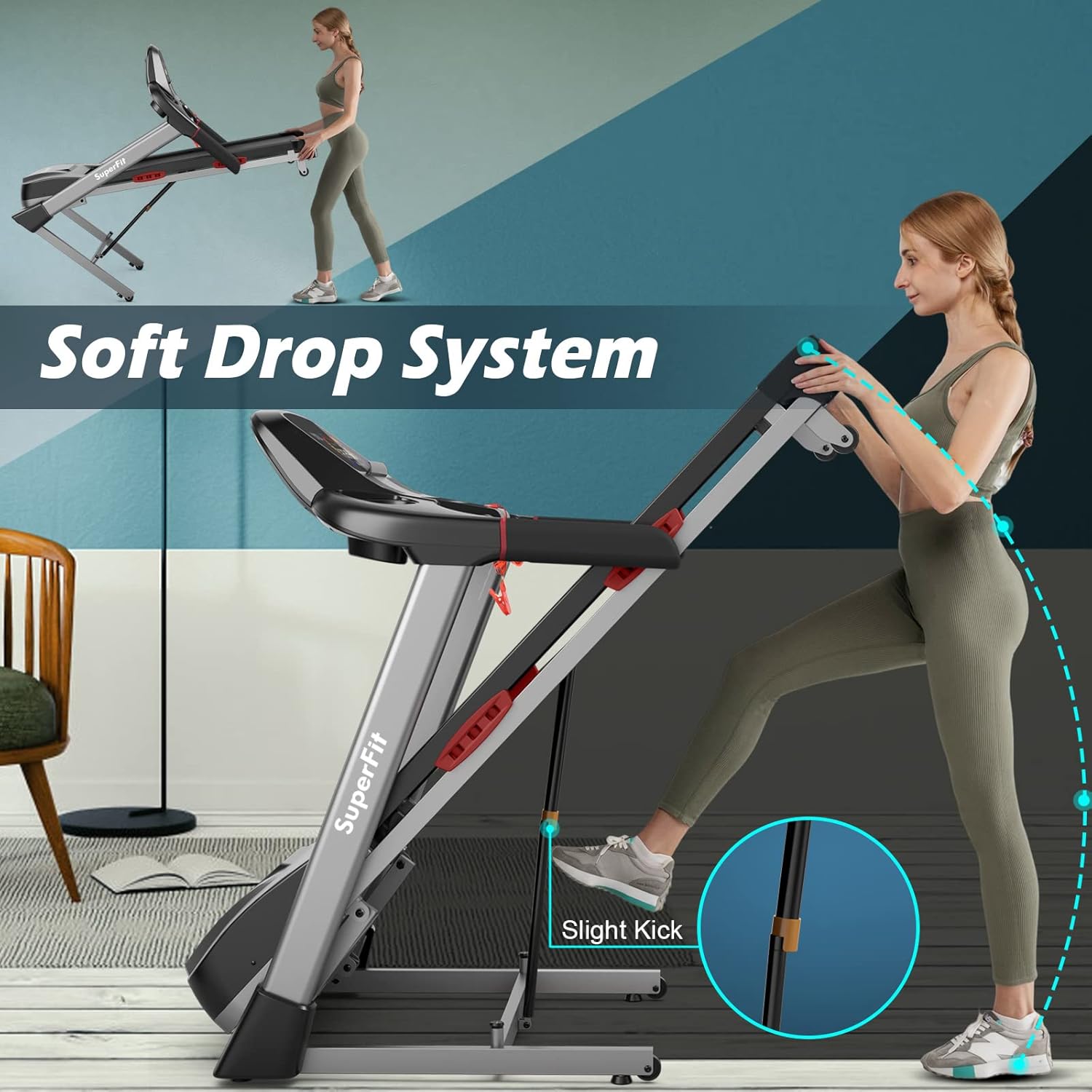
Image: A user demonstrating the Soft Drop System of the treadmill, showing how a slight kick to the hydraulic tube allows the running deck to lower slowly and safely. The image also illustrates the treadmill in its folded upright position.
Operating Instructions
Getting Started:
- Plug the treadmill into a grounded electrical outlet.
- Attach the safety key to the designated slot on the console and clip the other end to your clothing.
- Step onto the treadmill belt.
Control Panel and Display:
The large LED display provides real-time workout data:
- Time: Duration of your workout.
- Calories: Estimated calories burned.
- Distance: Distance covered during your session.
- Heart Rate: Your pulse when holding the heart rate sensors.
- Steps: Number of steps taken.

Image: Overhead view of the treadmill's full-featured LED display, clearly showing metrics such as time, calories, distance, heart rate, and steps, providing comprehensive workout feedback.
Exercise Modes and Programs:
The treadmill offers diverse workout options:
- 5 Exercise Modes: Includes time countdown, calories countdown, distance countdown, and free running.
- 20 Preset Programs (P1-P20): Pre-designed workout routines that automatically adjust speed and incline to challenge you.

Image: The treadmill console displaying the P1-P20 preset programs, which help users achieve diversified training goals. The image also illustrates the 15% automatic incline feature, simulating different outdoor road conditions.
Speed and Incline Adjustment:
Use the +/- keys on the control panel to manually adjust speed (0.6 to 12 mph) and incline (1% to 15%). Shortcut keys may also be available for quick adjustments.
Smart Gymax APP Control:
Enhance your workout experience by connecting to the Gymax APP via Bluetooth. The app allows you to:
- Start and adjust treadmill speed.
- Synchronize and view your exercise data.
- Participate in training courses and check real-time sports rankings.
- Share fitness results and add personal workout plans.

Image: The treadmill console with a smartphone displaying the Gymax App interface, demonstrating how users can control the treadmill and monitor their workout data wirelessly via Bluetooth.
Official Product Video:
Video: An official product video from Goplus showcasing the key features and benefits of the 4.75HP Folding Treadmill for home gym use, including its folding mechanism, motor, cushioning, and smart features.
Maintenance and Care
Regular maintenance ensures the longevity and optimal performance of your treadmill.
- Cleaning: Wipe down the treadmill with a damp cloth after each use to remove sweat and dust. Avoid using abrasive cleaners.
- Running Belt: The 7-layer anti-skid running belt is designed for durability. Periodically check for wear and tear.
- Shock Absorption: The 4 shock-absorbing cushions help reduce impact on your joints. Ensure they are free from debris.
- Lubrication: Refer to the specific lubrication instructions in your product's quick start guide or contact customer support if unsure.

Image: A cross-section diagram illustrating the 7-layer anti-slip running belt and the placement of the 4 shock-absorbing cushions, designed to provide a safe and smooth running experience by reducing impact.
Troubleshooting
If you encounter issues with your treadmill, try the following common solutions:
- Treadmill not starting: Ensure the power cord is securely plugged in and the safety key is correctly placed on the console. Check the circuit breaker.
- Belt slipping or stopping: The running belt may need adjustment or lubrication. Refer to the maintenance section or contact support.
- Unusual noises: Check for loose parts or foreign objects under the belt. If the noise persists, discontinue use and contact customer support.
- Display not working: Ensure all connections are secure. Try unplugging the unit for a few minutes and plugging it back in.
For specific error codes or persistent issues, please refer to the detailed troubleshooting section in your product's quick start guide or contact Goplus customer support.
Product Specifications
| Feature | Detail |
|---|---|
| Brand | Goplus |
| Model Name | Treadmill |
| Color | Black |
| Product Dimensions (LxWxH) | 69.5"D x 32.2"W x 50.2"H |
| Item Weight | 170 Pounds |
| Material | Steel + MDF |
| Maximum Speed | 12 Miles per Hour |
| Special Feature | Foldable |
| Recommended Uses | Fitness and exercise |
| Target Audience | Adult |
| Maximum Horsepower | 4.75 Horsepower |
| Maximum Incline Percentage | 15% |
| Assembly Required | No (mostly pre-assembled) |
| Display Type | LED |
| Number of Programs | 20 |
| Maximum Weight Recommendation | 265 Pounds |
| Deck Length | 51.2 Inches |
| Deck Width | 19.7 Inches |
| Frame Material | Alloy Steel |
| Minimum Speed | 0.6 Miles per Hour |
| UPC | 798470374379 |

Image: A visual representation of the treadmill's key dimensions (length, width, height, running area) and a summary of its basic specifications, including operating voltage, maximum load, speed range, and motor power.
Warranty and Support
This Goplus Treadmill comes with a 3-month warranty. For warranty claims, technical support, or any product-related inquiries, please contact Goplus customer service.
You can also visit the official Goplus Store on Amazon for more information and product resources.
Related documentsTreadmill


Ask a question about this manual
Ask about setup, troubleshooting, compatibility, parts, safety, or missing instructions. Manuals+ will review the question and use this page’s manual context to help answer it.