
1. Introduction
Thank you for choosing the Telbum PL-31X Stage Lights with Stand. This LED Par Light set is designed for various events such as parties, mobile DJ booths, weddings, and church bands. It features sound activation, remote control, and versatile installation options. Please read this manual thoroughly before operation to ensure proper setup, safe use, and optimal performance of your lighting system.
2. Safety Information
- Always connect the unit to a grounded power outlet.
- Ensure proper ventilation around the unit to prevent overheating. Do not block ventilation openings.
- Do not expose the unit to rain or moisture.
- Avoid direct eye exposure to the light source, as it can cause eye damage.
- Disconnect from power before cleaning or servicing.
- This product is intended for indoor use only.
- Keep out of reach of children.
3. What's in the Box
Carefully unpack your Telbum PL-31X Stage Lights and check that all components are present and in good condition:
- 1 x Telbum PL-31X Par Light Set
- 1 x Remote Control
- 1 x Tripod Light Stand
- 1 x User Manual (this document)

Image: Contents of the Telbum PL-31X Stage Lights package.
4. Setup Instructions
The Telbum PL-31X offers two primary installation methods: using the included tripod stand or hanging from a truss with its integrated handle.
4.1. Tripod Stand Installation
- Unfold the Tripod: Place the tripod stand on a flat, stable surface. Carefully spread the legs of the tripod until they are fully extended and stable.
- Secure the Base: Tighten the knob at the base of the tripod to lock the legs in position, ensuring maximum stability.
- Extend the Stand: The stand's central pole is divided into three sections. Loosen the locking knobs on each section and extend them to your desired height. Securely tighten each knob after adjusting.
- Attach the Light Bar: Align the mounting bracket on the Telbum PL-31X light bar with the top of the extended tripod stand. Insert the stand's pin into the bracket's hole.
- Tighten the Bracket: Secure the light bar to the stand by tightening the knob on the mounting bracket. Ensure the light bar is firmly attached and does not wobble.
- Connect Power: Plug the power cable into the 'POWER IN' port on the back of the light bar and then into a suitable power outlet.
Video: Detailed guide on how to install the Telbum PartyBar onto its tripod stand.

Image: Illustration of the two primary installation methods for the light bar.
4.2. Truss Hanging Installation
The Telbum PL-31X light bar includes a handle that can be used for hanging it from a truss or ceiling. Ensure that any hanging hardware (not included) is rated for the weight of the light bar and is securely installed by a qualified professional.
5. Operating Instructions
The Telbum PL-31X can be operated using the included remote control. Ensure the remote has working batteries and is pointed towards the IR receiver on the light bar.
5.1. Remote Control Functions

Image: Remote control layout and available lighting modes.
- ON/OFF: Powers the unit on or off.
- Color Selection: Buttons for Red, Green, Blue, White, Rose, Amber, Cyan, and various color combinations (e.g., R&G, G&B, R&B, RGB).
- Speed: Adjusts the speed of dynamic modes.
- Mode Selection:
- Static Color Mode: Displays a single, constant color.
- Jump Mode: Lights change colors abruptly.
- Strobe Mode: Lights flash rapidly.
- Fade Mode: Lights smoothly transition between colors.
- Auto Mode: Cycles through various pre-programmed lighting effects automatically.
- Sound Mode: Lights react to the rhythm of music or ambient sound.
- Sound Sensitivity: To increase voice sensitivity in Sound Mode, first press the SOUND MIX button on the remote control, then press SEN+.
6. Features and Modes
The Telbum PL-31X is equipped with 4 LED PAR lights, each featuring 3-color (RGB) LEDs, and offers a variety of dynamic lighting effects:
- Versatile Usage: Ideal for parties, mobile DJ setups, weddings, and stage lighting. Can be floor-mounted for uplighting.
- Portable Design: Comes with 4 LED PARs and a tripod stand, designed for quick setup and teardown.
- Sound Activated: The lights change colors and speed in synchronization with music or sound, enhancing the party atmosphere.
- Remote Control: Provides flexible control over color selection, flash speed, and all 6 function modes.
- Multiple Modes: Includes Static color, Jump, Strobe, Fade, Auto, and Sound modes to suit different event requirements.

Image: Examples of various color outputs and lighting effects.
7. Maintenance
To ensure the longevity and optimal performance of your Telbum PL-31X Stage Lights, follow these maintenance guidelines:
- Cleaning: Regularly wipe the exterior of the light bar and stand with a soft, dry cloth. Do not use abrasive cleaners or solvents.
- Lens Cleaning: Gently clean the light lenses with a soft, lint-free cloth to maintain light output clarity.
- Ventilation: Ensure the fan and ventilation openings on the unit are free from dust and debris to prevent overheating.
- Storage: When not in use, store the light set in a cool, dry place, away from direct sunlight and extreme temperatures.
- Cable Inspection: Periodically check the power cable for any signs of damage. If damaged, replace it immediately with an approved cable.
8. Troubleshooting
If you encounter issues with your Telbum PL-31X Stage Lights, refer to the following common problems and solutions:
| Problem | Possible Cause | Solution |
|---|---|---|
| Light does not turn on. | No power, faulty cable, unit off. | Check power connection, try another outlet, ensure power button is pressed. |
| Remote control not working. | Dead batteries, remote not aimed at IR receiver, obstruction. | Replace remote batteries, ensure clear line of sight to IR receiver, remove obstructions. |
| Sound activated mode not responding. | Low sound sensitivity, no sound input. | Increase sound sensitivity via remote (SOUND MIX then SEN+), ensure music is playing loudly enough near the unit. |
| Lights flicker or behave erratically. | Loose connection, power fluctuation, internal issue. | Check all connections, try a different power source. If problem persists, contact support. |
9. Specifications
Detailed technical specifications for the Telbum PL-31X Stage Lights:
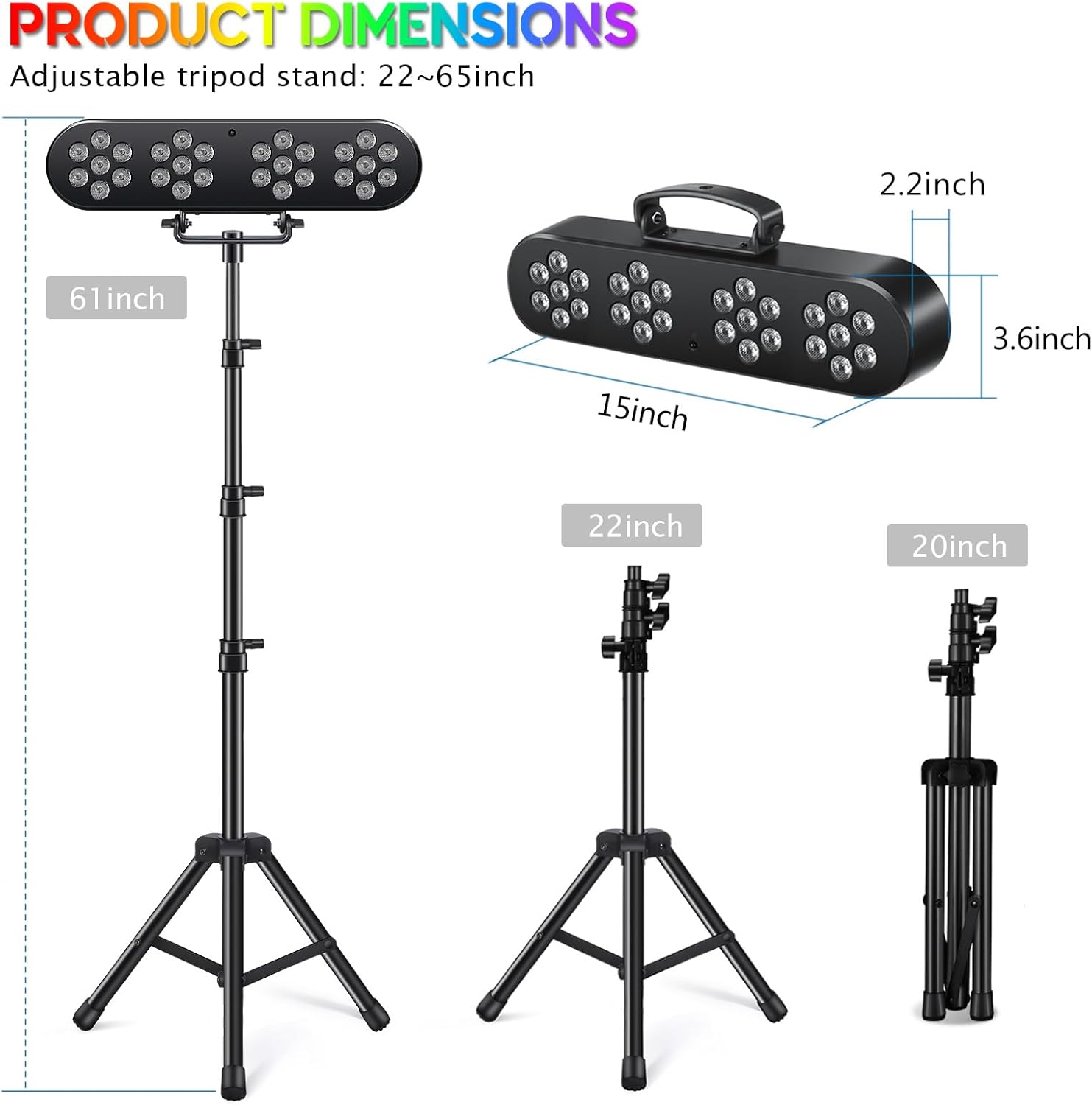
Image: Product dimensions for the light bar and tripod stand.
| Feature | Detail |
|---|---|
| Model Number | PL-31X |
| Brand Name | Telbum |
| Color | Black |
| Material | Plastic |
| Light Source Type | Light Emitting Diode (LED) |
| Number of Light Sources | 4 (PAR lights) |
| Maximum Compatible Light Source Wattage | 10 Watts |
| Power Source | Corded Electric |
| Mounting Type | Floor Mount (with tripod) / Handle for hanging |
| Item Weight | 2.34 Kilograms |
| Item Dimensions (L x W x H) | 17.7"L x 9.8"W x 4.7"H |
| Included Components | Par light set, Remote, Tripod light stand, User manual |
| Manufacturer | Guangzhou Xinyu Stage Lighting Installation Factory |
10. Warranty and Support
The Telbum PL-31X Stage Lights come with a 6-month manufacturer's warranty from the date of purchase. This warranty covers defects in materials and workmanship under normal use.
For warranty claims, technical support, or any questions regarding your product, please contact Telbum customer service through the retailer's platform or the official Telbum website. Please have your purchase receipt and model number (PL-31X) ready when contacting support.
