
1. Introduction
Thank you for choosing the RETLLAS 310LCD-Electronic Floor Safe. This manual provides essential information for the proper installation, operation, and maintenance of your safe. Please read these instructions carefully before use to ensure optimal security and functionality. Keep this manual for future reference.
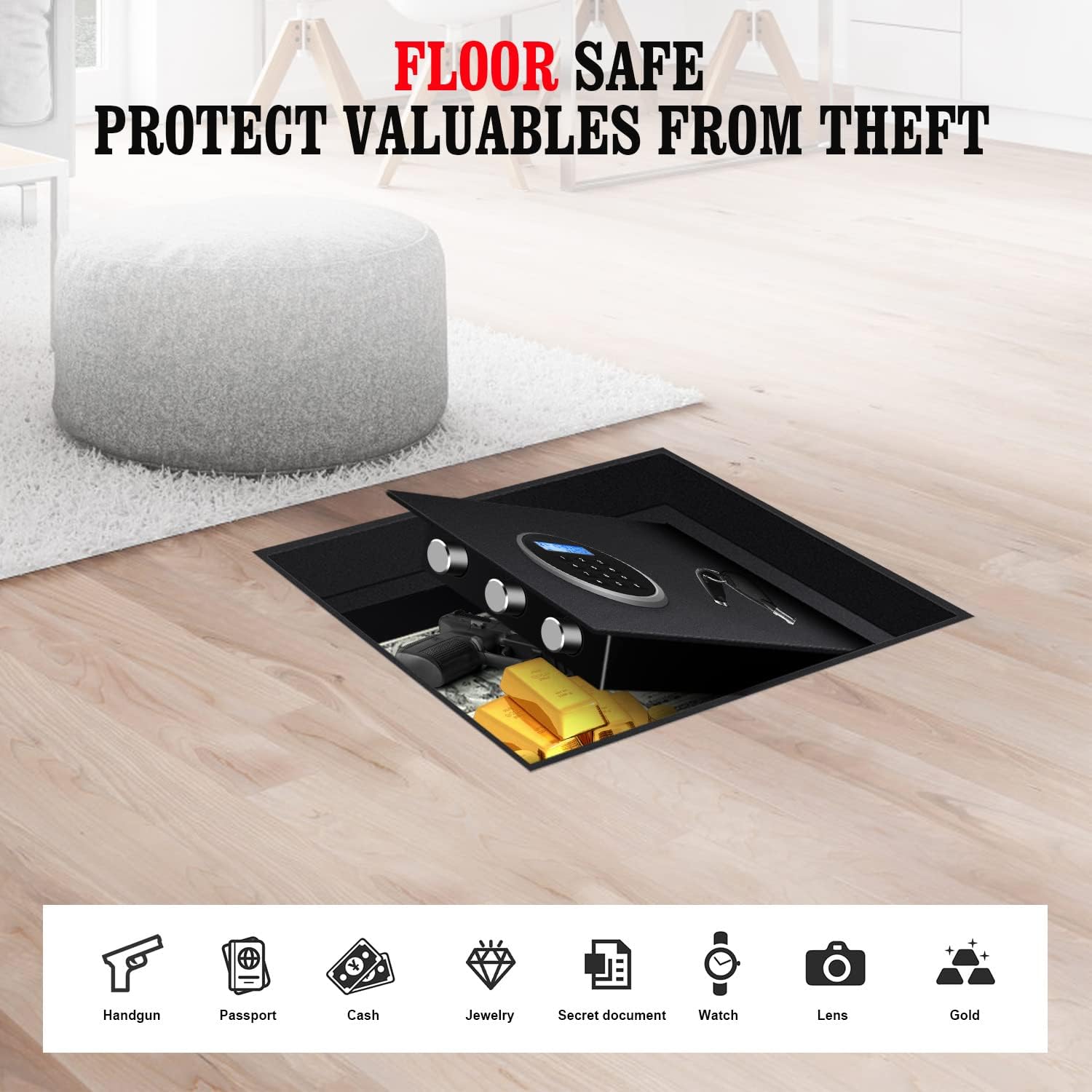
Image: The RETLLAS Floor Safe discreetly installed within a floor, showcasing its concealed design and capacity for storing various valuables.
2. Safety Information
- Always keep the emergency keys in a secure location away from the safe and not inside the safe itself.
- Do not store the user manual or emergency keys inside the safe.
- Ensure the safe is installed securely according to the installation instructions to prevent unauthorized removal.
- Replace batteries promptly when the low battery indicator appears to avoid being locked out.
- This safe is designed for security and fire resistance, but it is not water resistant. Avoid exposure to water.
3. Package Contents
Please check the package contents upon receipt:
- RETLLAS 310LCD-Electronic Floor Safe
- Emergency Keys (2)
- Dust Cover
- User Manual
- Mounting Hardware (bolts)
4. Product Overview and Features
The RETLLAS 310LCD-Electronic Floor Safe is designed for concealed, secure storage of your valuables. It features robust construction and an advanced electronic locking system.
Key Components:
- Digital Keypad: For entering your personal access code.
- LCD Display: Shows time, date, and operational status.
- Knob: Used to open the safe door after successful code entry or key turn.
- Emergency Keyhole: For manual override using the emergency key.
- 3*25mm Solid Live Bolts: Enhanced security against forced entry.
- Battery Case: Houses the power source for the electronic lock.
- FPD Interior LED Light: Illuminates the safe's interior when opened.
- 120N Gas Assisted Strut: Provides smooth and controlled opening and closing of the lid.
- Dust Cover: Conceals the safe and protects it from debris when installed in the floor.
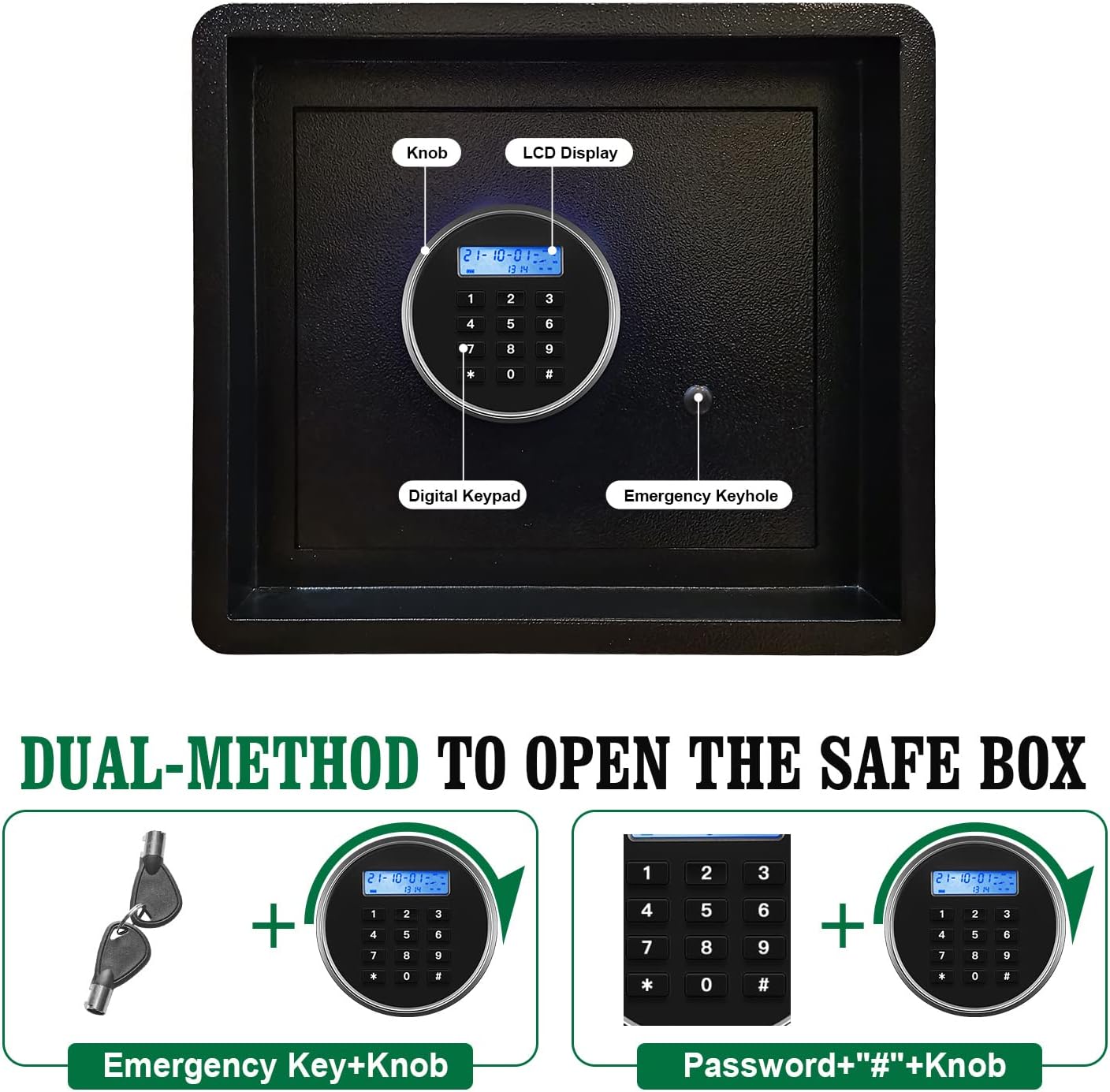
Image: Detailed view of the safe's electronic keypad and manual override, illustrating the dual opening methods.
Key Features:
- Dual-Method Opening: Access via electronic passcode or emergency key.
- Anti-Theft System: Features a dual warning alarm system that activates after 3 failed password attempts or upon violent vibration.
- Concealed Design: Designed for in-floor installation, offering discreet security.
- Fire Resistance: Constructed with all-steel for enhanced protection against fire.
- Durable Construction: Made from alloy steel, offering pry-resistant, drill-resistant, and tamper-proof qualities.

Image: Overview of the safe's electronic features and dual access methods.

Image: Various internal and external features of the safe, including the LED light, gas strut, and dust cover.
5. Setup
5.1. Battery Installation
The electronic lock requires batteries to operate. The battery case is located on the inside of the safe door.
- Open the safe using the emergency key (refer to section 5.2 for initial opening).
- Locate the battery case on the inside of the door.
- Insert the required number of AA batteries (not included) into the battery compartment, ensuring correct polarity (+/-).
- Close the battery case cover.

Image: Internal components of the safe, showing the location of the battery case.
5.2. Initial Opening with Emergency Key
Upon first use, or if the batteries are depleted, you will need to use the emergency key.
- Locate the emergency keyhole, usually concealed behind a small cover on the keypad panel.
- Insert the emergency key into the keyhole and turn it clockwise.
- While holding the key turned, rotate the knob clockwise to open the safe door.
- Once open, remove the key. Store emergency keys in a safe, separate location.
5.3. Floor Installation
For maximum security, the safe should be securely mounted into the floor.
- Choose a suitable location for installation, ensuring sufficient space and structural integrity of the floor.
- Prepare an opening in the floor that matches the dimensions of the safe's body.
- Place the safe into the prepared opening.
- Secure the safe to the floor using the provided mounting hardware. Ensure all bolts are tightened firmly.
- Once installed, place the dust cover over the safe to conceal it and protect the lid.
6. Operating Instructions
6.1. Setting Your Personal Passcode
It is recommended to set a new personal passcode immediately after battery installation.
- With the safe door open, press the internal reset button (location may vary, often on the inside of the door or near the battery compartment). The LCD display should indicate 'SET' or similar.
- Enter your desired 3-8 digit passcode on the digital keypad.
- Press the '#' key to confirm. The LCD display should show 'GOOD' or 'SUCCESS'.
- Test the new passcode with the door open before closing it.
6.2. Opening the Safe with Your Passcode
- Enter your 3-8 digit personal passcode on the digital keypad.
- Press the '#' key. The LCD display should show 'OPEN' and the lock will disengage.
- Within 5 seconds, rotate the knob clockwise to open the safe door.
- To close, simply shut the door and turn the knob counter-clockwise until it locks.
6.3. Anti-Theft Alarm System
The safe is equipped with a dual warning alarm system for enhanced security.
- Incorrect Passcode Alarm: If an incorrect passcode is entered 3 consecutive times, the alarm will sound, and the keypad will be temporarily locked.
- Vibration Alarm: If the safe detects violent vibration or tampering, an alarm will sound.

Image: Visual representation of the safe's anti-theft alarm system activation.
7. Maintenance
- Battery Replacement: When the LCD display shows a low battery warning, replace all batteries promptly. Use only new, high-quality AA alkaline batteries.
- Cleaning: Clean the safe's exterior with a soft, damp cloth. Avoid abrasive cleaners or solvents that could damage the finish or electronic components.
- Keyhole Maintenance: Do not lubricate the emergency keyhole with oil-based lubricants, as this can attract dust and cause blockages.
8. Troubleshooting
| Problem | Possible Cause | Solution |
|---|---|---|
| Safe does not open with passcode. | Incorrect passcode entered; batteries are low or dead; keypad malfunction. | Re-enter passcode carefully. Replace batteries. Use emergency key to open. |
| Emergency key does not work or fit. | Key inserted incorrectly; wrong key; lock mechanism jammed. | Ensure key is fully inserted and turned correctly. Verify it is the correct key for this safe. Do not force the key. |
| Batteries fall out when door shuts. | Battery case not secured properly; incorrect battery size. | Ensure battery case cover is firmly closed and latched. Use correct AA battery size. |
| LCD display is blank or dim. | Low or dead batteries. | Replace all batteries with new ones. |
| Alarm sounds unexpectedly. | Incorrect passcode attempts; physical shock/vibration. | Ensure correct passcode is used. Avoid bumping or moving the safe forcefully. |
9. Specifications
| Feature | Detail |
|---|---|
| Brand | RETLLAS |
| Model Number | 310LCD-Electronic (LCD-floor safe series) |
| Lock Type | Combination, Electronic, Key |
| Capacity | 1.27 Cubic Feet |
| Material | Alloy Steel |
| Special Feature | Durable, Fire Resistant, Concealed Design |
| Mounting Type | Floor Mount |
| Item Weight | 32 Pounds |
| Alarm | Vibration, Wrong Access |
| Water Resistance Level | Not Water Resistant |
| External Dimensions (approx.) | 31cm (W) x 33cm (H) x 35cm (D) / 12.20" (W) x 12.99" (H) x 13.78" (D) |

Image: Dimensions of the RETLLAS Floor Safe and the included dust cover.

Image: Size comparison of different RETLLAS LCD series safe models.
10. Warranty and Support
For warranty information or technical support, please refer to the contact details provided at your point of purchase or visit the official RETLLAS website. Keep your purchase receipt as proof of purchase for any warranty claims.
