
GreenForest COCOA-TVS-BK-GW

GreenForest 55-inch TV Stand User Manual
Model: COCOA-TVS-BK-GW
Product Overview
The GreenForest 55-inch TV Stand is a versatile entertainment center designed to accommodate televisions up to 65 inches. It features a robust construction with an industrial design, making it a suitable addition to various living spaces. This TV stand provides ample storage and display options for your media devices and decorative items.

Figure 1: GreenForest 55-inch TV Stand (Black)
Key Features:
- Ample Display and Storage Space: Equipped with 6 open storage compartments, ideal for TV boxes, game consoles, remote controls, and other accessories.
- Suitable for Large TVs: Measures 55"(L) x 16"(W) x 24"(H) inches, designed for TVs up to 65 inches.
- High Load Capacity: Supports up to 220 pounds, ensuring stability for your TV and entertainment devices.
- Adjustable Shelf with Cable Management: Features an adjustable middle shelf and a cable management hole for neat organization of wires.
- Reinforced X-Shape Side Structure: Provides enhanced stability and durability, contributing to a sturdy and reliable setup.
- Versatile Application: Can be used in living rooms, bedrooms, offices, or as an accent console table or storage cabinet.
Safety Information
Please read and understand all safety instructions before assembly and use. Failure to follow these guidelines may result in injury or damage to the product.
- Assembly requires careful attention to ensure stability.
- Do not exceed the maximum load capacity of 220 pounds for the TV stand.
- Keep liquids away from the product to prevent damage to the materials.
- Always assemble and use the product strictly according to the provided instructions to ensure safety and proper function.
- Ensure all connections are secure before placing items on the stand.
Setup and Assembly
The GreenForest TV Stand is designed for easy assembly. All necessary tools and a detailed manual are included in the package. It is recommended to assemble the unit in the desired location to avoid moving it after placing heavy items.
Assembly Steps:
- Unpack all components and verify against the parts list in the included manual.
- Identify and separate all hardware. Extra parts are included in case of misplacement.
- Follow the step-by-step instructions provided in the physical manual for proper assembly.
- Ensure all screws and fasteners are tightened securely for stability.

Figure 2: Product Dimensions and Weight Capacity. Tabletop Max Weight: 200lbs, Each Partition Max Weight: 30lbs.
Key Assembly Features:
- Adjustable Shelf: The middle shelf can be customized to three different heights to accommodate various storage needs. This allows for flexible organization of media devices or decorative items.
- Cable Management: A dedicated cable hole is located at the back of the central compartment, allowing for neat routing and concealment of power cords and signal cables.
- Adjustable Foot Pads: The feet of the TV stand are adjustable, enabling you to level the unit on uneven surfaces and protect your floor from scratches.

Figure 3: Adjustable Shelf for flexible storage.
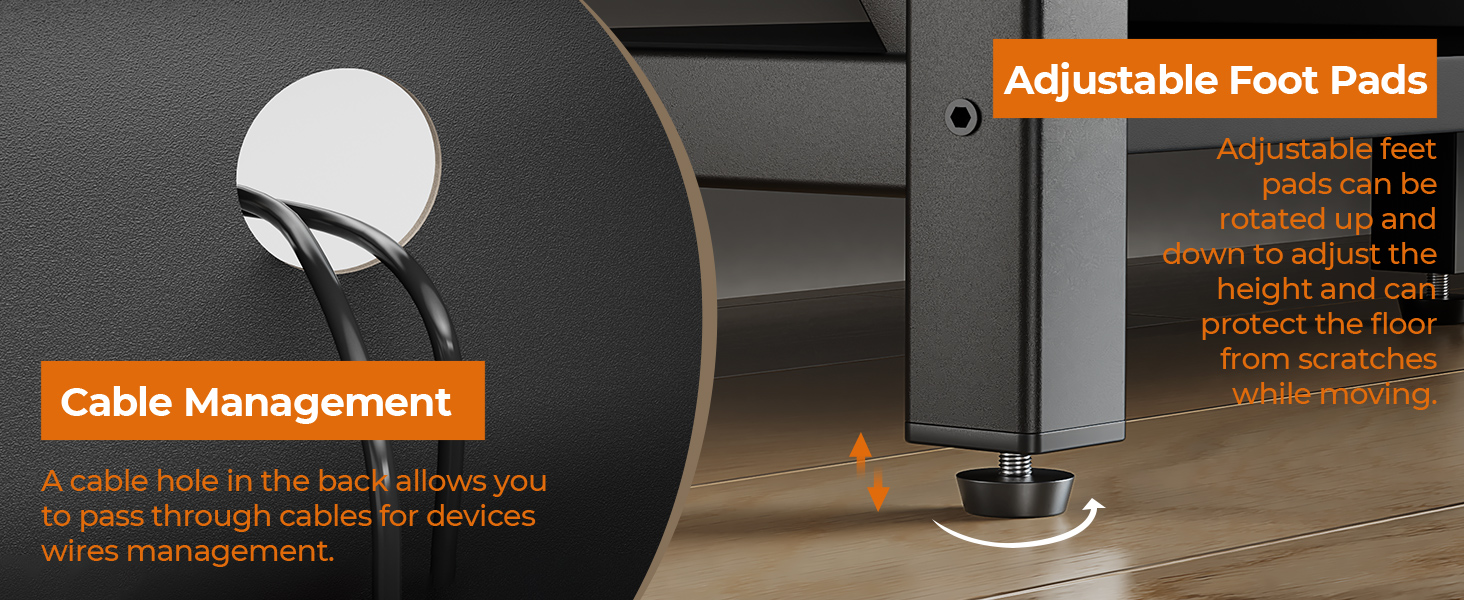
Figure 4: Cable Management and Adjustable Foot Pads.
Assembly Videos:
Watch this video for an overview of the GreenForest TV Stand and its features, including suitability for TVs up to 65 inches.
Video 1: GreenForest TV Stand for TV up to 65 inches (Seller Video)
This video provides a closer look at the 55-inch Television Stands Console Table, highlighting its design and functionality.
Video 2: GreenForest 55 inch Television Stands Console Table (Seller Video)
Explore the storage capabilities of the TV Stand with 6 Storage Cabinets, showcasing how various items can be organized.
Video 3: TV Stand with 6 Storage Cabinet for Living Room (Seller Video)
Operating Instructions
Once assembled, the GreenForest TV Stand is ready for use. Its design allows for flexible arrangement of your entertainment devices and decorative items.
- Place your television centrally on the top surface, ensuring its base is fully supported and within the weight limit of 200 pounds.
- Utilize the 6 open compartments for organizing media players, gaming consoles, soundbars, and other accessories.
- Route cables through the designated cable management hole to maintain a tidy appearance and prevent tangles.
- Adjust the middle shelf height as needed to fit taller items or create more space.

Figure 5: TV Size Suitability for the 55-inch TV Stand.

Figure 6: Six open storage compartments for organization.
Maintenance
Regular maintenance will help preserve the appearance and longevity of your GreenForest TV Stand.
- Cleaning: Wipe surfaces with a soft, damp cloth. Avoid using harsh chemicals, abrasive cleaners, or polishes that may damage the finish.
- Spills: Immediately wipe up any spills to prevent moisture damage or staining.
- Sunlight Exposure: Avoid prolonged exposure to direct sunlight to prevent fading or discoloration of the finish.
- Stability Check: Periodically check all screws and connections to ensure they remain tight and secure. Re-tighten if necessary.
Troubleshooting
If you encounter any issues with your GreenForest TV Stand, refer to the following common solutions:
- Wobbling/Instability:
- Ensure all assembly screws are fully tightened.
- Adjust the foot pads on the bottom of the legs to level the stand on uneven flooring.
- Verify that the X-shape side structures are correctly installed and secured.
- Difficulty with Assembly:
- Double-check the instruction manual to ensure each step is followed precisely.
- Verify that you are using the correct hardware for each step, as indicated by the labels.
- If a part seems difficult to fit, re-examine the orientation and ensure no components are reversed.
- Damaged or Missing Parts:
- Carefully inspect all packaging for small parts that may have been overlooked.
- If parts are genuinely missing or damaged upon arrival, contact GreenForest customer support for assistance.
Specifications
| Feature | Detail |
|---|---|
| Brand | GreenForest |
| Model Number | COCOA-TVS-BK-GW |
| Color | Black |
| Product Dimensions | 15"D x 54.3"W x 24.4"H |
| Recommended Uses | Entertainment Media |
| Special Feature | TV Stand with 6 Storage Cabinet |
| Mounting Type | Floor Mount |
| Room Type | Living Room, Bedroom |
| Weight Limit | 220 Pounds |
| Included Components | 1 x TV Stand, 1 x Installation Tool, 1 x Manual |
| Finish Type | Painted |
| Size | 55 inch |
| Base Type | Legs |
| Installation Type | Freestanding |
| Top Material Type | Metal |
| Assembly Required | Yes |
| Frame Material | Metal |
| Number of Compartments | 6 |
| Item Weight | 42.6 pounds |
| Country of Origin | China |
| Date First Available | April 12, 2022 |
Warranty and Support
The GreenForest TV Stand is covered by the manufacturer's warranty. For specific warranty details, please refer to the documentation included with your product or contact GreenForest customer support.
For any questions regarding assembly, missing parts, or product functionality, please contact the seller or manufacturer directly. Contact information can typically be found on the product packaging or the official GreenForest website.
Ask a question about this manual
Ask about setup, troubleshooting, compatibility, parts, safety, or missing instructions. Manuals+ will review the question and use this page’s manual context to help answer it.