
1. Product Overview
The Aerogogo GM2 Automatic Sleeping Mat is designed for outdoor enthusiasts seeking comfort and convenience. This ultralight sleeping mat features a built-in electric air pump for rapid inflation and deflation, providing a comfortable sleeping surface for camping, backpacking, hiking, and other outdoor activities. Its durable construction and ergonomic design ensure a restful experience.
Key Features:
- Comfortable Thickness: Inflates to 14cm (5.5 inches) for superior comfort and insulation.
- Integrated Electric Pump: Features a 3800 mAh lithium-ion battery, capable of over 20 inflations on a single charge. Provides a rapid inflation speed of 225 L/min and a pressure of up to 4 kPa.
- Ergonomic Design: Wavy stripe surface and stretching structure distribute weight evenly, providing strong support and conforming to body contours.
- Durable Construction: Made from high-quality, thick TPU fabric with hot press high-frequency welding for excellent sealing and air retention.
- Waterproof: IP68 rated for protection against water and dust.
- Compact and Portable: Folds down to a compact size of approximately 16.8 cm x 16.8 cm x 30 cm (6.6" x 6.6" x 11.8") for easy transport.
2. Safety Information
- Do not overinflate the mat.
- Keep the mat away from sharp objects, open flames, and extreme heat sources.
- Ensure the pump's charging port is dry before charging.
- Do not immerse the entire mat or pump in water, despite its IP68 rating, to prevent damage to internal components.
- Supervise children when near the product.
- Store in a cool, dry place when not in use.
3. Package Contents
- Aerogogo GM2 Automatic Sleeping Mat (Double)
- Integrated Electric Air Pump
- Carry Bag
4. Setup and Operation
4.1. Inflation
- Unroll the sleeping mat on a flat, clear surface.
- Locate the built-in electric air pump on the side of the mat.
- Press the power button on the pump to begin inflation. The pump will automatically inflate the mat.
- The mat will typically inflate within approximately one minute. Once fully inflated, the pump may stop automatically or you can press the button again to turn it off.
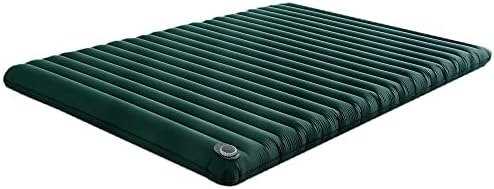
Image: The Aerogogo GM2 Automatic Sleeping Mat fully inflated, showcasing its ribbed design and integrated pump valve.
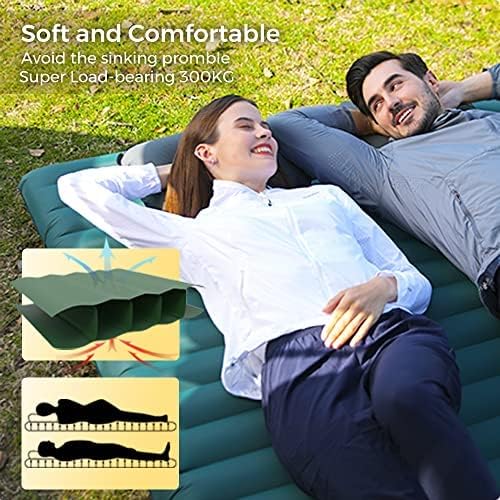
Image: Two individuals comfortably resting on the inflated Aerogogo GM2 mat in an outdoor setting, demonstrating its spaciousness and comfort.

Image: A close-up view illustrating the 14cm (5.5 inches) thickness of the fully inflated Aerogogo GM2 sleeping mat, highlighting its cushioning.
4.2. Deflation
- Locate the deflation valve on the mat, typically near the pump.
- Open the deflation valve. Air will begin to escape.
- To speed up deflation, gently roll the mat from the end opposite the valve towards the valve, pressing out the air.
- Once deflated, close the valve and fold the mat for storage.
4.3. Charging the Built-in Pump
The integrated electric pump is powered by a 3800 mAh lithium-ion battery. Ensure the pump is charged before extended use.
- Locate the charging port on the pump (usually covered by a protective cap).
- Connect a compatible USB charging cable (not included) to the port and to a power source.
- A full charge provides power for over 20 inflation cycles.

Image: A person relaxing on the mat, with an overlay displaying key pump specifications: 225 L/min inflation speed, 4 kPa pressure, IP68 waterproof rating, and a 3800 mAh battery capacity, capable of 20+ inflations.
5. Maintenance
5.1. Cleaning
- Wipe the mat with a damp cloth and mild soap.
- Rinse thoroughly with clean water.
- Ensure the mat is completely dry before folding and storing to prevent mold or mildew.
- Do not use harsh chemicals or abrasive cleaners.

Image: A close-up of the mat's surface with water droplets, illustrating its IP68 waterproof capability.
5.2. Storage
- Deflate the mat completely.
- Fold or roll the mat neatly and place it into the provided carry bag.
- Store the mat in a cool, dry place, away from direct sunlight and extreme temperatures.
- For prolonged storage, it is recommended to periodically charge the pump's battery to maintain its health.

Image: A person holding the Aerogogo GM2 mat packed in its carry bag, demonstrating its compact and portable dimensions (approximately 30cm height, 14cm width).
6. Troubleshooting
6.1. Mat Not Inflating
- Check Battery: Ensure the built-in pump's battery is sufficiently charged.
- Pump Activation: Verify that the power button on the pump has been pressed correctly.
- Valve Closure: Ensure the deflation valve is fully closed before inflation.
6.2. Air Leakage
- Valve Seal: Check that the inflation and deflation valves are securely closed and free from debris.
- Punctures: Inspect the mat surface for any punctures or tears. Small holes can often be repaired with a standard patch kit (not included).
6.3. Pump Not Working
- Battery Level: Recharge the pump's battery.
- Obstructions: Check the pump's intake and exhaust ports for any blockages.
- Overheating: If the pump has been running for an extended period, it may have overheated. Allow it to cool down before attempting to use it again.
7. Specifications
| Feature | Specification |
|---|---|
| Model Number | GM2 |
| Dimensions (Inflated) | 200 x 140 x 14 cm (78.7 x 55.1 x 5.5 inches) |
| Weight | 2.1 kg (4.6 lbs) |
| Built-in Pump Battery | 3800 mAh Lithium-ion |
| Pump Speed | 225 L/min |
| Pump Pressure | Up to 4 kPa |
| Material | Thick TPU Fabric |
| R-Value | 3 |
| Waterproof Rating | IP68 |
| Folded Dimensions | Approx. 16.8 x 16.8 x 30 cm (6.6 x 6.6 x 11.8 inches) |
8. Warranty and Support
For warranty information or technical support, please refer to the retailer where the product was purchased or visit the official Aerogogo website. Keep your proof of purchase for any warranty claims.
