
REL Acoustics HT/1003 MKII
REL HT/1003 MKII 10-Inch Powered Subwoofer User Manual
Model: HT/1003 MKII | Brand: REL Acoustics
Introduction
Thank you for choosing the REL HT/1003 MKII 10-Inch Powered Subwoofer. This manual provides essential information for the proper setup, operation, and maintenance of your new subwoofer. Designed for deep bass in home theater, stereo systems, and surround sound, the HT/1003 MKII offers seamless integration and powerful performance. Please read this manual thoroughly before use to ensure optimal performance and safety.
Safety Information
Always observe the following safety precautions to prevent electric shock, fire, or damage to the unit:
- Do not expose this appliance to rain or moisture.
- Do not place objects filled with liquids, such as vases, on the apparatus.
- Do not block any ventilation openings. Install in accordance with the manufacturer's instructions.
- Do not install near any heat sources such as radiators, heat registers, stoves, or other apparatus (including amplifiers) that produce heat.
- Protect the power cord from being walked on or pinched, particularly at plugs, convenience receptacles, and the point where they exit from the apparatus.
- Only use attachments/accessories specified by the manufacturer.
- Unplug this apparatus during lightning storms or when unused for long periods of time.
- Refer all servicing to qualified service personnel. Servicing is required when the apparatus has been damaged in any way, such as power-supply cord or plug is damaged, liquid has been spilled or objects have fallen into the apparatus, the apparatus has been exposed to rain or moisture, does not operate normally, or has been dropped.
- Proposition 65 Warning: This product may contain chemicals known to the State of California to cause cancer and birth defects or other reproductive harm.
What's in the Box
Upon unpacking, please ensure all items are present:
- REL HT/1003 MKII Subwoofer (1 unit)
- Power Cord
- User Manual (this document)
Product Overview
The REL HT/1003 MKII is a compact yet powerful 10-inch powered subwoofer designed to deliver deep, impactful bass for both home theater and stereo music systems. It features a Class D amplifier and is available in a line-grained white finish.
Key Features
- Seamless Integration: Easily connects to any home theater or stereo system with Left and Right RCA outputs or a dedicated subwoofer output.
- Powerful Bass: Equipped with a 10-inch driver and a 300 Watt (RMS) Class D amplifier for robust low-frequency reproduction.
- Versatile Connectivity: Supports both High Level and RCA connection methods.
- Compact Design: Its dimensions (14.25"W x 13.25"H x 15.25"D) allow for flexible placement in various room sizes.
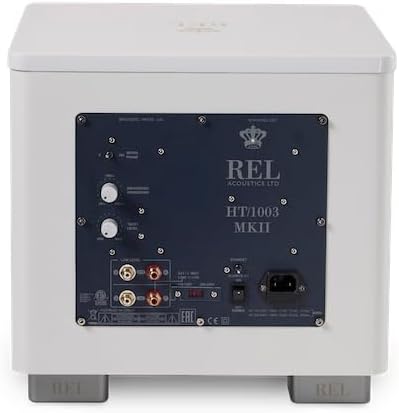
Visual Guide




Setup
1. Placement
Optimal placement of your subwoofer is crucial for sound quality. Experiment with different locations in your room. Generally, corner placement can enhance bass output, while placement along a wall can provide a more balanced sound. Consider the room's acoustics and your primary listening position.
2. Connections
The HT/1003 MKII offers flexible connection options:
- For Home Theater (LFE/Subwoofer Output): Connect an RCA cable from your AV receiver's dedicated subwoofer output (LFE or Sub Out) to the LFE input on the REL HT/1003 MKII rear panel. This is the recommended connection for movie watching.
- For Stereo Music (Left/Right RCA Outputs): For music listening, connect RCA cables from your stereo amplifier's Left and Right RCA outputs (if available) to the corresponding Left and Right RCA inputs on the REL HT/1003 MKII. Alternatively, you can still use the dedicated subwoofer output from your receiver for music.
- Power Connection: Once audio connections are made, connect the supplied power cord to the AC inlet on the subwoofer's rear panel and then to a suitable wall outlet.
Ensure all connections are secure before proceeding.
3. Initial Power On
After making all connections, switch on the power to the subwoofer using the power switch located on the rear panel. The power indicator light should illuminate.
Operating
The REL HT/1003 MKII features several controls on its rear panel to fine-tune its performance to your listening environment and preferences.
Controls Overview (Refer to Rear Panel Image)
- Volume/Gain Control: Adjusts the overall output level of the subwoofer. Start with a low setting and gradually increase until the bass blends seamlessly with your main speakers.
- Crossover Frequency Control: Determines the upper frequency limit at which the subwoofer operates. This should be set to blend with the low-frequency roll-off of your main speakers. Common settings range from 80Hz to 120Hz for home theater.
- Phase Switch (0°/180°): Adjusts the phase of the subwoofer's output relative to your main speakers. Experiment with both settings to find the one that produces the most impactful and coherent bass at your listening position. The correct setting will result in the loudest and clearest bass.
Usage Tips
- Break-in Period: Allow for a break-in period of several hours of use for the driver to loosen up and achieve its full performance potential.
- Fine-Tuning: After initial setup, play various types of content (movies, music) and make small adjustments to the volume, crossover, and phase controls until the bass sounds natural and integrated, not boomy or disconnected.
- Room Acoustics: Room acoustics significantly impact bass performance. Small adjustments to subwoofer placement can often yield significant improvements.
Maintenance
Proper care will ensure the longevity and continued performance of your REL HT/1003 MKII subwoofer.
- Cleaning: Use a soft, dry cloth to wipe the cabinet. For stubborn marks, a slightly damp cloth can be used, followed immediately by a dry cloth. Avoid abrasive cleaners, solvents, or chemical sprays.
- Ventilation: Ensure that the subwoofer's ventilation openings are not obstructed. Adequate airflow is essential to prevent overheating.
- Placement: Avoid placing the subwoofer in direct sunlight or near heat sources, as this can damage the finish and internal components.
- Power Off: If the subwoofer will not be used for an extended period, it is advisable to unplug it from the power outlet.
Troubleshooting
If you experience issues with your subwoofer, refer to the table below for common problems and their solutions.
| Problem | Possible Cause | Solution |
|---|---|---|
| No Sound from Subwoofer | No power; Incorrect connections; Volume too low; Source issue. | Check power cord and outlet. Ensure power switch is ON. Verify RCA/LFE cable connections. Increase subwoofer volume. Check audio source and receiver settings. |
| Weak or Muffled Bass | Incorrect phase setting; Crossover frequency too low; Improper placement. | Toggle the phase switch (0°/180°). Increase crossover frequency. Experiment with subwoofer placement. |
| Boomy or Overpowering Bass | Volume too high; Crossover frequency too high; Room acoustics. | Decrease subwoofer volume. Lower crossover frequency. Adjust subwoofer placement or consider room acoustic treatments. |
| Humming or Buzzing Noise | Ground loop; Faulty cable; Nearby electrical interference. | Try plugging the subwoofer into a different electrical outlet. Use a ground loop isolator. Replace audio cables. Move subwoofer away from other electronics. |
Specifications
| Feature | Detail |
|---|---|
| Model Name | HT/1003 MKII White |
| Speaker Type | Subwoofer |
| Woofer Diameter | 10 Inches |
| Speaker Maximum Output Power | 300 Watts (RMS) |
| Amplifier Type | Class D |
| Connectivity Technology | Wired (RCA, LFE) |
| Compatible Devices | Home Theater, Laptop, MP3 Player, Smartphone, Television |
| Product Dimensions (Depth x Width x Height) | 15.25"D x 14.25"W x 13.25"H |
| Item Weight | 28 Pounds (12.7 kg) |
| Material | Wood |
| Color | White |
| Control Method | Touch |
| UPC | 857316005751 |
Warranty and Support
Warranty Information
The REL HT/1003 MKII Subwoofer comes with a Limited Warranty provided by REL Acoustics. Please refer to the warranty card included with your product or visit the official REL Acoustics website for detailed terms and conditions regarding coverage, duration, and claims procedures. Keep your proof of purchase for warranty validation.
Customer Support
For technical assistance, troubleshooting beyond this manual, or warranty inquiries, please contact REL Acoustics customer support. You can typically find contact information (phone, email, or support portal) on the official REL Acoustics website (rel.net) or through your authorized dealer.
Related documentsHT/1003 MKII


Ask a question about this manual
Ask about setup, troubleshooting, compatibility, parts, safety, or missing instructions. Manuals+ will review the question and use this page’s manual context to help answer it.