
Strong PLWF600TRIFR
STRONG Powerline 600Mbps + WiFi 300Mbps Kit User Manual
Model: PLWF600TRIFR
Introduction
This user manual provides comprehensive instructions for setting up, operating, and maintaining your STRONG Powerline 600Mbps + WiFi 300Mbps Kit. This kit is designed to extend your internet connection and Wi-Fi coverage throughout your home using your existing electrical wiring. It offers a simple plug-and-play solution for high-speed data transmission and Wi-Fi hotspot creation.
What's in the Box

Image: The kit contents, including the Powerline adapters and Ethernet cables.
Your STRONG Powerline 600Mbps + WiFi 300Mbps Kit includes the following components:
- 2 x Powerline 600Mbps Adapters (with integrated filtered socket and Ethernet port)
- 1 x Powerline WiFi 600Mbps Adapter (creates a Wi-Fi hotspot)
- 2 x Ethernet Network Cables
- 1 x User Manual (this document)
- 1 x 24-month Warranty Card
Setup Guide
The STRONG Powerline Kit is designed for easy plug-and-play installation. No complex configuration or software installation is required.
Step 1: Connect the First Powerline Adapter
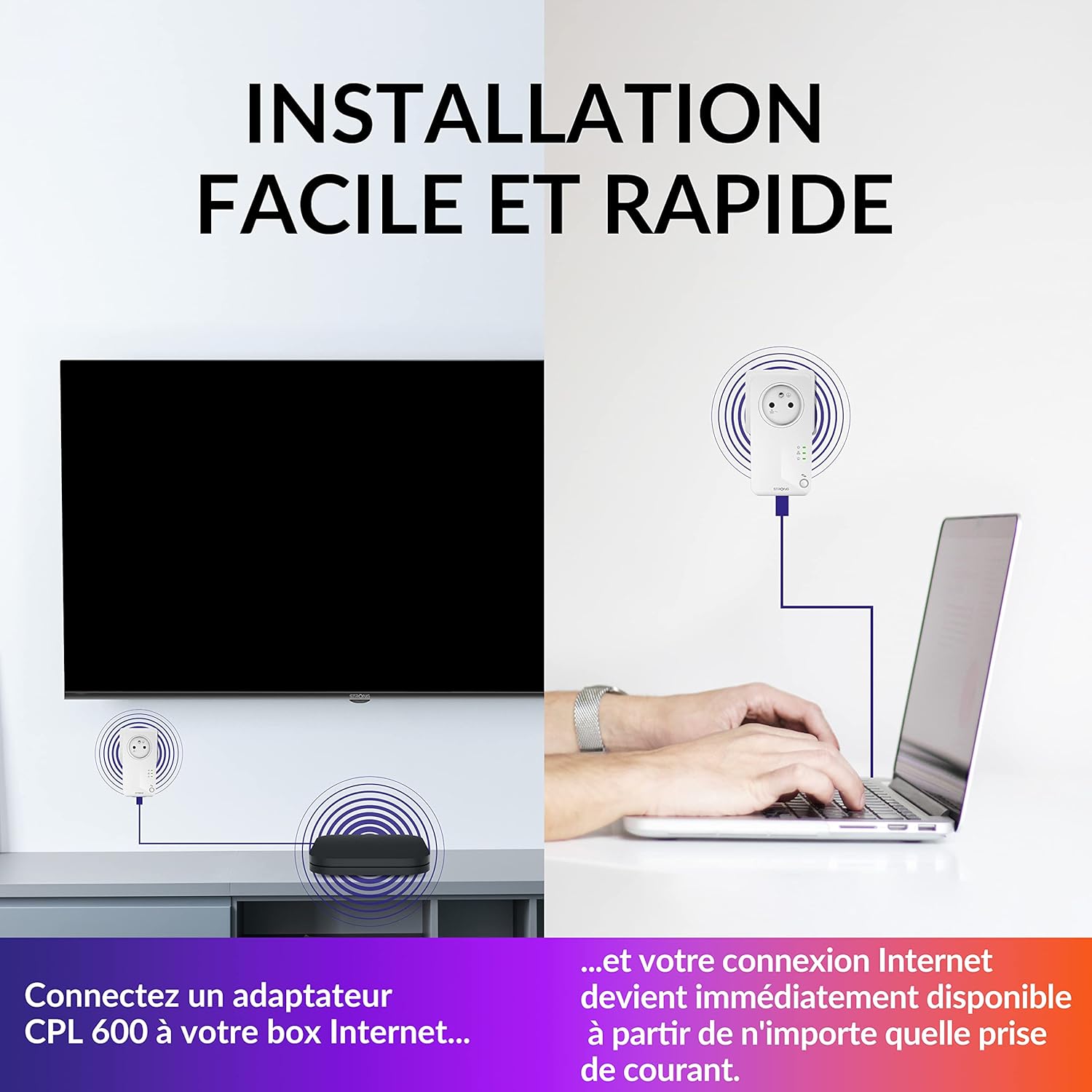
Image: Connecting the first Powerline adapter to your internet router.
- Plug one of the two Powerline 600Mbps adapters into a wall power outlet near your internet router (Internet Box).
- Connect this Powerline adapter to your internet router using one of the provided Ethernet cables.
- Ensure the power indicator light on the adapter turns on, indicating it is receiving power.
Step 2: Connect the Second Powerline Adapter (for wired connection)
- Plug the second Powerline 600Mbps adapter into a wall power outlet in the room where you need a wired internet connection (e.g., for a smart TV, game console, or PC).
- Connect your device to this Powerline adapter using an Ethernet cable.
- The adapters will automatically establish a connection. Check the indicator lights on both adapters to confirm a successful Powerline connection.
Step 3: Set up the Powerline WiFi Adapter (for wireless connection)

Image: Extending Wi-Fi coverage with the Powerline WiFi adapter.
- Plug the Powerline WiFi 600Mbps adapter into a wall power outlet in the room where you want to create a new Wi-Fi hotspot or extend your existing Wi-Fi coverage.
- The adapter will automatically connect to the Powerline network established by the first adapter.
- Once connected, the Wi-Fi indicator light on the adapter will illuminate. You can now connect your wireless devices (smartphones, tablets, laptops) to the new Wi-Fi network broadcast by this adapter.
Note: For optimal performance, plug Powerline adapters directly into wall outlets. Avoid power strips, surge protectors, or extension cords, as these can interfere with the Powerline signal.
Operating Instructions
High-Speed Data Transmission

Image: High-speed internet connectivity for various activities.
The Powerline 600Mbps adapters transmit data at speeds up to 600 Mbps over your home's electrical wiring, with a range of up to 300 meters. This is ideal for activities requiring high bandwidth, such as HD or 4K UHD video streaming, online gaming, and sharing internet access across different rooms.
Wi-Fi Hotspot Creation
The Powerline WiFi 600Mbps adapter allows you to create a new Wi-Fi hotspot with speeds up to 300 Mbps. This extends your wireless network coverage to areas previously unreachable by your main router's Wi-Fi signal.
Integrated Filtered Socket

Image: The integrated filtered socket feature, allowing other devices to be plugged in without losing a power outlet.
Each Powerline adapter features an integrated filtered electrical socket. This means you don't lose a power outlet when using the adapter. You can plug other electrical devices directly into the adapter's socket without affecting the Powerline network performance.
Connect & Secure Feature (Pairing)

Image: Illustrating the AES 128-bit encryption for secure data transmission.
For enhanced security, the STRONG Powerline adapters support AES 128-bit encryption. To secure your connection or add more adapters to your existing Powerline network:
- Press the "Connect & Secure" button (usually a small button on the side or bottom of the adapter) on one of your existing Powerline adapters for 1-2 seconds.
- Within 2 minutes, press the "Connect & Secure" button on the new adapter you wish to add or secure.
- The adapters will automatically pair and encrypt their communication.
STRONG Powerline adapters are compatible with all Powerline adapters that support HomePlug AV2 and HomePlug AV standards from other brands.
Energy Saving Mode

Image: The automatic energy-saving mode, reducing power consumption by up to 85%.
The adapters feature an automatic standby function that reduces power consumption by up to 85% when no data activity is detected. This helps conserve energy without requiring manual intervention.
Maintenance
The STRONG Powerline adapters require minimal maintenance. To ensure optimal performance and longevity:
- Keep the adapters clean by wiping them with a soft, dry cloth. Do not use liquid cleaners or aerosols.
- Ensure proper ventilation around the adapters. Do not cover them or place them in enclosed spaces.
- Avoid exposing the adapters to extreme temperatures, humidity, or direct sunlight.
Troubleshooting
If you encounter issues with your STRONG Powerline Kit, try the following troubleshooting steps:
| Problem | Possible Cause / Solution |
|---|---|
| No Power / Adapter Lights Off |
|
| No Powerline Connection (Powerline light off/blinking) |
|
| Slow Speed / Intermittent Connection |
|
| Wi-Fi Not Broadcasting / No Internet on Wi-Fi |
|
Specifications
| Feature | Detail |
|---|---|
| Brand | Strong |
| Model Number | PLWF600TRIFR |
| Data Transfer Rate (Powerline) | Up to 600 Mbps |
| Data Transfer Rate (Wi-Fi) | Up to 300 Mbps |
| Powerline Range | Up to 300 meters over electrical wiring |
| Hardware Interface | Ethernet, 802.11 ac/b/g/n |
| Data Link Protocol | IEEE 802.11b, IEEE 802.11g, Ethernet, IEEE 802.11n |
| Security | AES 128-bit Encryption |
| Energy Saving | Automatic standby, up to 85% power reduction |
| Integrated Socket | Yes (filtered, 16A Max) |
| Compatible Devices | Computers, Smartphones, Smart TVs, Game Consoles, Network Printers, NAS |
| Dimensions (approx.) | 1 x 1 x 1 cm (individual adapter) |
| Item Weight (total kit) | 960 g |
| Colour | White |
Warranty and Support
Your STRONG Powerline 600Mbps + WiFi 300Mbps Kit comes with a 24-month warranty from the date of purchase. Please retain your proof of purchase for warranty claims.
For technical support, frequently asked questions, or to register your product, please visit the official Strong website or contact their customer service. You can often find support resources and updated drivers on the manufacturer's website.
For more information, visit the Strong Store on Amazon.
Related documentsPLWF600TRIFR

Ask a question about this manual
Ask about setup, troubleshooting, compatibility, parts, safety, or missing instructions. Manuals+ will review the question and use this page’s manual context to help answer it.