
1. Introduction
The AZLA ASE-500 earphones are engineered for superior comfort and versatility, particularly for extended listening sessions and use while sleeping. This model features a unique full silicone construction, ensuring a soft, flexible, and protrusion-free design that adapts perfectly to the ear. Equipped with a high-performance 5.7mm driver, co-developed with OLE WOLFF, it delivers clear audio. The included medical-grade SednaEarfit MAX eartips in various sizes further enhance fit and reduce ear fatigue. A 150cm TPE cable with an inline microphone and on/off switch makes it ideal for gaming, video calls, and music enjoyment. This manual provides comprehensive instructions for the Standard model, which uses a 3.5mm 4-pole plug.
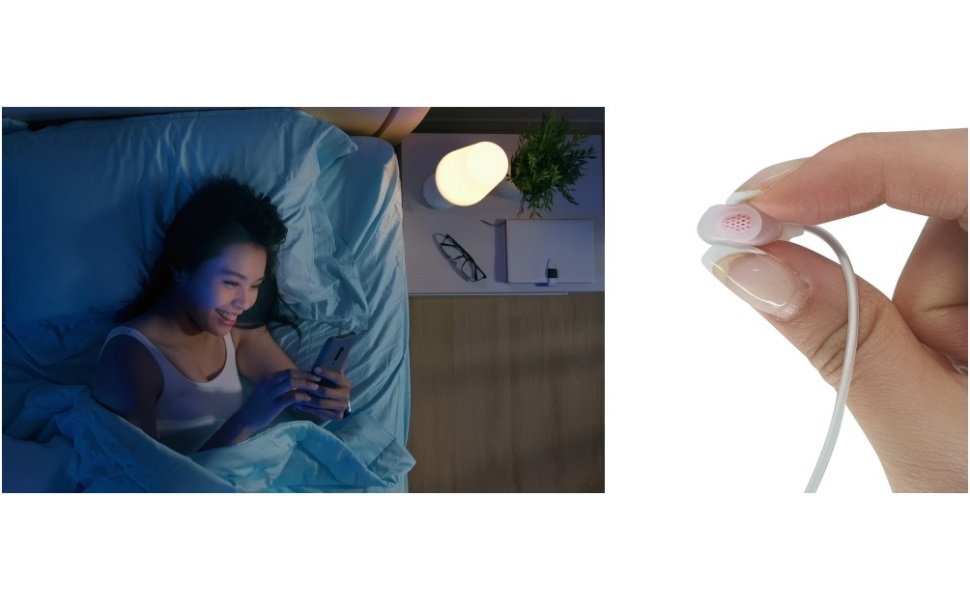
Image: Designed for comfort, even while sleeping.
2. Product Overview
2.1 Key Features
- Full Silicone Construction: The earphone housing is made entirely of soft, flexible silicone (excluding the driver and cable) for ultimate comfort and a gentle fit, even when lying down.
- High-Performance Driver: Features a 5.7mm ultra-small dynamic driver, co-developed with Danish company OLE WOLFF, balancing compact size with excellent sound quality.
- Medical-Grade Eartips: Includes six pairs of SednaEarfit MAX eartips (SS/MS/ML for standard, S/M/L for TWS) made from medical-grade silicone to minimize ear burden and provide a secure fit.
- Durable & Flexible Cable: A 150cm TPE (Thermoplastic Elastomer) cable, free of PVC, designed for optimal length and flexibility, preventing tangles and ensuring relaxed use.
- Inline Microphone with Switch: Equipped with an inline remote that includes a physical on/off switch for the microphone, making it convenient for gaming and communication.
- Lightweight Design: Each earpiece weighs approximately 2.8g, providing a 'light as air' wearing experience.
2.2 Package Contents
- AZLA ASE-500 Earphones (Standard model with 3.5mm 4-pole plug)
- SednaEarfit MAX Eartips (3 pairs: SS, MS, ML)
- SednaEarfit MAX for TWS Eartips (3 pairs: S, M, L)
- Silicone Carrying Pouch
- Quick Guide

Image: Stress-Free All-Day Comfort design with medical-grade silicone eartips and premium silicone housing.

Image: Lightweight design, instant microphone control, and portable silicone pouch.

Image: The soft, bouncy, and flexible silicone housing adapts perfectly to the ear.

Image: Exploded view illustrating the earphone's construction.
3. Setup
3.1 Choosing the Right Eartips
The AZLA ASE-500 comes with six pairs of SednaEarfit MAX eartips to ensure the best possible fit and sound isolation. Selecting the correct size is crucial for comfort and audio performance.
- SednaEarfit MAX (Standard): Sizes SS, MS, ML. These are designed for general use, offering a balanced fit.
- SednaEarfit MAX for TWS: Sizes S, M, L. These eartips have a slightly different design, optimized for true wireless earbuds but also suitable for the ASE-500 for users who prefer their fit.
Experiment with different sizes to find the pair that creates a comfortable, snug seal in your ear canal. A good seal improves bass response and noise isolation.

Image: Custom eartips for all-day comfort, including six pairs of medical silicone eartips.
3.2 Connecting the Earphones
Insert the 3.5mm 4-pole plug into the headphone jack of your audio device (smartphone, tablet, gaming console, PC, etc.). Ensure the plug is fully inserted for proper audio and microphone functionality.
4. Operating Instructions
4.1 Wearing the Earphones
Gently insert each earphone into your ear canal. Adjust the angle until you achieve a comfortable and secure fit. The soft silicone housing is designed to minimize pressure, even when lying on your side.
4.2 Using the Inline Remote and Microphone
The inline remote control is located on the cable and provides convenient access to microphone and audio functions.
- Microphone ON/OFF Switch: Slide the switch to turn the microphone on or off. This is useful for privacy or when you don't need the microphone during gaming or calls.
- Function Button: This button controls various functions depending on your device and application.
- Single Press: Play/Pause music, Answer/End calls.
- Double Press: Skip to the next track (music playback).
- Triple Press: Go back to the previous track (music playback).
4.3 Usage Scenarios
- Gaming: The inline microphone and comfortable fit make these earphones suitable for gaming on various platforms, including Nintendo Switch.
- Watching Videos/Movies: Enjoy clear audio for your favorite content.
- Listening to Music: Experience a soft sound tuning designed for fatigue-free listening.
- Sleeping/Relaxation: The low-profile, soft silicone design is ideal for listening to ASMR, podcasts, or relaxing music while lying down without discomfort.

Image: Enjoying gaming with AZLA ASE-500 earphones.

Image: Experience soft sound tuning with no harsh edges.
5. Maintenance
Proper maintenance ensures the longevity and optimal performance of your earphones.
- Cleaning Eartips: Regularly remove the eartips and clean them with a soft, damp cloth. For deeper cleaning, they can be gently washed with mild soap and water, then thoroughly dried before reattaching.
- Cleaning Earphones: Wipe the silicone housing and cable with a soft, dry, or slightly damp cloth. Avoid using harsh chemicals or abrasive materials. Ensure no moisture enters the driver unit.
- Cable Care: Avoid sharply bending or twisting the cable. When not in use, store the earphones neatly to prevent tangles and damage to the cable.
- Storage: Use the included silicone carrying pouch to protect your earphones from dust, dirt, and physical damage when not in use or during travel.
6. Troubleshooting
If you encounter any issues with your AZLA ASE-500 earphones, please refer to the following common solutions:
| Problem | Possible Cause | Solution |
|---|---|---|
| No sound or low volume |
|
|
| Poor sound quality (e.g., muffled, lacking bass) |
|
|
| Microphone not working |
|
|
| Ear discomfort |
|
|
7. Specifications
| Feature | Specification |
|---|---|
| Brand | AZLA |
| Model | ASE-500 (AZL-ASE500-SB) |
| Color | Sky Blue |
| Ear Placement | In-Ear |
| Headphone Form Factor | In-Ear |
| Impedance | 16 Ohms |
| Sensitivity | 96 dB |
| Cable Length | 150 cm |
| Product Weight | 18 grams |
| Outer Material | Silicone, Thermoplastic Elastomer (TPE) |
| Headphone Jack | 3.5mm Jack |
| Connectivity Interface | 3.5mm 4-pole stereo mini, Wired |
| Noise Control | Sound Isolation |
| Control Type | Microphone On/Off |
| Recommended Uses | Gaming, Video Watching, Music Appreciation, ASMR, Bedside, Mobile Gaming, Sleep Headphones, Sleep Earplugs |

Image: SPL and THD performance graph of the ASE-500 driver.
8. Warranty and Support
8.1 Warranty Information
The AZLA ASE-500 earphones come with a manufacturer's warranty. Please note the following:
- Manufacturer's Warranty: 1 year from the date of purchase.
- Accessories Warranty: Initial defects only for 1 week for eartips and other accessories.
- Proof of Purchase: Your receipt or purchase history email (showing the purchase date) serves as your warranty certificate. Please retain it.
- Geographical Limitation: Warranty is valid only for use within the country of purchase.
Important Note: The warranty period for USB Type-C DAC cables, USB-A conversion adapters, and Lightning DAC cables (if purchased as separate models or included in other variants) is 6 months. This Standard model does not include a DAC cable.
8.2 Compatibility Disclaimer
Full functional compatibility with all connected devices is not guaranteed. Depending on the device manufacturer, some functions may not be compatible. Please confirm compatibility with your device before use.
8.3 Customer Support
For further assistance, technical support, or warranty claims, please contact your retailer or the official AZLA customer service channel in your region. Refer to the packaging or official AZLA website for specific contact details.