
Vactidy T6
Vactidy Nimble T6 Robot Vacuum Cleaner User Manual
Model: T6 | Brand: Vactidy
1. Introduction
Thank you for choosing the Vactidy Nimble T6 Robot Vacuum Cleaner. This intelligent cleaning device is designed to simplify your home cleaning routine with powerful suction, versatile cleaning modes, and smart control options. Please read this manual thoroughly before use to ensure proper operation and maintenance.

Figure 1.1: Vactidy Nimble T6 Robot Vacuum Cleaner and accessories.
2. What's in the Box
Please check the package contents to ensure all items are present:
- Vactidy Nimble T6 Robot Vacuum Cleaner
- Charging Base
- Side Brushes (4 pieces)
- HEPA Filters (2 pieces)
- Remote Control
- Power Adapter
- User Manual
3. Setup
3.1 Initial Charging
Before first use, fully charge the robot vacuum. Place the charging base against a wall in an open area, ensuring there are no obstacles within 1 meter (3 feet) to the sides and 2 meters (6 feet) in front. Connect the power adapter to the charging base and a power outlet. Place the robot vacuum onto the charging base, aligning its charging contacts. The indicator light will show charging status.
3.2 Installing Side Brushes
Attach the side brushes to the corresponding posts on the bottom of the robot vacuum until they click into place. Ensure they are securely fastened.
3.3 Connecting to the App (Optional)
For enhanced control and scheduling, download the Vactidy app from your smartphone's app store. Follow the in-app instructions to connect your robot vacuum to your home Wi-Fi network.
4. Operating Instructions
4.1 Power On/Off
Press and hold the power button on the robot or remote control to turn it on or off. A short press will start or pause cleaning.
4.2 Cleaning Modes
The Nimble T6 offers multiple cleaning modes to suit different needs:
- Auto Cleaning: The robot cleans systematically, maximizing coverage.
- Spot Cleaning: Focuses on a specific dirty area, cleaning in a spiral pattern.
- Edge Cleaning: Cleans along walls and furniture edges.
- Random Cleaning: Cleans randomly, suitable for open spaces.
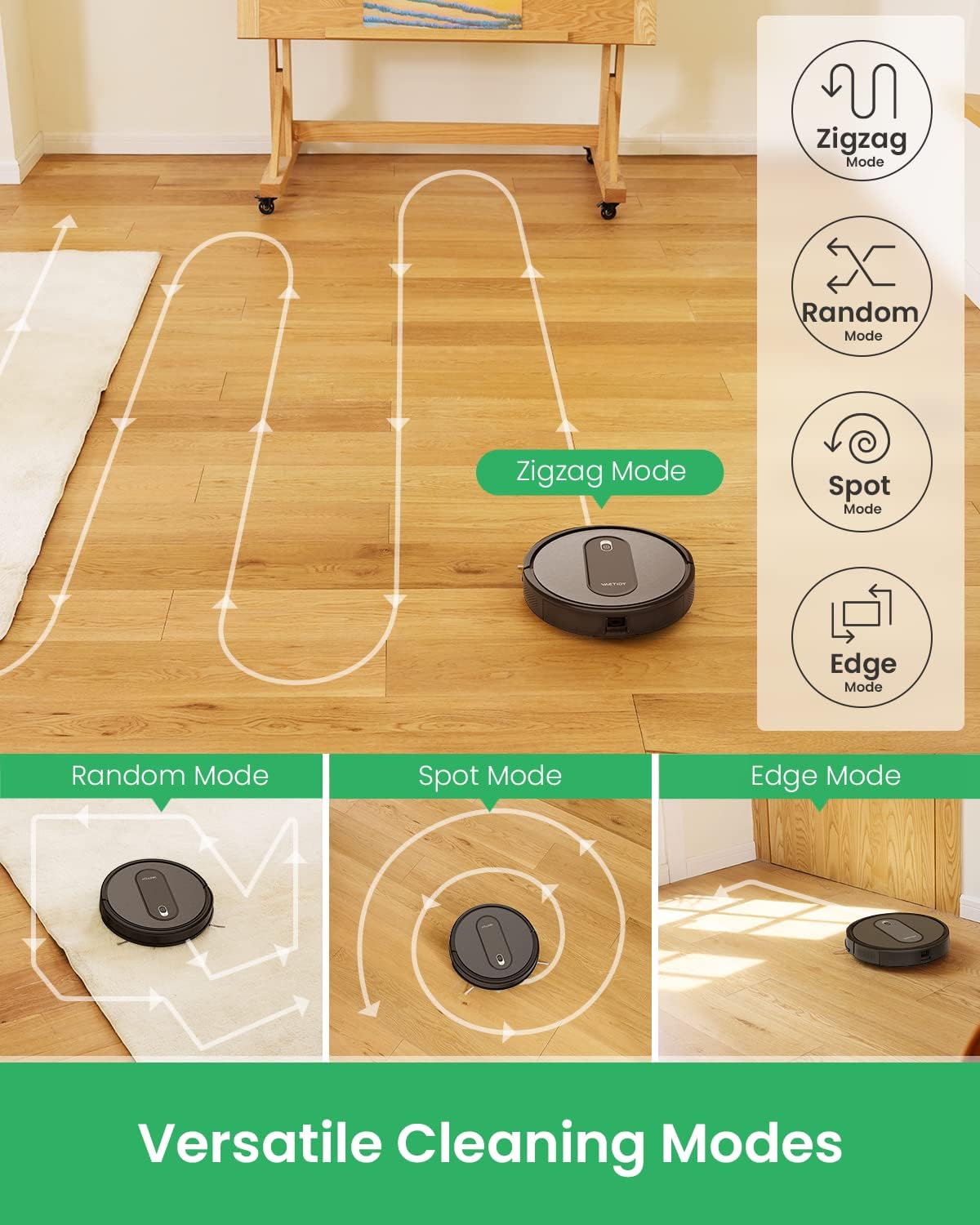
Figure 4.1: Versatile cleaning modes for comprehensive coverage.
4.3 Suction Power Levels
Adjust suction power via the app or remote control:
- Silent Mode: For quiet operation.
- Standard Mode: Default cleaning power.
- Max Mode: For deep cleaning and stubborn dirt.

Figure 4.2: Different suction modes for various cleaning needs.
4.4 Automatic Recharge
When the battery level is low (below 15%), the robot vacuum will automatically return to its charging base to recharge. Ensure the charging base is accessible.

Figure 4.3: Automatic return to charging base for continuous operation.
4.5 Smart Control (App & Voice)
Control your Nimble T6 remotely using the Vactidy app. You can monitor cleaning progress, schedule cleaning times, and change modes. The robot also supports voice commands via Alexa and Google Home for convenient hands-free operation.

Figure 4.4: Remote control functionality for easy operation.
4.6 Auto Carpet Boost
The Nimble T6 features an automatic carpet detection system. When it moves from hard floors to carpets, it will automatically increase suction power to ensure a deeper clean on carpeted surfaces.

Figure 4.5: Automatic carpet boost for optimized cleaning on different surfaces.
4.7 Quiet Operation
Designed for minimal disruption, the Nimble T6 operates at a low noise level of less than 60 dB, allowing you to relax or work without significant disturbance while it cleans.

Figure 4.6: Enjoy a quiet cleaning experience with the Nimble T6.
4.8 Anti-Drop Sensors
Equipped with advanced anti-drop sensors, the robot vacuum can detect ledges and stairs, preventing it from falling and ensuring safe operation around your home.

Figure 4.7: Anti-dropping sensors ensure safe navigation near stairs.
5. Maintenance
Regular maintenance is crucial for optimal performance of your robot vacuum.
5.1 Emptying the Dustbin
Empty the 500ml dustbin after each cleaning cycle or when it is full. Press the dustbin release button, remove the dustbin, open it, and discard the debris. Clean the dustbin with a dry cloth.

Figure 5.1: The 500ml dustbin, showing collected debris.
5.2 Cleaning the Filter
The HEPA filter should be cleaned regularly (e.g., weekly) by tapping it gently to remove dust. Replace the filter every 3-6 months depending on usage.
5.3 Cleaning Brushes
Remove and clean the side brushes and the main roller brush regularly to prevent hair and debris entanglement. Use the cleaning tool provided to cut and remove tangled hair.

Figure 5.2: Double-side brushes for effective cleaning.
5.4 Cleaning Sensors and Charging Contacts
Wipe the anti-drop sensors and charging contacts on both the robot and the charging base with a clean, dry cloth to ensure proper function and charging.
6. Troubleshooting
If you encounter issues with your Vactidy Nimble T6, please refer to the following common problems and solutions:
| Problem | Possible Cause | Solution |
|---|---|---|
| Robot does not turn on | Low battery; Power button not pressed correctly | Charge the robot; Press and hold the power button for 3 seconds |
| Robot does not charge | Charging contacts dirty; Charging base not powered | Clean charging contacts; Ensure charging base is plugged in |
| Poor suction power | Dustbin full; Filter clogged; Brushes tangled | Empty dustbin; Clean/replace filter; Clean brushes |
| Robot gets stuck frequently | Obstacles in path; Cliff sensors dirty | Clear obstacles; Clean cliff sensors |
If the problem persists, please contact Vactidy Customer Support.
7. Specifications
| Feature | Specification |
|---|---|
| Brand | Vactidy |
| Model Number | 8801420112-DI (T6) |
| Color | Black |
| Product Dimensions (L x W x H) | 32 x 32 x 8 cm (12.6 x 12.6 x 3.15 inches) |
| Capacity (Dustbin) | 500 Milliliters |
| Noise Level | 60 dB |
| Product Compatibility | Google Home, Alexa |
| Special Features | Smart Control with App/Alexa/Siri |
| Item Weight | 3.37 Kilograms (7.43 lbs) |
| Batteries | 1 AAA battery required (for remote control) |
| Manufacturer | Vactidy |
| Country of Origin | China |
| Surface Recommendation | Carpet, Hard Floors |
| Controller Type | App Control, Remote Control |
| Included Components | Robot Vacuum Cleaner, Charging Base, Side Brush*4, HEPA Filter*2, Remote Control |
| Filter Type | Cloth (HEPA) |
| Battery Life | Up to 100 minutes (Silent Mode) |
8. Warranty and Support
Vactidy offers a 24-month free warranty for the Nimble T6 Robot Vacuum Cleaner, ensuring peace of mind regarding product quality and performance. Additionally, a 30-day refund guarantee is provided.
For any questions, technical assistance, or warranty claims, please contact Vactidy Customer Support through the official website or the contact information provided with your purchase. Please have your model number (T6) and purchase details ready when contacting support.

Figure 8.1: Vactidy's commitment to customer satisfaction.
Related documentsT6


Ask a question about this manual
Ask about setup, troubleshooting, compatibility, parts, safety, or missing instructions. Manuals+ will review the question and use this page’s manual context to help answer it.