
Fastrack NT3289KM01
Fastrack Opulence Quartz Analog Watch NT3289KM01 User Manual
Model: NT3289KM01
1. Introduction
This manual provides essential instructions for the proper setup, operation, and maintenance of your Fastrack Opulence Quartz Analog Watch, model NT3289KM01. This timepiece features a precise quartz movement, an analog display with a black dial, an integrated date display, and a durable black stainless steel strap. Please read this manual thoroughly to ensure optimal performance and longevity of your watch.

Figure 1: Front view of the Fastrack Opulence Quartz Analog Watch.
2. Watch Components
Familiarize yourself with the main components of your Fastrack Opulence watch:
- Crown: Used for setting the time and date. Located on the right side of the watch case.
- Dial: The watch face, displaying hours, minutes, and seconds.
- Hands: Hour, Minute, and Second hands indicate the current time.
- Date Window: A semi-circular display at the 6 o'clock position showing the current date.
- Case: The main body of the watch, housing the movement and protecting the dial.
- Strap: The black stainless steel band used to secure the watch to your wrist.
- Clasp: The mechanism used to fasten and unfasten the strap.

Figure 2: Side view highlighting the crown for adjustments.
3. Initial Setup
3.1 Setting the Time
- Gently pull the crown out to the second click position. The second hand will stop.
- Rotate the crown in either direction to set the hour and minute hands to the desired time. Ensure you distinguish between AM and PM if setting the date simultaneously.
- Once the time is set, push the crown back into its normal operating position (first click). The second hand will resume movement.
3.2 Setting the Date
- Gently pull the crown out to the first click position. The second hand will continue to move.
- Rotate the crown to adjust the date. Rotate until the correct date is displayed in the date window.
- Once the date is set, push the crown back into its normal operating position.
Note: Avoid setting the date between 9:00 PM and 3:00 AM, as this may interfere with the automatic date change mechanism. If you need to set the date during this period, first set the time outside this range, adjust the date, and then reset the time.
4. Operating Your Watch
4.1 Wearing the Watch
Adjust the black stainless steel strap to fit comfortably on your wrist. The clasp should secure the watch firmly without being too tight, allowing for proper circulation.
4.2 Water Resistance
Your Fastrack Opulence watch has a water resistance rating of 50 meters (5 ATM). This means it is suitable for short periods of recreational swimming, showering, or washing hands. It is not suitable for diving, snorkeling, or high-impact water sports. Always ensure the crown is fully pushed in before any contact with water.
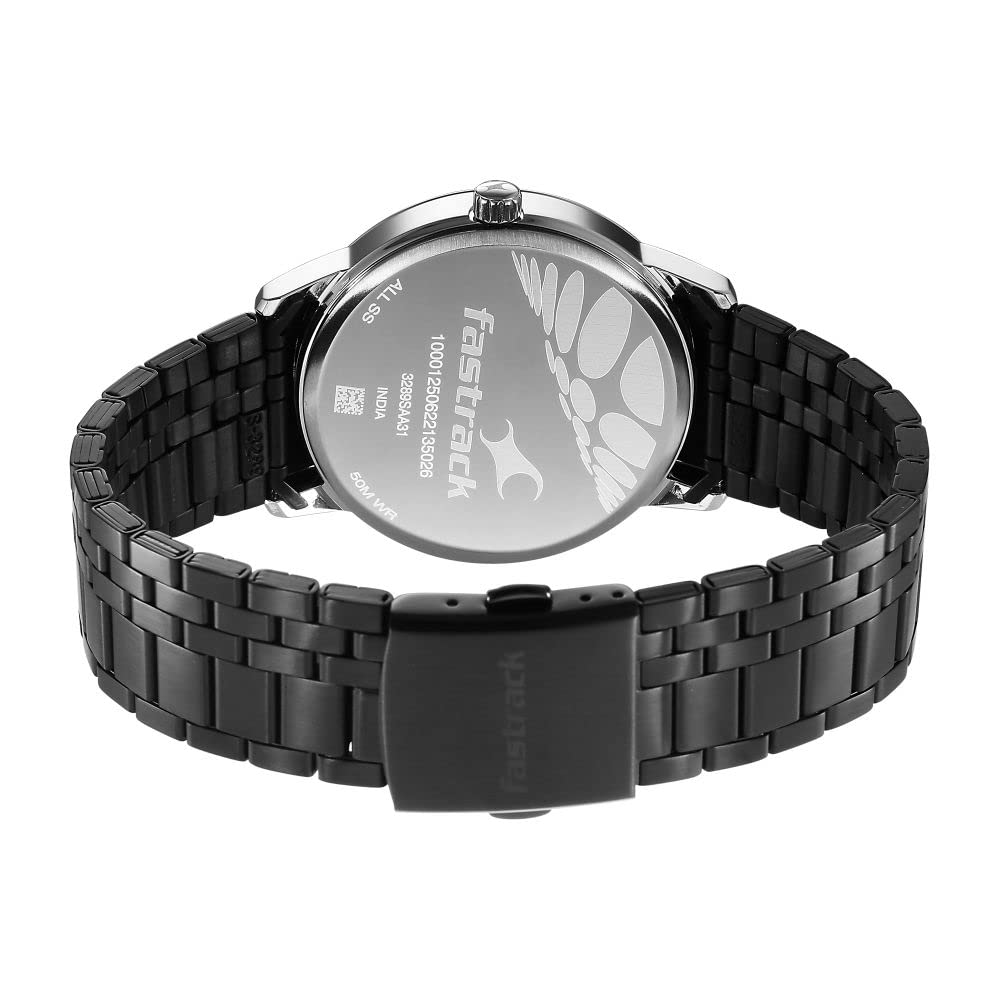
Figure 3: Watch back case indicating 50M WR (Water Resistant).
5. Care and Maintenance
Proper care will help maintain the appearance and functionality of your watch:
- Cleaning: Wipe the watch case and strap regularly with a soft, dry cloth to remove dust and perspiration. For the stainless steel strap, a slightly damp cloth can be used, followed by immediate drying.
- Avoid Chemicals: Do not expose the watch to solvents, detergents, perfumes, or cosmetics, as these can damage the case, strap, or seals.
- Temperature Extremes: Avoid exposing your watch to extreme temperatures (above 60°C / 140°F or below 0°C / 32°F) or sudden temperature changes.
- Magnetic Fields: Keep the watch away from strong magnetic fields, such as those produced by speakers, refrigerators, or mobile phones, as they can affect the accuracy of the quartz movement.
- Battery Replacement: When the watch stops or the second hand moves erratically (e.g., skipping seconds), the battery may need replacement. This should be performed by a qualified watch technician to ensure proper sealing and function. The watch uses 1 Lithium Polymer battery.
6. Troubleshooting
If you encounter issues with your watch, refer to the following common problems and solutions:
| Problem | Possible Cause | Solution |
|---|---|---|
| Watch has stopped running. | Depleted battery. | Replace the battery. Contact an authorized service center. |
| Time is incorrect. | Crown is pulled out; time was not set correctly; exposure to strong magnetic fields. | Ensure crown is fully pushed in. Reset the time as per Section 3.1. Keep watch away from magnetic sources. |
| Date is incorrect. | Date was not set correctly. | Reset the date as per Section 3.2. |
| Condensation inside the watch. | Water ingress due to open crown or damaged seals. | Immediately take the watch to an authorized service center for inspection and repair. |
If the problem persists after attempting these solutions, please contact Fastrack customer support or an authorized service center.
7. Specifications
| Brand | Fastrack |
| Model Number | NT3289KM01 |
| Model Name | Opulence |
| Display Type | Analog |
| Movement | Quartz |
| Power Source | Battery Powered |
| Battery Type | 1 Lithium Polymer battery (included) |
| Water Resistance | 50 Meters (5 ATM) |
| Case Material | Stainless Steel |
| Strap Material | Black Stainless Steel |
| Special Features | Second Hand, Date Display |
| Product Dimensions | 14 x 7 x 10 cm |
| Item Weight | 191 g |
| Country of Origin | India |
8. Warranty Information
For detailed warranty terms and conditions, please refer to the warranty card included with your purchase or visit the official Fastrack website. Keep your purchase receipt as proof of purchase for any warranty claims.
9. Customer Support
If you require further assistance, have questions not covered in this manual, or need to arrange for service, please contact Fastrack customer support. Contact details can typically be found on the official Fastrack website or on your warranty documentation.
You can also visit the Fastrack Store on Amazon for more product information.
Ask a question about this manual
Ask about setup, troubleshooting, compatibility, parts, safety, or missing instructions. Manuals+ will review the question and use this page’s manual context to help answer it.