
LENRUE A39PRO
LENRUE A39PRO USB-C Computer Speaker User Manual
Model: A39PRO | Brand: LENRUE
1. Introduction
Thank you for choosing the LENRUE A39PRO USB-C Computer Speaker. This speaker is designed to provide clear and powerful audio for your laptop or desktop computer with a simple plug-and-play Type-C connection. This manual provides detailed instructions for setup, operation, and maintenance to ensure optimal performance and longevity of your device.
2. Package Contents
Please verify that all items are present in the package:
- 1 x LENRUE A39PRO Computer Speaker
- 1 x User Manual (this document)
3. Product Overview
The LENRUE A39PRO speaker features a sleek design with intuitive controls and vibrant lighting. Familiarize yourself with the components below.
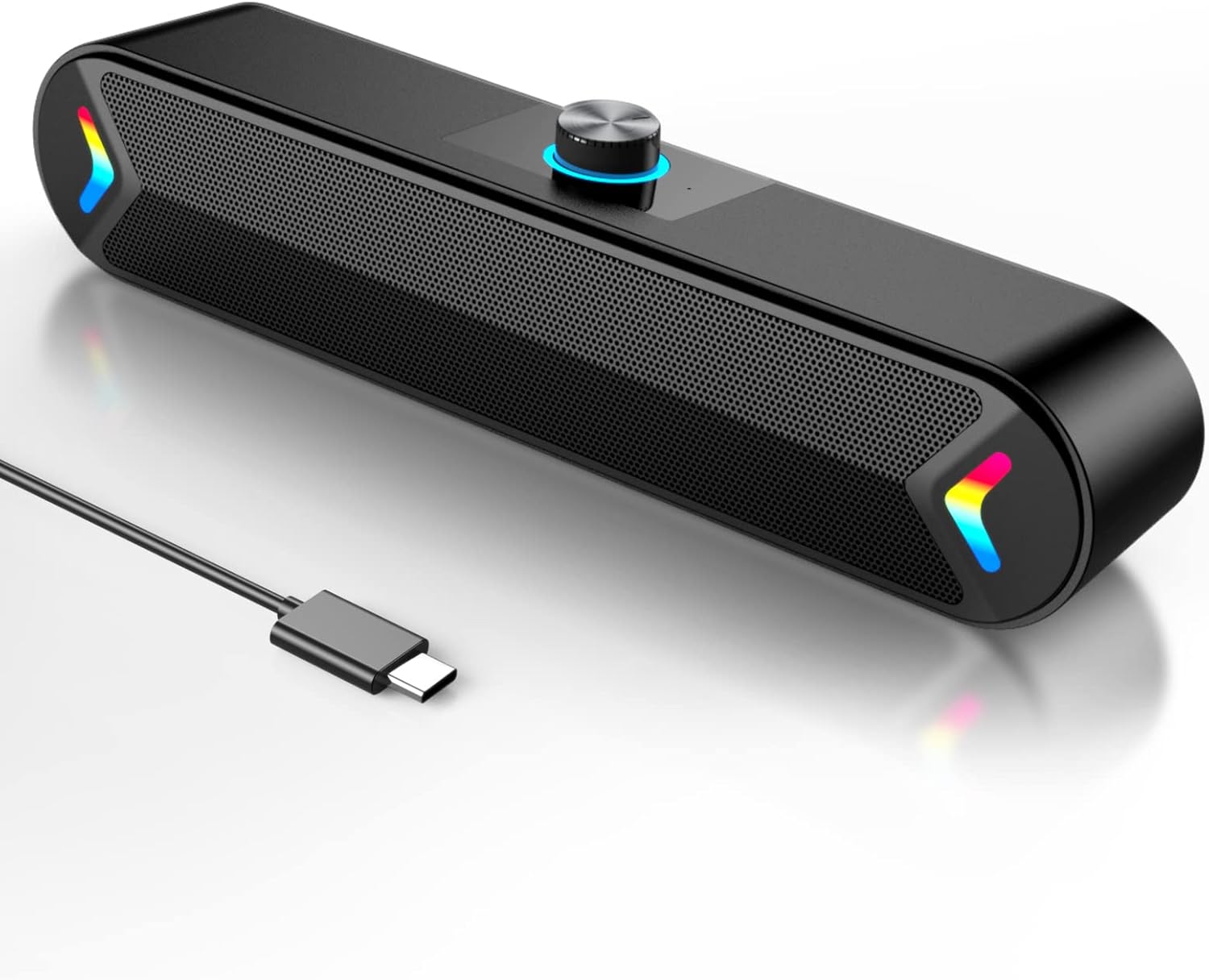
Figure 3.1: Front view of the LENRUE A39PRO speaker, showing the main grille and integrated USB-C cable.

Figure 3.2: Top and rear view of the speaker, highlighting the volume knob and the power/light control button.
Key Components:
- Volume Knob: Located on the top, used for adjusting audio volume.
- Power/Light Button: Located on the back, controls power and the colorful light feature.
- USB-C Cable: Integrated cable for both power and audio input.
- Dual 5W Drivers: Internal components providing clear stereo sound.
- Independent Bass Diaphragm: Enhances bass performance.
4. Setup Instructions
The LENRUE A39PRO speaker is designed for simple plug-and-play operation. No additional drivers or software are required for most operating systems.
Connecting the Speaker:
- Locate an available USB-C port on your laptop or desktop computer.
- Insert the integrated USB-C cable from the LENRUE A39PRO speaker firmly into the USB-C port on your computer.

Figure 4.1: Illustrates connecting the speaker's USB-C cable to a laptop's Type-C port.
- The speaker will automatically power on and be recognized by your operating system. You may need to select the "LENRUE A39PRO" as the default audio output device in your computer's sound settings.

Figure 4.2: The speaker in operation, connected to a laptop, demonstrating its plug-and-play functionality.
Important Note: Ensure your device has a Type-C interface for compatibility. The single USB-C cable transmits both audio and electrical power to the speaker.
5. Operating Instructions
Volume Control:
- Rotate the Volume Knob on the top of the speaker clockwise to increase the volume.
- Rotate the Volume Knob counter-clockwise to decrease the volume.
Controlling the Colorful Light:
The speaker features a colorful light design that can be controlled via the button on the back.
- Press the Power/Light Button once to turn on the speaker and activate the colorful lights.
- Press the Power/Light Button a second time to turn off the colorful lights while keeping the speaker powered on.
- Press the Power/Light Button a third time to power off both the speaker and the lights.
6. Compatibility
The LENRUE A39PRO speaker offers wide compatibility with various operating systems and devices that feature a USB-C port for audio and power.

Figure 6.1: Visual representation of the speaker's compatibility with Windows, macOS, Chrome OS, Linux, and Unix systems.
Supported Operating Systems:
- Windows PCs (Vista/7/8/10)
- macOS (MacBook Air, Mac mini)
- Google Chromebooks
- Linux
- Unix
Compatible Devices:
- Laptops with Type-C port
- Desktop Computers with Type-C port
7. Troubleshooting
If you encounter issues with your LENRUE A39PRO speaker, please refer to the following common problems and solutions:
| Problem | Possible Cause | Solution |
|---|---|---|
| No sound from speaker. |
|
|
| Lights are off, but speaker is on. | Lights have been toggled off. | Press the Power/Light Button once to cycle through light modes and turn them back on. |
| Sound is distorted or unclear. |
|
|
| Speaker not recognized by computer. |
|
|
8. Specifications
| Feature | Detail |
|---|---|
| Model Name | A39PRO |
| Speaker Type | Computer Speaker |
| Connectivity Technology | USB (Type-C) |
| Power Source | Corded Electric (via USB-C) |
| Audio Output Mode | Stereo |
| Speaker Maximum Output Power | 10 Watts (2x5W) |
| Controller Type | Knob control |
| Product Dimensions (D x W x H) | 2.17"D x 12.6"W x 2.56"H |
| Item Weight | 1.3 Pounds |
| Color | Black-USBC |
| Special Feature | One Cable with Type-C plug for charging and audio, Colorful light Design |
9. Maintenance
Proper care and maintenance will ensure the longevity and optimal performance of your speaker.
- Cleaning: Use a soft, dry cloth to wipe the surface of the speaker. Do not use liquid cleaners or abrasive materials, as they may damage the finish or internal components.
- Storage: When not in use for extended periods, store the speaker in a cool, dry place away from direct sunlight and extreme temperatures.
- Handling: Avoid dropping the speaker or subjecting it to strong impacts, which can damage internal circuitry.
- Water Exposure: The speaker is not waterproof. Avoid exposing it to water or other liquids.
10. Warranty and Support
The LENRUE A39PRO speaker comes with a Limited Warranty. For specific warranty terms, conditions, and support inquiries, please refer to the warranty information provided at the time of purchase or contact LENRUE customer support directly through their official channels.
For further assistance or technical support, please visit the official LENRUE website or contact their customer service department.
Ask a question about this manual
Ask about setup, troubleshooting, compatibility, parts, safety, or missing instructions. Manuals+ will review the question and use this page’s manual context to help answer it.