
Sigma PCC 565
SIGMA PCC 565 Document Shredder User Manual
Model: PCC 565 | Brand: Sigma
1. Important Safety Instructions
Please read all instructions carefully before using the SIGMA PCC 565 document shredder. Keep this manual for future reference.
- Always keep the shredder out of reach of children and pets.
- Do not insert fingers, loose clothing, jewelry, or long hair into the paper or media entry slots.
- Unplug the shredder from the power outlet when not in use, before cleaning, or before moving.
- Do not shred metal objects, adhesive labels, or plastic materials other than CDs/DVDs/credit cards as specified.
- Do not open the shredder casing. There are no user-serviceable parts inside. Refer all servicing to qualified service personnel.
- Ensure the shredder is placed on a stable, level surface.
- Do not operate the shredder if the power cord or plug is damaged.
2. Product Overview
The SIGMA PCC 565 is a versatile document shredder designed for home or small office use. It features a separate entry for CDs, DVDs, and credit cards, and includes automatic start/stop, overload, and overheat protection.
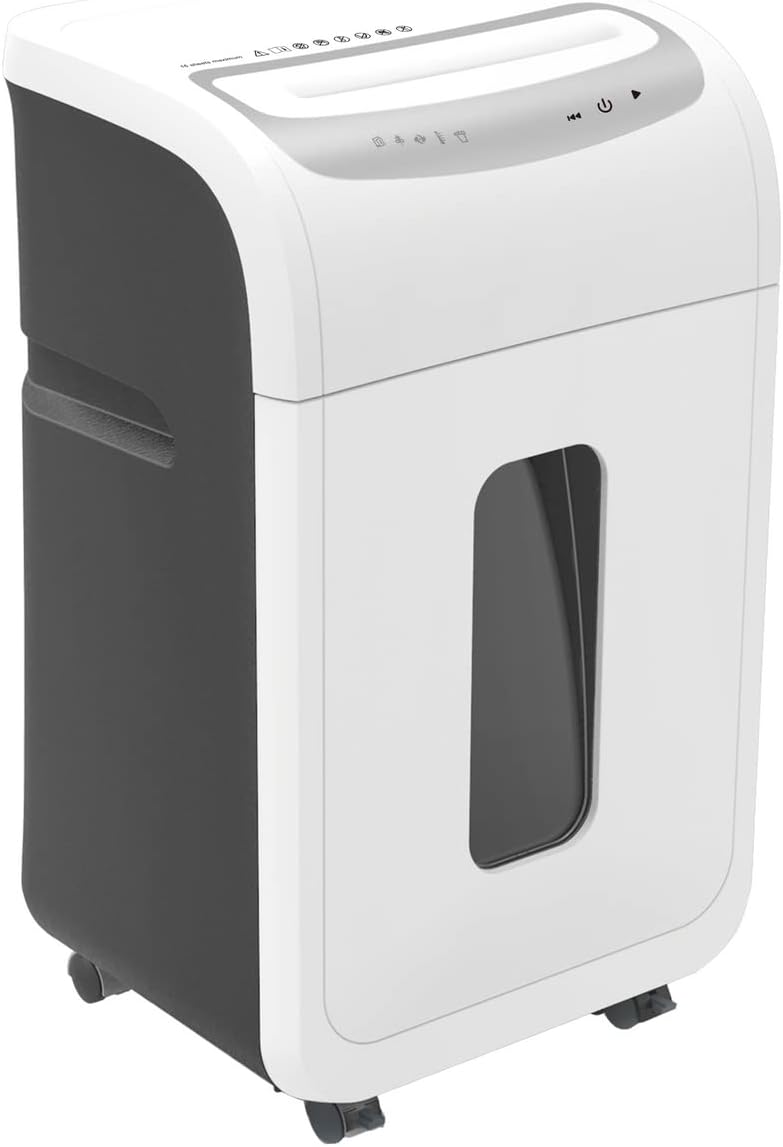
Image: Front view of the SIGMA PCC 565 Document Shredder. It features a white and dark grey casing, with a transparent window on the front to view the waste bin level. The top panel includes control buttons and paper/media entry slots.
Key Features:
- Shreds up to 16 sheets of 80 gsm paper simultaneously.
- Separate entry for CDs, DVDs, and credit cards.
- Automatic start/stop function.
- Overload protection to prevent paper jams.
- Overheat protection for motor longevity.
- Suitable for DIN A4 documents.
3. Setup
3.1 Unpacking
- Carefully remove the shredder from its packaging.
- Remove any protective materials or plastic bags.
- Ensure all components are present: shredder head, waste bin, and user manual.
3.2 Placement
Place the shredder on a flat, stable surface. Ensure there is sufficient space around the unit for ventilation and to access the power outlet.
3.3 Assembly
Carefully place the shredder head onto the top of the waste bin, ensuring it is securely seated. The shredder will not operate if the head is not correctly positioned.
3.4 Power Connection
Plug the power cord into a standard electrical outlet. The shredder is now ready for operation.
4. Operating Instructions
4.1 Controls
The control panel is located on the top of the shredder head. It typically includes:
- Auto (I): The shredder is in standby mode and will automatically start when paper is inserted.
- Off (O): The shredder is powered off.
- Reverse (<<): Manually reverses the shredding action to clear paper jams.
4.2 Shredding Paper
- Ensure the shredder is plugged in and the switch is set to 'Auto' (I).
- Insert up to 16 sheets of 80 gsm paper straight into the paper entry slot. Do not exceed the maximum capacity.
- The shredder will automatically start and shred the paper. Once shredding is complete, it will stop.
4.3 Shredding CDs/DVDs/Credit Cards
- Ensure the shredder is plugged in and the switch is set to 'Auto' (I).
- Insert one CD, DVD, or credit card into the separate media entry slot.
- The shredder will automatically start and shred the media. Once shredding is complete, it will stop.
4.4 Overload and Overheat Protection
- Overload Protection: If too much paper is inserted, the shredder may stop. Remove some sheets and try again. Use the 'Reverse' function if a jam occurs.
- Overheat Protection: For continuous operation, the shredder may automatically shut off to prevent overheating. If this happens, allow the shredder to cool down for approximately 20-30 minutes before resuming operation.
5. Maintenance
5.1 Emptying the Waste Bin
- Unplug the shredder from the power outlet.
- Carefully lift the shredder head off the waste bin.
- Empty the shredded material from the bin into a suitable recycling container.
- Replace the shredder head securely onto the waste bin.
5.2 Cleaning and Oiling
Regular cleaning and oiling help maintain shredder performance and extend its lifespan.
- Exterior Cleaning: Unplug the shredder. Wipe the exterior with a soft, damp cloth. Do not use abrasive cleaners or solvents.
- Oiling Blades: For optimal performance, oil the shredder blades regularly (e.g., after every 30 minutes of cumulative shredding or when performance decreases). Use shredder oil sheets or liquid shredder oil applied to a sheet of paper and shred it.
6. Troubleshooting
If you encounter issues with your shredder, refer to the table below for common problems and solutions.
| Problem | Possible Cause | Solution |
|---|---|---|
| Shredder does not turn on. | Not plugged in; Power switch off; Shredder head not seated correctly; Overheat protection active. | Ensure power cord is securely plugged in; Set switch to 'Auto' (I); Re-seat shredder head; Allow shredder to cool down for 20-30 minutes. |
| Paper jam. | Too much paper inserted; Paper inserted crookedly. | Press 'Reverse' (<<) to clear paper. If necessary, unplug, remove shredder head, and carefully remove paper manually. Do not force. |
| Shredder stops during operation. | Overheat protection active; Waste bin full. | Allow shredder to cool down; Empty the waste bin. |
| Poor shredding performance / Loud noise. | Blades need oiling; Waste bin too full. | Oil the shredder blades as per maintenance instructions; Empty the waste bin. |
7. Specifications
| Model | PCC 565 |
| Brand | Sigma |
| Color | White |
| Shred Type | Cross-cut (for paper, CDs/DVDs, credit cards) |
| Paper Shred Capacity | 16 sheets (80 gsm) |
| Media Shred Capacity | 1 CD/DVD or 1 Credit Card |
| Paper Entry Width | Compatible with DIN A4 documents |
| Media Entry | Separate slot for CDs/DVDs/Credit Cards |
| Dimensions (Height) | 60.2 cm |
| Power Source | Electric cable |
| Operating Mode | Automatic |
| Safety Features | Overload protection, Overheat protection, Auto-disconnect |
8. Warranty and Support
For warranty information, please refer to the warranty card included with your product or contact the retailer where you purchased the shredder. For technical support or service inquiries, please contact Sigma customer service or your local distributor.
Please have your model number (PCC 565) and purchase date ready when contacting support.
Ask a question about this manual
Ask about setup, troubleshooting, compatibility, parts, safety, or missing instructions. Manuals+ will review the question and use this page’s manual context to help answer it.