
1. Introduction
This manual provides detailed instructions for the setup, operation, and maintenance of your ARRAROWN ZK-TB21 Bluetooth Audio Amplifier Board. This 2.1 channel stereo digital amplifier is designed for DIY home speaker projects, offering 50W per stereo channel and 100W for the subwoofer, with Bluetooth 5.0 and AUX input capabilities.
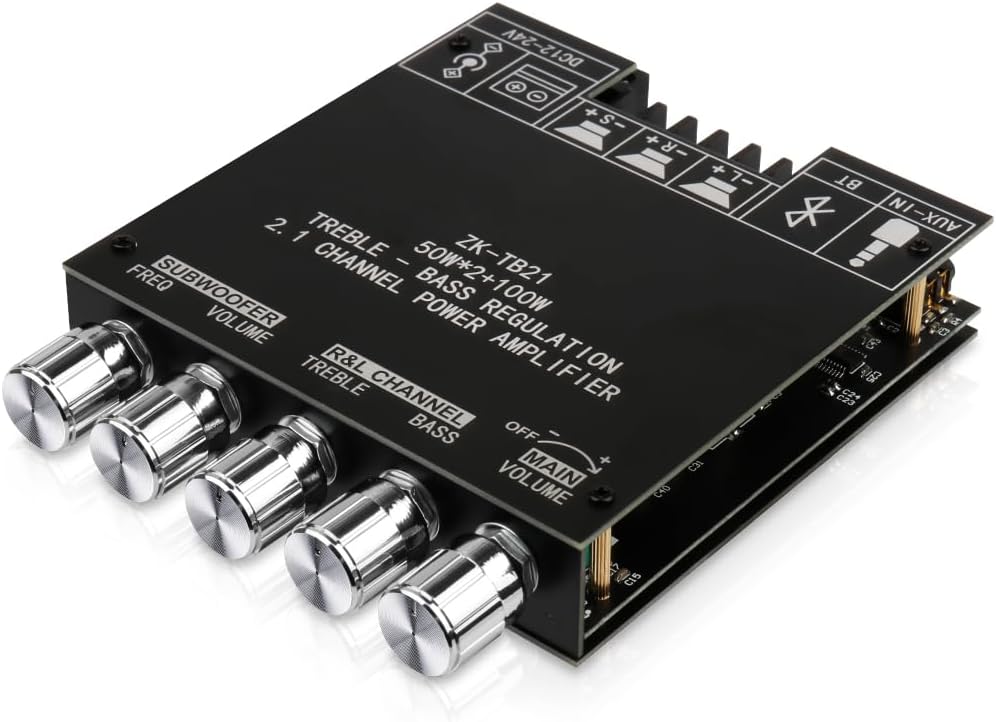
Figure 1: ARRAROWN ZK-TB21 Bluetooth Audio Amplifier Board. This image displays a top-down, angled view of the ZK-TB21 amplifier board, showcasing its compact design and all control knobs for subwoofer frequency, subwoofer volume, left/right channel treble, left/right channel bass, and main volume. The board also features clearly labeled input and output terminals.
2. Product Overview
2.1 Key Features
- 2.1 Channel Output: Provides 50W x 2 for stereo channels and 100W for the subwoofer.
- Bluetooth 5.0 Connectivity: For wireless audio streaming.
- AUX Audio Input: Supports wired audio connections.
- Treble and Bass Control: Independent adjustment knobs for main channels and subwoofer.
- Protective Functions: Includes over-voltage, under-voltage, over-heat, and short-circuit protection.
- Compact Design: Small size (4.72 in x 3.94 in x 0.7 in) for easy integration into DIY projects.
2.2 Component Identification

Figure 2: ZK-TB21 Amplifier Board Connection Diagram. This detailed diagram of the ZK-TB21 amplifier board clearly indicates the power input (DC12-24V), subwoofer speaker terminals, left and right channel speaker terminals, and AUX input. It also labels the control knobs for subwoofer frequency, subwoofer volume, left/right channel treble, left/right channel bass, and main volume.
The board features the following main components and controls:
- DC12-24V Power Input: For connecting the power supply.
- Subwoofer Speaker Terminals (-S, +S): For connecting your subwoofer.
- Left Channel Speaker Terminals (-L, +L): For connecting the left stereo speaker.
- Right Channel Speaker Terminals (-R, +R): For connecting the right stereo speaker.
- AUX-IN: 3.5mm jack for wired audio input.
- Subwoofer Freq Knob: Adjusts the cutoff frequency for the subwoofer.
- Subwoofer Volume Knob: Controls the output volume of the subwoofer.
- R&L Channel Treble Knob: Adjusts the high frequencies for the left and right stereo channels.
- R&L Channel Bass Knob: Adjusts the low frequencies for the left and right stereo channels.
- Main Volume Knob: Controls the overall output volume. This knob also serves as the power switch (OFF/ON).

Figure 3: Internal Components. An internal view of the ZK-TB21 amplifier board, highlighting key components such as the low noise front stage operational amplifier, shield power inductance, large capacity energy storage capacitors, and the original imported 3116 amplifier chip. This illustrates the quality of internal construction.
3. Safety Information
Please read and understand all safety instructions before operating this device. Failure to do so may result in injury or damage to the product.
- Ensure the power supply voltage is within the specified DC 12-24V range. Using an incorrect voltage can damage the amplifier.
- Do not expose the device to water, moisture, or extreme temperatures.
- Avoid placing the amplifier in direct sunlight or near heat sources.
- Ensure proper ventilation to prevent overheating.
- Do not attempt to disassemble or modify the amplifier beyond the intended assembly. This may void the warranty and pose safety risks.
- Keep out of reach of children.
- Always disconnect power before making any connections or disconnections.

Figure 4: Device Protective Functions. This diagram shows the dimensions of the ZK-TB21 amplifier board (120mm x 100mm x 23mm) and icons representing its protective functions: over-voltage protection, under-voltage protection, over-heat protection, and short-circuit protection. This emphasizes the compact size and built-in safety mechanisms.
4. Setup Guide
4.1 Assembly (if applicable)
The ZK-TB21 board may come with protective plates and standoffs for assembly. Follow the diagram below to secure the board within its enclosure.

Figure 5: Amplifier Board Assembly. An exploded diagram illustrating the assembly of the ZK-TB21 amplifier board, showing the top and bottom protective plates, the main circuit board, and the standoffs and screws used for secure enclosure.
4.2 Connecting Speakers
- Identify the speaker terminals on the board (Subwoofer: -S, +S; Left Channel: -L, +L; Right Channel: -R, +R).
- Connect your subwoofer to the Subwoofer terminals, ensuring correct polarity.
- Connect your left stereo speaker to the Left Channel terminals, ensuring correct polarity.
- Connect your right stereo speaker to the Right Channel terminals, ensuring correct polarity.
4.3 Power Connection
- Ensure the Main Volume knob is in the OFF position.
- Connect a DC 12-24V power supply to the DC power input jack on the board.
- Plug the power supply into a suitable power outlet.
4.4 Audio Input Connection
The amplifier supports two audio input methods: Bluetooth and AUX.
- Bluetooth: This is the primary wireless input.
- AUX-IN: For wired connections, use a 3.5mm audio cable to connect your audio source to the AUX-IN jack.
5. Operating Instructions
5.1 Powering On/Off
Rotate the Main Volume knob clockwise to turn the amplifier ON. Rotate it counter-clockwise until it clicks to turn the amplifier OFF.
5.2 Bluetooth Connection
- Turn on the amplifier. The Bluetooth indicator light will flash, indicating it is in pairing mode.
- On your audio device (e.g., smartphone, tablet), enable Bluetooth and search for available devices.
- Select "ZK-TB21" from the list of devices to pair.
- Once connected, the Bluetooth indicator light will remain solid. You can now stream audio wirelessly.
Video 1: Wuzhi Audio Bluetooth! This video demonstrates the Bluetooth functionality of the amplifier, showing how to connect an audio source and play music. It highlights the ease of wireless setup.
5.3 AUX Input Usage
If you prefer a wired connection, plug a 3.5mm audio cable from your audio source into the AUX-IN jack on the amplifier board. When using AUX mode, ensure that any active Bluetooth connection to the amplifier has been disconnected.
5.4 Adjusting Audio Settings
- Main Volume: Use the Main Volume knob to control the overall sound level.
- Treble/Bass (R&L Channel): Adjust these knobs to fine-tune the high and low frequencies of your stereo speakers.
- Subwoofer Volume: Use this knob to set the desired loudness of the subwoofer.
- Subwoofer Freq: Adjust this knob to control the crossover frequency for the subwoofer, determining which low frequencies are sent to it.
6. Maintenance
- Cleaning: Use a soft, dry cloth to clean the amplifier board. Do not use liquid cleaners or solvents.
- Storage: When not in use for extended periods, store the amplifier in a cool, dry place away from direct sunlight and moisture.
- Handling: Handle the board with care to avoid damaging components or connections.
7. Troubleshooting
| Problem | Possible Cause | Solution |
|---|---|---|
| No sound output |
|
|
| Distorted sound |
|
|
| Bluetooth connection issues |
|
|
| Amplifier overheating |
|
|
8. Specifications
- Model: ZK-TB21
- Brand: ARRAROWN
- Channels: 2.1 (Left, Right, Subwoofer)
- Output Power: 50W x 2 (stereo) + 100W (subwoofer)
- Input Voltage: DC 12-24V
- Minimum Supply Voltage: 12 Volts (DC)
- Maximum Supply Voltage: 24 Volts (DC)
- Supply Current: 5 Amps (recommended)
- Bluetooth Version: 5.0
- Audio Inputs: Bluetooth, AUX (3.5mm)
- Dimensions: 5.16 x 4.41 x 2.01 inches (approx. 131 x 112 x 51 mm)
- Item Weight: 8.4 ounces (approx. 238 grams)
- UPC: 789615751216
9. Warranty and Support
For warranty information or technical support, please refer to the product packaging or contact the manufacturer directly through their official channels. Keep your purchase receipt for any warranty claims.