
MediAcous ME-FL01-Adapter

MediAcous Floor Lamp Accessory Adapter
Model: ME-FL01-Adapter
Introduction
This user manual provides essential information for the safe and effective use of your MediAcous Floor Lamp Accessory Adapter, specifically designed for the ME-FL01 floor lamp. Please read this manual thoroughly before use and retain it for future reference.
Important Safety Information
- Use this adapter only with the MediAcous ME-FL01 floor lamp. Using it with other devices may cause damage or malfunction.
- This is an American standard plug adapter. Do not attempt to use it in regions with different voltage or plug standards without a proper converter.
- Do not expose the adapter to water, moisture, or extreme temperatures.
- Do not disassemble, modify, or attempt to repair the adapter. Refer all servicing to qualified personnel.
- Ensure the power outlet is easily accessible and unplug the adapter during electrical storms or when unused for long periods.
- Keep out of reach of children and pets.
Package Contents
Verify that all items are present in your package:
- 1 x MediAcous Floor Lamp Accessory Adapter (ME-FL01-Adapter)
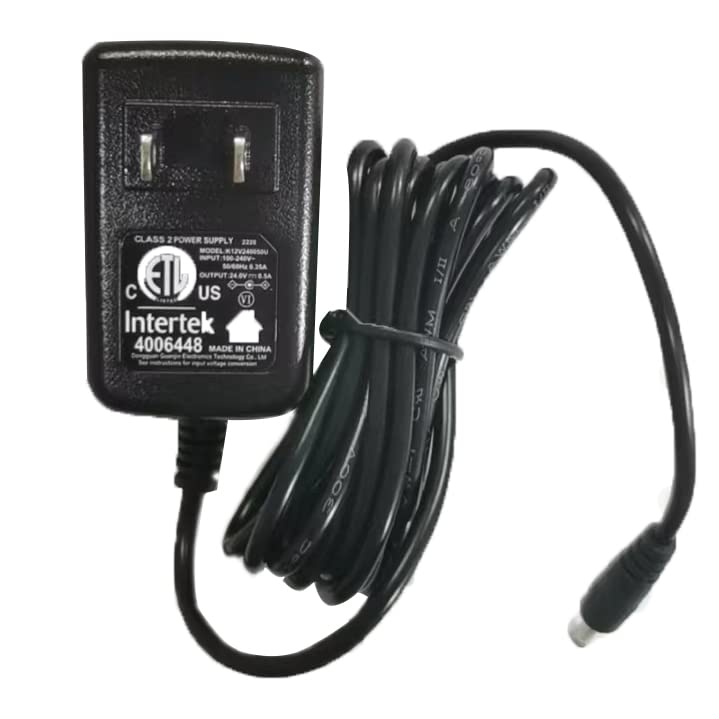
Image: The MediAcous Floor Lamp Accessory Adapter, featuring a black power brick with an American standard two-prong plug and an attached DC output cable.
Setup
Follow these steps to connect your adapter to the MediAcous ME-FL01 floor lamp:
- Locate the power input port on the base of your MediAcous ME-FL01 floor lamp.
- Take the DC output plug from the accessory adapter and carefully insert it into the power input port on the lamp base. Ensure it is fully and securely connected.
- Plug the adapter's two-prong plug into a standard American wall outlet (AC 100-240V, 50/60Hz).
- Once connected, the floor lamp is ready for operation using its integrated controls.

Image: A MediAcous ME-FL01 floor lamp standing next to a sofa, with the accessory adapter plugged into a wall outlet, demonstrating the connection.
Video: A demonstration showing how to connect the MediAcous Floor Lamp Accessory Adapter to the ME-FL01 floor lamp, from unboxing the adapter to plugging it into the lamp and then into a wall outlet.
Operation
The accessory adapter provides power to your MediAcous ME-FL01 floor lamp. Once connected and plugged into a power source, the lamp can be operated using its built-in controls (e.g., remote control, touch buttons on the lamp itself). Refer to your ME-FL01 floor lamp's specific user manual for detailed operating instructions.
Maintenance
- Cleaning: Disconnect the adapter from the power outlet and the lamp before cleaning. Use a soft, dry cloth to wipe the surface. Do not use liquid cleaners or aerosols.
- Storage: When not in use, store the adapter in a cool, dry place away from direct sunlight and moisture. Avoid tightly coiling the cable to prevent damage.
- Inspection: Periodically inspect the adapter and its cable for any signs of damage, such as frayed wires or cracked casing. If damage is found, discontinue use immediately and replace the adapter.
Troubleshooting
| Problem | Possible Cause | Solution |
|---|---|---|
| Lamp does not turn on after connecting the adapter. |
|
|
| Adapter feels unusually hot. |
|
|
If the problem persists after trying the above solutions, please contact MediAcous customer support.
Specifications
- Model: ME-FL01-Adapter
- Input: AC 100-240V ~ 50/60Hz
- Output: DC 24V 0.5A
- Plug Type: American Standard
- Weight: Approximately 3.2 ounces
- Material: Acrylonitrile Butadiene Styrene
Warranty and Support
For information regarding warranty coverage, please refer to the warranty card included with your original MediAcous ME-FL01 floor lamp or visit the official MediAcous website. For technical support, troubleshooting assistance, or replacement parts, please contact MediAcous customer service through their official channels.
You can often find contact information on the product packaging, the official MediAcous website, or through the retailer where you purchased the product.
Related documentsME-FL01-Adapter

Ask a question about this manual
Ask about setup, troubleshooting, compatibility, parts, safety, or missing instructions. Manuals+ will review the question and use this page’s manual context to help answer it.