
eufy MACH V1 Ultra (T2770111)
Contents
eufy MACH V1 Ultra All-in-One Cordless StickVac with Steam Mop
Model: MACH V1 Ultra (T2770111)
Introduction
The eufy MACH V1 Ultra is a versatile cleaning appliance designed to simplify floor care. It integrates vacuuming, mopping, and steaming functionalities into a single cordless unit, providing a comprehensive solution for various cleaning needs. This manual provides essential information for the safe and effective operation and maintenance of your MACH V1 Ultra.

Figure 1: eufy MACH V1 Ultra and included accessories.
- Vacuum, Mop and Steam All-in-One: Combines vacuum, mop and steam for the total floor cleaning solution to fulfill all your cleaning needs.
- Make Wet or Dry Messes, and Stubborn Stains Vanish: Clean wet or dry messes, and even built-up grime on floors effortlessly with constant heated steam.
- Industry's First TÜV Rheinland Certified: Maintain household cleanliness with high temperature steam and aqueous ozone, certified by TÜV Rheinland.
- Eco-Clean Ozone: Aqueous ozone is produced to remove stains on floors and remove odors naturally for a deeper clean. Safe for pets and children.
Setup
Before first use, ensure the device is fully charged. Place the MACH V1 Ultra on its charging dock. The indicator lights will show charging status. Once fully charged, the device is ready for operation.
To prepare for cleaning, fill the clean water tank with water and, if desired, add the recommended eufy floor cleaner. The device features a Tesla Valve Mixing system that precisely blends water and cleaning solution. For enhanced features and firmware updates, download the official eufy app and connect your device.

Figure 2: Download the eufy app for additional features and updates.
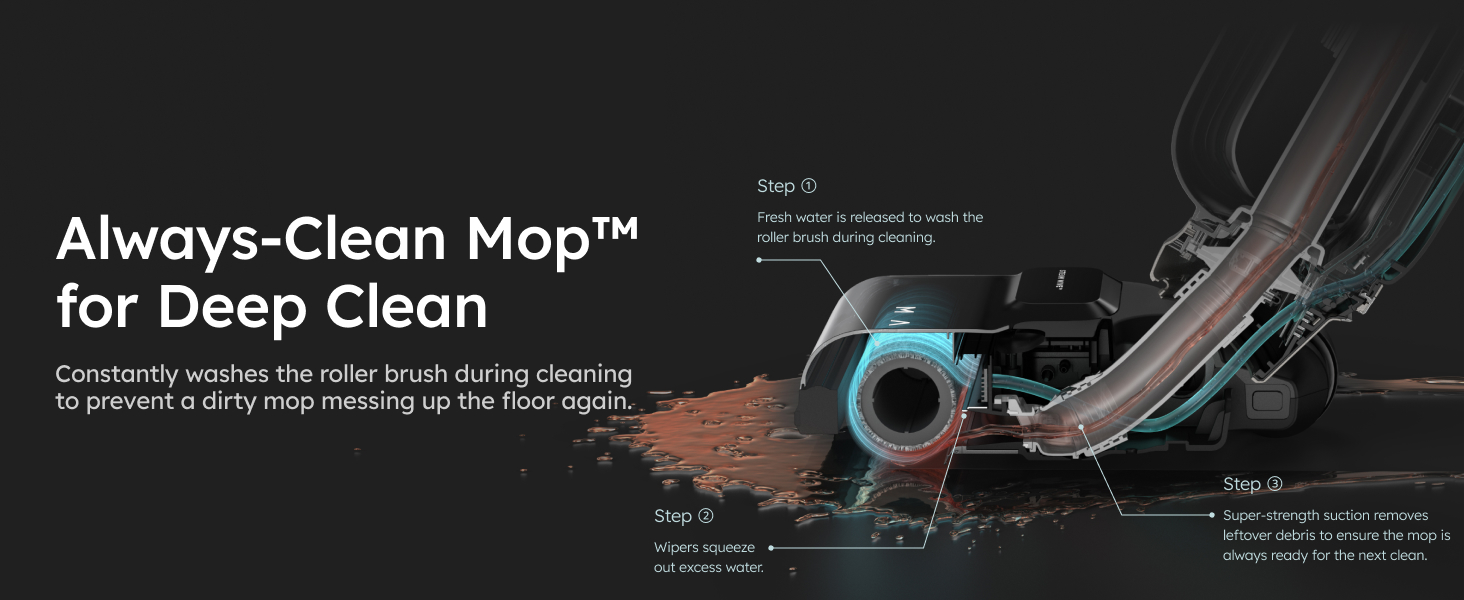
Figure 3: Filling the cleaning solution tank for optimal performance.
Operating Instructions
The eufy MACH V1 Ultra is designed for intuitive operation, allowing you to vacuum, mop, and steam simultaneously for efficient cleaning.
General Operation
- Press the power button to turn on the device.
- Select the desired cleaning mode (e.g., Standard, Steam, Suction Only) using the mode selection button.
- Gently push the device forward and pull back to clean the floor surface. The SteamWave Technology applies constant heated steam to dissolve stubborn stains.
- The Eco-Clean Ozone feature automatically generates aqueous ozone during cleaning to sanitize surfaces and eliminate odors.

Figure 4: Simultaneous vacuuming, mopping, and steaming in action.

Figure 5: Cordless SteamWave™ Technology effectively removes stains.

Figure 6: Eco-Clean Ozone provides a deep, chemical-free sanitization.
Cleaning Wet and Dry Messes
The MACH V1 Ultra is capable of handling both wet and dry spills. For wet messes, the powerful suction and steam work together to lift and remove liquids and grime. For dry debris, the vacuum function efficiently collects particles. The JetBlade Technology ensures floors dry faster after wet cleaning.
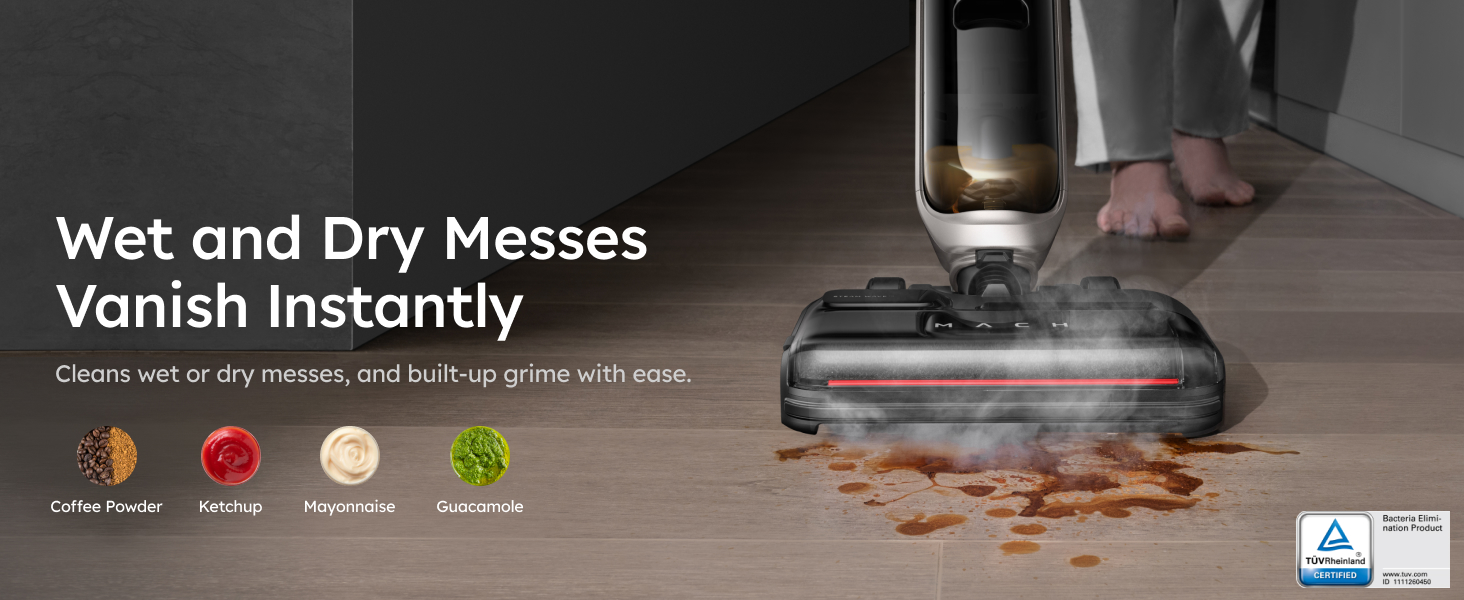
Figure 7: The device effectively cleans both wet and dry messes.
Maintenance
Regular maintenance ensures the longevity and optimal performance of your eufy MACH V1 Ultra.
Always-Clean Mop™
The Always-Clean Mop™ system continuously washes the roller brush during cleaning, preventing the spread of dirt and ensuring a fresh mop for every pass. This self-cleaning action minimizes secondary contamination.

Figure 8: The Always-Clean Mop™ system ensures continuous cleaning of the roller brush.
Triple Self-Cleaning System
After each cleaning session, place the device on its charging dock and activate the Triple Self-Cleaning System. This automated process includes:
- Self-Washing: Cleaning solution is released to thoroughly wash the roller brush.
- Self-Sterilizing: Aqueous ozone is produced to remove 99.9% of germs from the roller brush and internal components.
- Self-Drying: 122°F hot air is circulated to dry the roller brush, preventing odors and mildew.

Figure 9: The Triple Self-Cleaning System ensures hygiene and readiness for next use.
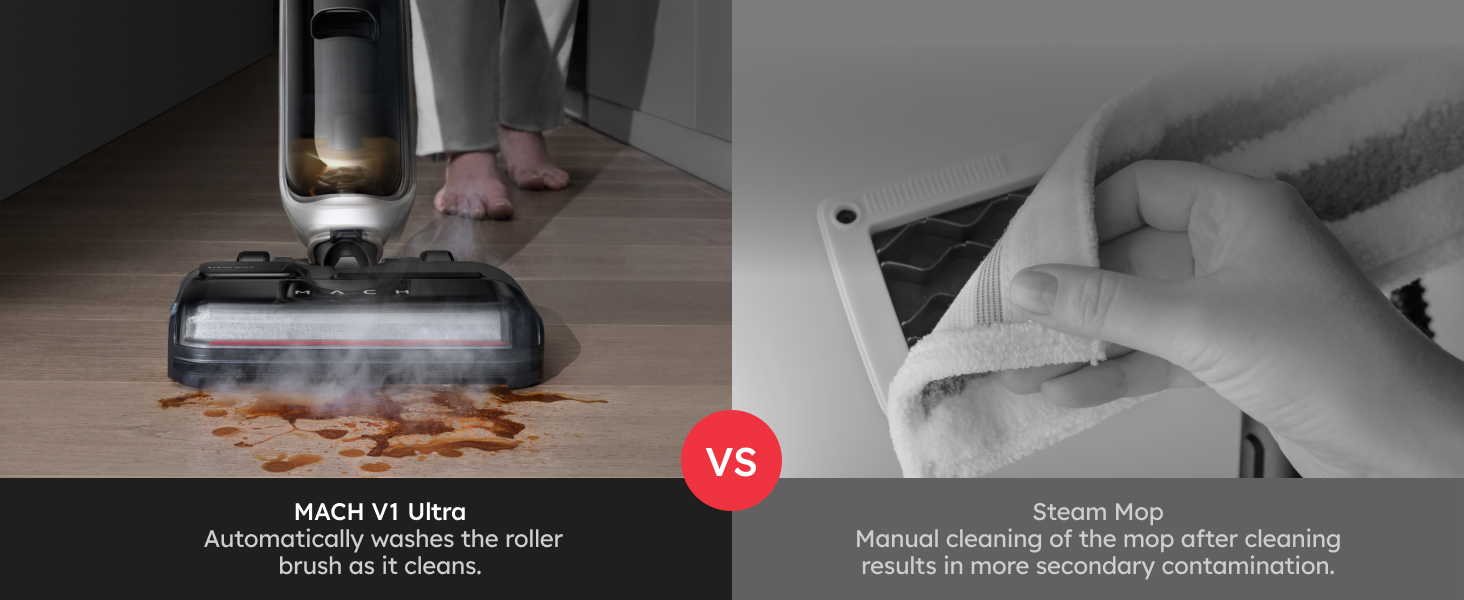
Figure 10: 122°F hot air ensures thorough self-drying of the roller brush.
Troubleshooting
If you encounter issues with your eufy MACH V1 Ultra, please refer to the following common solutions:
- Device not powering on: Ensure the device is fully charged. Check the charging dock connection.
- Poor suction: Check the dirty water tank for fullness and empty if necessary. Ensure the roller brush is free of obstructions. Clean or replace filters as needed.
- No steam: Verify the clean water tank is filled. Ensure the steam nozzle is not clogged.
- Unpleasant odors: Run the Triple Self-Cleaning System. Ensure the dirty water tank is emptied and cleaned regularly.
- App connectivity issues: Ensure your device's Bluetooth is enabled and the eufy app is updated to the latest version. Restart both the device and your smartphone.
For persistent issues, consult the full user manual or contact eufy customer support.
Specifications
| Feature | Specification |
|---|---|
| Brand | eufy |
| Model Name | MACH V1 Ultra |
| Item Model Number | T2770111 |
| Special Feature | Cordless, Portable, Wet/Dry |
| Surface Recommendation | Hard Floors, Middle-pile Carpets |
| Included Components | Cleaning Tool, Floor Cleaner, Citric Acid ×4 |
| Wattage | 680 watts |
| Item Weight | 12.57 Pounds |
| Tank Volume | 820 Milliliters |
| Form Factor | Stick |
| Color | Black |
| Power Source | Battery Powered |
| Voltage | 120 Volts |
| Style | MACH V1 Ultra |
| UPC | 194644114077 |
| Manufacture Year | 2022 |
| Product Dimensions | 46.3 x 10.94 x 10 inches |
| Batteries | 1 Lithium Ion batteries required. (included) |
| Date First Available | May 15, 2023 |
Warranty and Support
For detailed warranty information and customer support, please refer to the official eufy resources.
- User Guide (PDF): Download User Guide
- User Manual (PDF): Download User Manual
- eufy Store: Visit the official eufy Store on Amazon for more products and support.
Ask a question about this manual
Ask about setup, troubleshooting, compatibility, parts, safety, or missing instructions. Manuals+ will review the question and use this page’s manual context to help answer it.