
1. Introduction
This manual provides essential information for the safe and effective use of your HABYS Gemini Flex Electric Massage Table. Please read all instructions carefully before operating the device. Keep this manual for future reference.
2. Safety Instructions
Your safety is paramount. Please adhere to the following warnings and guidelines:
- Burn Hazard: Be aware of potential burns caused by the heated lying surface. Always check the temperature before use, especially for individuals with reduced sensation or prolonged contact.
- Stability: Ensure the massage table is placed on a stable, level surface and cannot tip over during use or adjustment.
- Approved Accessories: Use only accessories approved by HABYS. The use of unapproved accessories may result in injury or damage to the product and will void the warranty.
- Manufacturer's Instructions: Always follow the manufacturer's instructions for operation, maintenance, and cleaning.
- Power Supply: Connect the table only to a properly grounded power outlet with the correct voltage as specified on the product label.
- Children and Pets: Keep children and pets away from the massage table, especially during operation.
- Liquid Exposure: Avoid exposing the electrical components to liquids. In case of spills, immediately unplug the device and contact qualified service personnel.
- Maintenance: Do not attempt to service the table yourself. Refer all servicing to qualified service personnel.
3. Setup
The HABYS Gemini Flex Electric Massage Table requires no assembly. It is delivered ready for use. Follow these steps for initial setup:
- Unpacking: Carefully remove the massage table from its packaging. Retain packaging for potential future transport or storage.
- Placement: Position the table on a firm, level floor in your desired location, ensuring adequate space around it for safe operation and client access.
- Power Connection: Plug the power cord into a suitable, grounded electrical outlet.
- Remote Control: Ensure the remote control is securely connected to the table's control unit.

4. Operating Instructions
The HABYS Gemini Flex table is operated using the wired remote control. Familiarize yourself with the remote control buttons before use.

4.1 Remote Control Functions
- Height Adjustment: Use the up/down arrow buttons (often depicted with a table icon and vertical arrows) to raise or lower the entire table to the desired working height.
- Backrest Adjustment: Buttons with a reclining figure icon control the angle of the backrest. Press the appropriate button to raise or lower the backrest.
- Leg Rest Adjustment: Buttons with a figure showing leg movement control the angle of the leg rest section. Adjust as needed for client comfort.
- Heating Function: The 'HEATING' button activates or deactivates the integrated heating function of the lying surface. Use with caution and monitor temperature.
- Power Button: The 'POWER' button turns the table's electrical functions on or off.
- Reset Button: The 'RESET' button may return the table to a default flat or lowest position. Consult the specific remote diagram for exact functionality.


5. Maintenance
Proper maintenance ensures the longevity and hygiene of your massage table.
- Cleaning Upholstery: Regularly wipe down the upholstery with a soft cloth dampened with mild soap and water. Avoid harsh chemicals, abrasive cleaners, or solvents, as these can damage the material.
- Disinfection: For disinfection, use a disinfectant spray or wipe specifically designed for medical or spa equipment, ensuring it is compatible with vinyl or PU leather upholstery. Always test on an inconspicuous area first.
- Frame Cleaning: Clean the metal and plastic parts of the frame with a damp cloth.
- Electrical Components: Ensure no liquids come into contact with electrical components. Unplug the table before cleaning.
- Regular Inspection: Periodically check all moving parts, screws, and cables for wear, damage, or looseness. If any issues are found, contact customer support.
6. Troubleshooting
If you encounter issues with your HABYS Gemini Flex table, try the following basic troubleshooting steps:
- Table Not Responding:
- Check if the power cord is securely plugged into both the table and the wall outlet.
- Ensure the power outlet is functional by testing it with another device.
- Verify that the remote control cable is firmly connected to the table.
- Press the 'POWER' button on the remote control to ensure the table is switched on.
- Heating Not Working:
- Ensure the 'HEATING' button has been pressed.
- Allow a few minutes for the heating element to warm up.
- If still not working, check other electrical functions. If they work, there might be an issue with the heating element.
- Unusual Noises:
- Stop operation immediately.
- Inspect for any obstructions or loose parts.
- If the noise persists, discontinue use and contact customer support.
If these steps do not resolve the issue, please contact HABYS customer support for assistance. Do not attempt to repair electrical components yourself.
7. Specifications
Key technical specifications for the HABYS Gemini Flex Electric Massage Table:
| Feature | Specification |
|---|---|
| Model | Gemini Flex |
| Brand | HABYS |
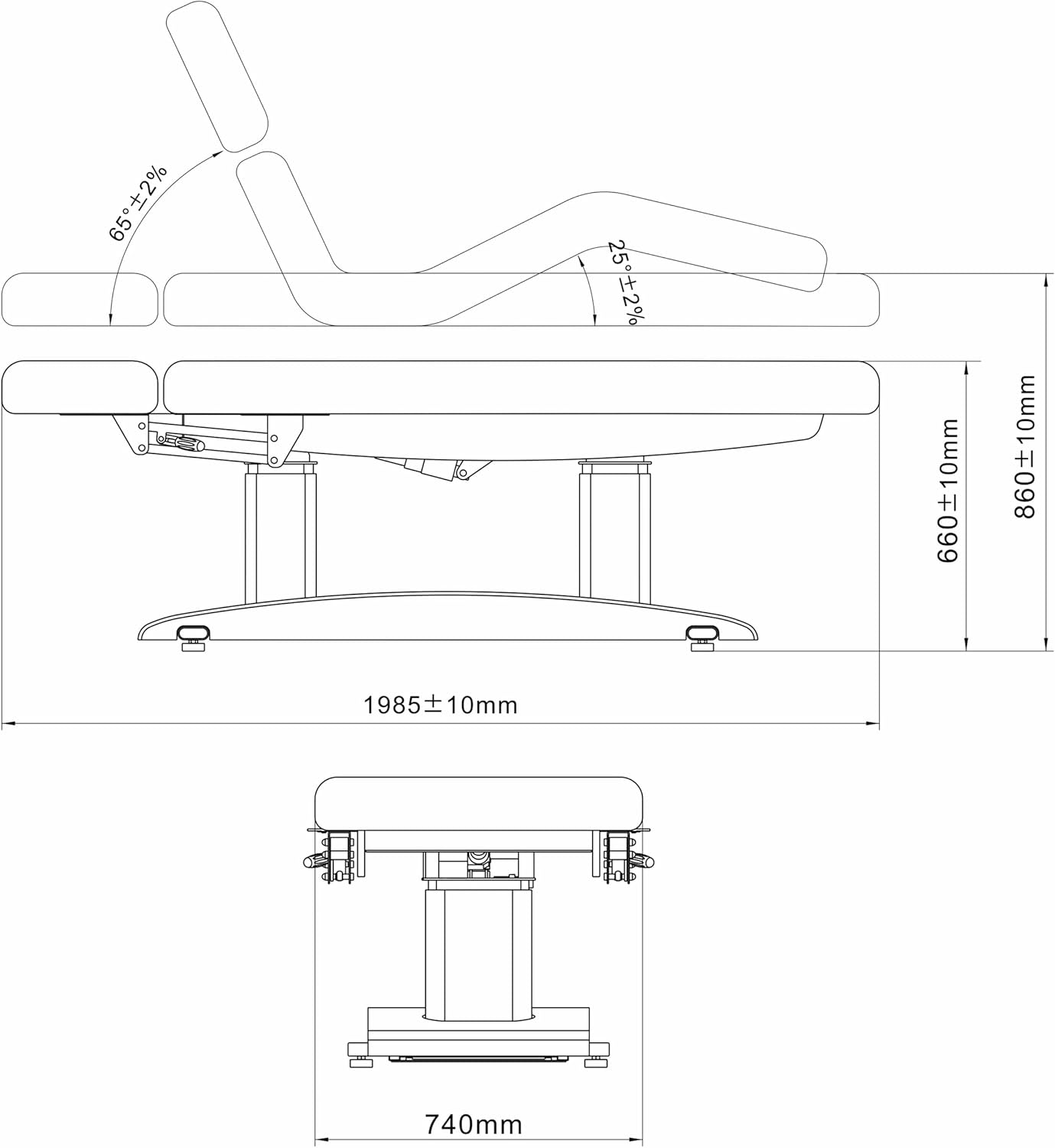
| Dimensions (L x W) | Approx. 198.5 cm x 74 cm (1985mm x 740mm) |
| Adjustable Height Range | Approx. 66 cm to 86 cm (660mm to 860mm) |
| Backrest Angle | Adjustable up to 65° ± 2% |
| Leg Rest Angle | Adjustable up to 25° ± 2% |
| Material | Wood (frame components) |
| Assembly Required | No |
| Shape | Rectangular |
| Style | Modern |
| Color Options | Beige or Grey |
| Spare Parts Availability | Information unavailable |
8. Warranty and Support
For warranty information, technical support, or service inquiries, please contact HABYS customer service directly. Refer to your purchase documentation for specific warranty terms and contact details.
Manufacturer: HABYS


