
1. Introduction
Thank you for choosing the TUXING TXET063 PCP Air Compressor. This manual provides essential information for the safe and efficient operation, maintenance, and troubleshooting of your compressor. Please read this manual thoroughly before operating the device and retain it for future reference.
The TUXING TXET063 is a portable, oil/water-free PCP air compressor designed for high-pressure inflation of PCP air rifles, airguns, and paintball tanks. It features an LCD display for real-time monitoring, an auto-stop function, and dual power capability (110V/220V AC or 12V DC).
2. Important Safety Instructions
- High Pressure Hazard: This compressor generates extremely high pressure. Always ensure all connections are secure before operation. Never point the air outlet at yourself or others.
- Electrical Safety: Ensure the power source matches the compressor's requirements (110V/220V AC or 12V DC). Do not operate with damaged cords or plugs. Keep the compressor away from water or damp environments.
- Temperature Monitoring: Continuously monitor the temperature displayed on the LCD. If the temperature reaches 70 ℃ (158 ℉), shut off the compressor and allow it to cool down. The cooling fan should continue to run during cooldown.
- Ventilation: Operate the compressor in a well-ventilated area to prevent overheating.
- Supervision: Do not leave the compressor unattended during operation, especially when filling tanks.
- Children and Pets: Keep children and pets away from the compressor during operation.
- Maintenance: Perform regular maintenance as described in this manual. Disconnect power before any maintenance or cleaning.
3. Package Contents
Verify that all items are present in the package:
- 1x TUXING PCP Air Compressor (TXET063-1)
- 1x Home Power Line (AC)
- 1x Car Power Line (DC)
- 1x Oil/Water Separator
- 1x Air Outlet Hose
- Filter Cotton (spare)
- Repair Kit (vulnerable parts)
4. Product Overview
The TUXING TXET063-1 compressor is designed for ease of use and portability. Key features include:
- LCD Display: Provides real-time information on working pressure, set pressure, current, and temperature.
- Auto-Stop Function: Automatically shuts off when the preset pressure is reached.
- Oil/Water-Free Design: Eliminates the need for oil and circulating cooling water, simplifying operation and maintenance.
- Built-in Transformer: Allows direct connection to 110V/220V AC power outlets.
- 12V DC Power Connector: Enables operation from a 12V car battery for outdoor use.
- Built-in Fan Cooling: An internal fan provides efficient cooling. Manual control is available for extended cooling after operation.
- Integrated Drainage System: For convenient moisture removal.
- Safety Features: Includes a burst disc and overload fuse for protection.
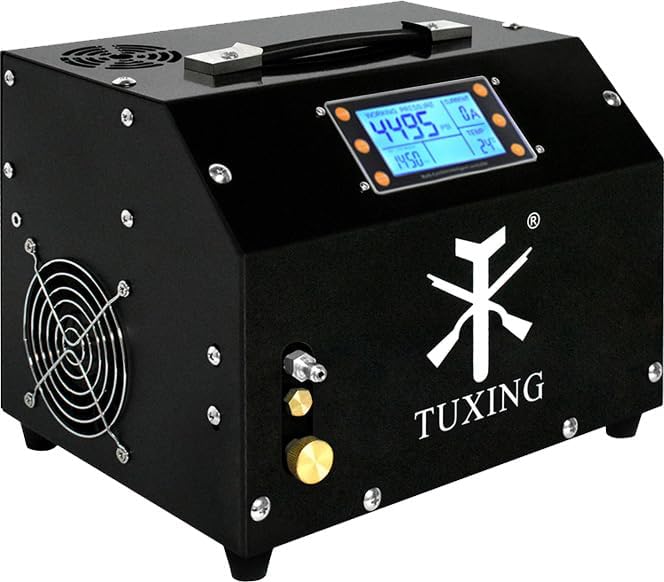
Figure 4.1: Front view of the TUXING TXET063-1 PCP Air Compressor, showing the LCD display and control panel.

Figure 4.2: Labeled components of the compressor, including the 110V/220V built-in transformer, all-round air vents, LED display, 12V DC power connector, built-in fan cooling, release valve, burst disc, air outlet (8mm male connector), and overload fuse.

Figure 4.3: Close-up of the high-definition backlit LCD display, showing working pressure (4495 PSI), set pressure (1450 PSI), current (0A), and temperature (24℃).

Figure 4.4: Internal view of the compressor, highlighting the built-in transformer, cooling fan, spiral tube, iron box with dust cover, integrated drainage system, and compressor head.
5. Setup Instructions
Follow these steps to set up your TUXING TXET063-1 compressor:
- Placement: Place the compressor on a stable, flat surface in a well-ventilated area. Ensure there is adequate space around the unit for airflow.
- Connect Air Hose: Connect one end of the air outlet hose to the compressor's 8mm male connector. Securely tighten the connection.
- Connect to Tank/Device: Connect the other end of the air outlet hose to your PCP airgun or paintball tank. Ensure this connection is also secure.
- Power Connection:
- For Home Use (AC): Use the provided Home Power Line to connect the compressor to a standard 110V or 220V AC power outlet. The built-in transformer handles voltage conversion.
- For Car Use (DC): Use the provided Car Power Line to connect the compressor directly to a 12V car battery. Ensure correct polarity.
- Bleed Valve: Ensure the bleed valve (release valve) on the compressor is securely closed before starting operation.
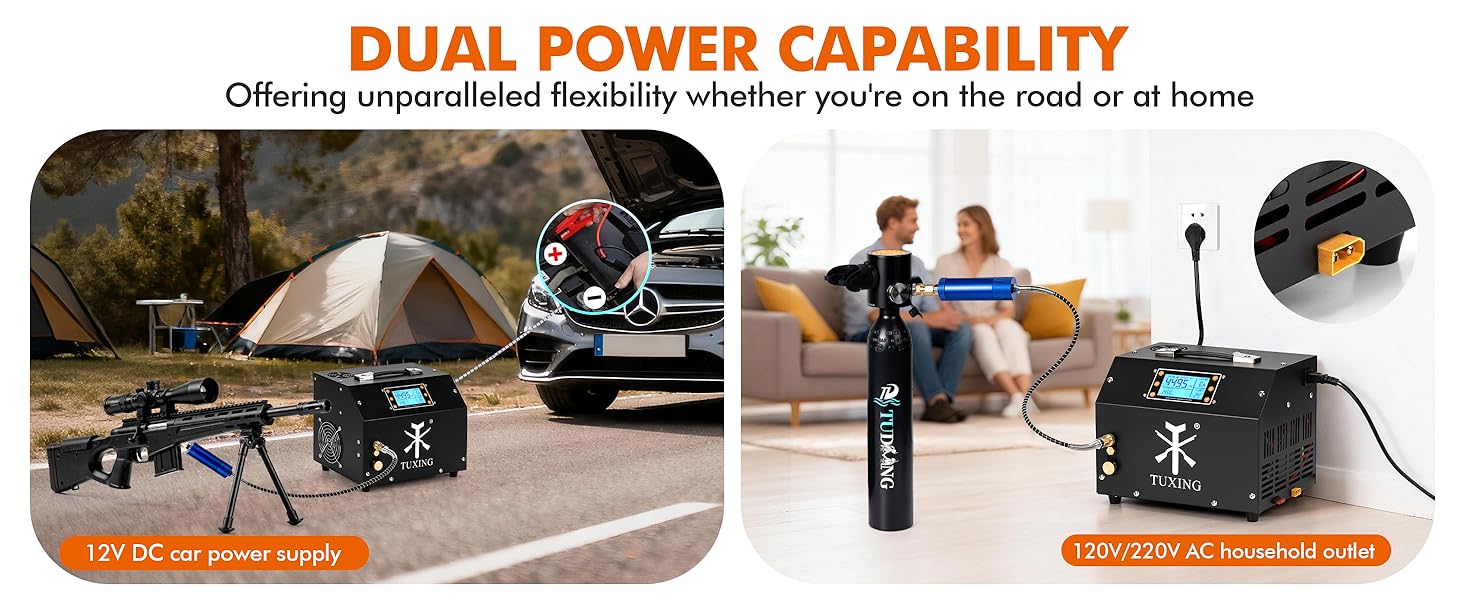
Figure 5.1: Illustration of connecting the air hose, using the LCD display, and the compressor's fast inflation capability.

Figure 5.2: Demonstrates the dual power capability, showing connection to a 12V DC car power supply and a 110V/220V AC household outlet.
6. Operating Instructions
Once the compressor is set up, follow these steps for operation:
- Power On: Turn on the main power switch. The LCD display will illuminate.
- Set Target Pressure: Use the controls on the LCD panel to set your desired target pressure (e.g., 3000 PSI or 200 Bar). Refer to your airgun or tank manufacturer's specifications for maximum safe pressure.
- Start Inflation: Press the start button to begin the inflation process. The compressor will start running, and the LCD will show the real-time working pressure and temperature.
- Monitor Operation: Continuously monitor the pressure and temperature on the LCD. Ensure the temperature does not exceed 70 ℃ (158 ℉). If it does, stop the compressor immediately and allow it to cool.
- Automatic Shut-off: The compressor will automatically stop once the preset target pressure is reached.
- Manual Shut-off: You can manually stop the compressor at any time by pressing the stop button.
- Release Pressure: After inflation, slowly open the bleed valve to release the pressure from the hose before disconnecting it from your airgun or tank.
- Power Off: Turn off the main power switch and disconnect the power cable.
Video 6.1: Official product video demonstrating the TUXING TXET063 PCP air compressor in operation, showcasing its features and functionality.
7. Maintenance
Proper maintenance ensures the longevity and optimal performance of your compressor.
- Drainage: Regularly drain any accumulated moisture from the integrated drainage system. This is crucial for preventing internal corrosion.
- Filter Replacement: Periodically check and replace the filter cotton to ensure clean air output. The frequency depends on usage and environmental conditions.
- Cleaning: Keep the exterior of the compressor clean and free of dust. Use a dry cloth for cleaning. Ensure air vents are unobstructed.
- Storage: Store the compressor in a dry, cool place away from direct sunlight and extreme temperatures.
8. Troubleshooting
If you encounter issues with your TUXING TXET063-1 compressor, refer to the following common problems and solutions:
- Compressor does not power on:
- Check if the power cable is securely connected to both the compressor and the power source.
- Verify the power source is active (e.g., wall outlet has power, car battery is charged).
- Check the overload fuse. If blown, replace it with a fuse of the same rating (spare fuses are included in the repair kit).
- Compressor runs but does not build pressure:
- Ensure the air hose connections are tight and there are no leaks. Apply thread tape if necessary.
- Verify the bleed valve is fully closed.
- Check if the air outlet hose or the tank connection is obstructed.
- Compressor overheats quickly:
- Ensure the compressor is operating in a well-ventilated area.
- Check that the cooling fan is running and its vents are not blocked.
- Allow sufficient cooling time between inflation cycles, especially for larger tanks.
- Excessive noise or vibration:
- Ensure the compressor is on a stable, level surface.
- Check for any loose components or debris inside the unit (after disconnecting power).
If the problem persists after attempting these solutions, please contact TUXING customer support.
9. Specifications

Figure 9.1: Product information and dimensions of the TUXING TXET063-1 PCP Air Compressor.
| Feature | Specification |
|---|---|
| Model Name | TXET063-1 |
| Rated Power | 350 W |
| Maximum Pressure | 4500 PSI / 30 MPa / 300 Bar |
| Inflating Rate | 2700 R/min |
| Cooling Method | Built-in Fan Cooling |
| Stop Type | Automatic Stop (Preset Pressure) |
| Power Source | Corded Electric (110V/220V AC) / 12V DC Car Battery |
| Maximum Temperature | 70 ℃ / 158 ℉ |
| Noise Level | 85 Decibels |
| Item Weight | 9 kg (19.8 lbs) |
| Product Dimensions | 12.99"L x 10.62"W x 13.38"H (approx. 33cm L x 27cm W x 34cm H) |
| Material | Iron |
| Hose Length | 0.5 Meters |
10. Warranty and Support
Warranty Information: The main parts of the TUXING TXET063-1 PCP Air Compressor come with a 1-year warranty from the date of purchase. This warranty covers manufacturing defects under normal use. Please retain your proof of purchase for warranty claims.
Exclusions: The warranty does not cover damage caused by misuse, neglect, unauthorized modifications, accidents, or normal wear and tear. Consumable parts like filter cotton are not covered under warranty.
Customer Support: For technical assistance, warranty claims, or inquiries about spare parts, please contact TUXING customer support through the retailer where you purchased the product or visit the official TUXING website for contact information.


