
1. Introduction
This manual provides detailed instructions for the installation, operation, and maintenance of your Kolice Commercial Dough Baking Proofer, Model KDP-16F. This versatile unit integrates freezing, thawing, fresh-keeping, and fermentation functions, designed for commercial baking environments. Please read this manual thoroughly before operating the appliance to ensure safe and efficient use.

Image 1.1: Front view of the Kolice Commercial Dough Baking Proofer KDP-16F.
2. Safety Instructions
Adhering to safety guidelines is crucial for preventing injury and damage to the appliance. Keep this manual for future reference.
- Ensure the unit is connected to a grounded power outlet with the correct voltage (110V, 60Hz).
- Do not operate the appliance with wet hands or while standing on wet surfaces.
- Keep the appliance away from water and other liquids.
- Do not block ventilation openings. Ensure adequate clearance around the unit for proper airflow.
- Only use the specified 60x40cm stainless steel trays with this unit. Using other sizes may cause operational issues or damage.
- Regularly inspect the power cord for damage. If damaged, contact qualified service personnel for replacement.
- Do not attempt to repair or modify the appliance yourself. Refer all servicing to authorized personnel.
- Unplug the unit before cleaning or performing any maintenance.
- Keep children away from the appliance during operation and cleaning.
3. Setup and Installation
3.1 Unpacking
Carefully remove the proofer from its packaging. Inspect the unit for any signs of shipping damage. Report any damage to your supplier immediately.
3.2 Placement
Place the proofer on a stable, level surface. Ensure there is sufficient space around the unit for ventilation, especially at the rear and sides. The adjustable stainless steel feet can be used to level the unit on uneven floors.

Image 3.1: The proofer with its door open, showing the 16 tray slots.
3.3 Power Connection
Connect the power cord to a dedicated 110V, 60Hz, 680W grounded electrical outlet. Do not use extension cords or adapters.
3.4 Initial Cleaning
Before first use, wipe down the interior and exterior surfaces with a damp cloth and mild detergent. Rinse thoroughly and dry completely. Ensure all 16 stainless steel trays (60x40cm) are clean before loading.
4. Operating Instructions
4.1 Control Panel Overview
The unit features a touch control panel for easy operation. Familiarize yourself with the various indicators and buttons.

Image 4.1: Detailed view of the touch control panel, showing time, temperature, humidity displays, and function buttons.
- Power Button: Turns the unit on or off.
- Time Display: Shows the set or remaining operation time.
- Temperature Display: Shows the current or set temperature.
- Humidity Display: Shows the current or set humidity level.
- Mode Selection: Buttons for Freezing, Thawing, Keep Fresh, Proofing 1, Proofing 2.
- Set Buttons: Used to adjust time, temperature, and humidity settings.
- Light Button: Controls interior lighting.
4.2 Basic Operation
- Power On: Press the Power button to turn on the unit.
- Select Function: Choose the desired function (Freezing, Thawing, Keep Fresh, Proofing 1, Proofing 2) using the corresponding button.
- Set Parameters: Use the set buttons to adjust the temperature (range: -22°C to 45°C / -7.6°F to 113°F), humidity (range: 0% to 99%), and timer (up to 24 hours) as needed for your specific product.
- Loading Trays: Place your dough or food items on the 60x40cm stainless steel trays and slide them into the designated slots.
- Start Cycle: Once settings are confirmed, the unit will begin its operation.
- Monitoring: The transparent glass window allows for visual monitoring of the process without opening the door.
The unit supports a two-stage humidity setting for optimal fermentation: 65% for the first stage and 85% for the second stage. The cold air convection system ensures uniform temperature distribution throughout the cabinet.

Image 4.2: Visual representation of dough before and after proofing in the unit.

Image 4.3: Examples of food items that can be processed using the proofer's various functions.
5. Maintenance
Regular maintenance ensures the longevity and optimal performance of your proofer.
5.1 Cleaning
- Daily Cleaning: Wipe down the interior and exterior with a soft cloth and mild, food-safe detergent. Avoid abrasive cleaners or scouring pads that can scratch the stainless steel finish.
- Tray Cleaning: Remove and clean the stainless steel trays after each use. They are dishwasher safe.
- Seal Strip: The removable seal strip on the door should be cleaned regularly to maintain insulation effectiveness. Ensure it is properly re-seated after cleaning.
- Water Discharge: The unit features automatic water discharge. Ensure the drainage system is clear and unobstructed.
5.2 Auto-Defrost
The proofer is equipped with an auto-defrost function, minimizing manual defrosting. Allow the cycle to complete as needed.
5.3 General Inspection
Periodically check the door hinges, seal, and power cord for any signs of wear or damage. Contact customer support if any issues are identified.
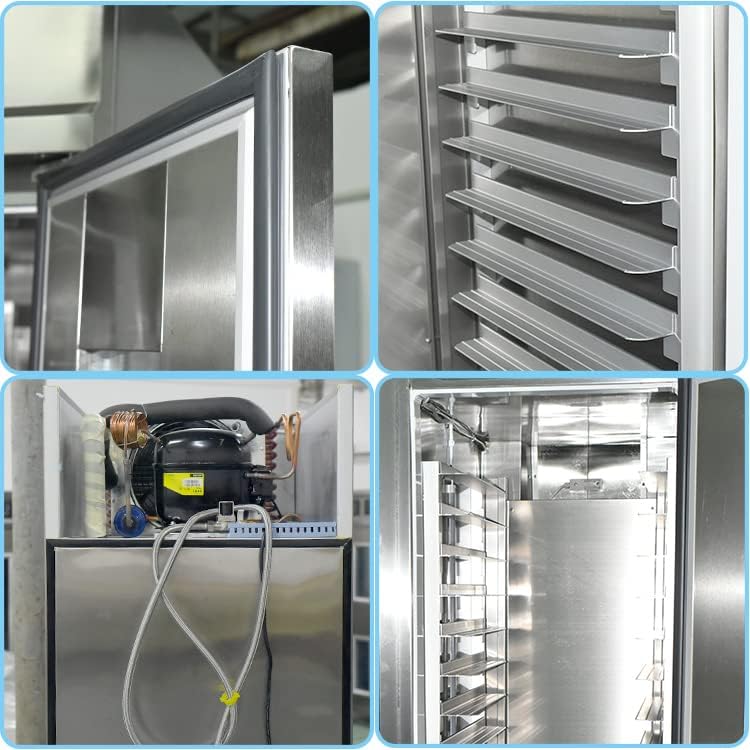
Image 5.1: Close-up details of the proofer's construction, highlighting the stainless steel door seal, precise control panel, removable shelves, and durable fuselage.

Image 5.2: Interior view of the proofer, illustrating the internal air circulation fans and refrigeration unit components.
6. Troubleshooting
This section addresses common issues you might encounter. For problems not listed here, contact customer support.
| Problem | Possible Cause | Solution |
|---|---|---|
| Unit does not power on. | No power supply; power cord disconnected; circuit breaker tripped. | Check power connection; ensure outlet is functional; reset circuit breaker. |
| Temperature not reaching set point. | Door not closed properly; ventilation obstructed; ambient temperature too high/low. | Ensure door is sealed; clear obstructions around unit; adjust ambient conditions if possible. |
| Humidity not stable. | Water supply issue; humidity sensor malfunction; door seal compromised. | Check water circulation system; inspect door seal; contact support if sensor suspected. |
| Unusual noise during operation. | Unit not level; internal component loose; fan obstruction. | Ensure unit is level; inspect for loose parts; check for fan obstructions. |
7. Specifications
| Feature | Detail |
|---|---|
| Model | KDP-16F |
| Brand | Kolice |
| Functions | Freezing, Thawing, Keep Fresh, Fermentation |
| Capacity | 600 Liters |
| Tray Capacity | 16 stainless steel trays (60x40cm) |
| Power Supply | 110V, 60Hz |
| Rated Power | 680W |
| Temperature Range | -22°C to 45°C (-7.6°F to 113°F) |
| Humidity Range | 0% to 99% (Two-stage: 65%, 85% for fermentation) |
| Timer | Up to 24 hours |
| Dimensions (WxDxH) | 33.46" x 27.56" x 77.95" (85cm x 70cm x 198cm) |
| Weight | 195 pounds (approx. 88.5 kg) |
| Material | Food-grade Stainless Steel |
| Insulation | Double-layer with 6cm high-density environmental material |
| Control Type | Touch Control Panel |
8. Warranty & Support
Kolice products are manufactured with quality and durability in mind. This product comes with a standard manufacturer's warranty. For specific warranty terms and conditions, please refer to the documentation provided with your purchase or visit the official Kolice website.
For technical assistance, troubleshooting, or to inquire about spare parts, please contact Kolice customer support. Contact information can typically be found on the product packaging, the official Kolice website, or through your point of purchase.
Kolice Refrigeration Equipment Manufacturer Inc. provides long-term technical support and spare parts for maintenance.