
1. Introduction
Thank you for choosing the hygger 3400 GPH Aquarium Inverter Wavemaker Pump. This device is designed to create natural water movement within your aquarium, promoting a healthier environment for your aquatic inhabitants. It features multiple wave-making modes, wireless linkage capabilities, and an intuitive LED controller for easy operation. Please read this manual thoroughly before installation and operation to ensure proper use and longevity of the product.
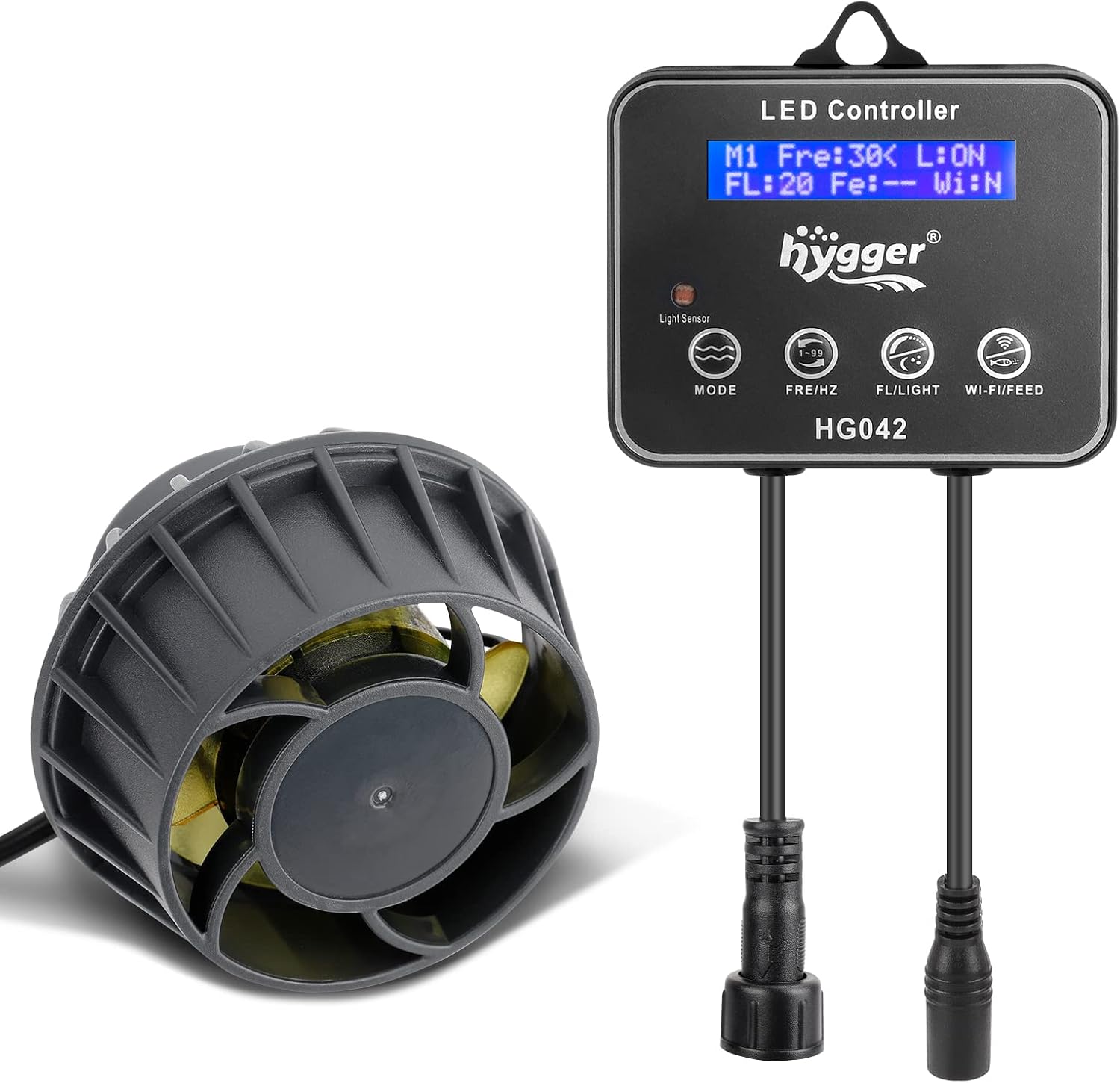
Image 1.1: The hygger 3400 GPH Wavemaker Pump and its LED Controller.
2. Safety Instructions
To prevent electric shock or injury, always follow basic safety precautions, including the following:
- Read and follow all instructions carefully.
- DANGER: To avoid possible electric shock, special care should be taken since water is used in the use of aquarium equipment.
- Do not attempt to repair this unit yourself; return it to an authorized service facility for service or discard the appliance.
- Always unplug the appliance from the outlet when not in use, before putting on or taking off parts, and before cleaning.
- Do not operate any appliance if it has a damaged cord or plug, or if it is malfunctioning or has been dropped or damaged in any manner.
- To avoid the possibility of the appliance plug or receptacle getting wet, position the aquarium stand and tank to one side of a wall-mounted receptacle to prevent water from dripping onto the receptacle or plug.
- A "drip loop" should be arranged by the user for each cord connecting an aquarium appliance to a receptacle. The "drip loop" is the part of the cord below the level of the receptacle, or the connector if an extension cord is used, to prevent water from traveling along the cord and coming into contact with the receptacle.
- Close supervision is necessary when any appliance is used by or near children.
- This appliance is intended for household use only.
3. Package Contents
- Hygger Wavemaker Pump
- LED Controller
- Power Adapter
- User Manual
4. Product Overview
4.1. Components and Features

Image 4.1: Key features of the hygger wavemaker pump.
- Compact Design: Easy to hide within the aquarium while providing powerful water flow.
- Magnetic Bracket: Strong magnetic base ensures stable adsorption to the aquarium glass, preventing accidental detachment. Suitable for glass thickness up to 15mm.
- Protective Net Cover: Prevents small fish or debris from being sucked into the impeller.
- Efficient Propeller Impeller: Designed for strong power and large water flow, simulating natural river environments.
- Ultra-Quiet Operation: Noise level typically less than 30dB, ensuring a peaceful environment for both you and your aquatic pets.
4.2. LED Controller Functions

Image 4.2: Detailed view of the LED Controller and its buttons.
| Button | Function (Short Press) | Function (Long Press) |
|---|---|---|
| MODE | Select wave-making mode (M1-M6) | Select direction of frequency adjustment |
| FRE/HZ | Adjust frequency (Fre:01-Fre:99) | Continuously adjust frequency |
| FL/LIGHT | Adjust flow rate (FL:01-FL:20) | Turn on or off night mode |
| WI-FI/FEED | Select solo, lead, or follow mode | Enter or exit feeding mode |
The LED display shows: Current Mode (M1-M6), Current Frequency (Fre:01-Fre:99), Current Flow (FL:01-FL:20), Night Mode Status (L:ON/L:OFF), Linkage Status (WI:N/WI:M/WI:S), and Feeding Mode Status (Fe:10/Fe:--).
5. Setup and Installation
- Clean the Aquarium Glass: Ensure the area where the wavemaker will be installed is clean and free of algae or debris.
- Position the Pump: Place the wavemaker pump inside the aquarium, ensuring it is fully submerged. The magnetic base should be positioned against the inner glass surface.
- Attach the External Magnet: Align the external magnet on the outside of the aquarium glass directly opposite the internal magnetic base of the pump. The strong magnetic force will secure the pump in place.
- Ensure Full Submersion: The pump must be fully submerged in water during operation. Do not run the pump dry.
- Connect to Controller: Plug the wavemaker pump cable into the designated port on the LED controller.
- Connect Power Adapter: Plug the power adapter into the LED controller, then plug the adapter into a suitable power outlet. Ensure a drip loop is formed with the power cord.

Image 5.1: Correct installation method (sliding the external magnet).

Image 5.2: Incorrect installation method (aiming the external magnet directly).

Image 5.3: Correct operation (pump fully submerged).

Image 5.4: Incorrect operation (pump not fully submerged).
6. Operating Instructions
6.1. Power On/Off
Once connected to power, the LED controller display will light up, and the pump will begin operating in its last saved mode. To turn off, unplug the power adapter. To resume, plug it back in.
6.2. Wave-making Modes (M1-M6)
The hygger wavemaker offers 6 distinct wave-making modes to simulate various natural water movements. Short press the MODE button to cycle through them.

Image 6.1: Visual representation of the 6 wave-making modes.
- M1: Constant Flow Rate Working Mode: Provides a steady, continuous flow.
- M2: Classic Wave Making Mode: Generates a classic, rhythmic wave pattern.
- M3: Classic Reverse Wave Making Mode: Similar to M2 but with a reversed wave pattern.
- M4: Sine Flow Creation Mode: Creates a smooth, sinusoidal flow.
- M5: Random Flow Creation Mode: Produces an unpredictable, natural-like flow.
- M6: Single-Sided Switching of Wave Making Mode: Alternates flow direction from one side.
6.3. Adjusting Wave Strength and Frequency
- Frequency (Wave Strength): Short press the FRE/HZ button to adjust the frequency (Fre:01-Fre:99). A higher frequency generally means stronger wave action. Long press for continuous adjustment.
- Flow Rate (Wave Interval): Short press the FL/LIGHT button to adjust the flow rate (FL:01-FL:20). This controls the interval or intensity of the flow.
6.4. Wireless Linkage of Pumps
Multiple hygger wavemaker pumps can be wirelessly linked for synchronized operation. The distance between paired controllers should be within 15 meters for optimal signal reception.

Image 6.2: Setting up solo mode and lead/follow modes for multiple pumps.
- Solo Mode (WI:N): Each pump operates independently. Short press WI-FI/FEED until "WI:N" is displayed.
- Lead Mode (WI:M): One pump acts as the master, controlling other linked pumps. Short press WI-FI/FEED until "WI:M" is displayed on the desired lead pump's controller.
- Follow Mode (WI:S): Other pumps follow the lead pump's settings. Short press WI-FI/FEED until "WI:S" is displayed on the controllers of the pumps you want to follow.
6.5. Feeding Function
To temporarily stop the pump for feeding, long press the WI-FI/FEED button. The display will show "Fe:10" indicating a 10-minute countdown. The pump will resume its previous operation mode after 10 minutes. To exit feeding mode early, long press the WI-FI/FEED button again.
6.6. Night Mode
When Night Mode is set to ON (L:ON), the wave pump will automatically enter a low constant flow mode (night mode) when the controller's light sensor detects darkness. This provides a quiet environment during nighttime hours. Long press the FL/LIGHT button to toggle Night Mode ON/OFF.

Image 6.3: The wavemaker pump automatically enters quiet night mode when the controller detects darkness.
6.7. Power-Off Memory Function
The wave pump features a power-off memory function. After a power outage, the pump will automatically resume its last working mode (M1-M6) once power is restored, eliminating the need for re-setting.
6.8. Screen Protection Function
If there is no operation on the controller within 30 seconds, the display screen will automatically turn off to save power and reduce light pollution. The screen will reactivate with any button press.
7. Maintenance
Regular maintenance is crucial for the optimal performance and longevity of your hygger wavemaker pump.
- Cleaning the Pump: Periodically remove the pump from the aquarium and disassemble the impeller cover and impeller. Clean any accumulated algae, debris, or calcium deposits from the impeller and its housing using a soft brush and warm water. Do not use harsh chemicals.
- Check Net Cover: Ensure the protective net cover is clear of obstructions to maintain proper water flow and prevent fish from being sucked in.
- Inspect Cables: Regularly check the power cord and controller cables for any signs of damage, fraying, or kinks. Replace if damaged.
- Magnetic Base: Keep the magnetic surfaces clean to ensure strong adhesion to the aquarium glass.

Image 7.1: The wavemaker pump can be fitted with a sponge cover for additional pre-filtration, which should be cleaned regularly.
8. Troubleshooting
If you encounter issues with your wavemaker pump, refer to the following table for common problems and solutions.
| Problem | Possible Cause | Solution |
|---|---|---|
| Pump not working | No power; Impeller jammed; Controller malfunction | Check power connection; Clean impeller; Contact support |
| Weak water flow | Impeller dirty/blocked; Incorrect mode/settings; Pump not fully submerged | Clean impeller; Adjust frequency/flow rate; Ensure pump is fully submerged |
| Excessive noise | Impeller dirty/damaged; Pump not securely mounted; Air trapped in pump | Clean/inspect impeller; Re-secure pump; Gently shake pump to release air |
| Controller display off | Screen protection activated; No power | Press any button to reactivate; Check power connection |
| Wireless linkage not working | Controllers too far apart; Incorrect linkage mode set | Ensure controllers are within 15m; Verify lead/follow settings (WI:M/WI:S) |
9. Specifications

Image 9.1: Dimensions and key electrical parameters of the wavemaker pump and controller.
| Parameter | Value |
|---|---|
| Model | HG042 |
| Power | 18W |
| Input Voltage | 100-240V |
| Output Voltage | DC 24V |
| Maximum Flow | 3400 GPH |
| Applicable Fish Tank Size | 75-200 Gallons |
| Product Dimensions (Pump) | 3.1"L x 3.1"W x 2.6"H |
| Product Dimensions (Controller) | 4.2"L x 3.5"W |
| Material | Plastic |
| Style | Submersible |
| Item Weight | 1.59 Pounds |
10. Warranty and Support
Hygger provides a ONE YEAR free warranty for this product. If you have any questions or require assistance, please do not hesitate to contact us. Our customer support team is available to help with any inquiries regarding product setup, operation, or troubleshooting.
For further information or to explore other hygger products, please visit the official hygger store:
Visit the hygger Store on Amazon

Image 10.1: Hygger customer support and warranty information.


