Introduction
This manual provides instructions for the ALLIMITY SE-R0346 replacement remote control. This remote is designed to be compatible with various Toshiba DVD VCR Combo Player models, offering direct functionality without programming.
Compatible models include: SDV398KC, SDV398, SD-V398, SD-V398KC, RT79104138, SD-V392, and SDV392.

Image: Overview of the ALLIMITY SE-R0346 remote control, highlighting its compatibility with Toshiba DVD VCR Combo Players and no programming requirement.
Setup
The ALLIMITY SE-R0346 remote control requires no programming. Simply install batteries to begin operation.
Battery Installation
- Locate the battery compartment on the back of the remote control.
- Press down on the tab and slide the battery cover downwards to open.
- Insert two (2) AAA alkaline batteries, ensuring the positive (+) and negative (-) terminals match the diagrams inside the compartment.
- Slide the battery cover back into place until it clicks securely.
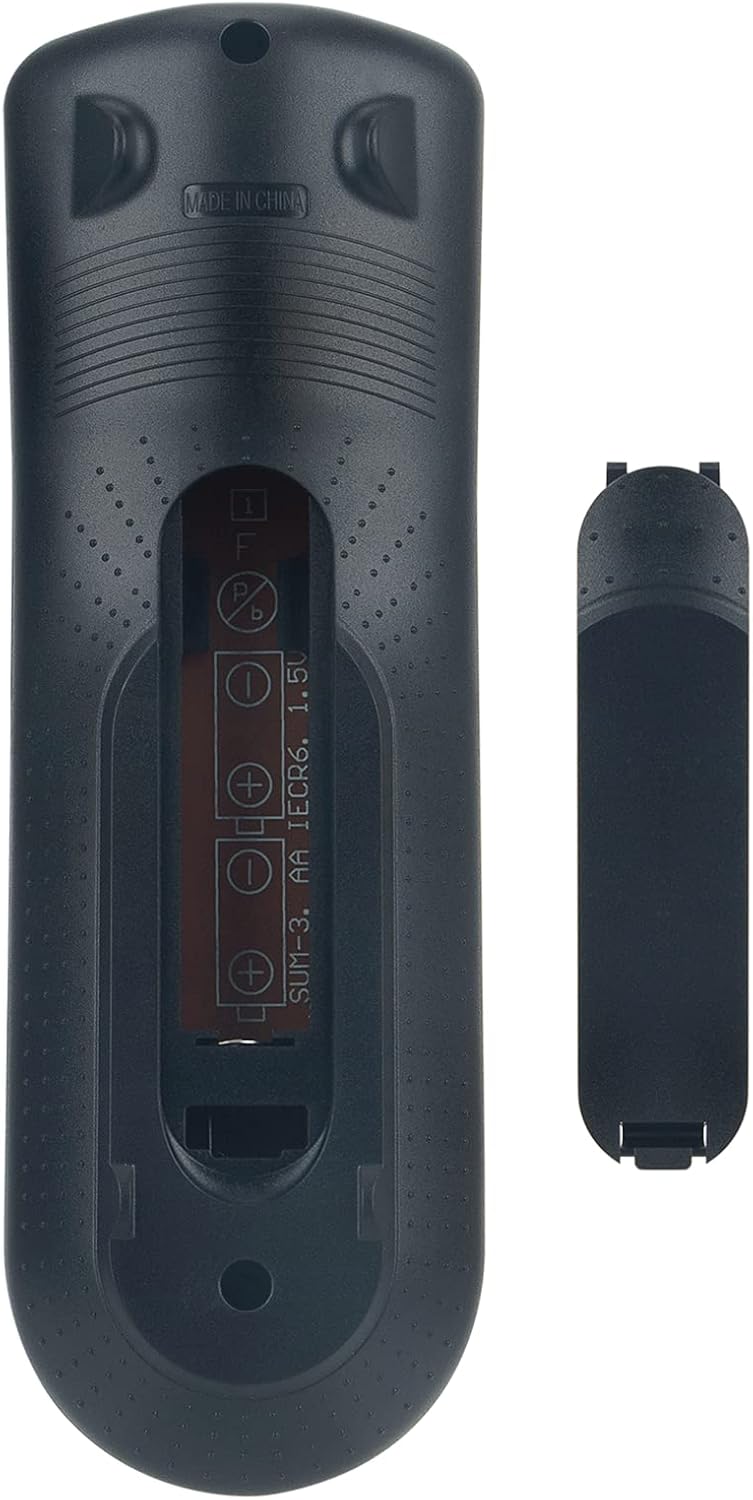
Image: Rear view of the remote control showing the open battery compartment and the battery cover.
Operating Instructions
This remote control provides full functionality for your compatible Toshiba DVD VCR Combo Player. Below is a general guide to the buttons and their functions.

Image: Front view of the ALLIMITY SE-R0346 remote control, displaying all control buttons.
Key Functions:
- Power (Red I/O button): Turns the DVD VCR Combo Player on or off.
- Open/Close: Opens or closes the disc tray.
- Number Buttons (0-9, +10): Direct input for channel selection, track numbers, or time.
- CH. (Channel Up/Down): Navigates through TV channels.
- VCR / DVD Mode: Switches between VCR and DVD playback modes.
- Play, Stop, Pause, Fast Forward, Rewind, Skip: Standard media playback controls.
- REC/OTR (Record/One-Touch Record): Initiates recording on the VCR.
- Top Menu / Menu: Accesses the main menu or disc menu.
- Setup: Enters the system setup menu.
- Directional Arrows (Up, Down, Left, Right) & Enter: Navigates menus and confirms selections.
- Return: Goes back to the previous menu or screen.
- Audio: Changes audio tracks or language.
- Subtitle: Toggles or selects subtitle options.
- Zoom: Adjusts the screen zoom level.
- Angle: Changes camera angles on compatible DVDs.
- Repeat: Repeats playback of a track, chapter, or entire disc.
Maintenance
- Cleaning: Use a soft, dry cloth to clean the remote control. Do not use liquid cleaners or abrasive materials.
- Battery Care: If the remote will not be used for an extended period, remove the batteries to prevent leakage and damage.
- Storage: Store the remote in a cool, dry place away from direct sunlight and extreme temperatures.
Troubleshooting
| Problem | Possible Cause | Solution |
|---|---|---|
| Remote is unresponsive. | Dead or incorrectly inserted batteries. Obstruction between remote and player. Remote is out of range. | Replace batteries with new AAA alkaline batteries, ensuring correct polarity. Remove any obstructions. Ensure you are within a reasonable range and pointing the remote directly at the player's IR sensor. |
| Certain buttons do not work. | Player is in the wrong mode (DVD/VCR). Button malfunction. | Press the VCR or DVD button to switch modes. If the issue persists, the remote may be faulty. |
| Remote does not control the player at all. | Incompatibility with the specific player model. | Verify your Toshiba DVD VCR Combo Player model number against the list of compatible models provided in the Introduction section. This remote is a replacement and may not be universally compatible with all Toshiba models. |
Specifications
- Model: ALLIMITY SE-R0346
- Compatible Devices: Toshiba DVD VCR Combo Players (Specific models listed in Introduction)
- Power Source: 2 x AAA Batteries (not included)
- Dimensions: 6.5 x 1.38 x 0.72 inches
- Item Weight: 2 ounces
- Color: Black
- Special Feature: No Programming Required
Warranty and Support
Specific warranty information for this ALLIMITY product is not provided in the product details. Please refer to your purchase documentation or contact the seller directly for warranty details and support inquiries.
For further assistance, please contact the retailer from whom you purchased this remote control.


