
Introduction
This manual provides detailed instructions for the OREI 8K HDMI Splitter 1x2 with Audio Extractor (Model BK-102A). This device is designed to duplicate one HDMI input signal to two identical HDMI output displays, supporting advanced resolutions up to 8K@60Hz and 4K@120Hz. It also features an integrated audio extractor, allowing for optical or analog audio output. The BK-102A is compatible with various operating systems and media devices, including gaming consoles, streaming boxes, and Blu-ray players.
Safety Information
- Ensure proper ventilation around the device to prevent overheating.
- Do not expose the device to water, moisture, or extreme temperatures.
- Use only the provided power adapter.
- Avoid disassembling the unit; refer servicing to qualified personnel.
- Keep out of reach of children.
Package Contents
Please verify that all items are present in your package:
- 1 x OREI 8K HDMI Splitter 1x2 (Model: BK-102A)
- 1 x Power Adapter
- 1 x User Manual (this document)
Product Overview
The OREI BK-102A HDMI Splitter features a compact design with clearly labeled ports and indicators for ease of use.
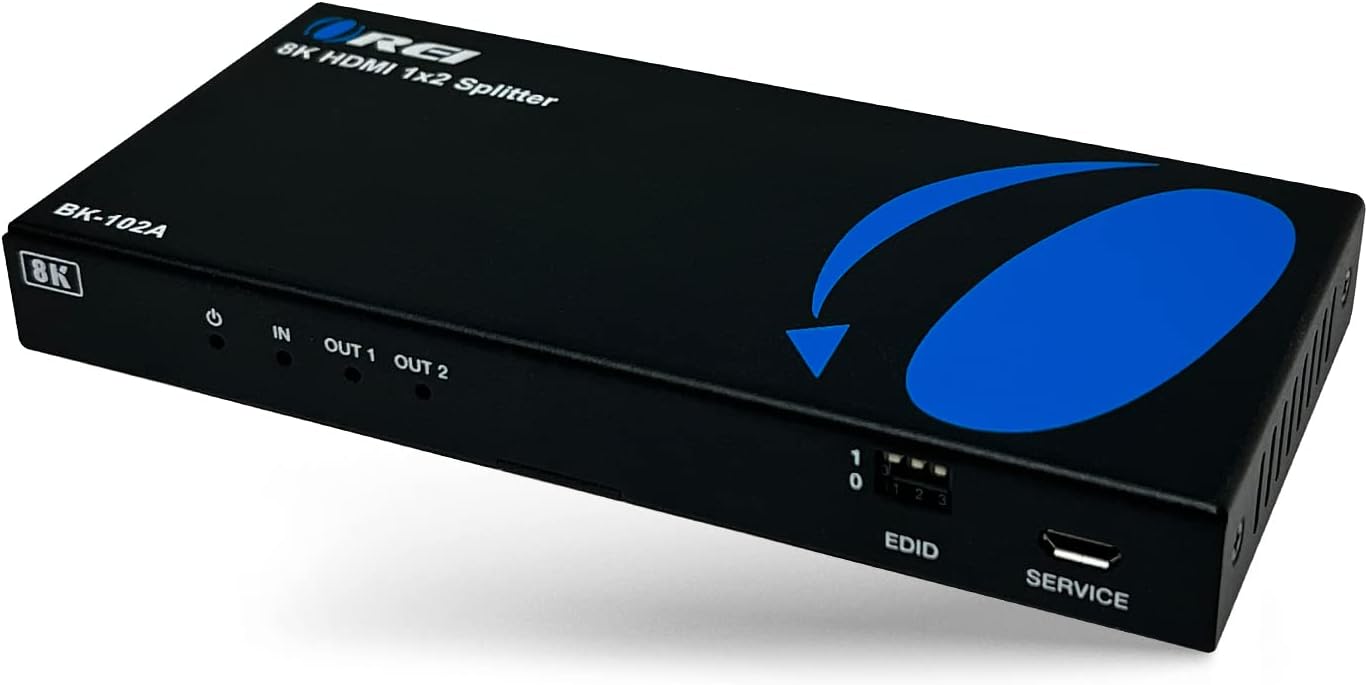
Image: Front view of the OREI BK-102A 8K HDMI Splitter, showing power indicator, HDMI IN, HDMI OUT 1, HDMI OUT 2, EDID DIP switches, and SERVICE port.

Image: Rear view of the OREI BK-102A 8K HDMI Splitter, highlighting the HDMI IN, HDMI OUT 1, HDMI OUT 2, Optical audio output, L/R analog audio output, and DC 5V power input ports.
Front Panel Features:
- Power Indicator: Illuminates when the device is powered on.
- IN: HDMI Input port for connecting your source device.
- OUT 1 / OUT 2: HDMI Output ports for connecting to displays.
- EDID DIP Switches: Used for manual EDID management (see Operating Instructions).
- SERVICE: Micro USB port for firmware updates.
Rear Panel Features:
- HDMI IN: Connects to your HDMI source device.
- HDMI OUT 1 / HDMI OUT 2: Connects to your HDMI display devices.
- OPTICAL: Optical audio output for connecting to an audio receiver or soundbar.
- L/R: 3.5mm analog audio output for connecting to stereo speakers or headphones.
- DC 5V: Power input port for the included power adapter.
Setup Instructions
Follow these steps to connect your OREI BK-102A HDMI Splitter:
- Connect HDMI Source: Using a high-quality HDMI cable, connect your HDMI source device (e.g., PS5, Xbox, Blu-ray player, streaming box) to the HDMI IN port on the splitter.
- Connect Displays: Connect your two HDMI display devices (e.g., TVs, monitors, projectors) to the HDMI OUT 1 and HDMI OUT 2 ports on the splitter using high-quality HDMI cables.
- (Optional) Connect Audio System:
- For optical audio, connect an optical cable from the OPTICAL port on the splitter to your audio receiver or soundbar.
- For analog stereo audio, connect a 3.5mm audio cable from the L/R port on the splitter to your stereo speakers or amplifier.
- Connect Power: Plug the included 5V DC power adapter into the DC 5V port on the splitter, then plug the adapter into a power outlet. The power indicator on the front panel will illuminate.
- Power On Devices: Power on your HDMI source device and both display devices. The splitter will automatically detect and output the signal.
Important Considerations:
- This device does not downscale resolutions. Both connected output displays must support the highest resolution being transmitted (e.g., if transmitting 8K, both displays must be 8K compatible).
- For optimal performance when transmitting 4K@120Hz content, it is recommended to use HDMI cables that are 10 feet (approximately 3 meters) or shorter.

Image: Connection diagram illustrating one HDMI input from a streaming box splitting to two HDMI displays and audio output to speakers.
Operating Instructions
EDID Management
The OREI BK-102A features intelligent EDID management, which typically auto-detects the optimal resolution and audio settings based on the connected displays. However, for specific configurations or troubleshooting, you can manually adjust EDID settings using the DIP switches on the front panel.

Image: Close-up view of the EDID DIP switches (labeled 1, 2, 3) on the front panel of the splitter, used for manual configuration.
Refer to the detailed EDID switch chart available on the OREI official website for specific configurations. Generally, the device will attempt to match the best common resolution and audio format supported by both connected displays.
Audio Extraction
The splitter can extract audio from the HDMI signal and output it via the optical or analog L/R ports.
- Optical Output: Supports up to 5.1 channel audio formats.
- Analog L/R Output: Supports 2 channel PCM stereo audio.
Note that audio extraction via HDMI passthrough supports a wider range of formats (LPCM, Dolby Digital / Plus/EX, Dolby True HD, DTS, DTS-EX, DTS-96/24, DTS High Res, DTS-HD Master Audio, DSD) directly to the displays. The dedicated optical and analog outputs have specific channel limitations.

Image: Graphic highlighting key features such as advanced EDID management, built-in equalizer, retiming & driver, support for HDR, HDR10, HDR10+, Dolby Vision, HLG Pass Through, and included power supply.
Troubleshooting
- No Video or Audio Output:
- Ensure all HDMI cables are securely connected to both the source and display devices, and to the splitter.
- Verify the power adapter is correctly connected and the power indicator on the splitter is illuminated.
- Check that your source device is powered on and outputting a signal.
- Confirm that both connected displays support the resolution being output by the source. This splitter does not downscale.
- Try adjusting the EDID DIP switches to a specific setting if auto-detection is not working as expected.
- Intermittent Signal or Flickering:
- Ensure you are using high-quality HDMI 2.1 certified cables.
- For 4K@120Hz or 8K@60Hz signals, use shorter HDMI cables (preferably 10 feet or less). Longer cables can lead to signal degradation.
- Check for electromagnetic interference from other electronic devices.
- No Audio from Optical/Analog Output:
- Verify that your audio receiver/soundbar is correctly connected to the optical or L/R port.
- Ensure your audio system is set to the correct input source.
- Confirm that the audio format from your source is compatible with the extractor's output (Optical: up to 5.1ch, Analog L/R: 2ch PCM). Some advanced audio formats may only pass through HDMI directly to the display.
- Resolution Issues (e.g., not getting 8K/4K):
- Ensure your source device, both displays, and all HDMI cables support the desired resolution and refresh rate (e.g., 8K@60Hz or 4K@120Hz).
- Check the EDID settings.
Specifications

Image: Graphic detailing the compact size and weight of the BK-102A, along with its heavy-duty metal enclosure.
| Model Number | BK-102A |
| Product Dimensions | 5.7 x 2.67 x 1 inches (14.5 x 6.8 x 2.5 cm) |
| Item Weight | 13.9 ounces (0.39 kg) |
| Connector Type | HDMI |
| Cable Type | HDMI |
| Supported Resolutions | Up to 8K@60Hz, 4K@120Hz, 1080p, 720p |
| HDR Support | HDR, HDR10, HDR10+, Dolby Vision, HLG Pass Through |
| HDCP Compliance | HDCP 2.3 |
| HDMI Audio Formats (Passthrough) | LPCM, Dolby Digital / Plus/EX, Dolby True HD, DTS, DTS-EX, DTS-96/24, DTS High Res, DTS-HD Master Audio, DSD |
| Optical Audio Output | Up to 5.1 channel audio |
| Analog L/R Audio Output | 2 channel PCM stereo audio |
| Compatible Devices | Cable Boxes, PS5, Streaming Devices, Xbox, Blu-ray players, Projectors |
Maintenance
- Clean the device with a soft, dry cloth. Do not use liquid or aerosol cleaners.
- Keep the device away from direct sunlight, heat sources, and areas with high humidity.
- Ensure all cables are free from kinks or excessive bends.
Warranty and Support
The OREI BK-102A HDMI Splitter comes with a 1-Year Manufacturer's Warranty, covering defects in materials and workmanship under normal use. OREI also provides Lifetime Technical Support for this product.

Image: Graphic indicating OREI's over 10 years of experience, full 1-year limited warranty, and US-based lifetime local support.
For warranty claims, technical assistance, or any questions regarding your product, please contact OREI customer support through their official website or the contact information provided with your purchase.


