
1. Introduction
The MAUL MTL 600 is a commercial desktop calculator designed for professional use, offering precision and reliability. It features a large 12-digit, 2-line display that shows both the calculation path and the result simultaneously. This manual provides essential information for setting up, operating, maintaining, and troubleshooting your calculator.

Image 1.1: Front view of the MAUL MTL 600 Commercial Calculator, displaying its 12-digit, 2-line screen and key layout.
2. Setup
2.1. Power Source
The MAUL MTL 600 calculator operates on both solar power and battery power. It is designed to be energy-saving, utilizing solar panels when sufficient light is available. If the ambient light is too low, the calculator automatically switches to battery power.
2.2. Battery Installation/Replacement
The calculator includes one LR1130 battery. While the calculator primarily uses solar power, the battery provides backup power in low-light conditions. To replace the battery:
- Ensure the calculator is turned off.
- Locate the battery compartment on the back of the calculator.
- Open the compartment cover.
- Remove the old LR1130 battery and insert a new one, observing the correct polarity (+/-).
- Close the battery compartment cover securely.
2.3. Turning On/Off
- To turn on the calculator, press the ON button.
- The calculator features an automatic shutdown function to conserve energy when not in use for a period.
- To clear all calculations and reset the calculator, press the AC button.
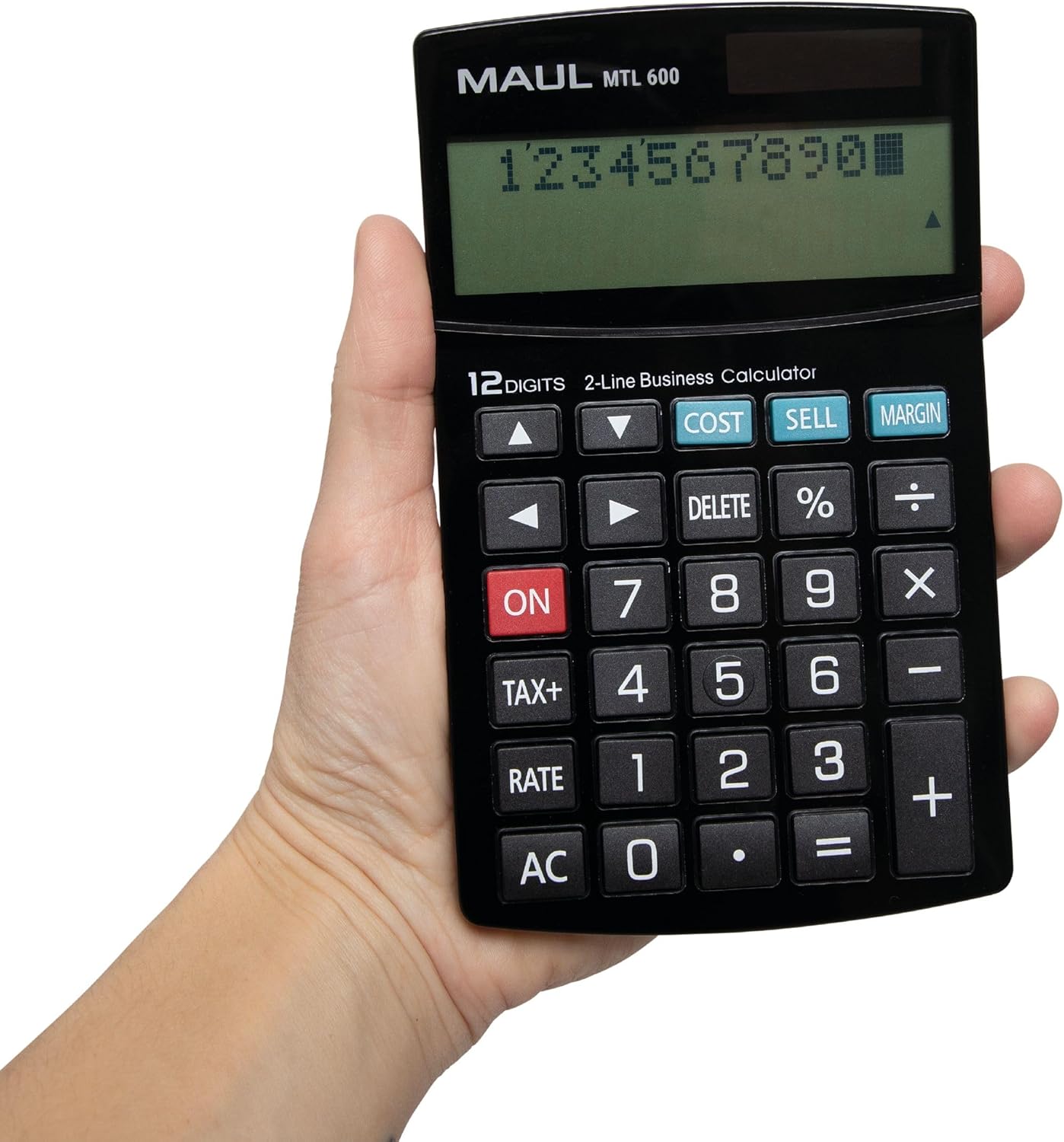
Image 2.1: The MAUL MTL 600 calculator held in a hand, illustrating its ergonomic and portable design.
3. Operating Instructions
3.1. Display Features
The calculator is equipped with a 12-digit, 2-line LCD display. The upper line shows the calculation path (input), while the lower line displays the current result. This allows for easy verification of entered values and operations.
3.2. Basic Arithmetic Operations
Perform standard calculations using the number keys (0-9, .), and operation keys (+, -, ×, ÷, =).
- Addition (+): Press the + key.
- Subtraction (-): Press the - key.
- Multiplication (×): Press the × key.
- Division (÷): Press the ÷ key.
- Equals (=): Press the = key to display the result.
3.3. Special Functions
- Tax Calculation (TAX+): Use the TAX+ button to calculate prices with or without tax. This function simplifies tax-related computations.
- Profit Margin Calculation (COST, SELL, MARGIN): The dedicated COST, SELL, and MARGIN keys allow for quick calculation of profit margins, sales prices, or purchase prices.
- Percentage (%): Use the % key for percentage calculations.
- Correction Function (Arrow Keys, DELETE):
- The arrow keys (▲, ▼, ◄, ►) allow you to navigate through the entered calculation path.
- The DELETE button removes the last entered digit or operation, enabling corrections without re-entering the entire calculation.
- Clear Entry (CE): The CE button (often combined with AC or a separate key) clears the last entered number without affecting previous calculations.

Image 3.1: A close-up view of the MAUL MTL 600 calculator's 2-line display and its clearly labeled function keys, including COST, SELL, and MARGIN.
4. Maintenance
4.1. Cleaning
The MAUL MTL 600 features sturdy plastic buttons and a durable casing that are easy to clean. To maintain optimal performance and appearance:
- Use a soft, dry cloth to wipe the calculator's surface regularly.
- For stubborn dirt, slightly dampen the cloth with water or a mild, non-abrasive cleaning solution. Avoid harsh chemicals or solvents.
- Do not allow liquids to enter the calculator's interior or around the keys.
4.2. Storage
Store the calculator in a cool, dry place away from direct sunlight and extreme temperatures to prolong its lifespan.
5. Troubleshooting
If you encounter issues with your MAUL MTL 600 calculator, refer to the following common problems and solutions:
| Problem | Possible Cause | Solution |
|---|---|---|
| Display is blank or dim. | Insufficient light for solar power, or low battery. | Move the calculator to a brighter area. If the problem persists, replace the LR1130 battery. |
| Calculator turns off unexpectedly. | Automatic shutdown function activated due to inactivity. | This is normal behavior to conserve energy. Press ON to restart. |
| Incorrect calculation results. | Incorrect input or operation sequence. | Verify the entered numbers and operations on the 2-line display. Use the arrow keys and DELETE button to correct errors. Press AC to clear all and start over. |
| Keys are unresponsive. | Dirt or debris under keys, or internal issue. | Clean the calculator surface and around the keys. If the issue persists after cleaning and battery replacement, contact customer support. |
6. Specifications
Detailed technical specifications for the MAUL MTL 600 Commercial Calculator:
- Model: MTL 600
- Manufacturer Part Number: 7269090
- Brand: MAUL
- Display: 12-digit, 2-line LCD
- Power Source: Solar and Battery (1 x LR1130 included)
- Functions: Tax calculation (TAX+), Profit margin calculation (COST, SELL, MARGIN), Percentage (%), Correction function (arrow keys, DELETE), Basic arithmetic.
- Material: Plastic
- Color: Black
- Dimensions (L x W x H): 17 cm x 10.3 cm x 2.6 cm
- Automatic Shutdown: Yes
- Warranty: 5 years

Image 6.1: Diagram illustrating the dimensions of the MAUL MTL 600 calculator, measuring 17 cm in length and 10.3 cm in width.
7. Warranty and Support
7.1. Warranty Information
The MAUL MTL 600 Commercial Calculator comes with a 5-year warranty, ensuring precision and reliability. This warranty covers manufacturing defects under normal use conditions.
7.2. Customer Support
For any questions, technical assistance, or warranty claims, please contact MAUL customer service. Refer to the product packaging or the official MAUL website for the most current contact information.


