
ODK 120x50cm Computer Gaming Desk
ODK Computer Gaming Desk User Manual
Model: 120x50cm Computer Gaming Desk (Brown)
Brand: ODK
1. Introduction
Thank you for choosing the ODK Computer Gaming Desk. This manual provides detailed instructions for assembly, operation, maintenance, and troubleshooting to ensure you get the most out of your new desk. Designed for both work and gaming, this desk features an integrated monitor stand and ample storage solutions to enhance your productivity and comfort.
Please read this manual thoroughly before assembly and use, and keep it for future reference.
2. Safety Instructions
- Always assemble the desk on a clean, flat, and soft surface to prevent scratches.
- Ensure all screws and fasteners are securely tightened before use. Periodically check and re-tighten if necessary.
- Do not overload the desk or shelves. Refer to specifications for weight limits.
- Keep small parts and packaging materials away from children and pets to prevent choking hazards.
- Avoid placing hot items directly on the desk surface without protection.
- Use adjustable feet to ensure the desk is stable and level on uneven floors.
3. Package Contents
Before beginning assembly, please verify that all components listed below are present and undamaged. If any parts are missing or damaged, please contact customer support.
- Desktop Panels (Main desk surface)
- Monitor Stand Shelf
- Side Storage Shelves (Adjustable)
- Metal Frame Components (Legs, support bars)
- Assembly Hardware (Screws, nuts, bolts, adjustable feet)
- Assembly Tools (Hex key/Allen wrench)
- Instruction Manual
4. Setup and Assembly
Assembly typically takes about 30 minutes with the provided tools. Follow these steps carefully:
- Unpack and Identify Parts: Lay out all components on a soft, clean surface. Refer to the parts list to identify each piece.
- Assemble the Main Frame: Connect the metal leg frames using the horizontal support bars. Ensure all connections are finger-tight initially.
- Attach Desktop Panels: Carefully place the desktop panels onto the assembled frame and secure them with the provided screws.
- Install Monitor Stand: Attach the monitor stand shelf to the designated supports on the desktop.
- Assemble Side Storage Shelves: Insert the side storage shelves into the frame. Note that the height of these shelves is adjustable to accommodate different items, including computer towers.
- Tighten All Fasteners: Once all parts are in place, systematically tighten all screws and bolts using the provided hex key. Do not overtighten.
- Adjust Leveling Feet: Adjust the adjustable foot pads at the bottom of the desk legs to ensure the desk is stable and level on your floor.

Figure 4.1: Desk Dimensions. This diagram illustrates the overall dimensions of the desk, including the monitor stand height and shelf spacing, crucial for planning your setup.

Figure 4.2: Adjustable Storage. This image highlights the spacious and adjustable storage shelves, demonstrating how a computer tower can fit by removing a shelf.
5. Operating and Usage
5.1 Monitor Stand
The integrated monitor stand, measuring 11.4cm (4.5 inches) in height, is designed to elevate your screen to an ergonomic viewing level. This helps reduce neck and back strain during long periods of use. The spacious design allows for placement of one large monitor or two standard computer monitors.
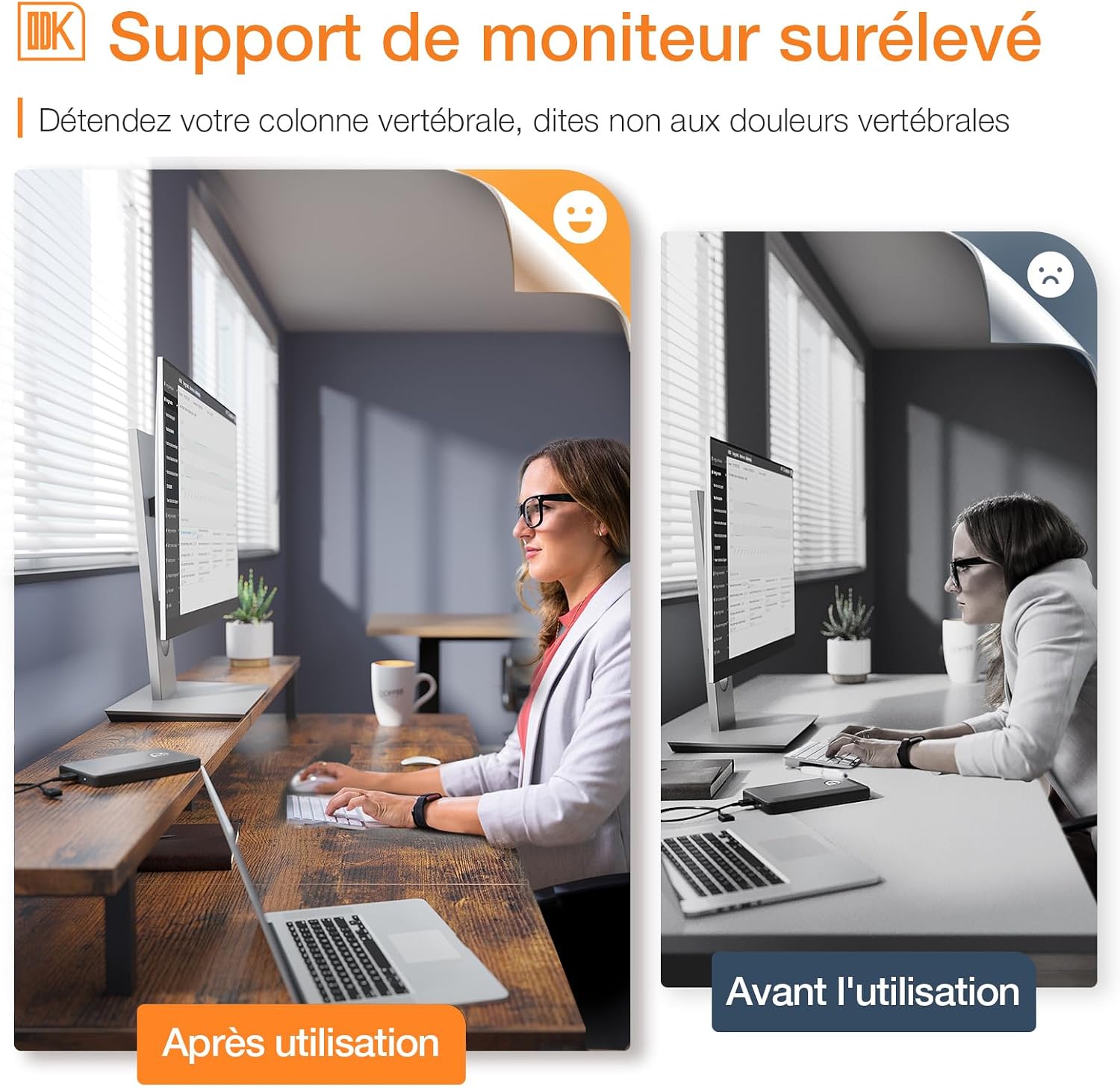
Figure 5.1: Ergonomic Monitor Stand. This image illustrates the difference in posture before and after using the elevated monitor stand, highlighting its ergonomic benefits for spinal health.
5.2 Storage Shelves
The desk features open storage shelves on the side, providing ample space for books, work documents, office supplies, and other essentials. These shelves keep your items within easy reach, helping to maintain a tidy workspace. The height of the shelves is adjustable to two levels, allowing you to customize the storage space to fit items of various sizes, including computer towers.
6. Maintenance and Care
To ensure the longevity and appearance of your ODK Computer Gaming Desk, follow these simple maintenance guidelines:
- Cleaning: The desk surface is smooth, waterproof, and scratch-resistant. Daily stains and dust can be easily removed with a soft, damp cloth. Avoid using harsh chemicals or abrasive cleaners.
- Protection: Use coasters for drinks and protective pads under hot items to prevent damage to the surface.
- Stability Check: Periodically check all screws and connections to ensure they remain tight. Re-tighten if any looseness is detected.
- Environment: The desk is made from P2 standard compliant boards, ensuring it is odorless and safe for indoor environments.
7. Troubleshooting
7.1 Desk is Wobbly
- Check Leveling Feet: Ensure all adjustable foot pads are in firm contact with the floor and adjusted to compensate for any unevenness.
- Tighten Screws: Verify that all assembly screws and bolts are securely tightened. Loose connections can cause instability.
- Even Surface: Ensure the desk is placed on a flat, even surface.
7.2 Missing Parts or Damaged Components
- Refer to the "Package Contents" section to confirm all parts.
- If any parts are missing or damaged upon arrival, do not proceed with assembly. Contact ODK customer service immediately for assistance.
8. Specifications
| Feature | Detail |
|---|---|
| Brand | ODK |
| Product Dimensions | 120P x 50l x 86.5H centimeters (47.2"D x 19.7"W x 34.1"H) |
| Color | Brown |
| Style | Modern |
| Base Material | Metal |
| Top Material Type | Wood |
| Finish Type | Varnished |
| Special Feature | Monitor Stand |
| Room Type | Bedroom, Office |
| Recommended Uses | Work |
9. Warranty and Support
ODK is committed to providing high-quality products and excellent customer service. If you encounter any issues with your product, please do not hesitate to contact us.
- Return Policy: We offer a 1-year return policy without reason.
- Customer Service: Lifetime customer service is provided for all ODK products.
- Contact: For support, please refer to the contact information provided with your purchase or visit the official ODK store page on Amazon: ODK Amazon Store.
Related documents120x50cm Computer Gaming Desk


Ask a question about this manual
Ask about setup, troubleshooting, compatibility, parts, safety, or missing instructions. Manuals+ will review the question and use this page’s manual context to help answer it.