
Introduction
Thank you for choosing the Globe Electric 57011 Pratt 4-Light Track Lighting fixture. This manual provides essential information for the safe installation, operation, and maintenance of your new lighting fixture. Please read these instructions thoroughly before beginning installation and retain them for future reference.
Important Safety Instructions
To reduce the risk of fire, electric shock, or personal injury, always follow basic safety precautions when installing, operating, and maintaining this product.
- WARNING: Risk of electric shock. Disconnect power at the circuit breaker or fuse box before installation or servicing.
- This product must be installed in accordance with the applicable installation code by a person familiar with the construction and operation of the product and the hazards involved.
- Use only GU10 Bi-Pin Twist and Click bulbs, 50W maximum each. Ensure bulbs are fully seated.
- Do not install this fixture in wet or damp locations. It is designed for indoor use only.
- Ensure all connections are secure and properly insulated.
- Do not look directly into the light source when the fixture is on.
Package Contents
Verify that all components are present before beginning installation:
- 4-Light Track Lighting Fixture
- Mounting Hardware
- Instruction Sheet

Image: Packaging box for the Globe Electric Pratt 4-Light Track Lighting, showing the fixture and brand logo.
Product Specifications
| Feature | Specification |
|---|---|
| Brand | Globe Electric |
| Model Name | Pratt |
| Part Number | 57011 |
| Color | Matte White |
| Material | Metal |
| Product Dimensions | 4.8"L x 30"W x 7.3"H (12.2cm L x 76.2cm W x 18.5cm H) |
| Power Source | Hardwired |
| Voltage | 120 Volts |
| Number of Light Sources | 4 |
| Bulb Base | GU10 |
| Max Wattage per Bulb | 50 Watts |
| Special Feature | Dimmable, Matte White Finish |
| Indoor/Outdoor Usage | Indoor |
| Item Weight | 2.09 Pounds (0.95 kg) |

Image: A diagram illustrating the length (30 inches), width (4.75 inches), and height (7.25 inches) of the track lighting fixture.
Setup & Installation
Before You Begin
- Turn off power at the circuit breaker or fuse box.
- Ensure you have all necessary tools (screwdriver, wire strippers, ladder, etc.).
- Read all instructions carefully before proceeding.
Mounting the Fixture
- Carefully unpack the fixture and its components.
- Attach the mounting plate to the junction box in the ceiling using the provided screws.
- Connect the electrical wires: connect the black wire from the fixture to the black wire from the junction box, the white wire from the fixture to the white wire from the junction box, and the ground wire to the ground wire. Secure connections with wire nuts.
- Carefully tuck all wires into the junction box.
- Align the fixture base with the mounting plate and secure it with the provided screws.
- Install GU10 bulbs (sold separately) into each cylindrical head. A suction cup tool (often included with GU10 bulbs or the fixture) can assist in twisting and clicking the bulbs into place.
- Restore power at the circuit breaker.

Image: The 4-light track lighting fixture installed on a white ceiling, illuminating a kitchen counter.
Operating Instructions
Adjusting Light Heads
Each cylindrical light head on the track is independently adjustable. You can pivot and rotate each head to direct light precisely where needed, allowing for customized illumination of specific areas or objects.

Image: A close-up view of the track light heads, demonstrating their adjustable nature with arrows indicating movement.
Dimmable Functionality
This fixture is fully dimmable when used with compatible GU10 dimmable bulbs and a compatible dimmer switch (both sold separately). This allows you to adjust the light output to create the desired ambiance for any occasion.

Image: A graphic illustrating the dimmable feature, showing a dimmer switch and the track light.
Bulb Replacement Guide
To replace a GU10 bulb:
- Turn off power to the fixture at the circuit breaker.
- Allow the bulb to cool completely before handling.
- Gently push the GU10 bulb into its socket and twist counter-clockwise to remove it. A suction cup tool can be helpful for this step, especially if the bulb is recessed or difficult to grip.
- Insert the new GU10 bulb by aligning its pins with the socket holes, pushing gently, and twisting clockwise until it clicks into place.
- Restore power at the circuit breaker.
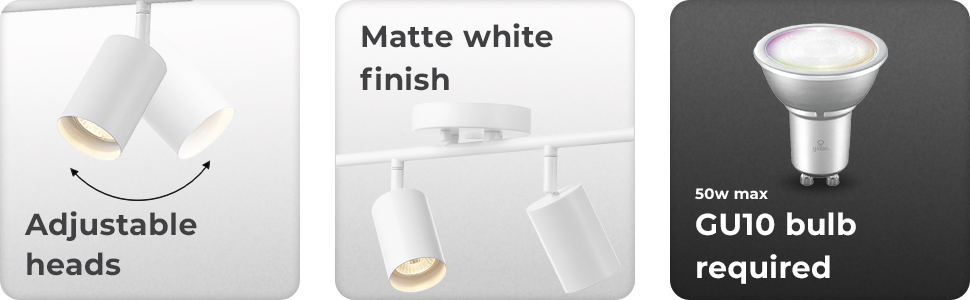
Image: A graphic highlighting the GU10 bulb requirement for the track lighting fixture.
Care and Maintenance
Regular care will help maintain the appearance and functionality of your track lighting fixture.
- Cleaning: Always turn off power before cleaning. Wipe the fixture with a soft, dry cloth. Do not use harsh chemicals, abrasive cleaners, or polishes as they may damage the finish.
- Bulb Check: Periodically check bulbs for proper function and replace as needed.
- Connections: Ensure all electrical connections remain secure. If you notice any loose wiring or flickering, consult a qualified electrician.
Troubleshooting Common Issues
| Problem | Possible Cause | Solution |
|---|---|---|
| Light does not turn on | No power to the fixture; Loose wiring; Faulty bulb; Faulty switch | Check circuit breaker/fuse; Verify wire connections; Replace bulb; Test switch functionality. |
| Lights flicker | Loose bulb; Incompatible dimmer switch/bulbs; Loose wiring | Ensure bulbs are fully seated; Use compatible dimmable GU10 bulbs and dimmer switch; Check wire connections. |
| Buzzing sound from fixture | Incompatible dimmer switch/bulbs; Loose wiring | Ensure dimmer switch and bulbs are compatible; Check wire connections. |
| Bulbs are difficult to install/remove | GU10 bulbs require a specific twist-and-click motion; Lack of grip | Use a suction cup tool designed for GU10 bulbs to aid in installation and removal. |
Warranty and Support
Warranty Information
This product is sold without a manufacturer's warranty. Please refer to your retailer's return policy for any issues.
Customer Support
For any questions, concerns, or assistance with your Globe Electric product, please contact the retailer where the product was purchased or visit the official Globe Electric website for support resources.


