
1. Introduction and Product Overview
The SHARP GC52BEB is a versatile kitchen appliance combining microwave, grill, and convection oven functions. Designed for efficiency and ease of use, it features a 25-liter capacity, 900W microwave power, 1200W grill power, and 2050W convection power. This appliance offers 11 power levels and 14 automatic programs, including a defrost function based on time and weight. Its flatbed design ensures easy cleaning and maximizes usable space.
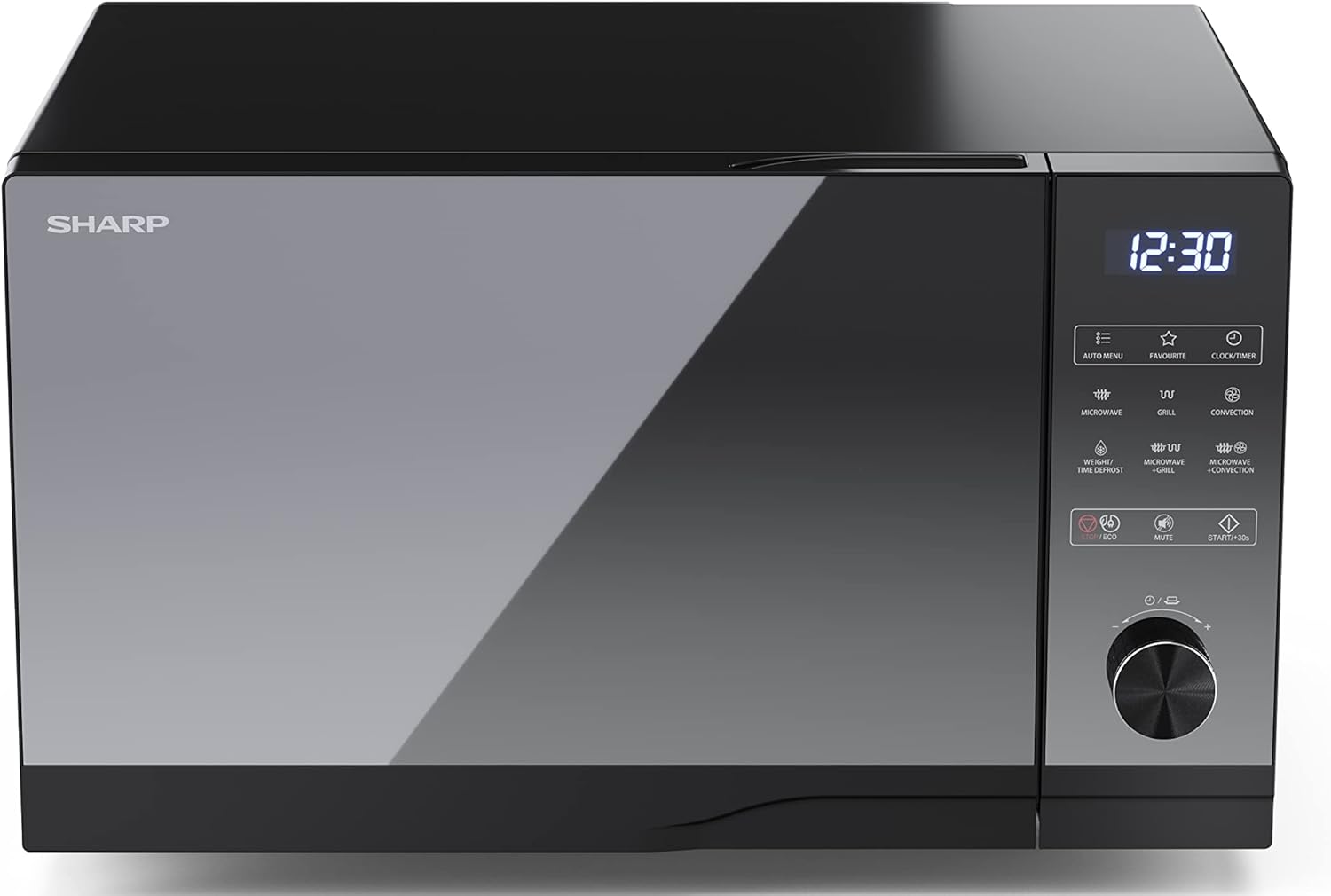
Figure 1: Front view of the SHARP GC52BEB microwave oven.
2. Important Safety Instructions
Always follow basic safety precautions when using electrical appliances to reduce the risk of fire, electric shock, injury to persons, or exposure to excessive microwave energy.
- Read all instructions before using the appliance.
- Do not operate the oven if it is damaged or malfunctioning. Contact qualified service personnel for repair.
- Ensure proper ventilation. Do not block any ventilation openings.
- Do not heat liquids or other foods in sealed containers as they are liable to explode.
- Never use metal utensils, foil, or dishes with metallic trim in the microwave mode, as this can cause arcing.
- Supervise children closely when the appliance is in use.
- Do not attempt to tamper with, adjust, or repair the door, control panel, safety interlock switches, or any other part of the oven.
- Clean the oven regularly and remove any food deposits. Failure to maintain the oven in a clean condition could lead to deterioration of the surface that could adversely affect the life of the appliance and possibly result in a hazardous situation.
3. Product Components
The SHARP GC52BEB microwave oven includes the following main components and accessories:
- Oven Cavity (interior)
- Control Panel with Touch Buttons and Rotary Dial
- Oven Door with Handle
- Grill Rack (for grilling)
- Baking Tray (for convection cooking)
- Power Cord

Figure 2: Interior view with grill rack.
4. Setup
4.1 Unpacking
Carefully remove the microwave oven and all packing materials from the carton. Check the oven for any damage, such as dents or a misaligned door. Do not operate the oven if it is damaged. Retain packaging materials for future transport if needed.
4.2 Placement
Place the oven on a flat, stable surface that can support its weight. Ensure there is adequate ventilation space around the oven: at least 20 cm (8 inches) above, 10 cm (4 inches) at the rear, and 5 cm (2 inches) on each side. Do not place the oven near heat sources or in a damp environment.
4.3 Power Connection
Plug the power cord into a grounded electrical outlet. Ensure the voltage matches the specifications of the appliance.
5. Operating Instructions
5.1 Control Panel Overview
The control panel features a digital display, touch buttons for various functions (e.g., Microwave, Grill, Convection, Auto Menu, Defrost), and a rotary dial for setting time, weight, or temperature. Refer to the labels on the control panel for specific functions.
5.2 Setting the Clock
- Press the 'CLOCK/TIMER' button.
- Use the rotary dial to set the hour. Press 'CLOCK/TIMER' again to confirm.
- Use the rotary dial to set the minutes. Press 'CLOCK/TIMER' again to confirm.
5.3 Microwave Cooking
- Place food in a microwave-safe container inside the oven.
- Press the 'MICROWAVE' button repeatedly to select the desired power level (e.g., 900W, 700W, etc.).
- Use the rotary dial to set the cooking time.
- Press 'START/+30s' to begin cooking.
5.4 Grill Cooking
- Place food on the grill rack provided.
- Press the 'GRILL' button.
- Use the rotary dial to set the grilling time.
- Press 'START/+30s' to begin.
5.5 Convection Cooking (Hot Air)
- Place food on the baking tray or a heat-resistant dish.
- Press the 'CONVECTION' button.
- Use the rotary dial to set the desired temperature. Press 'CONVECTION' again to confirm.
- Use the rotary dial to set the cooking time.
- Press 'START/+30s' to begin.
5.6 Combination Cooking
The oven offers combination modes (Microwave + Grill, Microwave + Convection) for faster and more thorough cooking. Refer to the specific icons on the control panel and the full manual for detailed instructions on setting these modes.
5.7 Defrost Function
The defrost function allows you to defrost food by weight or time.
- Press the 'WEIGHT/TIME DEFROST' button.
- Use the rotary dial to select either weight or time, and adjust the value accordingly.
- Press 'START/+30s' to begin defrosting.
5.8 Automatic Programs
The oven includes 14 automatic programs for various food types. Press the 'AUTO MENU' button and use the rotary dial to select the desired program. Follow the on-screen prompts for weight or quantity, then press 'START/+30s'.
5.9 Child Lock
To activate the child lock, press and hold the 'STOP/ECO' button for 3 seconds until a lock indicator appears on the display. To deactivate, press and hold the 'STOP/ECO' button again for 3 seconds.
5.10 Eco Function
The Eco function helps reduce energy consumption. Press the 'STOP/ECO' button briefly to activate or deactivate this mode. In Eco mode, the display may dim or turn off after a period of inactivity.
6. Cleaning and Maintenance
Regular cleaning and proper maintenance will ensure the longevity and optimal performance of your microwave oven.
- Exterior: Wipe the exterior surfaces with a damp cloth and mild detergent. Avoid abrasive cleaners.
- Interior: The flatbed design makes the interior easy to clean. Wipe the oven cavity with a damp cloth after each use. For stubborn food spills, place a bowl of water with lemon juice inside and microwave for a few minutes to loosen residue, then wipe clean.
- Door and Seal: Clean the door, door seals, and adjacent parts carefully with a damp cloth to remove any spills or spatters.
- Accessories: Wash the grill rack and baking tray in warm, soapy water.
- Power Off: Always unplug the appliance before cleaning.
7. Troubleshooting
If you encounter problems with your microwave oven, refer to the following table for common issues and solutions.
| Problem | Possible Cause | Solution |
|---|---|---|
| Oven does not start. | Power cord not plugged in; Door not closed properly; Fuse blown or circuit breaker tripped. | Ensure power cord is securely plugged in; Close the door firmly; Check household fuse/circuit breaker. |
| Food not heating. | Door not closed properly; Incorrect cooking time/power level set. | Ensure door is fully closed; Adjust cooking time and power level. |
| Unusual noise during operation. | Metal objects inside; Appliance not on a level surface. | Remove any metal objects; Place the oven on a flat, stable surface. |
| Display shows 'LOCK'. | Child lock is activated. | Press and hold the 'STOP/ECO' button for 3 seconds to deactivate. |
If the problem persists after trying these solutions, please contact customer support.
8. Specifications
Key technical specifications for the SHARP GC52BEB microwave oven:
- Model Number: GC52BEB
- Manufacturer: SHARP
- Microwave Power: 900W
- Grill Power: 1200W
- Convection Power: 2050W
- Capacity: 25 Liters
- Product Dimensions (D x W x H): 28.7 x 49 x 49.5 cm
- Weight: 18.6 kg
- Color: Black
- Special Features: Electronic control, Flat design (easy to clean), Timer function, Clock, Child lock, Silent mode, Oven cavity lighting, Eco function.
- Installation Type: Freestanding
- Material: Stainless Steel, Glass

Figure 3: SHARP GC52BEB dimensions.
9. Warranty and Support
This SHARP appliance comes with a standard manufacturer's warranty. Please refer to the warranty card included in your product packaging for specific terms, conditions, and duration of coverage. Keep your proof of purchase for warranty claims.
For technical assistance, spare parts, or service inquiries, please contact SHARP customer support. Contact details can typically be found on the manufacturer's official website or in the warranty documentation.


