
Devanti DH-002-BK
Devanti Dehumidifier User Manual
Model: DH-002-BK
Introduction
Thank you for purchasing the Devanti 2-in-1 Dehumidifier and Air Purifier. This appliance is designed to effectively reduce excess moisture in your home, preventing issues like mold, dust mites, and mildew growth, while also purifying the air. Its quiet operation and versatile features make it an ideal solution for maintaining a healthier indoor environment.
Please read this user manual thoroughly before operating the appliance and retain it for future reference.
Important Safety Instructions
To reduce the risk of fire, electric shock, or injury when using your dehumidifier, follow these basic precautions:
- Read all instructions before using the appliance.
- Do not operate the dehumidifier with a damaged cord or plug.
- Ensure the power supply voltage matches the rating label on the appliance.
- Do not immerse the appliance, cord, or plug in water or other liquids.
- Keep the appliance away from heat sources and direct sunlight.
- Always unplug the dehumidifier before cleaning or performing any maintenance.
- Do not block air inlets or outlets.
- This appliance is for indoor use only.
- Keep out of reach of children.
Package Contents
Carefully unpack your Devanti Dehumidifier and check that all items are present and in good condition:
- Devanti Dehumidifier (1 unit)
- Remote Control (1 unit)
- 1.5m Water Pipe (1 unit)
- User Manual (1 unit)
If any items are missing or damaged, please contact your retailer for assistance.
Product Overview
Familiarize yourself with the main components of your Devanti Dehumidifier.

Image: Front view of the Devanti Dehumidifier with its remote control. The dehumidifier is black with an LCD display showing "28" and a temperature icon. The remote control has power, timer, sleep, and other function buttons.
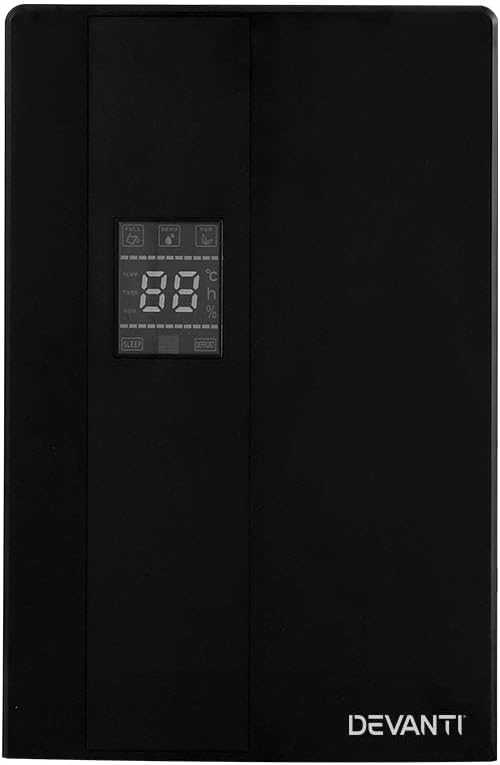
Image: A close-up of the dehumidifier's LCD display panel. It shows numerical readings, icons for full tank, defrost, timer, sleep, and humidity percentage.

Image: Diagram showing the dimensions of the Devanti Dehumidifier (24.5cm width, 13.7cm depth, 37.5cm height) and an inset image of the included 1.5m water pipe.

Image: A collage of four images detailing different parts of the dehumidifier: a convenient handle on top, the air outlet grille, the 2L removable water tank, and the drainage hole for continuous operation.
Setup
- Placement: Place the dehumidifier on a flat, stable surface in the desired room. Ensure there is at least 20cm of space around the air inlets and outlets for proper airflow.
- Power Connection: Plug the power cord into a suitable electrical outlet (220V-240V, 50-60Hz).
- Drainage Option (Choose One):
- Water Tank Drainage: For manual emptying, ensure the 2L water tank is correctly inserted. The unit will automatically stop when the tank is full, and an indicator light will illuminate.
- Continuous Drainage: For continuous operation without emptying the tank, connect the provided 1.5m water pipe to the drainage hole at the back of the unit. Route the pipe to a suitable drain or larger container, ensuring it is sloped downwards for gravity drainage.

Image: A visual comparison of the two drainage methods. On the left, the internal water tank with overflow protection. On the right, the continuous drainage setup with the water pipe connected.
Operating Instructions
Your Devanti Dehumidifier can be operated using the control panel on the unit or the included remote control.
Control Panel and Remote Control Functions:
| Button/Indicator | Description |
|---|---|
| Power Button | Turns the unit ON or OFF. |
| Timer Button | Sets the operating time from 1 to 24 hours. Press repeatedly to adjust. |
| Sleep Mode | Activates quiet operation mode, dimming the display for undisturbed sleep. |
| Air Purify Mode | Engages the photocatalyst filter for air purification. |
| Dehumidify Mode | Activates the dehumidification function. |
| Full Tank Indicator | Lights up when the water tank is full and needs emptying. The unit will pause operation. |
| Defrost Indicator | Indicates that the unit is in auto-defrost mode to prevent ice build-up. |
| LCD Display | Shows current temperature, humidity level, and timer settings. |
Initial Operation:
- Press the Power Button to turn on the dehumidifier. The LCD display will illuminate.
- The unit will automatically begin dehumidifying.
- To activate the air purification function, press the Air Purify Mode button.
- To set a timer for automatic shut-off, press the Timer Button repeatedly until the desired operating hours (1-24) are displayed.
- For quiet operation during sleep, press the Sleep Mode button.
Water Tank Management:
- When the water tank is full, the unit will automatically stop and the "Full Tank" indicator will light up.
- Carefully remove the water tank from the unit.
- Empty the collected water.
- Reinsert the empty water tank firmly into the unit. The dehumidifier will resume operation.
Maintenance
Regular maintenance ensures optimal performance and extends the lifespan of your dehumidifier.
Cleaning the Unit:
- Always unplug the dehumidifier from the power outlet before cleaning.
- Wipe the exterior of the unit with a soft, damp cloth. Do not use abrasive cleaners or solvents.
- Clean the air inlets and outlets regularly with a soft brush or vacuum cleaner attachment to remove dust and debris.
Cleaning the Water Tank:
- Remove the water tank and rinse it with clean water.
- For stubborn residue, use a mild detergent and a soft brush. Rinse thoroughly to remove all soap residue.
- Allow the tank to air dry completely before reinserting it.
Photocatalyst Filter Maintenance:
The photocatalyst filter helps remove bacteria and allergens. While it does not require replacement like a HEPA filter, it should be kept clean.
- Refer to the product diagram to locate the filter.
- Gently remove the filter.
- Clean the filter with a soft brush or vacuum cleaner. Do not wash with water.
- Reinsert the filter once clean.

Image: An illustration demonstrating the air purification process, highlighting the photocatalyst filter's role in reducing bacteria and allergens as air passes through the unit.
Troubleshooting
If you encounter issues with your dehumidifier, please refer to the following common problems and solutions before contacting support.
| Problem | Possible Cause | Solution |
|---|---|---|
| Unit does not turn on. | No power supply; power cord not plugged in; power outlet faulty. | Ensure the unit is plugged into a working power outlet. Check the circuit breaker. |
| Unit stops operating and "Full Tank" indicator is on. | Water tank is full. | Empty the water tank and reinsert it correctly. |
| Dehumidifier is not collecting water. | Room humidity is too low; temperature is too low (below 15°C); air inlets/outlets blocked. | Ensure room conditions are within operating range (15°C - 32°C). Clear any obstructions from air vents. |
| Unit is noisy. | Unit not on a stable surface; fan obstruction. | Place the unit on a flat, stable surface. Check for any foreign objects near the fan. |
| Remote control not working. | Batteries are dead or incorrectly inserted; obstruction between remote and unit. | Replace batteries. Ensure clear line of sight to the unit's sensor. |
If the problem persists after trying these solutions, please contact Devanti customer support.
Specifications
| Feature | Detail |
|---|---|
| Brand | Devanti |
| Model Number | DH-002-BK |
| Water Tank Capacity | 2 Litres |
| Power | 65W |
| Voltage | 220V-240V, 50-60Hz |
| Timer | 1-24 hours |
| Dehumidification Capacity | 500ml-700ml/day (at 30°C - RH85%) |
| Applicable Area | Up to 30 square metres |
| Operating Temperature | 15°C - 32°C |
| Overall Dimensions (L x W x H) | 24.5cm x 13.7cm x 37.5cm |
| Cable Length | 120cm |
| Water Pipe Length | 150cm |
| Colour | Black |
| Material | ABS Plastic |
| Special Features | Portable, 2-in-1 Dehumidifier & Purifier, LCD Display, Remote Control, Overflow Protection, Auto-Defrost |
Warranty and Support
This Devanti Dehumidifier comes with a 1-year warranty from the date of purchase.
For warranty claims, technical support, or any inquiries regarding your product, please contact the retailer or Devanti customer service with your proof of purchase.
Please visit the official Devanti website or refer to your purchase documentation for contact details and further warranty terms and conditions.
Related documentsDH-002-BK


Ask a question about this manual
Ask about setup, troubleshooting, compatibility, parts, safety, or missing instructions. Manuals+ will review the question and use this page’s manual context to help answer it.