
1. Introduction
The Sordin Pro-X Hearing Protector is an advanced electronic hearing protection device designed for active use in environments with varying noise levels, such as hunting, shooting, and communication. It combines effective noise attenuation with sound amplification to enhance situational awareness while protecting against harmful impulse noises.

Image 1.1: The Sordin Pro-X Hearing Protector, showcasing its design and controls.
2. Product Overview
The Sordin Pro-X features advanced electronic circuitry for active noise amplification and suppression. Key components include:
- Ear Cups: Designed for comfort and effective noise sealing.
- Gel Pads: Enhanced comfort and improved sealing for prolonged use.
- Headband: Adjustable for a secure and comfortable fit.
- Microphones: External microphones capture ambient sounds.
- Control Panel: Buttons for power, volume adjustment, and mode selection.
- Battery Compartment: Houses AAA batteries for power.

Image 2.1: Illustration of the SordinHEAR electronic system for active noise amplification.
3. Setup
3.1. Battery Installation
The Sordin Pro-X requires two AAA batteries. Follow these steps to install or replace batteries:
- Locate the battery compartment on one of the ear cups.
- Unscrew the battery cap by turning it counter-clockwise.
- Insert two AAA batteries according to the polarity indicators (+/-) inside the compartment.
- Replace the battery cap and screw it clockwise until secure.

Image 3.1: Battery compartment showing correct AAA battery placement.
Video 3.1: Instructions on how to change the batteries in Sordin Supreme series hearing protectors.
3.2. Headband Adjustment
Adjust the headband to ensure a snug and comfortable fit. The ear cups should fully cover your ears, creating a seal to maximize noise protection and sound quality.
4. Operating Instructions
4.1. Power On/Off
Press and hold the power button (usually the central button on the control panel) for approximately 2 seconds to turn the device on or off.
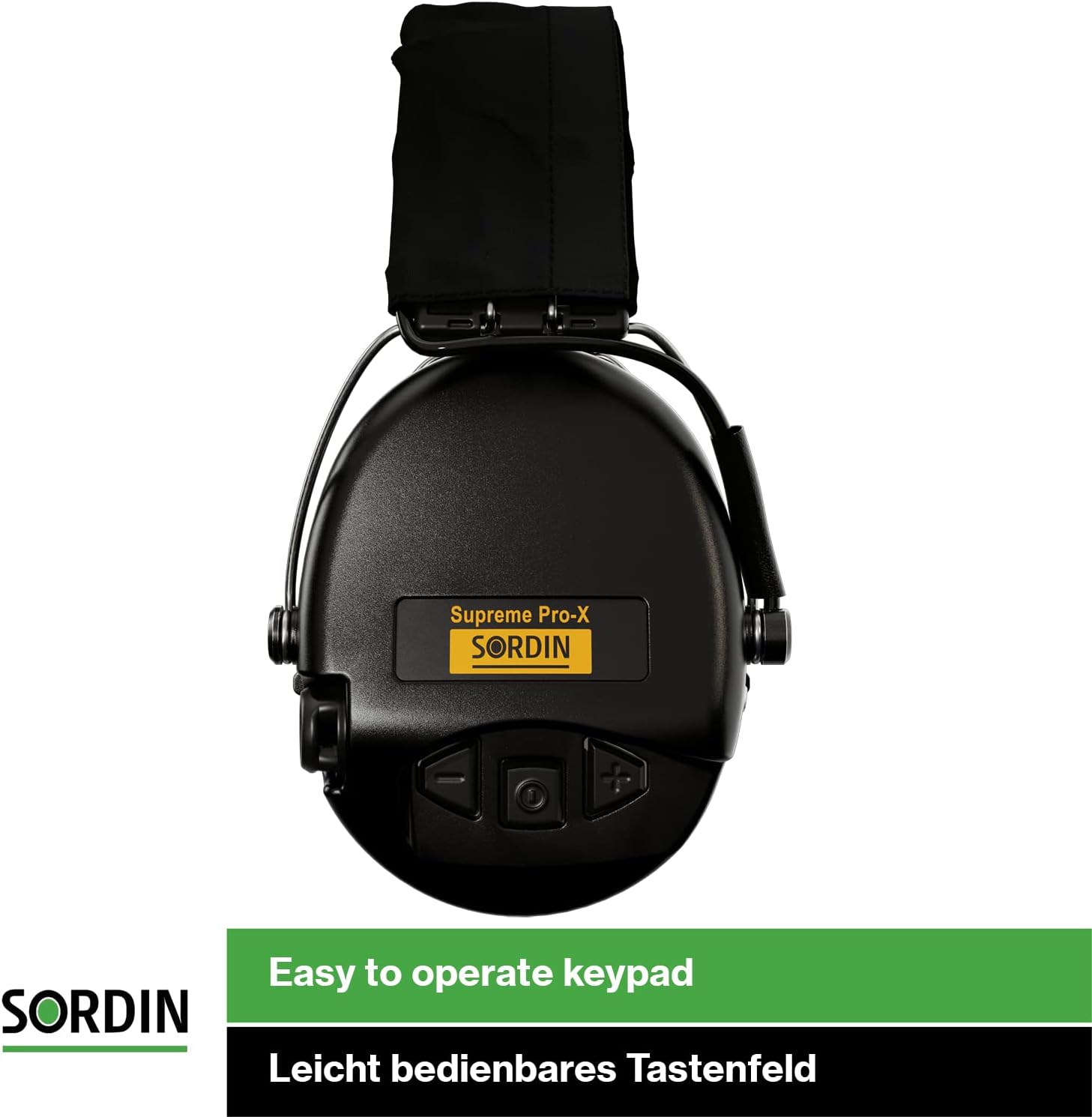
Image 4.1: The easy-to-operate keypad on the Sordin Pro-X ear cup.
4.2. Volume Adjustment
Use the '+' and '-' buttons on the control panel to increase or decrease the amplification level of ambient sounds.
4.3. Sound Modes
The Sordin Pro-X offers four selectable sound modes to optimize performance for different environments:
- Hunting Mode: Optimized for detecting subtle sounds in natural environments.
- Focus Mode: Enhances directional hearing for specific sound sources.
- Shooting Mode: Provides maximum impulse noise suppression while maintaining speech clarity.
- Communication Mode: Balances ambient sound amplification with clear communication.
Refer to the device's specific button combinations or sequence to cycle through these modes.
5. Maintenance
5.1. Cleaning
Wipe the ear cups and headband with a damp cloth. Do not use harsh chemicals or abrasive cleaners. Ensure the battery compartment is dry before closing.
5.2. Gel Pad Care
Regularly inspect the gel pads for wear and tear. Replace them if they become damaged or lose their sealing effectiveness. Replacement hygiene kits are available.

Image 5.1: Sordin Pro-X with focus on the ear cups, which can be fitted with hygienic foam kits.
5.3. Storage
Store the hearing protector in a dry, cool place away from direct sunlight. Remove batteries if the device will not be used for an extended period to prevent leakage.

Image 5.2: Detail of the Sordin Pro-X ear cup, demonstrating its durable design for tough conditions.
6. Troubleshooting
| Problem | Possible Cause | Solution |
|---|---|---|
| No sound or weak sound. | Low or dead batteries, incorrect battery insertion, device not powered on. | Replace batteries, ensure correct polarity, power on the device. |
| Distorted sound. | Low batteries, moisture in microphones, damaged components. | Replace batteries, allow device to dry, contact support if issue persists. |
| Uncomfortable fit. | Improper headband adjustment, worn gel pads. | Adjust headband, replace gel pads if necessary. |
7. Specifications
- Model Number: Sordin Supreme Pro-X
- Manufacturer: Sordin
- Compliance: EN 352 (European Standard for Hearing Protectors)
- Power Source: 2 x AAA Batteries
- Features: Active noise amplification, 4 selectable sound modes, waterproof electronics.

Image 7.1: Certification markings on the Sordin Pro-X, indicating compliance with EN 352 standards.
8. Warranty and Support
For warranty information, technical support, or to purchase replacement parts, please contact Sordin customer service directly. Refer to the official Sordin website for the most up-to-date contact details.
Note: The seller "ACE-Instruments" is responsible for fulfilling orders. For product-specific issues, Sordin is the manufacturer.


