
Max Power MPD1223-ROAR
Maxpower MPD1223 12" Bluetooth-Compatible Speaker User Manual
Model: MPD1223-ROAR
Introduction
The Maxpower MPD1223 is a versatile 12-inch Bluetooth-compatible speaker system designed for various audio applications, including parties, karaoke, and general music playback. It features a built-in microphone, remote control, and a speaker stand for enhanced usability. This manual provides detailed instructions for setup, operation, maintenance, and troubleshooting to ensure optimal performance and longevity of your device.
What's in the Box
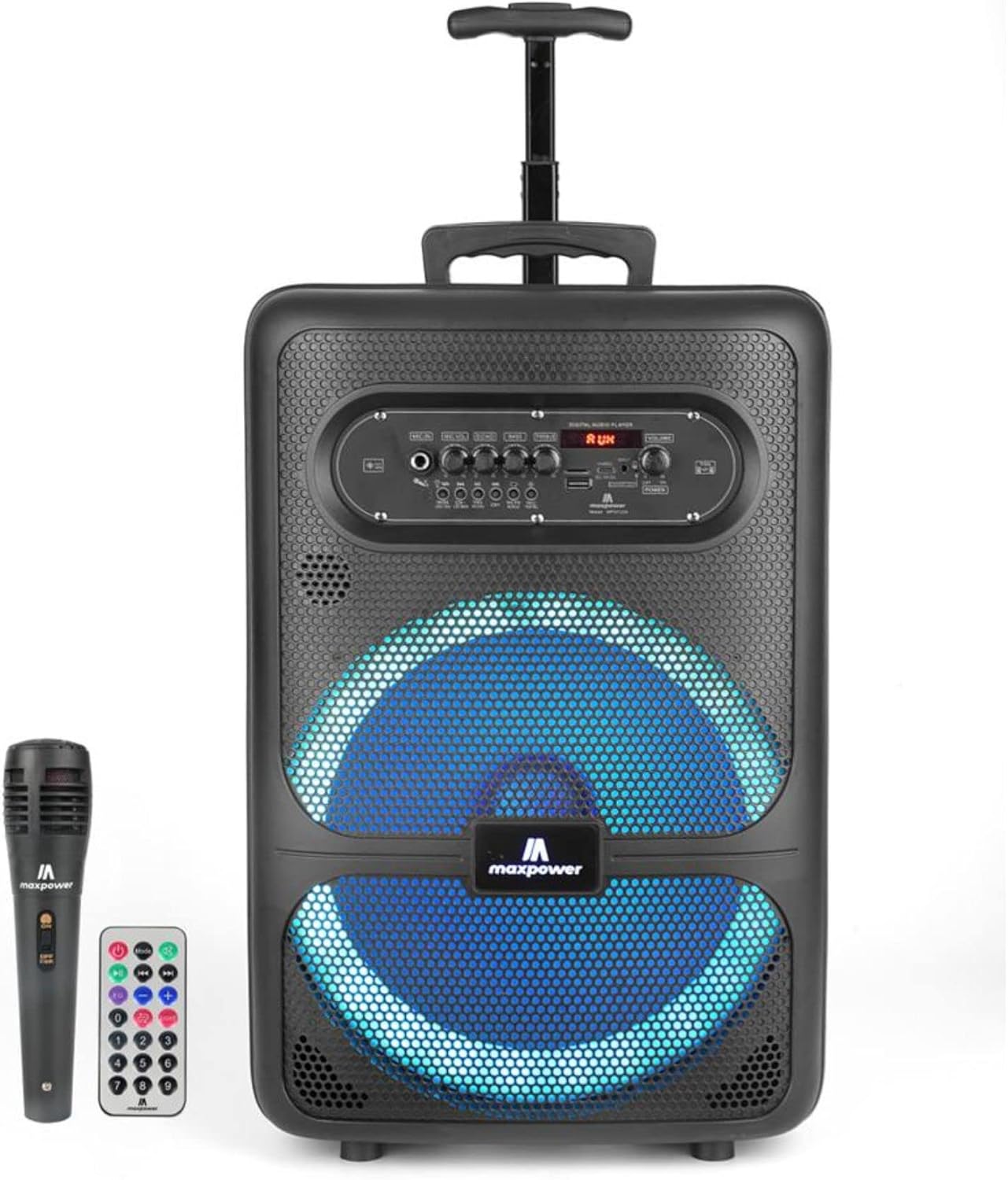
Image: The Maxpower MPD1223 speaker, accompanied by its wireless microphone and remote control.
Upon unboxing your Maxpower MPD1223 speaker system, please verify that all the following components are present:
- Maxpower MPD1223 12" Speaker Unit
- Wireless Microphone
- Remote Control
- Speaker Stand (DJ Stand)
- AC 100-240V Main Power Cable
- User Manual (this document)
Key Features

Image: A visual summary of the Maxpower MPD1223's key features, including its portability, battery life, and connectivity options.
- 12-inch Speaker with DJ Stand: Provides full-range stereo sound reproduction and impressive bass response, elevated by the included stand.
- Bluetooth Connectivity: Seamlessly stream music wirelessly from any Bluetooth-enabled device.
- Rechargeable Battery: Built-in battery offers up to 6 hours of playback, ideal for portable use.
- Multi LED Lights Mode: Integrated flashing lights enhance the visual experience, synchronizing with the music.
- Built-in Smartphone Charger: Convenient charging port for mobile devices.
- Multiple Audio Inputs: Supports USB, Aux, and Microphone inputs for versatile connectivity.
- Portable Design: Compact with a convenient carry handle, making it easy to transport.
- True Wireless Pairing (TWS): Allows connection of two MPD1223 speakers for a stereo sound experience.
Setup Guide
1. Charging the Speaker
Before initial use, fully charge the speaker. Connect the provided AC power cable to the speaker's power input and plug the other end into a standard electrical outlet. The charging indicator light will illuminate. Once fully charged, the light may change color or turn off, depending on the model.
2. Assembling the Speaker Stand
- Unfold the tripod legs of the speaker stand until they are fully extended and stable.
- Adjust the height of the stand using the locking pin and knob. Ensure the pin is securely inserted into one of the height adjustment holes.
- Carefully place the Maxpower MPD1223 speaker onto the top pole of the stand, ensuring it is seated firmly and securely.
3. Powering On
Locate the power switch on the speaker's control panel. Toggle it to the "ON" position. The digital display will light up, indicating the speaker is ready for operation.
Operating Instructions

Image: Detailed view of the Maxpower MPD1223 control panel, highlighting various inputs and adjustment knobs.
1. Bluetooth Pairing

Image: Illustration of the speaker's wireless Bluetooth streaming capability.
- Ensure the speaker is powered on.
- Press the "MODE" button on the control panel until "BLUE" or "Bluetooth" appears on the digital display. The speaker will enter pairing mode, indicated by a flashing Bluetooth icon or sound prompt.
- On your mobile device (smartphone, tablet, etc.), enable Bluetooth and search for available devices.
- Select "Maxpower MPD1223" from the list of found devices.
- Once paired, the speaker will emit a confirmation sound, and the Bluetooth indicator will stop flashing. You can now stream audio wirelessly.
2. Using the Microphone
Plug the microphone into the "MIC IN" jack on the control panel. Adjust the "MIC VOL" knob to control the microphone's volume. The "ECHO" knob can be used to add an echo effect to your voice for karaoke or vocal performances.
3. USB and AUX Playback
- USB Playback: Insert a USB flash drive containing MP3 audio files into the "USB" port. The speaker will automatically switch to USB mode and begin playing the first compatible track. Use the playback controls (Play/Pause, Next/Previous) on the speaker or remote.
- AUX Playback: Connect an external audio device (e.g., MP3 player, laptop) to the "AUX IN" port using a 3.5mm audio cable. Press the "MODE" button until "AUX" appears on the display. Control playback from your connected device.
4. Adjusting Sound and LED Lights
- Volume: Use the large "VOLUME" knob to adjust the overall output volume.
- Bass & Treble: Use the "BASS" and "TREBLE" knobs to fine-tune the audio's low and high frequencies.
- LED Lights: Press the "LED" button on the control panel to cycle through different light modes or turn the lights off.
Maintenance
- Cleaning: Use a soft, dry cloth to clean the speaker's exterior. Do not use abrasive cleaners or solvents.
- Storage: When not in use for extended periods, store the speaker in a cool, dry place, away from direct sunlight and extreme temperatures.
- Battery Care: To prolong battery life, avoid fully discharging the battery frequently. Charge the speaker regularly, even if not in use, to maintain battery health.
- Ventilation: Ensure the speaker's ventilation openings are not blocked during operation to prevent overheating.
Troubleshooting
| Problem | Possible Cause | Solution |
|---|---|---|
| No power | Battery discharged; Power cable not connected; Power switch off. | Charge the speaker; Ensure power cable is securely connected; Turn the power switch to "ON". |
| No sound | Volume too low; Incorrect input mode; Device not paired (Bluetooth); Microphone not connected. | Increase volume; Press "MODE" to select correct input; Re-pair Bluetooth device; Ensure microphone is plugged in and MIC VOL is up. |
| Bluetooth not connecting | Speaker not in pairing mode; Device too far; Interference; Speaker already connected to another device. | Ensure speaker is in Bluetooth pairing mode; Move device closer; Avoid obstacles; Disconnect from other devices. |
| Microphone not working | Microphone not plugged in; MIC VOL too low; Microphone battery low (if applicable). | Plug in microphone securely; Increase MIC VOL; Replace microphone batteries. |
Specifications

Image: Dimensions of the Maxpower MPD1223 speaker.
| Feature | Detail |
|---|---|
| Model Number | MPD1223-ROAR |
| Speaker Size | 12 inches |
| Power Source | Battery Powered (Rechargeable) |
| Battery Life | Up to 6 hours (Bluetooth on) |
| Connectivity Technology | Bluetooth, USB, Aux |
| Audio Input | Microphone |
| Mounting Type | Pole Mount (with included stand) |
| Product Dimensions (L x W x H) | 12 x 8.4 x 18.2 inches |
| Item Weight | 14.97 pounds |
| Color | Black |
| UPC | 785571464900 |
Support and Legal Information
Customer Support
For any questions, technical assistance, or support regarding your Maxpower MPD1223 speaker, please contact Max Power customer service. Refer to the product packaging or the official Max Power website for the most current contact information.
Legal Disclaimer
This product contains chemicals known to the State of California to cause cancer and birth defects or other reproductive harm. Please handle with care and refer to all safety guidelines provided with the product.
Related documentsMPD1223-ROAR


Ask a question about this manual
Ask about setup, troubleshooting, compatibility, parts, safety, or missing instructions. Manuals+ will review the question and use this page’s manual context to help answer it.