
Metabo WP 11-125 Quick (603624420)
Metabo WP 11-125 Quick Angle Grinder User Manual
Model: WP 11-125 Quick (603624420) | Brand: Metabo
1. Introduction
This manual provides essential information for the safe and effective operation, maintenance, and troubleshooting of your Metabo WP 11-125 Quick Angle Grinder. Please read this manual thoroughly before using the tool and keep it for future reference.
The Metabo Pro Series Angle Grinder is engineered and manufactured in Germany for durability, safety, and productivity. It features a powerful LongLife AC/DC motor designed for demanding applications.

2. Safety Information
Always observe the following safety precautions to prevent injury and damage to the tool:
- Wear appropriate personal protective equipment (PPE), including safety glasses, hearing protection, and gloves.
- Ensure the work area is clean, well-lit, and free from obstructions.
- Secure the workpiece to prevent movement during operation.
- Keep hands and body clear of the rotating disc.
- Disconnect the power supply before changing accessories or performing maintenance.
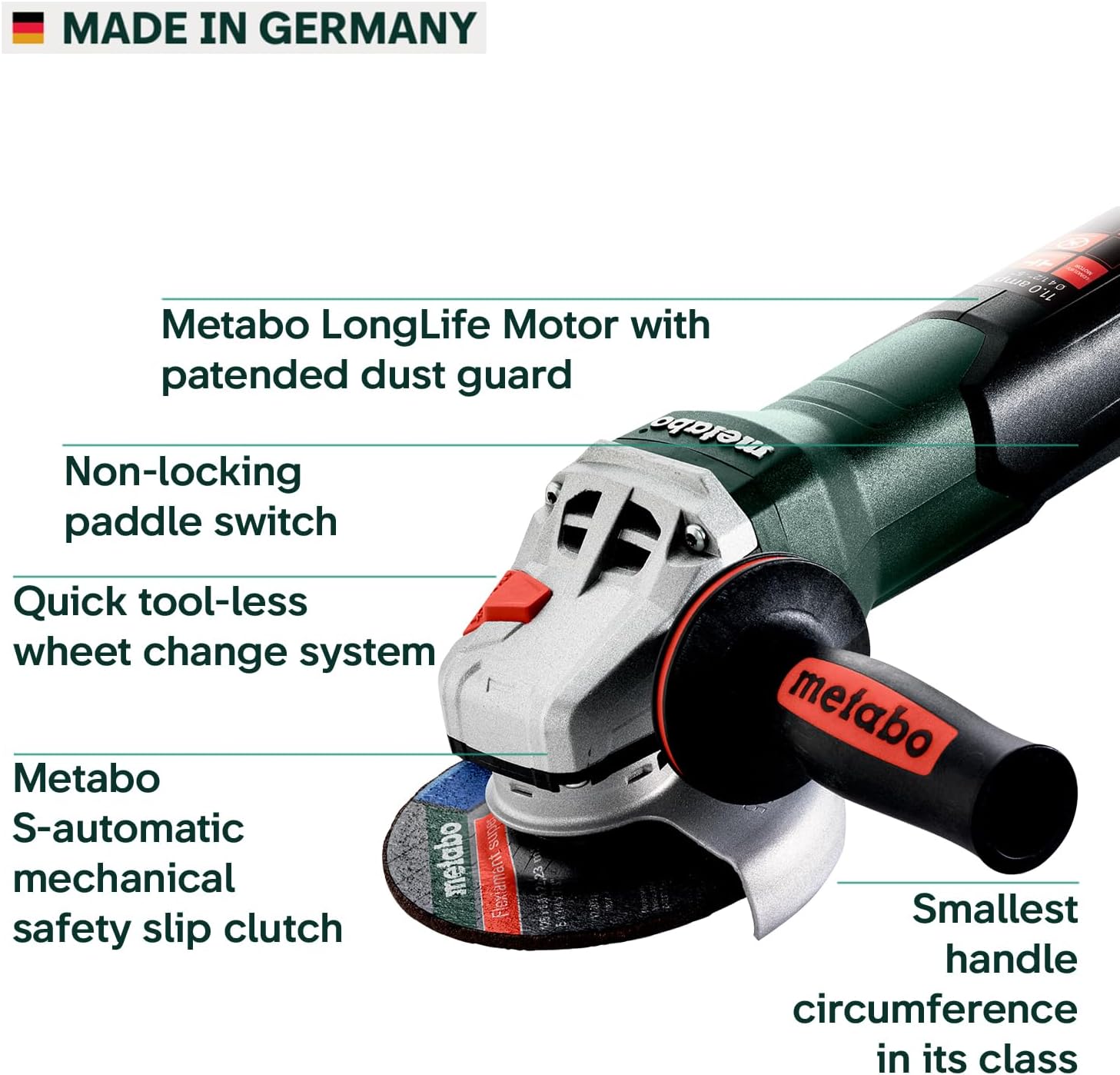
- The Metabo S-Automatic mechanical safety slip clutch helps reduce the likelihood of kickback and allows the user to maintain control in case of an accessory jam.
- The non-locking paddle switch provides increased safety by requiring continuous pressure for operation.

3. Product Components
The Metabo WP 11-125 Quick Angle Grinder typically includes the following components:
- Angle Grinder Unit: Main body with motor and gear housing.
- Adjustable Guard: Tool-free, burst-proof guard for safety during operation.
- Side Handle: Ergonomic, rubberized handle for optimal grip and reduced fatigue.
- M-Quick Nut: For fast, tool-free disc changes.
- Power Cord: Corded electric operation.
4. Setup
4.1 Attaching the Side Handle
The side handle can be attached to either side of the gear housing for comfortable operation, whether you are left-handed or right-handed.
- Identify the threaded holes on both sides of the grinder's gear housing.
- Screw the side handle firmly into the desired threaded hole.
4.2 Installing the Adjustable Guard
The tool-free adjustable guard provides protection from sparks and debris. Ensure it is securely in place before operation.
- Align the guard with the collar on the grinder's head.
- Push the guard onto the collar and rotate it until it clicks into a secure position.
- Adjust the guard's position to deflect sparks away from you and bystanders.
4.3 Attaching the Grinding/Cutting Disc
The patented M-Quick System allows for fast, tool-free disc changes.
- Ensure the grinder is unplugged from the power source.
- Press and hold the spindle lock button located on the gear housing.
- Unscrew the M-Quick nut by hand to remove the existing disc (if any).
- Place the new grinding or cutting disc onto the spindle, ensuring it is centered.
- Screw the M-Quick nut back on by hand until it is finger-tight. Release the spindle lock.

5. Operating Instructions
5.1 Powering On/Off
The Metabo WP 11-125 Quick features a non-locking paddle switch for enhanced safety.
- To turn on the grinder, firmly press and hold the paddle switch.
- To turn off the grinder, release the paddle switch. The tool will stop immediately.

5.2 Grinding and Cutting Techniques
Always ensure the appropriate disc is installed for the task (grinding or cutting).
- Allow the disc to reach full speed before contacting the workpiece.
- Apply steady, even pressure. Do not force the tool.
- For grinding, hold the disc at a slight angle (15-30 degrees) to the workpiece.
- For cutting, hold the disc perpendicular (90 degrees) to the workpiece and make straight, controlled passes.
- The 11 Amp motor produces 11,000 RPM, providing ample power for various applications.


5.3 Official Product Video
6. Maintenance
6.1 Cleaning
- Regularly clean the ventilation openings to prevent overheating. The LongLife motor features patented dust protection.
- Wipe down the tool with a dry cloth after each use.
- Do not use water or harsh chemicals for cleaning.
6.2 Carbon Brushes
The Metabo WP 11-125 Quick is equipped with auto-stop carbon brushes that protect the motor from damage. When the brushes wear down, the tool will automatically shut off, indicating they need replacement. Consult a qualified service technician for carbon brush replacement.
6.3 Storage
Store the grinder in a dry, secure location, out of reach of children and away from direct sunlight or extreme temperatures.
7. Troubleshooting
| Problem | Possible Cause | Solution |
|---|---|---|
| Grinder does not start. | No power supply; paddle switch not fully engaged; worn carbon brushes. | Check power connection; ensure paddle switch is fully pressed; replace carbon brushes (professional service recommended). |
| Excessive vibration. | Damaged or improperly installed disc; loose M-Quick nut. | Inspect and replace damaged disc; ensure disc is correctly installed and M-Quick nut is tightened. |
| Tool stops during operation. | Overload (S-Automatic clutch engaged); worn carbon brushes. | Reduce pressure; allow tool to cool; replace carbon brushes. |
8. Specifications
| Feature | Detail |
|---|---|
| Brand | Metabo |
| Model Number | 603624420 |
| Style | Paddle Switch |
| Power Source | Corded Electric |
| Voltage | 120 Volts |
| Wattage | 1100 watts |
| Maximum Rotational Speed | 11000 RPM |
| Item Weight | 6 Pounds |
| Product Dimensions | 14"L x 5"W x 5"H |
| Country of Origin | Germany |

9. Warranty and Support
9.1 Warranty Information
The Metabo WP 11-125 Quick Angle Grinder comes with a 3-Year Limited Warranty. This warranty covers defects in material and workmanship under normal use. Please retain your proof of purchase for warranty claims.
9.2 Customer Support
For technical assistance, parts, or warranty service, please contact Metabo customer support. Visit the official Metabo website for contact details and further information:
Related documentsWP 11-125 Quick (603624420)


Ask a question about this manual
Ask about setup, troubleshooting, compatibility, parts, safety, or missing instructions. Manuals+ will review the question and use this page’s manual context to help answer it.