
Introduction
The FitNation by Echelon Pedal Pro Plus is a motorized seated elliptical designed to provide a convenient and effective way to exercise and aid in rehabilitation. It allows users to improve circulation, decrease joint pain, and engage in physical activity from the comfort of a chair, whether working, watching TV, or reading. This manual provides essential information for the setup, operation, maintenance, and troubleshooting of your device.
Key Features
- Exercise and Rehab: Designed to improve circulation, decrease joint pain, and facilitate exercise while seated.
- Auto and Manual Settings: Easily switch between automated programs and manual control for varied workout intensity.
- Improve Range of Motion: Features two-directional movement (forward and reverse) for enhanced flexibility and strength building.
- Preset Training Programs: Built-in display allows for the creation of three separate preset training programs for consistent exercise routines.
- Remote Control Included: A convenient remote control is provided for effortless adjustment of settings and programs.
- LCD Display: A clear digital display tracks key metrics including Speed, Time, Distance, Steps, and Calories burned.
Product Components
Your FitNation Pedal Pro Plus package includes the following items:
- FitNation Pedal Pro Plus Unit
- Power Cord
- Remote Control (requires 2x AAA batteries, included)
- Instruction Manual (this document)
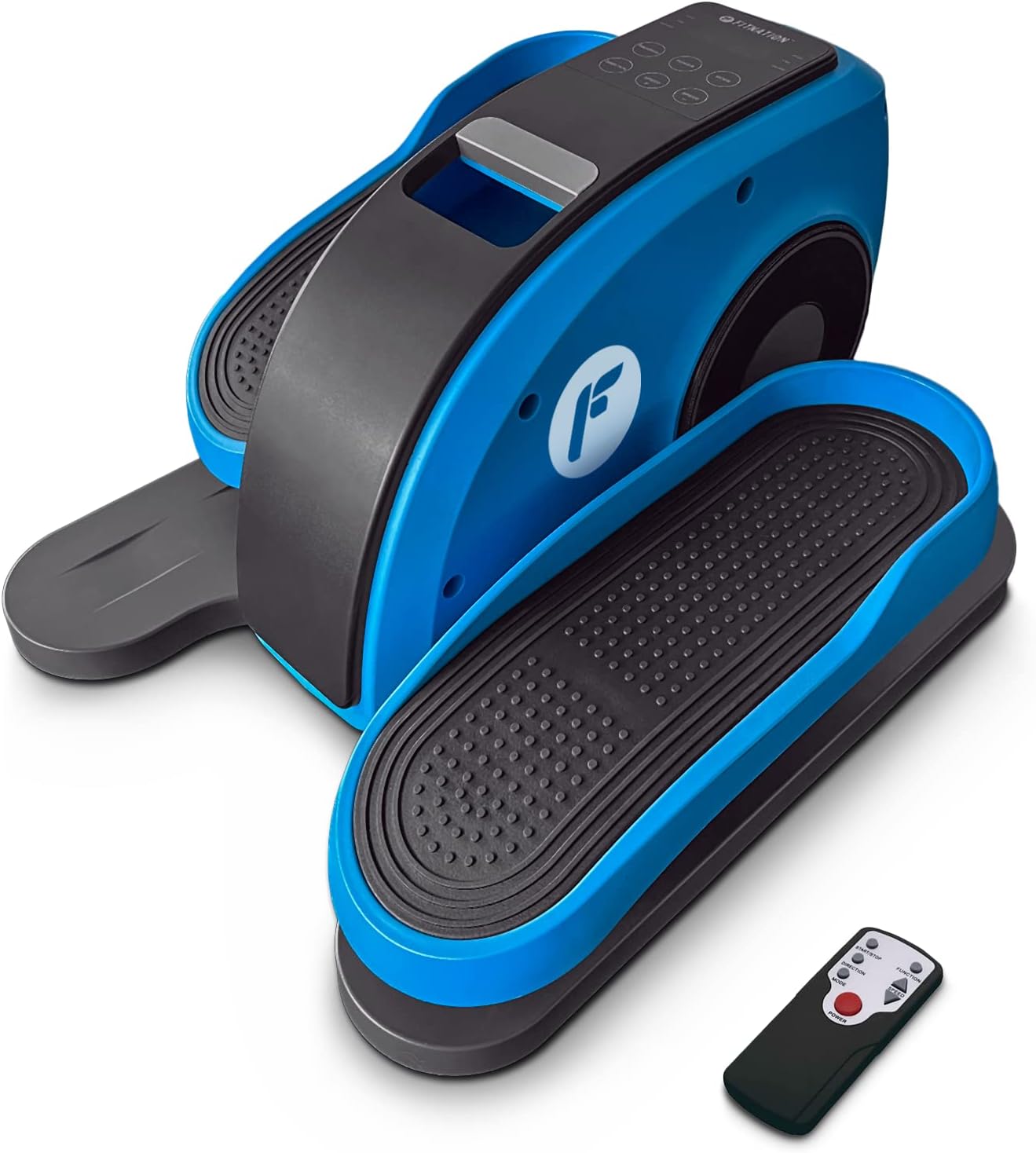
Figure 1: The FitNation Pedal Pro Plus unit with its remote control.
Setup
- Unpack the Unit: Carefully remove all components from the packaging. Retain packaging for future storage or transport.
- Place the Unit: Position the Pedal Pro Plus on a flat, stable surface near a power outlet. Ensure there is enough space for comfortable leg movement. It can be placed under a desk or in front of a chair.
- Connect Power: Insert the power cord into the power input port located at the back of the unit. Plug the other end into a standard electrical outlet.

Figure 2: Rear view of the unit, highlighting the power input.
- Insert Remote Batteries: Open the battery compartment on the back of the remote control and insert the two AAA batteries, ensuring correct polarity.

Figure 3: The remote control used to operate the elliptical.
Operating Instructions
The Pedal Pro Plus can be operated using the control panel on the unit or the included remote control.
Control Panel and Display

Figure 4: The main control panel and LCD display.
- LCD Display: Shows Speed, Time, Distance, Steps, and Calories.
- POWER Button: Turns the unit on or off.
- MODE Button: Cycles through display metrics (Time, Distance, Steps, Calories).
- PROGRAM Button: Selects between preset training programs (P1, P2, P3) or manual mode.
- DIRECTION Button: Changes the direction of pedal rotation (forward or reverse).
- SPEED +/- Buttons: Adjusts the speed level (1-10).
Remote Control Functions
The remote control mirrors most functions of the main control panel for convenience.

Figure 5: Remote control button layout and functions.
- Start/Stop Button: Initiates or pauses the elliptical movement.
- Function Button: Toggles between Auto and Manual programs.
- Direction Button: Reverses the pedal movement.
- Speed Adjustment Buttons: Increases or decreases the speed level (1-10).
- Power Button: Turns the unit on or off.
Using the Elliptical
- Ensure the unit is plugged in and the remote has batteries.
- Sit comfortably in a chair with the Pedal Pro Plus positioned in front of you. Place your feet securely on the pedals.
- Press the POWER button on the unit or remote to turn it on. The LCD display will illuminate.
- Select your desired mode:
- Manual Mode: Press the PROGRAM button until no program number (P1, P2, P3) is displayed. Use the SPEED +/- buttons to set your desired speed.
- Preset Programs: Press the PROGRAM button to cycle through P1, P2, or P3. These programs have pre-defined speed variations.
- To change the direction of pedal movement, press the DIRECTION button.
- Begin pedaling. The display will show your workout metrics.
- To stop the workout, press the Start/Stop button on the remote or the POWER button on the unit.
- When finished, press the POWER button to turn off the unit and unplug it from the wall outlet if not in use for an extended period.

Figure 6: The elliptical can be used discreetly under a desk.
Maintenance
- Cleaning: Wipe the unit with a soft, damp cloth after each use. Do not use abrasive cleaners or solvents.
- Storage: Store the unit in a cool, dry place away from direct sunlight and extreme temperatures.
- Inspection: Periodically check all connections and moving parts for any signs of wear or damage. If any issues are found, discontinue use and contact customer support.
Troubleshooting
| Problem | Possible Cause | Solution |
|---|---|---|
| Unit does not power on. | Power cord not properly connected; No power from outlet; Remote batteries dead or incorrectly inserted. | Ensure power cord is securely plugged into unit and outlet. Test outlet with another device. Replace remote batteries, checking polarity. |
| Pedals are not moving smoothly. | Unit placed on uneven surface; Obstruction; Internal issue. | Ensure unit is on a flat, stable surface. Check for any objects obstructing pedal movement. If problem persists, contact customer support. |
| Remote control not responding. | Dead or incorrectly inserted batteries; Obstruction between remote and unit; Remote out of range. | Replace remote batteries, checking polarity. Ensure clear line of sight to the unit's sensor. Move closer to the unit. |
| Display not showing correct metrics. | Incorrect mode selected. | Press the MODE button to cycle through the display metrics. |
Specifications

Figure 7: Product dimensions and weight for easy reference.
| Attribute | Detail |
|---|---|
| Model Name | Pedal Pro Plus Blue |
| Brand | FITNATION |
| Color | BLUE |
| Product Dimensions (D x W x H) | 17.5"D x 14.5"W x 10.5"H |
| Material | Steel, Plastic, Synthetic Leather |
| Resistance Mechanism | Magnetic |
| Maximum Weight Recommendation | 100 Kilograms (220 lbs) |
| Item Weight | 15.8 Pounds (7.17 kg) |
| Number of Resistance Levels | 8 |
| UPC | 810091983218 |
| Model Number (Part Number) | PPP-FN-BLUE |
Warranty and Support
The FitNation Pedal Pro Plus comes with a 1-year manufacturer's warranty. This warranty covers defects in materials and workmanship under normal use.
For warranty claims, technical assistance, or any questions regarding your product, please contact FitNation customer support. Refer to the contact information provided on the product packaging or the official FitNation website.
Please have your model number (PPP-FN-BLUE) and proof of purchase ready when contacting support.