
1. Overview
This manual provides essential information for the proper use and care of your OLEVS Men's Business Quartz Watch, Model YPF-G2859GH-HL. This watch features a precise Japanese quartz movement, a durable stainless steel construction, and multiple functions including a chronograph, date display, and luminous hands.

Figure 1: OLEVS Men's Business Quartz Watch (Model YPF-G2859GH-HL)
2. Key Features
- Analog Quartz Movement: Equipped with an imported Japanese quartz movement and a high-quality battery for accurate timekeeping.
- Multifunctional Chronograph: Features three sub-dials displaying 60 seconds, 60 minutes, and a calendar window for the date.
- Durable Stainless Steel: Constructed with a 316L stainless steel strap, suitable for various wrist sizes. Includes a free band adjustment tool.
- Luminous Display: Hands and markers are luminous, allowing for easy time reading in low-light conditions.
- Water Resistance: Rated 3ATM (30 meters or 100 feet) for daily waterproof needs, suitable for splashes and brief immersion, but not for swimming or diving.

Figure 2: Detailed view of watch face and features.
3. Setup and Adjustment
3.1 Setting Time and Date
- Time Adjustment: Pull the crown (main knob on the side) out to the second click position. Rotate the crown to set the hour and minute hands to the desired time. Push the crown back in to start the watch.
- Date Adjustment: Pull the crown out to the first click position. Rotate the crown to adjust the date. Push the crown back in to secure the date.
3.2 Adjusting the Watch Band
Your OLEVS watch comes with a stainless steel band and a complimentary adjustment tool. To adjust the length of the band, use the provided tool to remove or add links as necessary. If you are unsure, it is recommended to seek professional assistance to avoid damage to the band or watch.
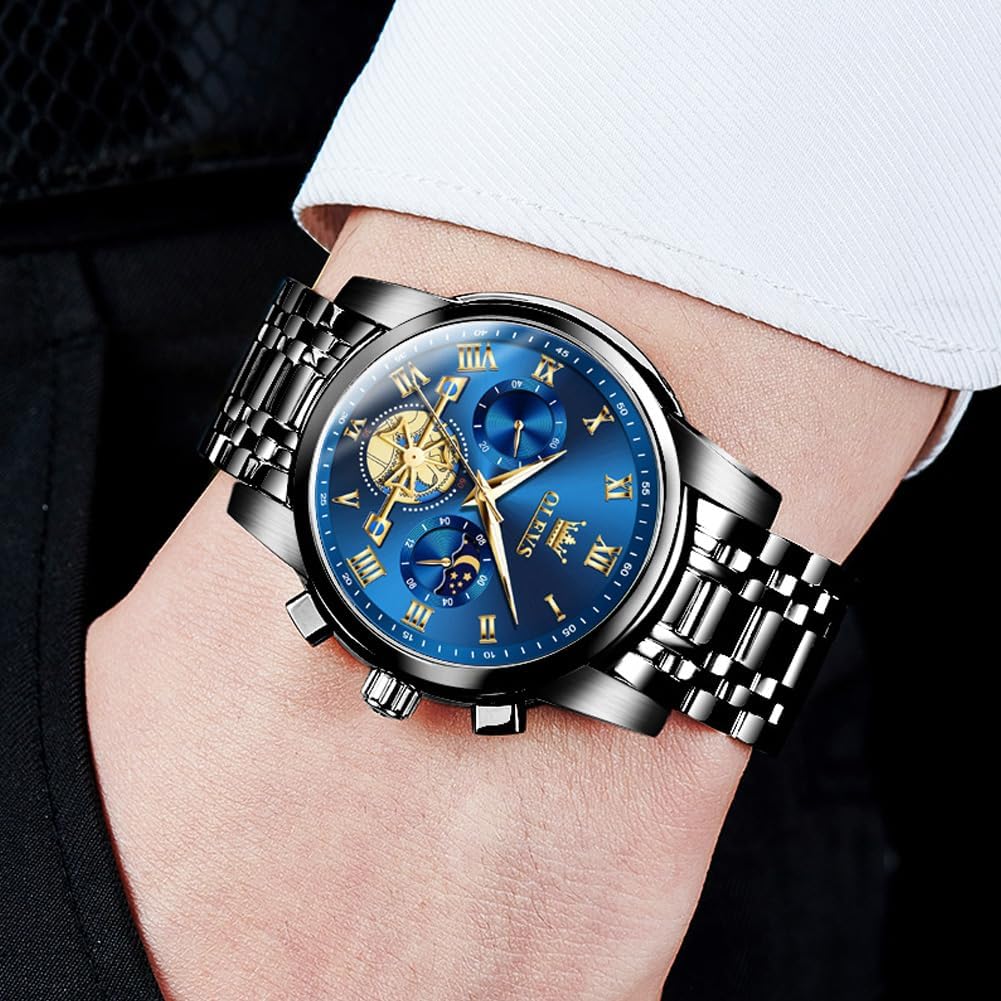
Figure 3: Watch crown and push buttons for time and chronograph functions.
4. Operating Instructions
4.1 Chronograph Function
The chronograph function allows for precise timing. The watch features three sub-dials: a 60-second counter, a 60-minute counter, and a 24-hour display (often integrated with the moon phase or day/night indicator).
- Start/Stop: Press the upper push button to start the chronograph. Press it again to stop the timing.
- Reset: After stopping the chronograph, press the lower push button to reset all chronograph hands to their zero positions.
4.2 Luminous Display
The watch hands and hour markers are coated with a luminous material. Exposure to light (natural or artificial) will charge this material, allowing it to glow in the dark for a period, enhancing readability at night.
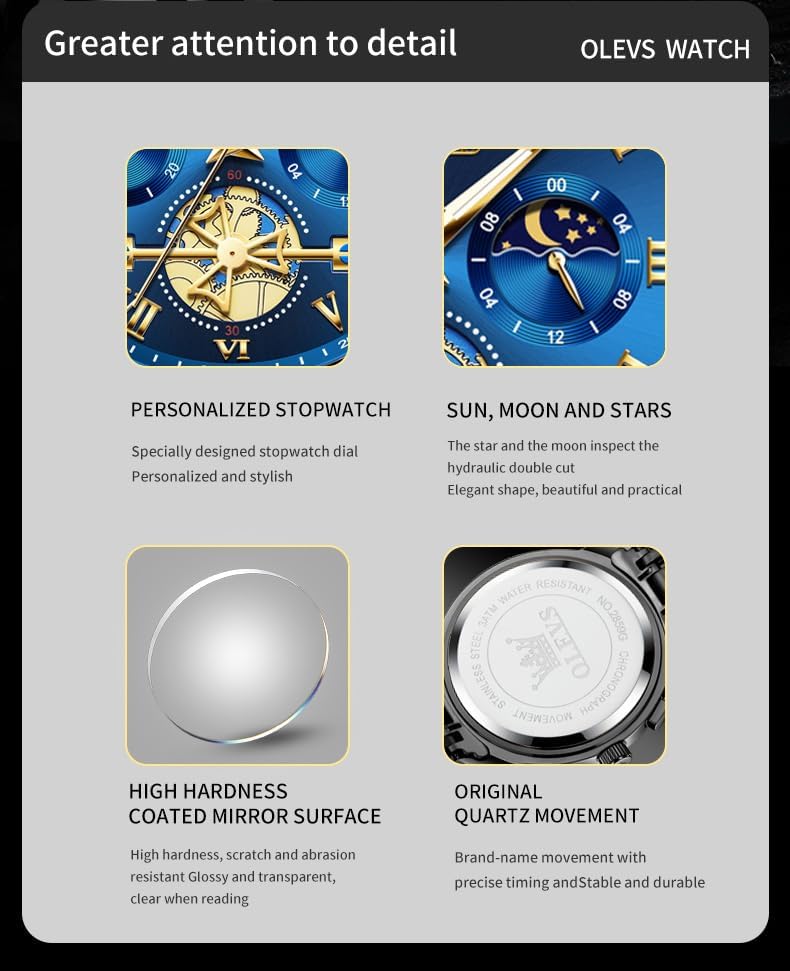
Figure 4: Luminous feature for visibility in low light.
5. Care and Maintenance
- Water Resistance: This watch is 3ATM (30 meters/100 feet) water-resistant. It is suitable for daily use, such as hand washing or rain exposure. It is not recommended for showering, swimming, or diving. Ensure the crown is fully pushed in to maintain water resistance.
- Cleaning: Wipe the watch regularly with a soft, dry cloth to remove dust and smudges. For the stainless steel band, a slightly damp cloth can be used, followed by immediate drying.
- Avoid Chemicals: Do not expose the watch to harsh chemicals, solvents, or detergents, as these can damage the case, strap, or internal components.
- Temperature Extremes: Avoid exposing the watch to extreme temperatures (hot or cold) or sudden temperature changes, which can affect its accuracy and longevity.
- Magnetic Fields: Keep the watch away from strong magnetic fields, as they can interfere with the quartz movement.

Figure 5: Water resistance demonstration.
6. Troubleshooting
- Watch Not Running: Check if the crown is fully pushed in. If the watch still does not run, the battery may need replacement. Contact customer support or a qualified watch technician.
- Incorrect Time/Date: Refer to Section 3.1 for instructions on setting the time and date. Ensure the crown is securely pushed back in after adjustment.
- Chronograph Malfunction: If the chronograph hands do not reset to zero or function incorrectly, try resetting them by pressing the lower push button after stopping the chronograph. If the issue persists, contact customer support.
- Water Inside Watch: If moisture appears inside the watch, immediately take it to a qualified watch technician for inspection and repair to prevent further damage.
7. Specifications
| Feature | Detail |
|---|---|
| Model Number | YPF-G2859GH-HL |
| Brand | OLEVS |
| Movement | Japanese Quartz |
| Display Type | Analog |
| Case Material | Stainless Steel |
| Band Material | Stainless Steel |
| Dial Color | Blue |
| Case Diameter | 41 mm |
| Case Thickness | 11 mm |
| Band Width | 18 mm |
| Band Length | 200 mm |
| Crystal Material | Synthetic Sapphire |
| Water Resistance | 3ATM (30 meters / 100 feet) |
| Additional Functions | Chronograph, Date, Luminous |
| Clasp Type | Push Button Hidden Clasp |
| Item Weight | 130 Grams |
8. Product Videos
8.1 OLEVS Men's Chronograph Watch Overview
This video provides a comprehensive overview of the OLEVS Men's Chronograph Business Casual Watch, showcasing its design, features, and functionality.
8.2 OLEVS Men's Chronograph Watch Features
A detailed look at the chronograph and other features of the OLEVS Men's Business Casual Quartz Watch, highlighting its intricate design and practical applications.
8.3 OLEVS Men's Chronograph Dress Watch Showcase
This video presents the OLEVS Men's Chronograph Business Dress Quartz Watch, focusing on its elegant appearance and suitability for formal and business settings.
9. Warranty and Support
Your OLEVS watch comes with a 2-year after-sales service warranty. If you encounter any issues or have questions regarding your product, please contact OLEVS customer support for assistance. Ensure you retain your proof of purchase for warranty claims.


