
Nitecore nitecore-p10i
NITECORE P10i Instruction Manual
Model: P10i | Brand: Nitecore
1. Introduction
The NITECORE P10i is an i-Generation tactical flashlight designed for superior performance and reliability. Utilizing a Luminus SST-40-W LED, it delivers a maximum output of 1,800 lumens, a maximum beam distance of 290 meters, and a peak beam intensity of 21,100 candelas. It features a Type-C USB rechargeable design and an ultimate dual tail switch for intuitive operation.
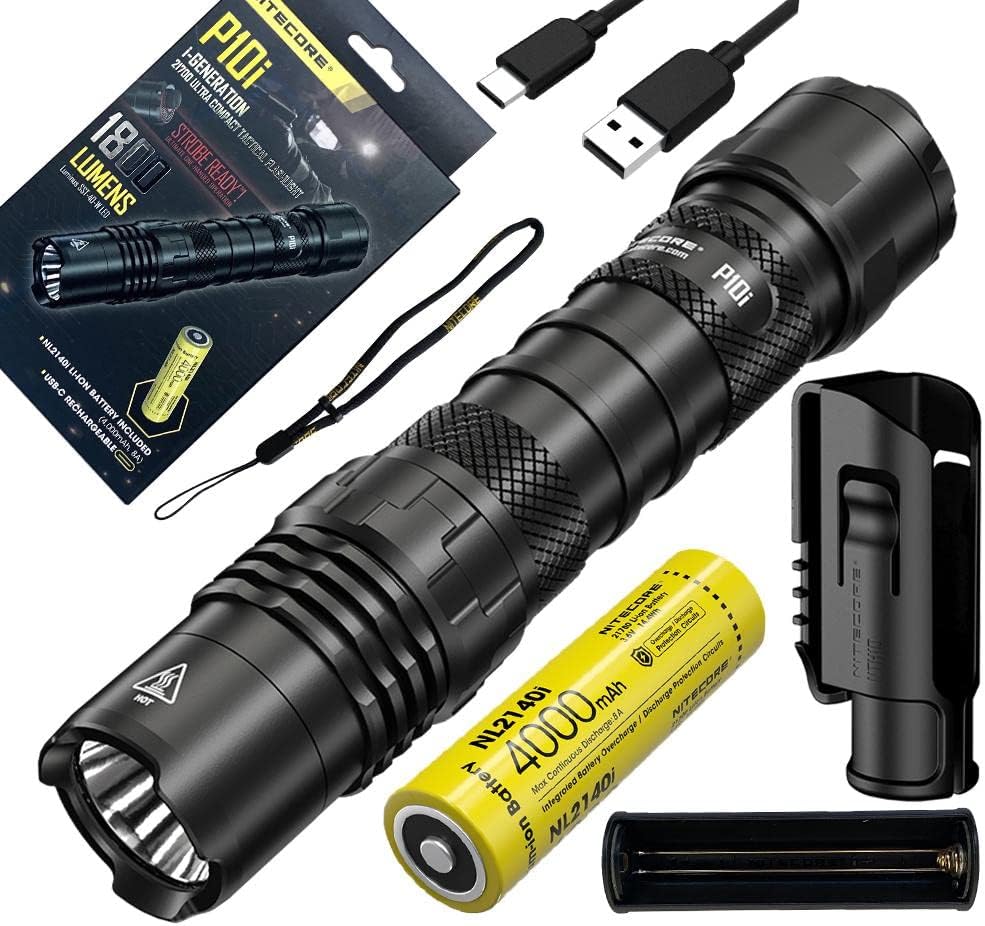
Figure 1: NITECORE P10i Flashlight and Accessories
This image displays the Nitecore P10i flashlight along with its complete set of accessories, including the rechargeable battery, NTH10 holster, pocket clip, lanyard, and USB-C charging cable. These components are essential for the flashlight's operation and portability.
2. Package Contents
- Nitecore P10i Flashlight
- Nitecore 21700i Series Rechargeable Li-ion Battery (NL2140i 4000mAh)
- NTH10 Holster
- Pocket Clip
- Lanyard
- USB-C Charging Cable
3. Setup
3.1 Battery Installation
The P10i is powered by a Nitecore 21700i Series Li-ion battery. Ensure the battery is inserted with the positive (+) end facing the head of the flashlight.
- Unscrew the tail cap counter-clockwise.
- Insert the 21700i Series battery with the positive (+) terminal facing inwards towards the head.
- Screw the tail cap clockwise until it is fully tightened.

Figure 2: 21700i Series Battery Orientation
This diagram illustrates the correct orientation for inserting the 21700i series battery into the Nitecore P10i flashlight, clearly marking the positive and negative terminals to ensure proper installation and function.
3.2 Charging
The P10i features a built-in USB-C charging port for convenient and fast recharging of the 21700i Series battery. The charging port is protected by a cover to ensure water, dust, and impact resistance.
- Locate the USB-C charging port on the flashlight body.
- Lift the charging port cover to expose the port.
- Connect one end of the USB-C charging cable to the flashlight's port and the other end to a USB power source (e.g., USB adapter, computer, power bank).
- The power indicator will show charging status.

Figure 3: USB-C Charging Port
This image provides a detailed view of the USB-C charging port on the Nitecore P10i, highlighting its protective cover which ensures durability against water, dust, and impacts. The reversible plug-in design of the USB-C port is also visible.
4. Operating Instructions
4.1 General Operation
The P10i features an ultimate dual tail switch design for versatile control.

Figure 4: Ultimate Dual Tail Switch Design
This image details the dual tail switch system of the Nitecore P10i, showcasing the Tactical Tail Switch for momentary-on and constant-on illumination, and the STROBE READY Mode Button for output adjustment and instant access to the STROBE mode.
Tactical Tail Switch
- Momentary-on: Half-press and hold the Tactical Tail Switch to turn on the light momentarily. Release to turn off.
- Constant-on: Fully press the Tactical Tail Switch until a click is heard to turn on the light constantly. Press again to turn off.
STROBE READY Mode Button
- Output Adjustment: When the light is on, short press the STROBE READY Mode Button to cycle through brightness levels (e.g., High, Mid, Low).
- Instant STROBE: When the light is off or on, press and hold the STROBE READY Mode Button to instantly access STROBE mode. Release to exit.
4.2 Brightness Levels and Modes
The P10i offers multiple brightness levels and a special Strobe mode for various tactical and general illumination needs.
- High: 1800 Lumens
- Mid: (Specific lumen output not provided, typically lower than High)
- Low: (Specific lumen output not provided, lowest constant output)
- Strobe: 1800 Lumens (Tactical Blazing Performance)
5. Maintenance
Proper maintenance ensures the longevity and optimal performance of your Nitecore P10i flashlight.
- Cleaning: Clean the threads and O-rings regularly with a clean cloth. Apply a thin layer of silicone lubricant to the O-rings to prevent wear and tear and maintain water resistance.
- Battery Care: If the flashlight is to be stored for an extended period, remove the battery to prevent leakage. Recharge the battery every three months to maintain its health.
- Water Resistance: The P10i is rated as waterproof. Ensure the tail cap is fully tightened and the USB-C port cover is securely closed before exposing the flashlight to water. Avoid submerging the flashlight beyond its rated depth or for prolonged periods.
- Lens Care: Keep the lens clean from dust and debris. Use a soft, lint-free cloth to wipe the lens.
6. Troubleshooting
If you encounter issues with your Nitecore P10i, refer to the following common problems and solutions:
| Problem | Possible Cause | Solution |
|---|---|---|
| Flashlight does not turn on. | Battery is depleted or incorrectly inserted. | Recharge or replace the battery. Ensure battery is inserted with correct polarity. |
| Light output is dim or flickers. | Low battery power; loose tail cap or head; dirty contacts. | Recharge battery. Tighten tail cap and head. Clean battery contacts and threads. |
| Cannot charge the flashlight. | USB-C cable or power source issue; charging port obstruction. | Try a different USB-C cable or power source. Check for debris in the charging port. |
| Strobe mode not activating. | Incorrect button press. | Ensure you are pressing and holding the STROBE READY Mode Button. |
If the problem persists after attempting these solutions, please contact Nitecore customer support for further assistance.
7. Specifications
| Feature | Specification |
|---|---|
| Max Output | 1800 Lumens |
| Max Beam Distance | 290 meters |
| Max Beam Intensity | 21100 cd |
| Max Runtime | 50 hours 0 minutes (2.08 days) |
| LED | Luminus SST-40-W LED |
| Special Modes | Strobe |
| Length | 147 mm / 5.79 inches |
| Head Size | 25.4 mm / 1.00 inch |
| Weight | 84 g / 2.96 oz |
| Material | Aluminum |
| Color | Black |
| Power Source | Battery Powered (21700i Li-ion) |
| Voltage | 3.7 Volts (DC) |
| Water Resistance Level | Waterproof |
8. Warranty and Support
Nitecore products are known for their quality and reliability. For information regarding warranty coverage, terms, and conditions, please refer to the official Nitecore website or contact their customer support directly.
For further assistance, technical support, or to inquire about replacement parts, please visit the official Nitecore store or contact their customer service department.
Official Nitecore Store: Visit the Nitecore Store on Amazon
Related documentsnitecore-p10i


Ask a question about this manual
Ask about setup, troubleshooting, compatibility, parts, safety, or missing instructions. Manuals+ will review the question and use this page’s manual context to help answer it.