
Introduction
This manual provides essential information for the setup, operation, and maintenance of your Humanscale eFloat Go Desk. The eFloat Go is an electric height-adjustable table designed to promote active working by allowing seamless transitions between sitting and standing positions.
It features innovative anti-collision technology, quiet motors, and a programmable hand switch for personalized height settings.
Safety Information
Please read all safety instructions before assembly and operation. Failure to do so may result in injury or damage to the product.
- The maximum weight capacity for this desk is 250 pounds. Do not exceed this limit.
- Ensure all cables are properly managed to prevent tripping hazards or entanglement during height adjustments.
- Keep hands and objects clear of moving parts during operation to avoid pinching or crushing.
- The desk is equipped with anti-collision technology, but always exercise caution.
- Assembly requires careful attention to instructions. It is recommended that at least one person is available for assembly.
Setup
The Humanscale eFloat Go Desk is designed for quick assembly, typically taking under 5 minutes. Follow the detailed assembly instructions provided in the packaging. Ensure all components are present before beginning.
Unpacking and Inspection
- Carefully open the packaging and remove all components.
- Verify that all parts listed in the assembly guide are included and undamaged.
- Place components on a soft, clean surface to prevent scratches during assembly.
Assembly Steps
- Attach the desk legs to the tabletop using the provided hardware. Ensure all screws are tightened securely.
- Connect the motor cables according to the diagram in the assembly guide.
- Mount the programmable hand switch to the underside of the desk in a convenient location.
- Plug the power cord into a grounded electrical outlet.
- Perform an initial test run to ensure smooth operation.

Figure 1: Desk Dimensions. This image illustrates the overall dimensions of the eFloat Go Desk, including its depth, width, and height, which are crucial for planning your workspace.
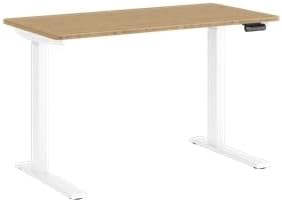
Figure 2: Assembled Desk. This image shows the fully assembled Humanscale eFloat Go Desk, highlighting its white base and bamboo top, ready for use in an office or home environment.
Operating Instructions
The eFloat Go Desk features an intuitive programmable hand switch for easy height adjustments.
Basic Operation
- To raise the desk, press and hold the Up arrow button.
- To lower the desk, press and hold the Down arrow button.
- Release the button at your desired height.
Programming Height Presets
The hand switch allows you to save up to three preferred height settings.
- Adjust the desk to your desired height for the first preset.
- Press the 'M' button (Memory). The display will show 'S-'.
- Within 3 seconds, press the desired preset number button ('1', '2', or '3'). The display will show 'S-1', 'S-2', or 'S-3' to confirm the setting.
- Repeat for other desired height presets.
Recalling Presets
To move the desk to a saved height, simply press the corresponding preset number button ('1', '2', or '3'). The desk will automatically adjust to the saved position.

Figure 3: Control Panel. This image provides a detailed view of the desk's control panel, showing the buttons for height adjustment and memory presets.
Maintenance
Regular maintenance ensures the longevity and optimal performance of your eFloat Go Desk.
- Cleaning: Wipe the desk surfaces with a dry cloth or a damp cloth. Avoid abrasive cleaners or harsh chemicals that may damage the finish.
- Cable Management: Periodically check and organize cables to prevent tangling or interference with the desk's movement.
- Fastener Check: Every few months, inspect all screws and fasteners to ensure they remain tight. Retighten if necessary.
- Motor Care: The desk's motors are designed for quiet operation and require no special lubrication. If you notice unusual noises, refer to the troubleshooting section.
Troubleshooting
If you encounter issues with your eFloat Go Desk, refer to the following common problems and solutions.
| Problem | Possible Cause | Solution |
|---|---|---|
| Desk does not move. | Power cord unplugged; circuit breaker tripped; motor overload. | Check power connection. Reset circuit breaker. Unplug for 30 minutes, then retry. |
| Desk moves unevenly or makes unusual noise. | Loose fasteners; obstruction; uneven weight distribution. | Check and tighten all fasteners. Remove any obstructions. Redistribute weight evenly on the tabletop. |
| Height presets are not working. | Presets not properly saved; power interruption. | Reprogram the height presets following the "Programming Height Presets" section. |
| Anti-collision feature triggers too often. | Sensitive setting; minor obstruction. | Ensure no objects are near the desk's path. Consult Humanscale support for sensitivity adjustment if needed. |
If the problem persists after attempting these solutions, please contact Humanscale customer support.
Specifications
Key technical specifications for the Humanscale eFloat Go Desk:
- Model Number: FTR2448BM_FG1224DW
- Product Dimensions (D x W x H): 23"D x 46"W x 26.5"H
- Top Size: 23" Depth x 46" Width
- Color: White on Bamboo
- Base Material: Metal
- Top Material: Bamboo
- Special Feature: Electric Height-Adjustable
- Item Weight: 150 Pounds
- Maximum Weight Recommendation: 250 Pounds
- Required Assembly: Yes
Warranty Information
The Humanscale eFloat Go Desk is backed by a comprehensive warranty to ensure your peace of mind.
- Warranty Period: 10-Year, 24/7 Humanscale Warranty.
- This warranty covers defects in materials and workmanship under normal use.
- For full warranty terms and conditions, please refer to the warranty card included with your product or visit the official Humanscale website.
Customer Support
For further assistance, technical support, or warranty claims, please contact Humanscale customer service.
- Humanscale Official Website: www.humanscale.com
- Refer to the product packaging or the Humanscale website for specific contact numbers or email addresses for your region.


