
Davilis BN59-01199G
Davilis® Universal Remote Control User Manual
Model: BN59-01199G
Introduction
Thank you for choosing the Davilis® Universal Remote Control. This remote is designed to be a perfect replacement for your original Samsung TV remote, offering identical functionality without the need for complex programming. Simply insert batteries and begin using it with your Samsung LCD, QLED, LED, HDTV, 3D, or 4K television.

Setup
The Davilis Universal Remote Control requires no programming or configuration. It is pre-programmed for immediate use with compatible Samsung televisions.
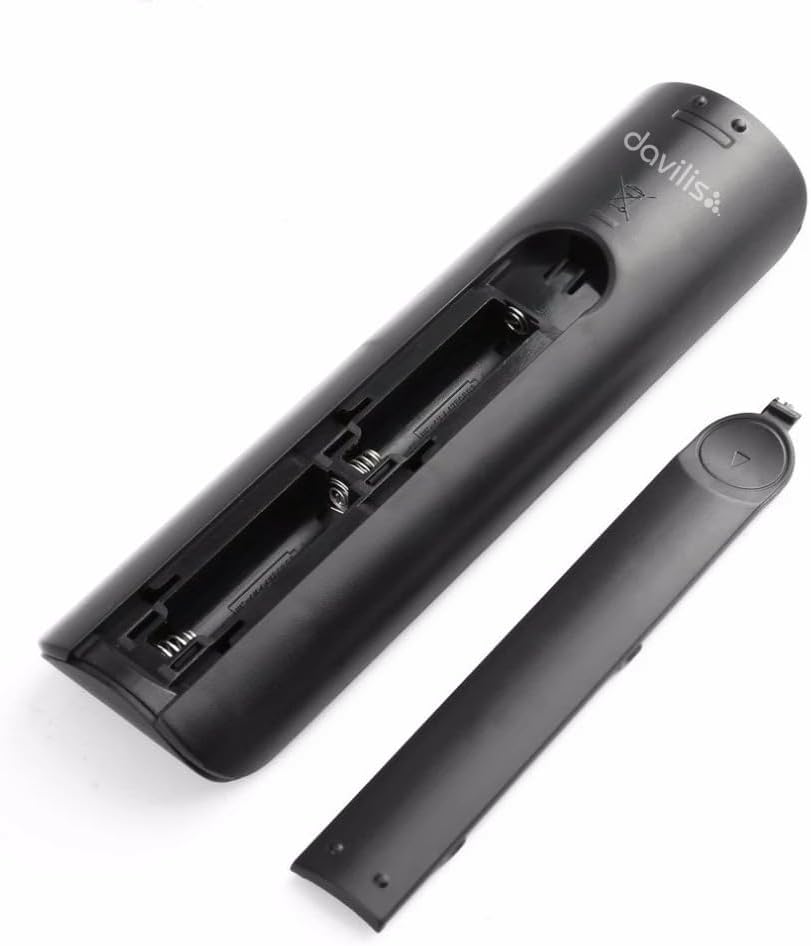
Battery Installation
- Locate the battery compartment on the back of the remote control.
- Slide the battery cover downwards to remove it.
- Insert two (2) AAA batteries (not included) into the compartment, ensuring the correct polarity (+/-) as indicated inside the compartment.
- Slide the battery cover back into place until it clicks securely.

Operating Instructions
This remote control replicates all functions of your original Samsung TV remote. Point the remote directly at your television for optimal performance.
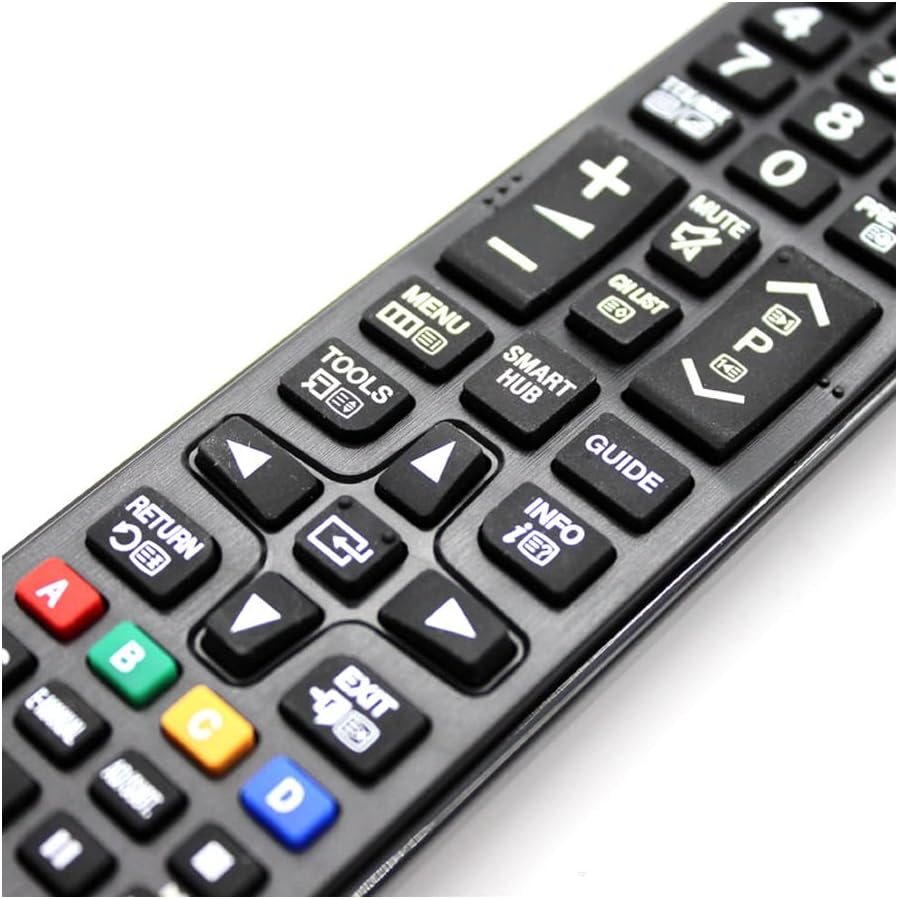
Key Functions Overview
| Button | Function |
|---|---|
| Power (⏻) | Turns the TV on or off. |
| Source | Selects input source (HDMI, AV, etc.). |
| Number Buttons (0-9) | Direct channel selection. |
| Volume (+/-) | Adjusts the volume level. |
| Mute | Mutes or unmutes the TV sound. |
| Channel (P▲/P▼) | Changes channels up or down. |
| Menu | Accesses the TV's main menu. |
| Smart Hub | Opens the Samsung Smart Hub for apps and services. |
| Guide | Displays the electronic program guide. |
| Tools | Accesses quick settings or tools menu. |
| Info | Displays information about the current program or input. |
| Navigation Arrows (Up, Down, Left, Right) | Navigates through menus and options. |
| Enter/OK | Confirms selections. |
| Return | Goes back to the previous screen or menu. |
| Exit | Exits the current menu or application. |
| Color Buttons (Red, Green, Yellow, Blue) | Context-sensitive functions within menus or applications. |
| Media Control Buttons (Play, Pause, Stop, Fast Forward, Rewind) | Controls media playback. |

Maintenance
To ensure the longevity and optimal performance of your Davilis Universal Remote Control, follow these maintenance guidelines:
- Cleaning: Wipe the remote control regularly with a soft, dry cloth. For stubborn dirt, slightly dampen the cloth with water or a mild, non-abrasive cleaner. Avoid using harsh chemicals or abrasive materials, as they can damage the surface and buttons.
- Battery Replacement: Replace batteries when the remote's response becomes sluggish or it stops functioning. Always replace both batteries at the same time with new AAA batteries. Do not mix old and new batteries, or different types of batteries.
- Storage: Store the remote control in a cool, dry place away from direct sunlight, extreme temperatures, and high humidity.
- Handling: Avoid dropping the remote control or subjecting it to strong impacts. While designed to be durable, excessive force can cause internal damage.
Troubleshooting
If you encounter issues with your Davilis Universal Remote Control, please refer to the following common problems and solutions:
- Remote is not responding:
- Check if the batteries are inserted correctly with the correct polarity.
- Replace the batteries with new AAA batteries.
- Ensure there are no obstructions between the remote control and the TV's infrared receiver.
- Make sure you are within the effective operating range (approximately 10 meters).
- Some buttons are not working:
- Clean the remote control, especially around the non-functioning buttons, to remove any dirt or debris that might be preventing proper contact.
- Ensure the remote is pointed directly at the TV.
- Remote works intermittently:
- This often indicates low battery power. Replace the batteries.
- Check for strong light sources (like direct sunlight or bright fluorescent lights) that might interfere with the infrared signal.
If the problem persists after trying these solutions, please contact Davilis customer support for further assistance.
Specifications
| Feature | Detail |
|---|---|
| Brand | Davilis |
| Model Name | Replacement Remote Control |
| Model Number | BN59-01199G |
| Product Dimensions | 2.4 x 4.4 x 17.5 cm; 60 grams |
| Batteries Required | 2 AAA (not included) |
| Hardware Platform | TV |
| Compatible Devices | Samsung Televisions (various models including LCD, QLED, LED, HDTV, 3D, 4K) |
| Special Features | Universal, Pre-programmed, No programming required, Lightweight, Ergonomic |
| Connectivity Technology | Infrared |
| Number of Buttons | 42 |
| Maximum Range | 10 Meters |

Warranty and Support
For warranty information or technical support, please refer to the Davilis official website or contact their customer service directly. Specific warranty terms may vary by region and retailer.
For further assistance, you may visit the Davilis Store on Amazon.
Related Documents - BN59-01199G
 |
Samsung Universal Remote Control BN59-01315A User Guide Comprehensive user guide for the Samsung BN59-01315A universal remote control. Learn about its features, compatibility with Samsung smart TVs, setup, and programming instructions for seamless TV and cable/satellite box operation. |
 |
Samsung BN59-01259E Universal Smart TV Remote Control User Manual User guide for the Samsung BN59-01259E Universal Smart TV Remote Control, covering usage steps, safety restrictions, and CE certification details. |
 |
Samsung Remote Control User Guide and Compatibility Comprehensive guide to Samsung remote control functions, installation steps, and compatibility with various Samsung TV models. Includes model numbers for easy reference. |
 |
User Manual: Infrared Remote Control (Traditional Model) - Erilles BN59-01315B Comprehensive user manual for the Erilles BN59-01315B infrared remote control. Includes setup, pairing instructions, troubleshooting tips, and important safety warnings for traditional models. |
 |
BN59-01315B Replacement Remote Control for Samsung Smart TVs - User Guide Detailed specifications and features for the BN59-01315B replacement remote control, compatible with various Samsung Smart TV models. Includes safety advisories and CE compliance information. |
 |
Samsung LCD/LED TV Remote Control Manual User manual and instructions for operating the Samsung LCD/LED TV remote control, including button functions, battery installation, and compatibility information for models like BN59-01258B. |