
Retoo M024-1
Retoo 1 DIN Car Radio M024-1 Instruction Manual
Bluetooth, USB, SD, AUX, FM/RDS Tuner
1. Introduction
Thank you for choosing the Retoo 1 DIN Car Radio M024-1. This manual provides essential information for the safe and efficient operation of your new car radio. Please read it thoroughly before installation and use, and retain it for future reference.
This car radio features a Bluetooth hands-free system, dual USB ports for music playback and device charging, an SD card slot, AUX input, and an FM/RDS radio tuner with customizable RGB lighting. It is designed to enhance your in-car audio experience and connectivity.
2. Safety Information
- Power Supply: Ensure the car radio is connected to a 12V DC power supply with negative grounding. Incorrect voltage can damage the unit.
- Installation: Professional installation is recommended. Incorrect wiring can cause damage to the vehicle's electrical system or the radio.
- Wiring: Before connecting, ensure all wires are properly insulated to prevent short circuits. Refer to the wiring diagram.
- Driving Safety: Do not operate the radio in a way that distracts you from driving. Always prioritize road safety.
- Temperature: Avoid exposing the unit to extreme temperatures or direct sunlight for prolonged periods.
- Moisture: Keep the unit dry. Exposure to moisture can cause malfunction or electric shock.
3. Package Contents
Verify that all items are present in the package:
- Retoo 1 DIN Car Radio M024-1
- Remote Control
- ISO Wiring Harness (Power and Speaker)
- Mounting Frame
- Disassembly Keys (2 pcs)
- User Manual (this document)
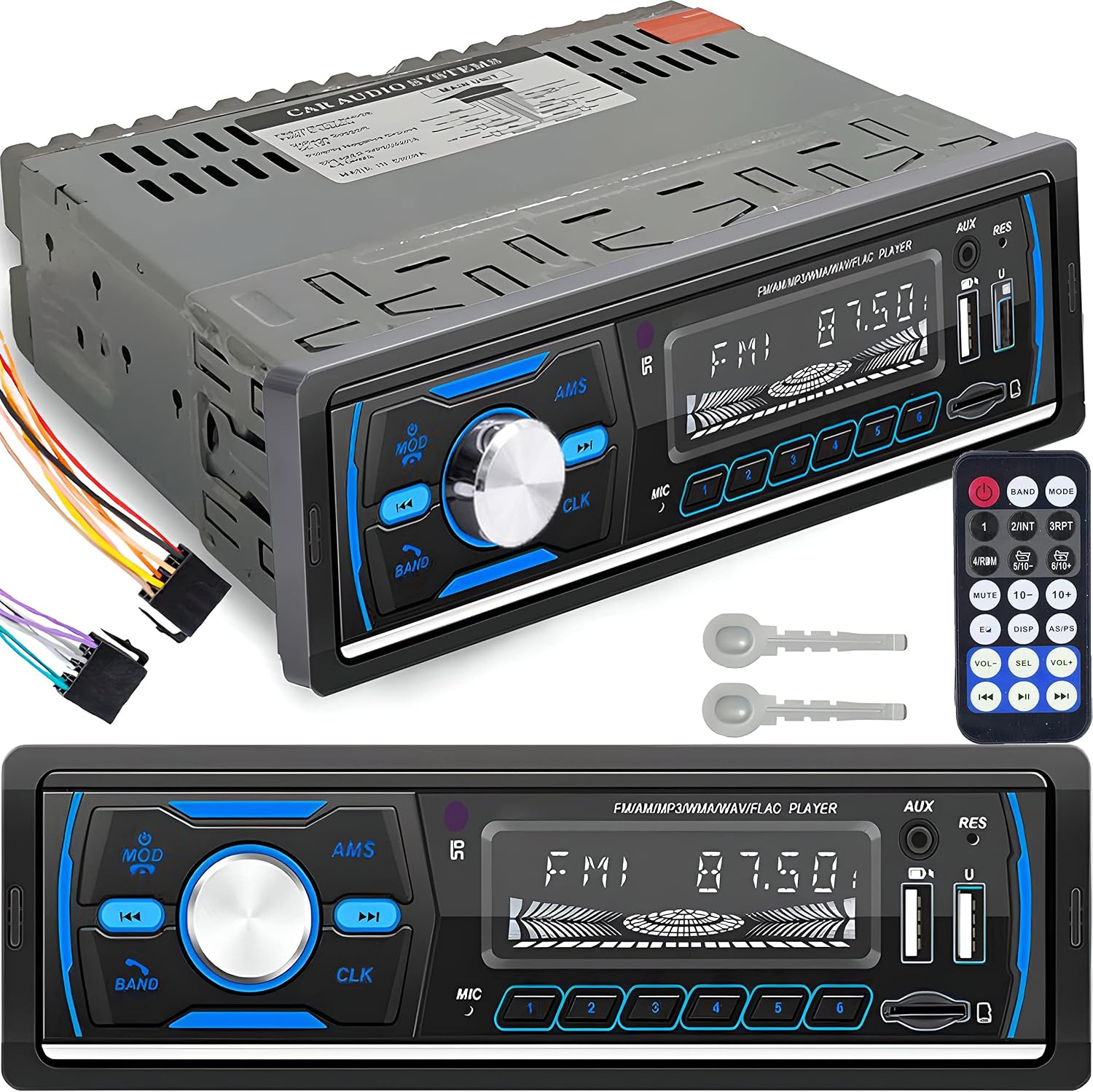
4. Product Overview
Front Panel Layout

- Power/Mode (MOD) Button: Press to turn on/off, switch between modes (FM/USB/SD/AUX/Bluetooth).
- Band Button: Selects radio bands (FM1, FM2, FM3).
- Previous Track/Tune Down Button: Short press for previous track/station, long press for fast reverse/manual tuning.
- AMS (Automatic Memory Store) Button: Auto-scan and store FM stations.
- Volume Knob/Select (SEL) Button: Rotate to adjust volume. Press to cycle through audio settings (Bass, Treble, Balance, Fader, EQ, Loud, etc.).
- Next Track/Tune Up Button: Short press for next track/station, long press for fast forward/manual tuning.
- CLK (Clock) Button: Displays time. Long press to set time.
- Microphone (MIC): Built-in microphone for hands-free calls.
- Preset Buttons (1-6): Store and recall radio stations. Also function as playback controls (e.g., Play/Pause, Repeat).
- AUX Input: 3.5mm jack for external audio devices.
- Reset (RES) Button: Small button to reset the unit to factory settings (requires a pointed object).
- USB Port (Charging): Dedicated USB port for charging mobile devices.
- USB Port (Media): USB port for connecting USB flash drives for music playback.
- SD Card Slot: Slot for MicroSD/TF cards for music playback.

Rear Panel Connections

The rear panel includes the main ISO connector for power and speaker wiring, an antenna input, and RCA outputs for connecting external amplifiers.
5. Installation
Warning: Incorrect installation can cause damage to the unit or vehicle. If you are unsure, seek professional assistance.
Wiring Diagram
The included ISO wiring harness simplifies connection. Match the wires according to the standard ISO color codes:
- Yellow (B+): Constant 12V (Battery)
- Red (ACC): Switched 12V (Ignition)
- Black (GND): Ground
- Blue (ANT): Power Antenna/Amplifier Remote (12V when radio is on)
- Speaker Wires:
- White/White-Black: Front Left Speaker (+/-)
- Grey/Grey-Black: Front Right Speaker (+/-)
- Green/Green-Black: Rear Left Speaker (+/-)
- Purple/Purple-Black: Rear Right Speaker (+/-)
Note: Some vehicles may require swapping the Yellow (B+) and Red (ACC) wires for proper operation. Consult your vehicle's wiring diagram if necessary.
Installation Steps
- Disconnect Battery: Before starting, disconnect the negative terminal of your car battery to prevent electrical shorts.
- Remove Old Radio: Use the appropriate tools to carefully remove your existing car radio.
- Install Mounting Sleeve: Insert the metal mounting sleeve into the dashboard opening and bend the tabs to secure it.
- Connect Wiring: Connect the included ISO wiring harness to your vehicle's wiring. Ensure all connections are secure and insulated. Connect the antenna cable.
- Test Connections: Reconnect the car battery and briefly test the radio's basic functions (power on/off, sound, radio reception) before fully inserting it.
- Insert Radio: Carefully slide the car radio into the mounting sleeve until it clicks into place.
- Final Check: Test all functions thoroughly.


6. Operation
6.1 Basic Functions
- Power On/Off: Press the MOD button to turn the unit on. Long press to turn off.
- Volume Control: Rotate the Volume Knob to adjust the sound level.
- Mode Selection: Press the MOD button repeatedly to cycle through available modes: FM, USB, SD, AUX, Bluetooth.
- Audio Settings: Press the Volume Knob (SEL) to access audio settings like Bass, Treble, Balance, Fader, EQ (Equalizer presets), and Loudness. Rotate the knob to adjust values.
- Clock Setting: Press CLK to display time. Long press CLK to enter time setting mode. Use the Previous/Next Track buttons to adjust hours/minutes, and SEL to confirm.
6.2 FM Radio Operation
- Select Band: In FM mode, press BAND to switch between FM1, FM2, and FM3.
- Automatic Scan: Long press AMS to automatically scan and store strong stations into the preset buttons (1-6).
- Manual Tuning: Long press the Previous/Next Track buttons to manually tune frequencies.
- Preset Stations: Short press Previous/Next Track buttons to jump between stored stations. Press preset buttons (1-6) to recall specific stored stations. Long press a preset button to store the current station.
6.3 Bluetooth Connectivity
The car radio supports Bluetooth for wireless audio streaming and hands-free calling.
- Pairing:
- Switch the radio to Bluetooth mode (BT). The display will show "BT".
- On your mobile device, enable Bluetooth and search for available devices.
- Select "CAR BT" (or similar) from the list. If prompted for a PIN, enter "0000".
- Once paired, the display will show "CONNECTED".
- Hands-Free Calling:
- Answer Call: Press the MOD button (or green call button on remote) to answer an incoming call.
- End Call: Press the MOD button (or red call button on remote) to end a call.
- Dialing: Dial from your phone; audio will automatically transfer to the car speakers.
- Audio Streaming: Play music from your paired device. Use the Previous/Next Track buttons on the radio or remote to control playback.

6.4 USB/SD Card Playback
Insert a USB flash drive into the media USB port or an SD card into the SD slot. The unit will automatically switch to USB/SD mode and begin playback.
- Supported Formats: MP3, WMA.
- Playback Controls: Use the Previous/Next Track buttons for track navigation. Preset button 1 typically functions as Play/Pause.
6.5 AUX Input
Connect external audio devices (e.g., MP3 players, older smartphones) to the 3.5mm AUX input on the front panel using an audio cable. Switch the radio to AUX mode using the MOD button.
6.6 RGB Color Customization
The car radio features customizable RGB lighting. The specific method for changing colors may vary. Typically, a long press on the BAND button or a dedicated button on the remote control cycles through available colors or color modes.

7. Maintenance
- Cleaning: Use a soft, dry cloth to clean the unit's front panel. Do not use abrasive cleaners, solvents, or chemical sprays.
- Dust: Regularly remove dust from the unit's vents to ensure proper heat dissipation.
- Fuse Replacement: If the unit does not power on, check the fuse located on the rear panel. Replace it with a fuse of the same rating (e.g., 10A).
8. Troubleshooting
| Problem | Possible Cause | Solution |
|---|---|---|
| No power | Incorrect wiring; Blown fuse; Loose connection | Check power (Yellow, Red, Black) connections. Verify fuse. Ensure battery is connected. |
| No sound | Speaker wires disconnected; Volume too low; Mute function active | Check speaker wiring. Increase volume. Deactivate mute. |
| Radio reception poor | Antenna not connected; Weak signal area; Damaged antenna | Ensure antenna is securely connected. Try a different location. Check antenna for damage. |
| Bluetooth not connecting | Device not in pairing mode; Incorrect PIN; Already connected to another device | Ensure radio is in BT mode. Make sure phone's Bluetooth is on and discoverable. Forget device on phone and re-pair. |
| USB/SD not playing | Unsupported file format; Corrupted files; Drive/card not inserted correctly | Ensure files are MP3/WMA. Reinsert USB/SD. Try a different USB/SD. |
| Remote control not working | Dead battery; Obstruction; Not pointed at IR sensor | Replace remote battery. Remove obstructions. Point remote directly at the radio's IR sensor. |
If problems persist after attempting these solutions, please contact customer support.
9. Specifications
- Model: M024-1
- Type: 1 DIN Car Radio
- Power Output: 4 x 50 Watts (Max)
- Tuner: FM/RDS
- Connectivity: Bluetooth, Dual USB (Media & Charging), SD Card Slot, AUX Input (3.5mm)
- Supported Audio Formats: MP3, WMA
- Hands-Free: Yes, with built-in microphone
- Display: LCD with RGB color options
- Power Supply: DC 12V (Negative Ground)
- Dimensions (Product): 18.5 x 12 x 5.3 cm (approx.)
- Weight: 400 g (approx.)

10. Warranty and Support
For warranty information, please refer to the terms and conditions provided at the point of purchase or contact your retailer. Keep your proof of purchase for any warranty claims.
For technical support or further assistance, please contact Retoo customer service through the retailer's platform or the official Retoo website.
Related documentsM024-1


Ask a question about this manual
Ask about setup, troubleshooting, compatibility, parts, safety, or missing instructions. Manuals+ will review the question and use this page’s manual context to help answer it.