
1. Introduction
Thank you for choosing the Orbegozo DHW2080 Dehumidifier. This appliance is designed to efficiently remove excess moisture from the air, creating a more comfortable and healthier environment in your home or office. With its 20L/day dehumidification capacity and Wi-Fi connectivity, it offers powerful performance and convenient control. Please read this manual thoroughly before operation to ensure proper use, maintenance, and safety.
2. Safety Information
Always follow basic safety precautions when using electrical appliances to reduce the risk of fire, electric shock, and injury.
- Ensure the power supply matches the voltage specified on the appliance's rating label.
- Do not operate the dehumidifier with a damaged cord or plug.
- Keep the appliance away from water and other liquids.
- Do not insert objects into the air inlet or outlet.
- Always unplug the unit before cleaning or performing any maintenance.
- This appliance is for indoor use only.
- Do not block the air vents.
- Keep out of reach of children.
- The refrigerant used is R290, which is environmentally friendly. Handle with care and ensure proper ventilation.
3. Product Overview
Familiarize yourself with the components of your Orbegozo DHW2080 Dehumidifier.
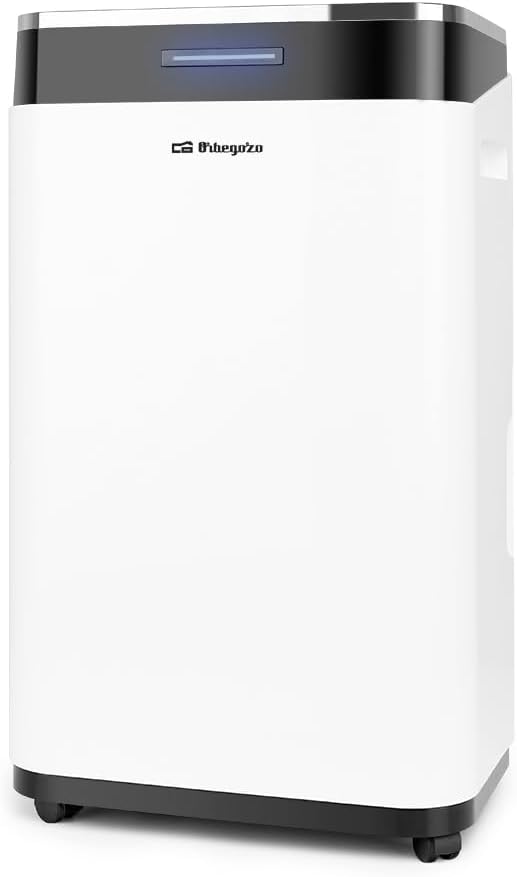
Figure 3.1: Front view of the Orbegozo DHW2080 Dehumidifier, showing the control panel at the top and the main body.

Figure 3.2: Side view of the Orbegozo DHW2080 Dehumidifier, highlighting the integrated handle for easy transport.

Figure 3.3: Diagram showing the approximate dimensions of the Orbegozo DHW2080 Dehumidifier: 24 cm (width) x 24 cm (depth) x 57 cm (height).
Key Components:
- Control Panel: Located on the top, for setting modes, humidity levels, and timer.
- Air Inlet/Outlet: Where air enters and exits the unit.
- Water Tank: 6-liter capacity for collecting condensed water. Features a viewing window to check water level.
- Continuous Drain Port: For connecting a hose for continuous drainage.
- Reusable Dust Filter: Located at the air inlet, for filtering dust particles.
- Handle and Wheels: For easy portability.
4. Setup
Follow these steps for the initial setup of your dehumidifier.
- Unpacking: Carefully remove the dehumidifier from its packaging. Ensure all packing materials are removed. The package includes the dehumidifier unit itself.
- Placement: Place the dehumidifier on a firm, level surface in the desired room. Ensure there is at least 20 cm (8 inches) of space around the unit for proper airflow. Avoid placing it near heat sources or in direct sunlight.
- Power Connection: Plug the power cord into a grounded electrical outlet.
- Water Tank: Ensure the water tank is correctly inserted into the unit. The unit will not operate if the tank is full or incorrectly positioned.
- Continuous Drainage (Optional): If you prefer continuous drainage, connect a suitable hose (not included) to the continuous drain port located at the back of the unit. Ensure the hose is sloped downwards to allow water to drain by gravity into a floor drain or large container.
5. Operating Instructions
Learn how to operate your Orbegozo DHW2080 Dehumidifier and utilize its features.
5.1 Control Panel Functions
The control panel allows you to manage various settings:
- Power Button: Turns the unit ON/OFF.
- Mode Button: Selects operating modes (e.g., continuous, auto, drying).
- Humidity Setting Buttons: Adjusts the desired humidity level (30% to 80%).
- Fan Speed Button: Adjusts fan speed (e.g., low, high).
- Timer Button: Sets the 0-24 hour timer for automatic ON/OFF.
- Display Screen: Shows current humidity, set humidity, and timer settings.
- Operation and Full Tank Indicator: Lights up to show operation status or when the water tank is full.
5.2 Basic Operation
- Press the Power Button to turn on the dehumidifier.
- Use the Humidity Setting Buttons to set your desired humidity level. The unit will operate until this level is reached, then cycle ON/OFF to maintain it.
- Adjust the Fan Speed as needed. Higher fan speed results in faster dehumidification but may produce more noise.
- To set a timer, press the Timer Button and use the humidity setting buttons to select the desired hours for the unit to turn ON or OFF.
5.3 Wi-Fi Connectivity (Orbegozo App)
The Orbegozo DHW2080 features wireless Wi-Fi connectivity, allowing control via the Orbegozo app. This feature enables remote control and monitoring of the dehumidifier.
- Download the App: Download the "Orbegozo" app from your smartphone's app store (iOS or Android).
- Register/Log In: Create an account or log in if you already have one.
- Add Device: Follow the in-app instructions to add your DHW2080 dehumidifier. This typically involves putting the dehumidifier into pairing mode (refer to the app or dehumidifier's specific Wi-Fi pairing instructions, often by holding a button on the control panel).
- Connect to Wi-Fi: Ensure your smartphone is connected to a 2.4GHz Wi-Fi network. The app will guide you through connecting the dehumidifier to your home Wi-Fi.
- Remote Control: Once connected, you can control the dehumidifier's power, humidity settings, fan speed, and timer from anywhere using the app.
Note: Some users have reported difficulties with Wi-Fi connection. Ensure your Wi-Fi network is 2.4GHz and follow the app's instructions precisely. If issues persist, try restarting both the dehumidifier and your router.
6. Maintenance
Regular maintenance ensures optimal performance and extends the lifespan of your dehumidifier.
6.1 Emptying the Water Tank
When the water tank is full, the unit will automatically shut off and the "Full Tank" indicator will illuminate. To empty:
- Gently pull out the water tank from the front of the unit.
- Carefully carry the tank to a sink or drain and empty the collected water.
- Rinse the tank with clean water if necessary. Do not use harsh detergents.
- Reinsert the empty water tank firmly into the dehumidifier. The unit will resume operation.
6.2 Cleaning the Air Filter
The reusable dust filter should be cleaned every two weeks or more frequently depending on usage and air quality.
- Turn off and unplug the dehumidifier.
- Locate the air filter (usually at the back or side, behind a removable grille).
- Carefully remove the filter.
- Clean the filter using a vacuum cleaner to remove dust. For heavier dirt, wash it gently with warm, soapy water.
- Allow the filter to air dry completely before reinserting it. Do not expose to direct sunlight or high heat.
6.3 Cleaning the Unit Exterior
Wipe the exterior of the dehumidifier with a soft, damp cloth. Do not use abrasive cleaners or solvents, as they may damage the surface.
7. Troubleshooting
Before contacting customer support, try these common troubleshooting steps.
| Problem | Possible Cause | Solution |
|---|---|---|
| Dehumidifier does not turn on. | No power; Water tank full or incorrectly placed; Unit in standby mode. | Check power cord connection; Empty and reinsert water tank correctly; Press power button to exit standby. |
| No water collected or low dehumidification. | Room temperature too low (below 5°C); Air filter clogged; Humidity setting too high; Room too large. | Dehumidifiers are less effective in cold temperatures (Frost protection system activates); Clean air filter; Lower desired humidity setting; Ensure unit is suitable for room size (up to 120 m²). |
| Unit is noisy. | Fan speed too high; Unit not on a level surface; Obstruction in fan. | Reduce fan speed; Place on a flat, stable surface; Check for and remove any obstructions. Max noise level is 45 dB. |
| Wi-Fi connection issues. | Incorrect Wi-Fi password; Router too far; 5GHz Wi-Fi network; App issues. | Double-check password; Move unit closer to router; Ensure you are connecting to a 2.4GHz network; Restart app and dehumidifier. |
If the problem persists after trying these solutions, please contact Orbegozo customer support.
8. Specifications
Technical specifications for the Orbegozo DHW2080 Dehumidifier.
- Model: DHW2080
- Dehumidification Capacity: 20 liters/day (at 80% RH, 30°C)
- Power Consumption: 370 W
- Maximum Noise Level: 45 dB
- Applicable Area: Up to 120 m²
- Water Tank Capacity: 6 liters
- Humidity Adjustment Range: 30% to 80%
- Timer: 0-24 hours
- Refrigerant: R290 (environmentally friendly)
- Dimensions (W x D x H): 34 x 24 x 57 cm
- Weight: Approximately 15.5 kg
- Voltage: 220-240V ~ 50Hz
- Special Features: Wi-Fi connectivity via Orbegozo App, Continuous drain port, Frost protection system, Reusable dust filter, Standby modes, Suspension.
9. Warranty and Support
For warranty information and technical support, please refer to the warranty card included with your product or visit the official Orbegozo website. Keep your purchase receipt as proof of purchase.
Manufacturer: Orbegozo
Model Number: DHW2080
ASIN: B0BGXBTQPL
For further assistance, you may contact Orbegozo customer service through their official channels. The product is offered by Orbegozo, a brand known for home appliances.


