
Product Overview
The Nitecore NU25 MCT UL ultralight rechargeable headlamp is designed for various outdoor activities such as camping, hiking, trail running, and more. It features ultra-high efficiency (UHE) LEDs capable of emitting a bright 400 lumen beam with a maximum distance of 144 yards. Weighing only 1.65 oz, it is ideal for minimizing pack weight.
A key innovation is its Multiple Color Temperature (MCT) LEDs, allowing users to switch between warm (3000K), neutral (4500K), and cool (6500K) light to optimize visibility and comfort in different conditions. The headlamp offers four brightness levels for white light, plus auxiliary red light with low, high, and slow flashing modes. Additional features include SOS and Beacon modes for emergencies, a USB-C charging port with battery status indicator, and a lockout mode to prevent accidental activation. Constructed from durable PC material, it is IP66 waterproof and impact resistant up to 1 meter.

Figure 1: Nitecore NU25 MCT UL Headlamp, showing the headlamp unit, ultralight headband, USB-C charging cable, and a Nitecore sticker.
What's in the Box
- Nitecore NU25 MCT Headlamp
- USB-C to USB-C Charging Cable
- Bracket
- Headband
- Diffusing Stuff Sack
- Nitecore Sticker
Setup
1. Headband Adjustment
The NU25 MCT UL features an ultralight elastic cord headband for maximum stress-free wearing. To adjust the fit, locate the small buckle on the headband. Press the button on the buckle and slide the cords to achieve a snug yet comfortable fit around your head. Ensure the headlamp is centered on your forehead.

Figure 2: The ultralight headband design, emphasizing its minimal weight and comfortable fit.
2. Initial Charge
Before first use, fully charge the headlamp. Connect the supplied USB-C to USB-C charging cable to the headlamp's USB-C port (located on the side, protected by a rubber seal) and to a compatible USB power source. The power indicator lights will show charging progress.
Operating Instructions
Power On/Off
To turn on the white light, press and hold the Power Button (large button with power symbol) for 1 second. To turn off, press and hold the Power Button for 1 second again.
Brightness Levels (White Light)
When the white light is on, short press the Power Button to cycle through brightness levels: Ultralow (6 lumens), Low (60 lumens), Mid (200 lumens), and High (400 lumens).
Multiple Color Temperature (MCT) Switching
The NU25 MCT UL features three color temperatures for its white light: Warm Light (3000K), Neutral White Light (4500K), and Cool White Light (6500K). When the white light is on, short press the Mode Button (smaller button with 'M' symbol) to switch between these color temperatures.

Figure 3: Dual primary lights with three color temperatures: 3000K Warm Light, 4500K Neutral White Light, and 6500K Cool White Light.
Red Light Modes
To activate the red light, press and hold the Mode Button for 1 second. Short press the Mode Button to cycle through red light modes: Low, High, and Slow Flashing. To turn off the red light, press and hold the Mode Button for 1 second.

Figure 4: The headlamp's 6 Lumens Ultralow white light mode and Red Light mode, ideal for preserving night vision and not attracting insects.
Special Modes (SOS / Beacon)
When the headlamp is off, double-press the Power Button to activate SOS mode. Double-press again to activate Beacon mode. To exit special modes, short press the Power Button.
Lockout Mode
To prevent accidental activation during carrying or storage, activate Lockout Mode. When the headlamp is off, press and hold both the Power Button and Mode Button simultaneously for 2 seconds until the light flashes. To unlock, repeat the process.
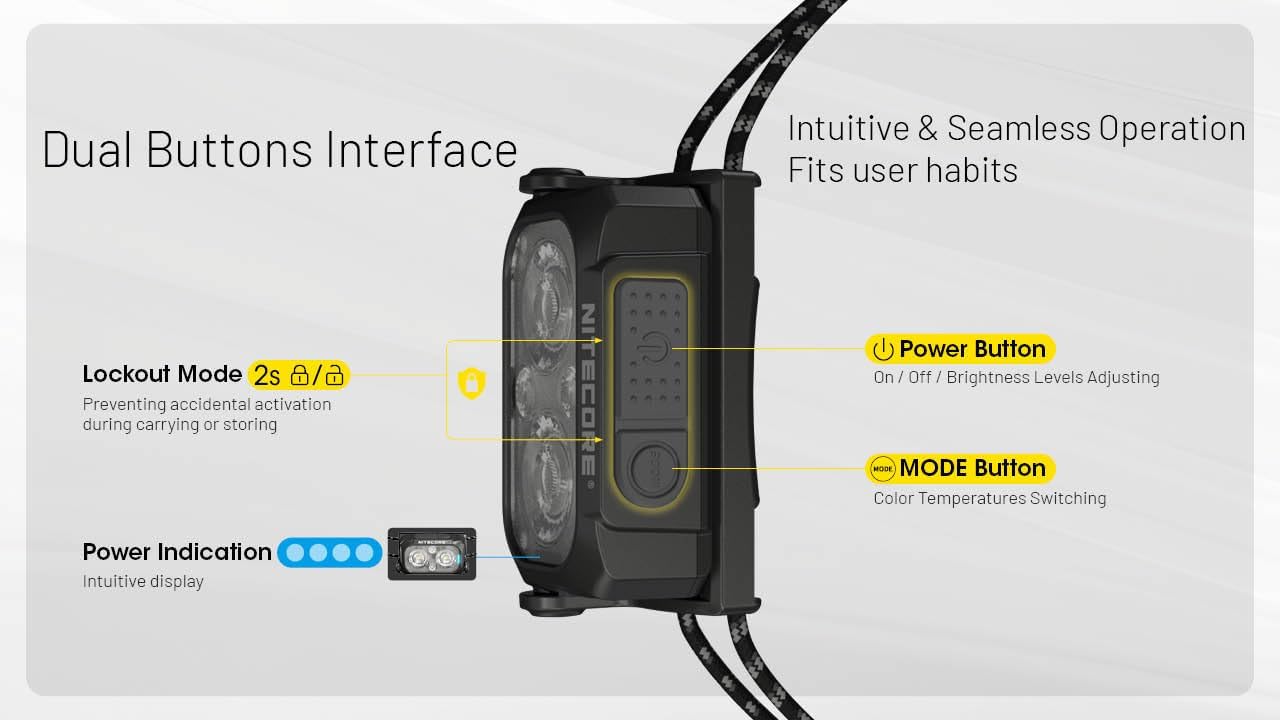
Figure 5: Dual Buttons Interface for intuitive operation, including Power Button for brightness and Mode Button for color temperatures. Also shows the power indication lights.
Charging
The Nitecore NU25 MCT UL is equipped with a built-in 700mAh rechargeable battery and a USB-C charging port. To charge, open the rubber cover on the side of the headlamp and connect a USB-C cable. A full charge takes approximately 1 hour and 15 minutes.
Battery Status Indication
When the headlamp is off, short press the Power Button. The blue indicator lights next to the buttons will illuminate to show the remaining battery power:
- 4 lights: 75%-100%
- 3 lights: 50%-75%
- 2 lights: 25%-50%
- 1 light: Below 25%
Maintenance
Cleaning
Wipe the headlamp body with a soft, damp cloth. Do not use harsh chemicals or abrasive materials. Ensure the USB-C port cover is securely closed to maintain its IP66 waterproof rating.
Storage
Store the headlamp in a cool, dry place away from direct sunlight and extreme temperatures. For long-term storage, charge the battery every 3 months to prolong its lifespan.
Troubleshooting
Light Not Turning On
- Check battery level: Ensure the headlamp has sufficient charge.
- Check lockout mode: If the headlamp is in lockout mode, unlock it by pressing and holding both buttons for 2 seconds.
Reduced Brightness or Short Runtime
- Battery low: Recharge the headlamp fully.
- Temperature: Extreme cold can affect battery performance.
- Thermal regulation: The headlamp may automatically reduce brightness to prevent overheating during prolonged high-output use.
Specifications
| Feature | Value |
|---|---|
| Brand | Nitecore |
| Model | NU25-400UL |
| Brightness (Max) | 400 Lumens |
| Beam Distance (Max) | 144 Yards (132m) |
| Weight | 1.65 oz (47g) |
| Power Source | Built-in 700mAh Lithium Ion Battery |
| Charging Port | USB-C |
| Water Resistance | IP66 |
| Impact Resistance | 1 Meter |
| Material | PC Plastic |

Figure 6: The headlamp's powerful 400 lumens output and 132-meter beam distance, highlighting its "Night Master" capabilities.

Figure 7: All-round lightweight design, emphasizing the 47g total weight (including bracket and headband) and durable PC plastic material.
Official Product Videos
No official product videos from the seller are available for embedding at this time.
Safety Information
- Do not shine the light directly into eyes.
- Keep out of reach of children.
- Avoid disassembling the headlamp, as this may damage it and void the warranty.
- Do not expose to fire or high temperatures.
- Ensure the USB-C port cover is sealed when not charging to maintain water resistance.
Warranty & Support
The Nitecore NU25 MCT UL Headlamp comes with a Limited Warranty. For detailed warranty terms and conditions, please refer to the warranty card included in your product packaging or visit the official Nitecore website.
For technical support, troubleshooting assistance, or warranty claims, please contact Nitecore customer service through their official website or the retailer where the product was purchased.
Visit the Nitecore Store on Amazon for more products and information.


