
Introduction
Thank you for choosing the MasterPro I-Rocket 500 Air Fryer. This appliance is designed to cook a variety of foods with minimal oil, offering a healthier alternative to traditional frying. It features a 5-liter capacity, 1500 Watts of power, an intuitive LED touchscreen, and a non-stick basket for easy use and cleaning. Please read this manual thoroughly before operating the appliance to ensure safe and efficient use.
Important Safety Instructions
When using electrical appliances, basic safety precautions should always be followed to reduce the risk of fire, electric shock, and injury to persons.
- Read all instructions: Familiarize yourself with the appliance's functions and operation before first use.
- Hot surfaces: The appliance surfaces become hot during use. Use oven mitts or gloves when handling hot components. Do not touch hot surfaces directly.
- Electrical safety: Ensure the voltage indicated on the appliance corresponds to your local mains voltage before connecting. Do not immerse the cord, plug, or the appliance itself in water or other liquids to prevent electric shock.
- Children and supervision: This appliance is not intended for use by persons (including children) with reduced physical, sensory, or mental capabilities, or lack of experience and knowledge, unless they have been given supervision or instruction concerning use of the appliance by a person responsible for their safety. Children should be supervised to ensure that they do not play with the appliance.
- Placement: Place the appliance on a stable, heat-resistant surface, away from walls and other heat-sensitive materials. Ensure adequate ventilation around the appliance.
- Avoid damage: Do not use the appliance if the plug, power cord, or the appliance itself is damaged. Contact authorized service personnel for repair.
- Proper use: Do not use the appliance for purposes other than those described in this manual.
- Unplug when not in use: Always unplug the appliance from the outlet when not in use and before cleaning. Allow it to cool down completely before handling or cleaning.
- Overfilling: Do not overfill the basket, as this may affect cooking performance and could cause damage.
Product Overview
The MasterPro I-Rocket 500 Air Fryer consists of several key components designed for efficient air frying.

Image: Front view of the MasterPro I-Rocket 500 Air Fryer. The appliance is white with a black top panel featuring a digital display and controls. A handle for the cooking basket is visible on the front.

Image: The MasterPro I-Rocket 500 Air Fryer with its cooking basket and crisper plate detached from the main unit. This illustrates the removable components for cleaning and food preparation.
Components:
- Main Unit: Houses the heating element and fan.
- Cooking Basket: Removable basket for holding food.
- Crisper Plate: Sits at the bottom of the cooking basket to allow air circulation and drain excess fat.
- Control Panel: LED touchscreen for setting temperature, time, and selecting programs.
- Handle: For safely removing and inserting the cooking basket.
Setup
- Unpack: Carefully remove all packaging materials from the air fryer and its accessories.
- Initial Cleaning: Wipe the exterior of the appliance with a damp cloth. Wash the cooking basket and crisper plate with warm, soapy water, then rinse and dry thoroughly.
- Placement: Place the air fryer on a stable, level, and heat-resistant surface. Ensure there is at least 10 cm (4 inches) of clear space around the back and sides of the appliance for proper ventilation.
- Insert Components: Place the crisper plate into the cooking basket, then slide the assembled basket back into the main unit until it clicks securely into place.
- Power Connection: Plug the power cord into a grounded electrical outlet. The appliance is now ready for use.
Operating Instructions
The MasterPro I-Rocket 500 Air Fryer features an intuitive LED touchscreen for easy operation.

Image: Close-up of the MasterPro I-Rocket 500 Air Fryer's LED touchscreen control panel, displaying temperature, time, and icons for 12 automatic cooking programs such as fries, ribs, meat, shrimp, fish, wings, cake, pizza, dehydrate, bake, defrost, and keep warm.
Basic Operation:
- Power On: Plug in the appliance. The power indicator will light up. Press the power icon to turn on the display.
- Preheating (Optional): For best results, preheat the air fryer for 3-5 minutes. Set the desired temperature (e.g., 180°C) and time, then press start.
- Load Food: Pull out the cooking basket using the handle. Place your ingredients onto the crisper plate inside the basket. Do not exceed the MAX fill line.
- Set Temperature and Time: Use the temperature controls (80°C - 200°C) and timer controls (up to 60 minutes) on the LED touchscreen to adjust settings according to your recipe.
- Start Cooking: Press the start/pause icon to begin the cooking process. The fan and heating element will activate.
- Shake/Flip Food: For even cooking, especially with smaller items like fries, pull out the basket halfway through the cooking time and gently shake or flip the food. Slide the basket back in to resume cooking.
- Finish Cooking: The air fryer will beep when the timer reaches zero. Carefully pull out the basket and transfer the cooked food to a plate.
- Power Off: Press and hold the power icon to turn off the appliance. Unplug from the wall outlet.
Using Automatic Programs:
The air fryer offers 12 preset cooking programs for common dishes. To use them:
- After powering on, press the menu/program selection icon to cycle through the available programs (e.g., fries, meat, fish, pizza).
- Once you select a program, the default temperature and time will be displayed. You can manually adjust these settings if needed.
- Press the start/pause icon to begin cooking with the selected program.
Mobile Application Control:
This air fryer is designed with Wi-Fi and Bluetooth connectivity, allowing control via a dedicated mobile application. Please note that some users have reported issues with the app's availability. Check your device's app store for the official MasterPro I-Rocket 500 application. If available, follow the in-app instructions for pairing and remote control.
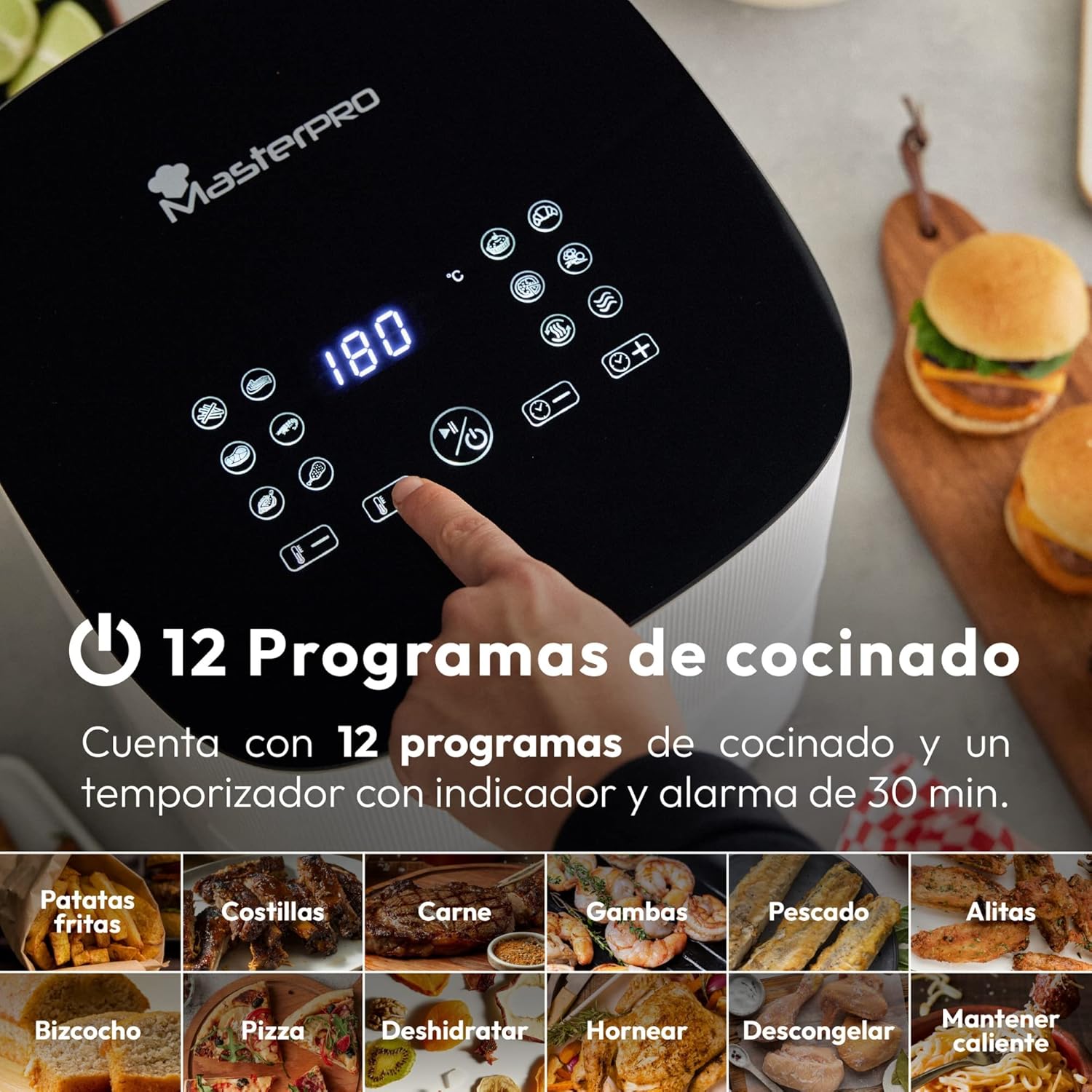
Image: A MasterPro I-Rocket 500 Air Fryer on a kitchen counter, with a hand holding a smartphone displaying an app interface, indicating remote control capabilities. Food is prepared on the counter.
Maintenance and Cleaning
Regular cleaning ensures optimal performance and extends the life of your air fryer.
- Unplug and Cool: Always unplug the air fryer and allow it to cool completely before cleaning.
- Clean Basket and Crisper Plate: Remove the cooking basket and crisper plate. Wash them in warm, soapy water using a non-abrasive sponge. The non-stick coating allows for easy cleaning. Rinse thoroughly and dry.
- Clean Interior: Wipe the interior of the appliance with a damp cloth. For stubborn food residue, use a mild detergent and a soft sponge. Ensure the interior is completely dry before next use.
- Clean Exterior: Wipe the exterior of the air fryer with a damp cloth. Do not use harsh chemicals or abrasive cleaners, as they may damage the finish.
- Storage: Store the cleaned and dried air fryer in a cool, dry place.
Troubleshooting
If you encounter issues with your MasterPro I-Rocket 500 Air Fryer, refer to the following common problems and solutions:
| Problem | Possible Cause | Solution |
|---|---|---|
| Appliance does not turn on. | Not plugged in; power outlet malfunction; appliance damage. | Ensure the power cord is securely plugged into a working outlet. Check the circuit breaker. If damaged, contact customer support. |
| Food is not cooked evenly. | Basket is overfilled; food not shaken/flipped; incorrect temperature/time. | Do not overfill the basket. Shake or flip food halfway through cooking. Adjust temperature and time as needed. |
| White smoke coming from the appliance. | Grease residue from previous use; fatty food cooking. | Clean the basket and crisper plate thoroughly after each use. For fatty foods, place a small amount of water in the bottom of the outer pan to prevent smoke. |
| Mobile app connectivity issues. | App not available; incorrect pairing; Wi-Fi issues. | Verify the app is available in your region's app store. Ensure your air fryer is in pairing mode and your Wi-Fi network is stable. Refer to the app's specific instructions for pairing. |
Specifications
| Brand | MasterPRO |
| Model Number | BGMP-9308 |
| Capacity | 5 Liters |
| Power | 1500 Watts |
| Voltage | 240 Volts |
| Dimensions (L x W x H) | 37.9 x 60.1 x 39.6 cm |
| Weight | 5.86 Kilograms |
| Material | Stainless steel and plastic |
| Special Features | Integrated application, Timer, Easy cleaning, Touch screen |
Warranty and Support
The MasterPro I-Rocket 500 Air Fryer comes with a 2-year availability for spare parts. For any product-related inquiries, technical support, or warranty claims, please refer to the contact information provided with your purchase documentation or visit the official MasterPRO website.


