
1. Product Overview
This ZYWUOY LED Transformer Driver is designed to power LED lighting fixtures, offering compatibility with 3-color LED systems. It features built-in protection mechanisms for short circuit, over voltage, over current, and over temperature, ensuring reliable and safe operation. This non-insulating driver is suitable for various applications including ceiling lights, light panels, and other LED installations.
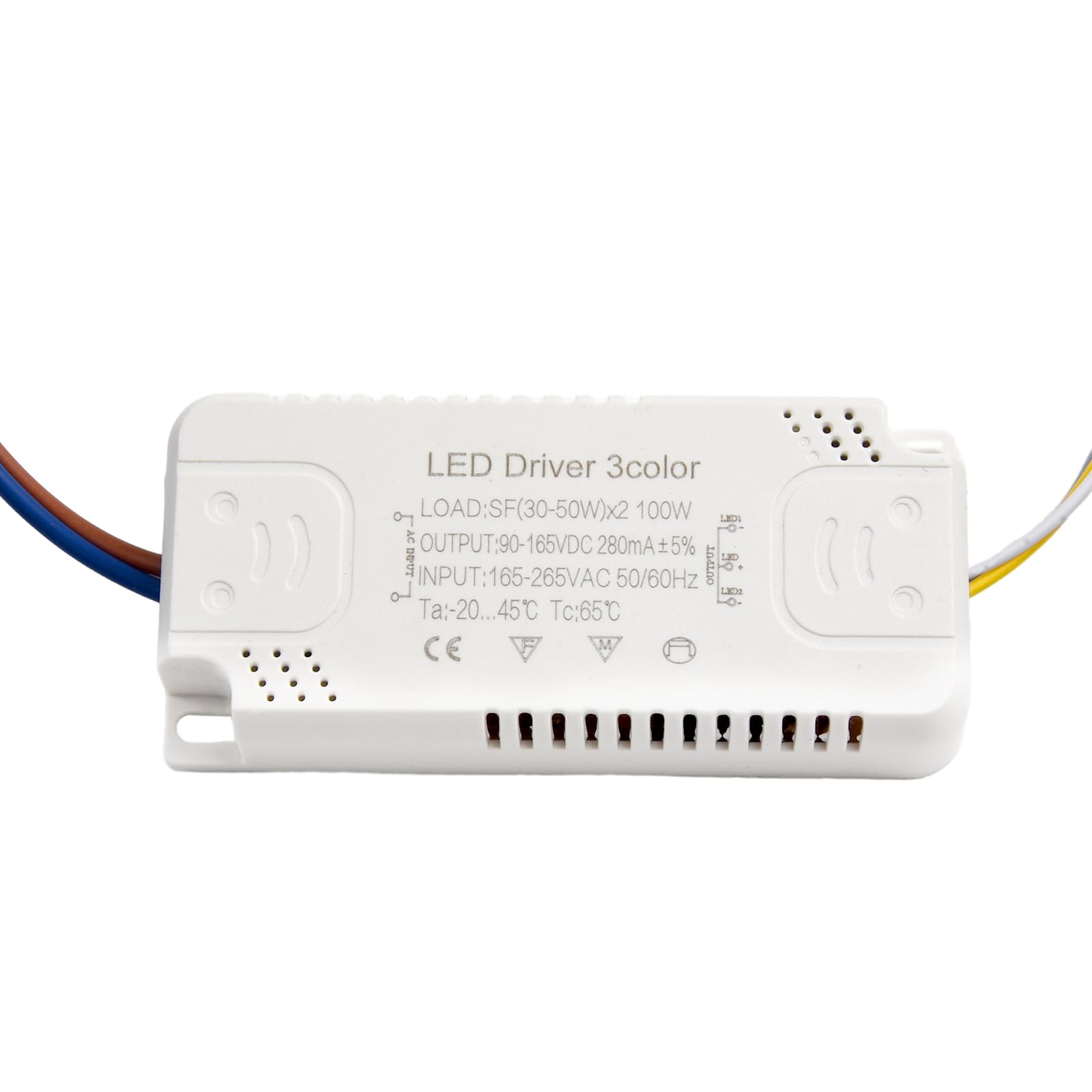
Image 1.1: The ZYWUOY LED Transformer Driver shown in an outdoor lighting application. The white rectangular driver unit is visible in the foreground, with illuminated outdoor lanterns in the background.
2. Safety Information
- Always disconnect power before installation, maintenance, or troubleshooting.
- Installation should be performed by a qualified electrician in accordance with local electrical codes.
- Ensure the input voltage (AC165-265V) matches your power supply.
- Do not exceed the specified power output of the driver.
- Keep the driver away from water and high humidity environments.
- Ensure proper ventilation to prevent overheating.
3. Specifications
| Feature | Specification |
|---|---|
| Type | LED Driver 3 Colors |
| Power Output Options | (8-24W)X2, (20-40W)X2, (30-50W)X2, (40-60W)X2, (50-70W)X2 |
| Input Voltage | AC165-265V |
| Frequency | 50-60HZ |
| Current | 260-280mA |
| Protection Features | Short circuit, Over voltage, Over current, Over temperature |
| Product Dimensions | 0.39 x 0.39 x 0.39 inches |
| Item Weight | 1.06 ounces |
| Model Number | 7dc1ea7f-053f-41ec-a5db-2febf3b2b9fd |

Image 3.1: A stack of ZYWUOY LED Transformer Drivers, illustrating various power output options available for the product line.
4. Setup and Installation
Follow these steps for proper installation of the LED Transformer Driver:
- Power Disconnection: Before beginning any wiring, ensure that the main power supply to the circuit is completely disconnected at the breaker.
- Input Wiring: Connect the input wires of the LED driver to your AC power supply. The live wire should be connected to the designated input terminal (often marked 'L' or indicated by a specific color, typically brown or red). The neutral wire should be connected to the neutral input terminal (often marked 'N' or indicated by a blue color). The input voltage range is AC165-265V.
- Output Wiring: Connect the output wires from the LED driver to your 3-color LED lamp board. The driver features a three-position terminal line for output:
- The gray wire is the positive electrode (+).
- The white wire is the negative electrode (-) for the white light component.
- The yellow wire is the negative electrode (-) for the yellow light component.
- Secure Placement: Mount the LED driver in a suitable location, ensuring it is protected from physical damage and has adequate ventilation.
- Power Restoration: Once all connections are secure and verified, restore power to the circuit.

Image 4.1: Detailed wiring instructions for the LED Driver. It shows the input wires (brown and blue) and the output wires (gray, white, and yellow) connected to the lamp board.
5. Operating Instructions
This LED driver is designed to work with 3-color LED lighting systems, typically allowing for sequential color changes. The specific operation depends on the connected LED lamp and its control mechanism, but commonly involves:
- Initial Power On: When power is first applied, the LED lamp will illuminate in its default color mode (e.g., white light).
- Color Cycling: To change the color, quickly toggle the power switch (turn off and then immediately on). Each toggle will cycle through the available color modes (e.g., white, yellow, and a combination of both).
- Memory Function: Some LED lamps may have a memory function that recalls the last selected color when powered off for a short period. Refer to your LED lamp's manual for specific details.
6. Maintenance
The ZYWUOY LED Transformer Driver requires minimal maintenance. Follow these guidelines to ensure longevity:
- Cleaning: Periodically clean the exterior of the driver with a dry, soft cloth to remove dust. Do not use liquid cleaners or solvents.
- Inspection: Regularly inspect the wiring for any signs of damage, fraying, or loose connections. Address any issues promptly.
- Ventilation: Ensure that the driver's ventilation openings are not obstructed to allow for proper heat dissipation.
- Environmental Conditions: Avoid exposing the driver to extreme temperatures, direct sunlight, or excessive moisture.
7. Troubleshooting
If you encounter issues with your LED Transformer Driver, refer to the following troubleshooting steps:
- Light Not Turning On:
- Check if the power supply is active.
- Verify all input and output wiring connections are secure and correct.
- Ensure the input voltage is within the specified AC165-265V range.
- Confirm the LED lamp is functional and compatible with the driver's power output.
- Incorrect or No Color Change:
- Ensure the LED lamp supports 3-color functionality and is correctly wired to the driver's white and yellow output terminals.
- Try cycling the power switch quickly to change colors.
- Verify the LED lamp itself is not faulty.
- Flickering or Dimming:
- Check for loose wiring connections.
- Ensure the total wattage of the connected LED lamp(s) does not exceed the driver's maximum output.
- Verify stable input voltage.
- Driver Overheating:
- Ensure the driver is installed in a well-ventilated area.
- Confirm the load on the driver is within its specified power range.
If problems persist after following these steps, contact customer support.
8. Warranty and Support
For warranty information or technical support regarding your ZYWUOY LED Transformer Driver, please refer to the documentation provided with your purchase or contact ZYWUOY customer service directly. Ensure you have your model number (7dc1ea7f-053f-41ec-a5db-2febf3b2b9fd) available when contacting support.