
1. Introduction
This manual provides essential information for the safe and efficient operation, maintenance, and troubleshooting of your Cecotec Conga Rockstar 3000 Advance Ergowet 4-in-1 digital cordless vacuum cleaner. Please read these instructions carefully before first use and retain them for future reference.
The Conga Rockstar 3000 Advance Ergowet is a versatile 4-in-1 cleaning device, functioning as a vertical, broom, handheld, and wet mop vacuum. It features a powerful digital Brushless motor, a specialized Jaliscazo brush, and the ErgoFlex system for enhanced maneuverability.
2. Safety Instructions
To reduce the risk of fire, electric shock, or injury, always follow basic safety precautions when using an electrical appliance:
- Do not use the appliance outdoors or on wet surfaces.
- Do not allow it to be used as a toy. Close attention is necessary when used by or near children.
- Use only as described in this manual. Use only manufacturer's recommended attachments.
- Do not use with a damaged cord or plug. If appliance is not working as it should, has been dropped, damaged, left outdoors, or dropped into water, return it to a service center.
- Do not pull or carry by cord, use cord as a handle, close a door on cord, or pull cord around sharp edges or corners. Do not run appliance over cord. Keep cord away from heated surfaces.
- Do not unplug by pulling on cord. To unplug, grasp the plug, not the cord.
- Do not handle plug or appliance with wet hands.
- Do not put any object into openings. Do not use with any opening blocked; keep free of dust, lint, hair, and anything that may reduce airflow.
- Keep hair, loose clothing, fingers, and all parts of body away from openings and moving parts.
- Turn off all controls before unplugging.
- Use extra care when cleaning on stairs.
- Do not use to pick up flammable or combustible liquids, such as gasoline, or use in areas where they may be present.
- Do not pick up anything that is burning or smoking, such as cigarettes, matches, or hot ashes.
- Do not use without dust cup and/or filters in place.
- Prevent unintentional starting. Ensure the switch is in the off-position before connecting to battery pack, picking up or carrying the appliance.
- Recharge only with the charger specified by the manufacturer.
3. Package Contents
Verify that all components are present and in good condition:
- Digital Vertical Vacuum Cleaner (motor body and removable battery)
- Jaliscazo Brush with LED lights
- Motorized Upholstery Brush
- Extendable Tube
- Elbow Connector Tube
- Flexible and Extendable Hose
- Fabric Brush
- Wall Mount Support
- 2-in-1 Wide Accessory for furniture and corners
- 2-in-1 Narrow Accessory for furniture and corners
- Water Tank with Microfiber Cloth
- Instruction Manual

Image 1: All components included with the Cecotec Conga Rockstar 3000 Advance Ergowet.
4. Setup
4.1 Assembly
- Main Unit Assembly: Connect the main motor unit to the extendable tube. Ensure it clicks securely into place.
- Brush Attachment: Attach the desired cleaning brush (e.g., Jaliscazo brush) to the end of the extendable tube. For handheld use, attach accessories directly to the main motor unit.
- Water Tank (for wet mopping): If using the wet mopping function, fill the Water Tank with water and attach the microfiber cloth. Secure it to the main brush head as per the diagram in the manual.
4.2 Charging the Battery
Before first use, fully charge the vacuum cleaner's lithium-ion battery. The charging time is approximately 2-3 hours for a full charge.
- Connect the charger to the charging port on the main motor unit or directly to the removable battery.
- Plug the charger into a power outlet.
- The LED display on the vacuum will indicate the charging status.
4.3 Wall Mount Installation
The included wall mount allows for convenient storage and charging.
- Choose a suitable location near a power outlet.
- Mark the drilling points on the wall using the wall mount as a template.
- Drill holes and insert wall plugs (if necessary).
- Secure the wall mount to the wall using the provided screws.
- Hang the vacuum cleaner on the wall mount for storage and charging.
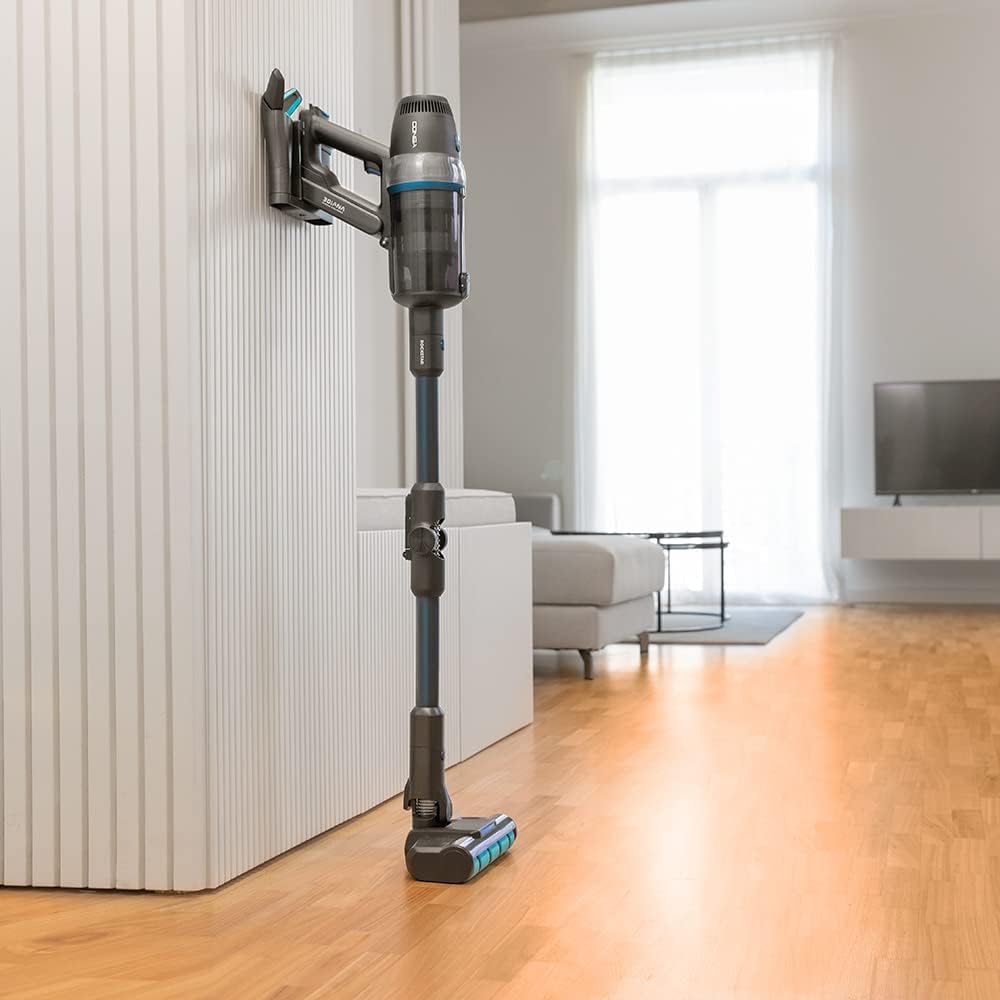
Image 2: Vacuum cleaner stored and charging on its wall mount.
5. Operating Instructions
5.1 Power On/Off and Mode Selection
- Power On: Press the power button on the main motor unit to turn on the vacuum cleaner.
- Mode Selection: Use the mode selection button to cycle through the four operating modes:
- Eco Mode: Provides maximum battery life for light cleaning tasks.
- Medium Mode: Balances efficiency and suction power for general cleaning.
- High Mode: Offers maximum suction for stubborn dirt and carpets.
- Auto Mode: Automatically adjusts suction power based on the detected dirt level and surface type (hard floor or carpet).
- Power Off: Press the power button again to turn off the vacuum cleaner.

Image 3: Digital LED display showing current mode and battery level.
5.2 Using Attachments
- Jaliscazo Brush: Ideal for both hard floors and carpets, effectively collecting fine and coarse dirt, as well as pet hair. The integrated LED lights illuminate the cleaning path.
- Motorized Upholstery Brush: Use for cleaning sofas, cushions, and pet beds.
- 2-in-1 Wide/Narrow Accessories: Suitable for cleaning corners, crevices, and delicate surfaces.
- ErgoFlex System: The flexible tube allows you to bend the vacuum to reach under furniture and other difficult areas without excessive bending.

Image 4: Demonstrating the ErgoFlex system for cleaning under furniture.

Image 5: The Jaliscazo brush head with LED illumination.
5.3 Wet Mopping Function
To use the wet mopping function:
- Fill the Water Tank with clean water. You may add a small amount of floor cleaning solution if desired.
- Attach the microfiber cloth securely to the Water Tank.
- Attach the Water Tank assembly to the main brush head.
- Proceed with vacuuming as usual. The microfiber cloth will dampen the floor for simultaneous mopping.
6. Maintenance
Regular maintenance ensures optimal performance and extends the lifespan of your vacuum cleaner.
6.1 Emptying the Dust Tank
Empty the 600 ml dust tank after each use or when the MAX fill line is reached.
- Ensure the vacuum is turned off.
- Press the release button to detach the dust tank from the main motor unit.
- Open the dust tank lid and empty the contents into a waste bin.
- Close the lid and reattach the dust tank to the motor unit.
6.2 Cleaning Filters
The Cyclonic System uses filters to separate particles. Clean these regularly to maintain suction power.
- Remove the dust tank.
- Carefully remove the internal filters.
- Tap the filters gently to remove loose dust. For a deeper clean, rinse them under running water.
- Allow filters to air dry completely for at least 24 hours before reinserting them. Do not use the vacuum with wet filters.
6.3 Cleaning the Jaliscazo Brush
Periodically check the brush roll for tangled hair or debris.
- Turn off the vacuum and detach the brush head.
- Use scissors or a brush cleaning tool to remove any tangled hair or fibers from the brush roll.
- Wipe the brush housing with a damp cloth.
6.4 Cleaning the Water Tank and Microfiber Cloth
After wet mopping:
- Empty any remaining water from the Water Tank.
- Rinse the Water Tank thoroughly with clean water.
- Remove the microfiber cloth and wash it by hand or machine (up to 60°C).
- Allow all components to air dry completely before reassembly.
7. Troubleshooting
If you encounter issues with your vacuum cleaner, refer to the following table:
| Problem | Possible Cause | Solution |
|---|---|---|
| Vacuum does not turn on | Battery is not charged Battery not properly installed | Charge the battery fully Ensure battery is securely clicked into place |
| Low suction power | Dust tank is full Filters are clogged Brush roll is blocked Hose or tube is obstructed | Empty the dust tank Clean or replace filters Remove debris from brush roll Check and clear any blockages in the hose or tube |
| Brush roll stops spinning | Debris tangled in brush Brush head attachment not properly connected | Clean debris from brush roll Ensure brush head is securely attached |
| Short battery life | Using High mode frequently Battery not fully charged Battery degradation | Use Eco or Medium mode for longer runtime Ensure battery is fully charged before use Contact customer support if battery life significantly decreases over time |
| Water tank leaks | Water tank not properly sealed Damage to water tank | Ensure water tank lid is securely closed and properly attached Inspect for cracks or damage; replace if necessary |
If the problem persists after attempting these solutions, please contact Cecotec customer support.
8. Specifications
| Feature | Specification |
|---|---|
| Brand | Cecotec |
| Model Number | 05775 |
| Type | 4-in-1 Cordless Digital Vacuum Cleaner (Vertical, Broom, Handheld, Wet Mop) |
| Motor | Digital Brushless Motor |
| Power | 680 Watts |
| Suction Pressure | 26 kPa |
| Air Watts (aW) | Up to 230 aW |
| Battery | 3000 mAh, 29.6 V Lithium-ion |
| Autonomy | Up to 90 minutes (in Eco mode) |
| Charging Time | Approximately 2-3 hours |
| Operating Modes | Eco, Medium, High, Auto (4 modes) |
| Noise Level | 88 dB |
| Dust Tank Capacity | 600 ml |
| Dimensions (L x W x H) | 27 x 25 x 121 cm |
| Weight | 4 Kilograms |
| Filter Type | Cartridge (Cyclonic System) |
| Surface Recommendation | All floor types |
9. Warranty and Support
9.1 Warranty Information
This product is covered by the manufacturer's warranty. Please refer to the warranty card included in your package for specific terms and conditions. Spare parts for this model are available for a period of 10 years from the date of purchase.
9.2 Customer Support
For technical assistance, spare parts, or any questions regarding your Cecotec Conga Rockstar 3000 Advance Ergowet, please contact Cecotec customer service through their official website or the contact information provided in your warranty documentation.


