1. Introduction
Thank you for choosing the Cecotec DrumFit WayHome 1600 Foldable Treadmill. This manual provides essential information for the safe and efficient operation, maintenance, and troubleshooting of your new treadmill. Please read this manual thoroughly before first use and keep it for future reference.
The DrumFit WayHome 1600 is a powerful and versatile treadmill designed for home fitness. It features a 1500 W motor, adjustable speed up to 16 km/h, and a motorized incline system. Its compact, foldable design and advanced damping system ensure a comfortable and effective workout experience.

Figure 1: Cecotec DrumFit WayHome 1600 Foldable Treadmill. This image shows the treadmill in its unfolded, ready-to-use state, highlighting its sleek black design and integrated LCD console.
2. Safety Instructions
Before using the treadmill, please read and understand all safety warnings and instructions.
- Always consult with a healthcare professional before starting any new exercise program.
- Place the treadmill on a flat, stable surface with adequate clearance around it (at least 2 meters behind and 1 meter on each side).
- Keep children and pets away from the treadmill during operation.
- Wear appropriate athletic footwear and clothing.
- Do not operate the treadmill if it is damaged or malfunctioning.
- Always use the safety key. Attach the clip to your clothing before starting your workout.
- Do not step on or off the treadmill while the belt is moving.
- Unplug the treadmill from the power outlet when not in use or before cleaning and maintenance.
- The maximum user weight capacity is 120 kg.
3. Package Contents
Carefully unpack the box and ensure all items are present and undamaged.
- 1 x Cecotec DrumFit WayHome 1600 Treadmill
- 1 x Assembly Tool Kit
- 1 x User Manual
- (Optional) Dumbbell set (if included with your specific model)
4. Setup and Assembly
The treadmill comes partially assembled. Follow these steps to complete the setup.
- Unpacking: Remove all packaging materials and place the main treadmill frame on a clear, flat surface.
- Unfolding: Carefully lift the running deck until it locks into the horizontal position. Ensure the locking mechanism is securely engaged.
- Attaching Uprights and Console: Secure the uprights to the base frame using the provided bolts. Then, attach the console to the top of the uprights, ensuring all cables are properly connected.
- Power Connection: Plug the power cord into a grounded electrical outlet.
- Initial Check: Before first use, ensure all bolts are tightened and the treadmill is stable.

Figure 2: Folding the treadmill for storage. This image demonstrates how the treadmill can be folded vertically to save space when not in use.
5. Operating Instructions
5.1 Control Panel Overview
The control panel features an LCD screen and various buttons for controlling your workout.

Figure 3: Detailed view of the treadmill's control panel. This image highlights the LCD screen, speed and incline controls, and other function buttons.
- LCD Screen: Displays speed, time, distance, calories burned, and heart rate.
- Start/Stop Buttons: To begin and end your workout.
- Speed +/- Buttons: Adjust the running belt speed from 1 km/h to 16 km/h.
- Incline +/- Buttons: Adjust the motorized incline up to 15%.
- Program Buttons: Select from 12 predefined programs and 4 operating modes (speed/incline).
- Heart Rate Sensors: Integrated into the handlebars to monitor your pulse.
- USB Charging Port: For charging mobile devices.
- Speakers: For audio playback.
- Tablet Holder: Securely holds your mobile device or tablet.
5.2 Starting a Workout
- Ensure the safety key is properly attached to the console and your clothing.
- Step onto the treadmill's side rails.
- Press the START button. The belt will begin to move at a low speed.
- Gradually increase the speed using the SPEED + button to your desired pace.
- Adjust the incline using the INCLINE +/- buttons as needed.
- To stop, press the STOP button or pull the safety key.

Figure 4: User exercising on the treadmill. This image illustrates the treadmill in active use, demonstrating the spacious running surface.
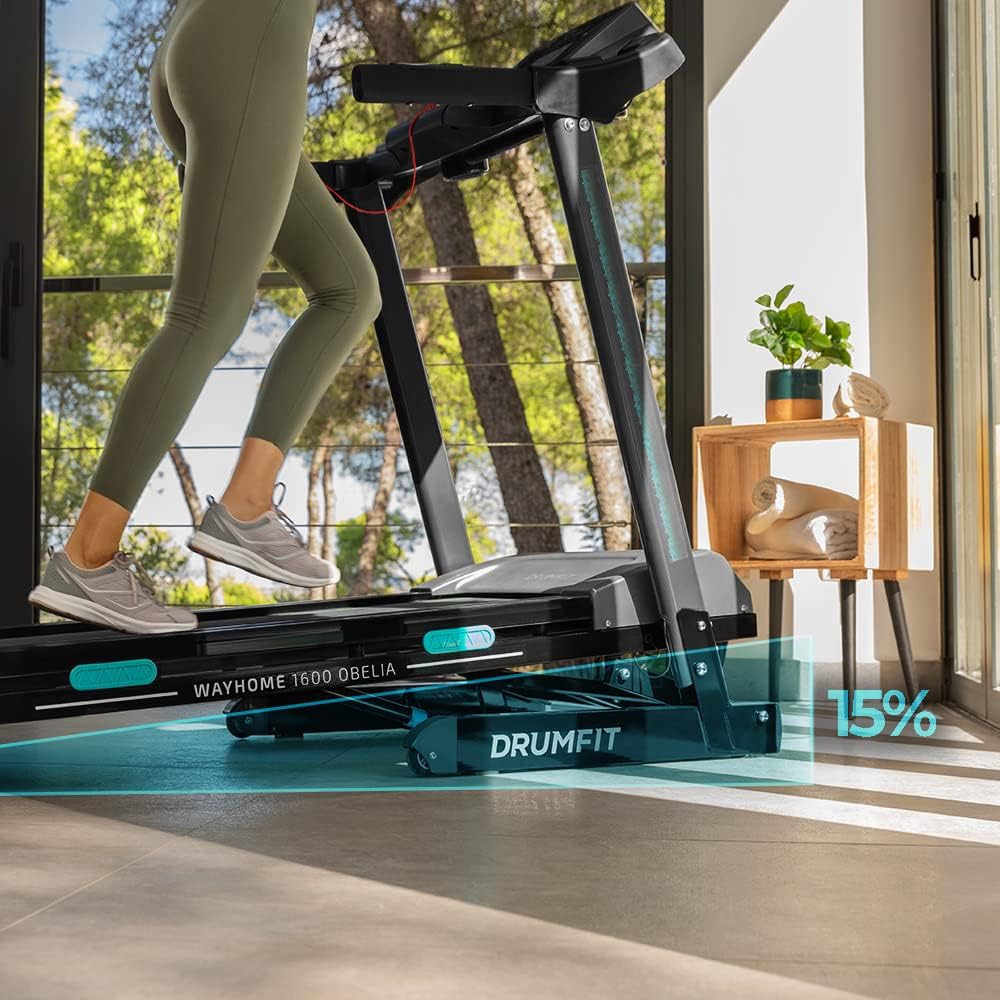
Figure 5: Treadmill demonstrating its motorized incline feature. The image shows the running deck elevated to simulate an uphill climb, indicating a 15% incline.

Figure 6: Close-up of the treadmill's running surface, highlighting its dimensions of 130 cm in length and 42 cm in width for comfortable use.
6. Maintenance
Regular maintenance ensures the longevity and optimal performance of your treadmill.
- Cleaning: Wipe down the treadmill after each use with a damp cloth to remove sweat and dust. Do not use abrasive cleaners.
- Lubrication: Periodically lubricate the running belt according to the instructions in the full manual (not provided here). This typically involves applying silicone lubricant under the belt.
- Belt Tension and Alignment: Check the running belt tension and alignment regularly. Adjust if the belt slips or drifts to one side. Refer to the detailed manual for adjustment procedures.
- Storage: When not in use, the treadmill can be folded for compact storage. Ensure it is unplugged before folding.
7. Troubleshooting
If you encounter issues with your treadmill, refer to the table below for common problems and solutions.
| Problem | Possible Cause | Solution |
|---|---|---|
| Treadmill does not start. | Power cord not plugged in, safety key not in place, circuit breaker tripped. | Check power connection, ensure safety key is inserted, reset circuit breaker. |
| Running belt slips. | Belt too loose, belt needs lubrication. | Adjust belt tension (refer to full manual), lubricate the belt. |
| Unusual noise during operation. | Loose parts, motor issue, belt friction. | Check for loose bolts and tighten. If noise persists, contact customer support. |
| Incline not working. | Motor issue, connection problem. | Check connections. If problem persists, contact customer support. |
For more detailed troubleshooting or issues not listed here, please contact Cecotec customer support.
8. Specifications
| Feature | Detail |
|---|---|
| Model | 07080 |
| Brand | Cecotec |
| Power | 1500 W / 2 HP |
| Max Speed | 16 km/h |
| Running Surface | 130 x 42 cm |
| Incline System | Motorized, up to 15% (Automatic Tilt) |
| Damping System | UltraFlex System (10 elastomers) |
| Display Type | LCD |
| Programs | 12 predefined programs, 4 operating modes |
| Heart Rate Monitor | Yes (sensor) |
| Connectivity | USB charging, Speakers |
| Material | Carbon Steel (main), Alloy Steel (frame) |
| Unfolded Dimensions (L x W x H) | 165 cm x 71.5 cm x 128 cm |
| Folded Dimensions (L x W x H) | 75.5 cm x 58.3 cm x 176.3 cm |
| Item Weight | 57 Kilograms |
| Max User Weight | 120 kg |
9. Warranty and Support
Cecotec products are manufactured to the highest quality standards.
- Spare Parts Availability: Spare parts for this product are available for 10 years from the date of purchase.
- Customer Service: For any questions, technical support, or warranty claims, please contact Cecotec customer service through their official website or the contact information provided with your purchase.


