1. Introduction
This manual provides detailed instructions for the installation, operation, and maintenance of your CAMECHO A2742A1MIUK-C156 2-DIN Android 10.0 Car Stereo. Please read this manual thoroughly before using the product to ensure correct operation and to prevent damage.
The CAMECHO A2742A1MIUK-C156 is a versatile 7-inch capacitive touchscreen car stereo designed for select VW, Skoda, and Seat vehicles. It features an Android 10.0 operating system, integrated Carplay, Bluetooth connectivity, GPS navigation, Wi-Fi, FM/RDS radio, and mirror link functionality. A rear camera and microphone are included for enhanced convenience and safety.
2. Product Features
- Operating System: Android 10.0 for smooth and responsive performance.
- Display: 7-inch HD capacitive touchscreen with 1024x600 resolution.
- Processor: 1.3 GHz Quad-Core MTK.
- Memory: 1GB RAM, 16GB ROM.
- Integrated Carplay: Seamless integration with Apple Carplay for iPhone users.
- Bluetooth 4.0: Supports A2DP for audio streaming, hands-free calling, and phonebook download.
- Mirror Link: Compatible with Android phones (excluding Samsung) and iPhones for screen mirroring.
- Wi-Fi Functionality: Connect to Wi-Fi hotspots for internet access.
- FM/RDS Radio: Features 18 preset stations for radio listening.
- GPS Navigation: Built-in GPS for accurate navigation.
- Rear Camera Input: Supports a rear view camera for parking assistance.
- Steering Wheel Control: Compatible with existing steering wheel controls for convenience.
3. Package Contents
Verify that all items listed below are included in your package:
- 1 x CAMECHO Android Player Unit
- 1 x Low Impact Vehicle Power Cable
- 1 x High Pay Vehicle Power Cable
- 2 x USB Adapters
- 1 x Radio Antenna
- 1 x GPS Antenna
- 1 x CANBUS Decoder
- 1 x CAM-VIN Cable
- 1 x RCA Input/Output Cable
- 1 x Rear Camera
- 1 x External Microphone

Figure 3.1: Included accessories and cables for the CAMECHO A2742A1MIUK-C156 car stereo.
4. Compatibility
This car stereo is designed to be compatible with various Volkswagen, Skoda, and Seat models. Please verify the installation size and shape of this unit against your vehicle's dashboard before purchase. For vehicles manufactured in 2014, 2015, 2016, or 2017, please contact customer support as different connectors and CANBUS systems may be required.
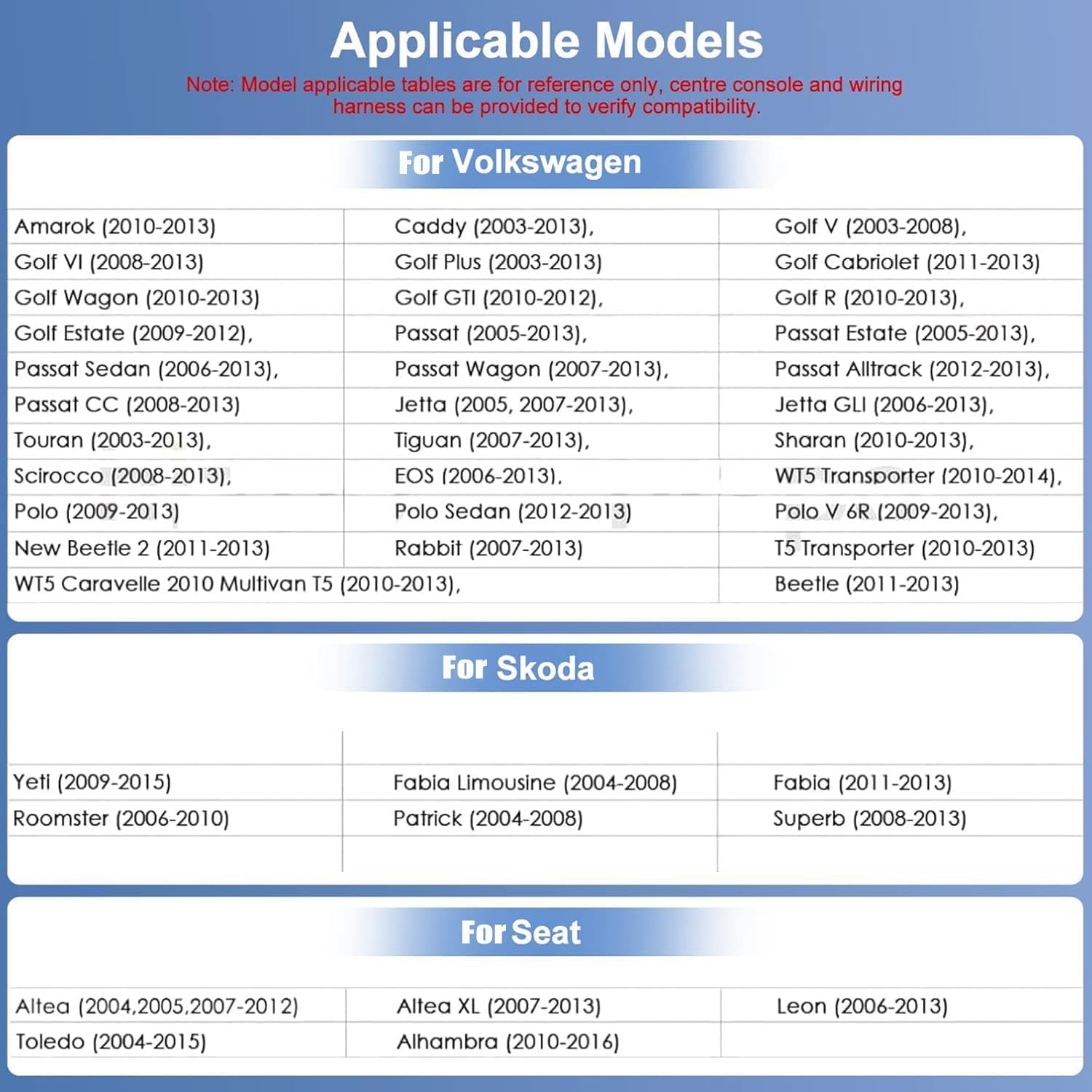
Figure 4.1: Applicable vehicle models for the CAMECHO A2742A1MIUK-C156 car stereo.
Applicable Models List:
| Brand | Model | Year Range |
|---|---|---|
| Volkswagen | Amarok | 2010-2013 |
| Caddy | 2003-2013 | |
| Golf V | 2003-2008 | |
| Golf VI | 2008-2013 | |
| Golf Plus | 2003-2013 | |
| Golf Cabriolet | 2011-2013 | |
| Golf Wagon | 2010-2013 | |
| Golf GTI | 2010-2012 | |
| Golf R | 2010-2013 | |
| Golf Estate | 2009-2012 | |
| Passat | 2005-2013 | |
| Passat Estate | 2005-2013 | |
| Passat Sedan | 2006-2013 | |
| Passat Wagon | 2007-2013 | |
| Passat Alltrack | 2012-2013 | |
| Passat CC | 2008-2013 | |
| Jetta | 2005, 2007-2013 | |
| Jetta GLI | 2006-2013 | |
| Touran | 2003-2013 | |
| Tiguan | 2007-2013 | |
| Sharan | 2010-2013 | |
| Scirocco | 2008-2013 | |
| EOS | 2006-2013 | |
| WT5 Transporter | 2010-2014 | |
| Polo | 2009-2013 | |
| Polo Sedan | 2012-2013 | |
| Polo V 6R | 2009-2013 | |
| New Beetle 2 | 2011-2013 | |
| Rabbit | 2007-2013 | |
| T5 Transporter | 2010-2013 | |
| WT5 Caravelle 2010 Multivan T5 | 2010-2013 | |
| Beetle | 2011-2013 | |
| Skoda | Yeti | 2009-2015 |
| Fabia Limousine | 2004-2008 | |
| Fabia | 2011-2013 | |
| Roomster | 2006-2010 | |
| Patrick | 2004-2008 | |
| Superb | 2008-2013 | |
| Seat | Altea | 2004, 2005, 2007-2012 |
| Altea XL | 2007-2013 | |
| Leon | 2006-2013 | |
| Toledo | 2004-2015 | |
| Alhambra | 2010-2016 |
5. Important Notes Before Installation
- Before purchasing, confirm that the dimensions and shape of this unit are suitable for your vehicle's dashboard.
- All car radio functions will be suspended when the reverse gear is engaged.
- For vehicles manufactured in 2014, 2015, 2016, or 2017, please contact customer support before installation. These models may require different connectors and CANBUS configurations.
- Professional installation is recommended to ensure proper functionality and to avoid damage to the unit or vehicle.
6. Installation Guide
This section provides a general overview of the installation process. Refer to the detailed wiring diagrams and consult a professional if you are unsure about any steps.
6.1. Unit Dimensions
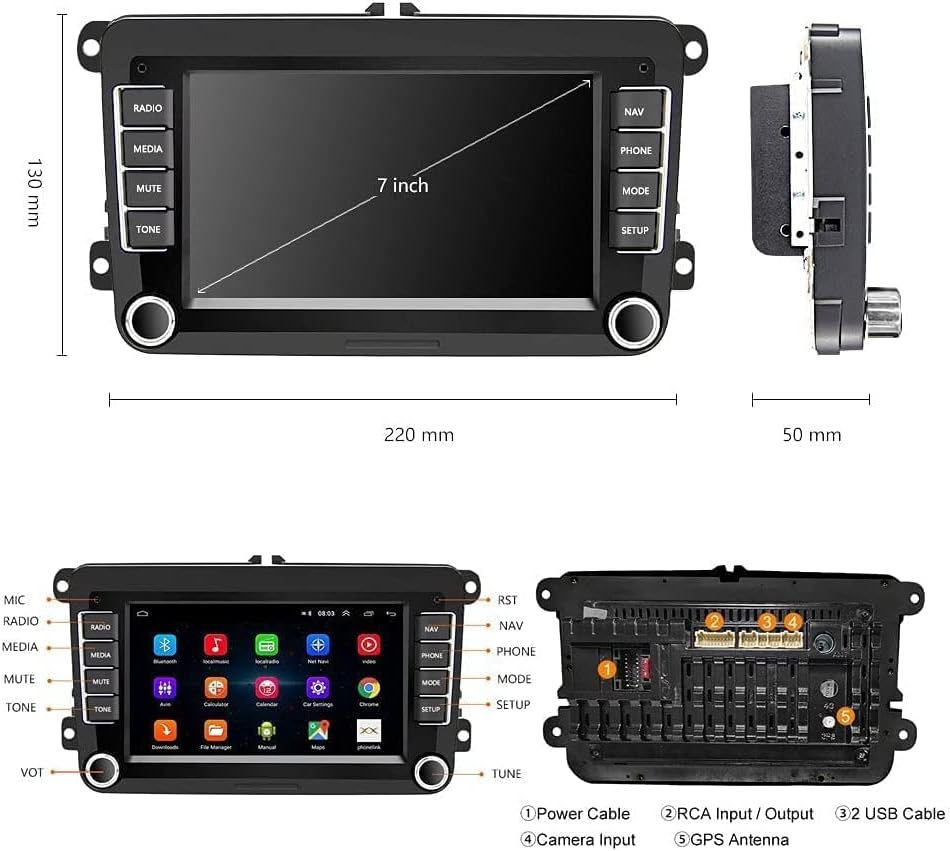
Figure 6.1: Dimensions of the CAMECHO A2742A1MIUK-C156 unit.
6.2. Wiring Diagram
Carefully connect all cables as shown in the diagram. Incorrect wiring can damage the unit or your vehicle's electrical system.

Figure 6.2: Rear view of the car stereo with labeled connection ports.
- Power Cable: Connect the main power harness to your vehicle's wiring. Ensure correct positive, negative, and accessory connections.
- CANBUS: Connect the CANBUS decoder if your vehicle requires it for steering wheel controls or other integrated functions.
- GPS Antenna: Mount the GPS antenna in a location with a clear view of the sky, typically on the dashboard.
- Radio Antenna: Connect the radio antenna for FM/RDS reception.
- USB Adapters: Connect the USB adapters for external storage or phone connectivity.
- Rear Camera: Connect the rear camera to the CAM-VIN input. Ensure the reverse trigger wire is correctly connected to activate the camera automatically when reversing.
- Microphone: Connect the external microphone for improved call quality.
7. Operating Instructions
This section covers the basic operation of your CAMECHO car stereo.

Figure 7.1: Main interface of the CAMECHO A2742A1MIUK-C156 car stereo.
7.1. Power On/Off
Press the power button (usually a physical knob or button on the unit) to turn the stereo on or off. The unit will typically power on automatically with the vehicle's ignition.
7.2. Radio (FM/RDS)
- Press the 'RADIO' button or select the Radio app from the main menu.
- Use the touch screen to scan for stations or select from preset stations.
- The RDS (Radio Data System) feature displays station information where available.
7.3. Bluetooth Connectivity
- Go to the 'Settings' menu and select 'Bluetooth'.
- Enable Bluetooth on your mobile device and search for available devices.
- Select the car stereo (e.g., 'CAMECHO') from your device's list and pair.
- Once paired, you can make hands-free calls, stream audio (A2DP), and sync your phonebook.
7.4. GPS Navigation
- Select the 'NAV' button or the Navigation app from the main menu.
- The unit comes with pre-installed navigation software. Follow the on-screen prompts to set your destination.
- Ensure the GPS antenna is properly installed for optimal signal reception.
7.5. Carplay / Android Auto
The unit supports both Apple Carplay and Android Auto for seamless smartphone integration.

Figure 7.2: Carplay and Android Auto interfaces.
- For Carplay (iPhone): Connect your iPhone via a USB cable to one of the unit's USB ports. Carplay should launch automatically.
- For Android Auto (Android phones): Connect your Android phone via a USB cable. Ensure Android Auto is installed on your phone.
- Alternatively, some Carplay/Android Auto functions may be available wirelessly via Bluetooth.
7.6. Mirror Link
Mirror Link allows you to display your smartphone screen on the car stereo. This feature is compatible with Android phones (excluding Samsung) and iPhones.
- Access the 'Mirror Link' app on the stereo.
- Follow the on-screen instructions to connect your phone via USB or Wi-Fi.
7.7. Rear Camera
When the vehicle is shifted into reverse gear, the display will automatically switch to the rear camera view, providing assistance for parking and maneuvering.
Figure 7.3: GPS, FM Radio, Steering Wheel Control, and Reverse Camera functions.
8. Specifications
| Feature | Specification |
|---|---|
| Operating System | Android 10.0 |
| Processor | 1.3 GHz Quad-Core MTK |
| RAM | DDR3 1GB |
| ROM | 16 GB |
| Screen Size | 7-inch Capacitive Touch Screen |
| Resolution | 1024 x 600 |
| Unit Dimensions (W x H x D) | 215mm x 130mm x 53mm |
| Radio Frequency | FM/RDS |
| Max Output Power | 4 x 45 W |
| Bluetooth Version | 4.0 |
| Connectivity | Bluetooth, Wi-Fi, USB |
| Compatible Devices | Smartphone |
| Audio Output Mode | Stereo |
9. Troubleshooting
If you encounter issues with your car stereo, refer to the following common problems and solutions:
- No Power:
- Check all power connections, including the main power cable and accessory wire.
- Verify the vehicle's fuse for the stereo is intact.
- Bluetooth Draining Car Battery:
- Ensure the CANBUS decoder is correctly installed and configured for your vehicle. The CANBUS manages power states and can prevent parasitic drain.
- Check the wiring of the accessory (ACC) power line to ensure the unit powers off completely with the ignition.
- If the issue persists, consult a professional installer or contact customer support.
- Rear Camera Not Working:
- Verify the CAM-VIN cable is securely connected to both the stereo and the camera.
- Ensure the reverse trigger wire from the stereo is correctly connected to your vehicle's reverse light circuit.
- Check the camera's power supply.
- No Sound:
- Check speaker wire connections.
- Ensure the volume is not muted or set too low.
- Verify audio output settings in the stereo's menu.
- Screen Not Turning On:
- Check power connections as described above.
- If the unit powers on but the screen remains black, try a soft reset (refer to the unit's settings for a reset option, or disconnect power for a few minutes).
10. Maintenance
- Cleaning the Screen: Use a soft, lint-free cloth to gently wipe the touchscreen. For stubborn smudges, slightly dampen the cloth with water or a screen-safe cleaner. Avoid harsh chemicals.
- General Cleaning: Keep the unit free from dust and debris. Use a soft brush or compressed air to clean around buttons and vents.
- Software Updates: Periodically check the manufacturer's website or the unit's settings for available software updates to ensure optimal performance and access to new features.
11. Warranty and Support
For warranty information, technical support, or service inquiries, please refer to the warranty card included with your product or contact CAMECHO customer service directly. Please have your model number (A2742A1MIUK-C156) and purchase details ready when contacting support.
Customer Support Contact: Please visit the official CAMECHO website for the most up-to-date contact information.


