
1. Introduction
Thank you for choosing the Hofstein Tamizat LED Ceiling Light. This manual provides essential information for the safe installation, operation, and maintenance of your new lighting fixture. Please read these instructions thoroughly before installation and retain them for future reference.
This modern LED ceiling light features dimmable functionality, adjustable color temperature (2700-6500K), and RGB color change capabilities. It can be controlled via a smart app, remote control, and Bluetooth, offering versatile lighting options for your home.
2. Safety Instructions
- Electrical Installation: Installation must be performed by a qualified electrician in accordance with local wiring regulations.
- Power Disconnection: Always disconnect the main power supply before installation, maintenance, or cleaning to prevent electric shock.
- Voltage: This fixture operates on 230 Volt AC. Ensure your electrical supply matches this requirement.
- Indoor Use Only: This product is designed for indoor use (IP20 rating). Do not expose it to moisture or direct water.
- Class II Appliance: This product is double insulated and does not require an earth connection.
- Non-Replaceable LEDs: The LED light sources in this fixture are not replaceable. Do not attempt to replace them.
- Heat: Do not cover the fixture. Ensure adequate ventilation around the light.
3. Package Contents
Please check that all components are present and undamaged:
- Hofstein Tamizat LED Ceiling Light Fixture
- Mounting Bracket
- Mounting Hardware (screws, wall plugs)
- Remote Control
- User Manual
4. Setup and Installation
Tools Required: Drill, screwdriver, wire strippers, voltage tester, pencil, measuring tape.
- Prepare for Installation: Turn off the main power supply at the circuit breaker. Verify that the power is off using a voltage tester.
- Remove Old Fixture (if applicable): Carefully disconnect and remove any existing ceiling light fixture.
- Attach Mounting Bracket: Position the mounting bracket on the ceiling where the light will be installed. Mark the drilling points. Drill holes and insert wall plugs. Secure the mounting bracket to the ceiling using the provided screws.
- Electrical Connection: Connect the household electrical wires to the terminal block on the fixture. Ensure correct polarity (Live to Live, Neutral to Neutral). This is a Class II appliance, so no earth connection is required.
- Mount the Fixture: Carefully align the ceiling light fixture with the mounting bracket and secure it using the provided screws. Ensure the fixture is firmly attached to the ceiling.
- Restore Power: Once installation is complete and all connections are secure, restore power at the circuit breaker.

Image: Dimensions of the Hofstein Tamizat LED Ceiling Light and its mounting bracket.
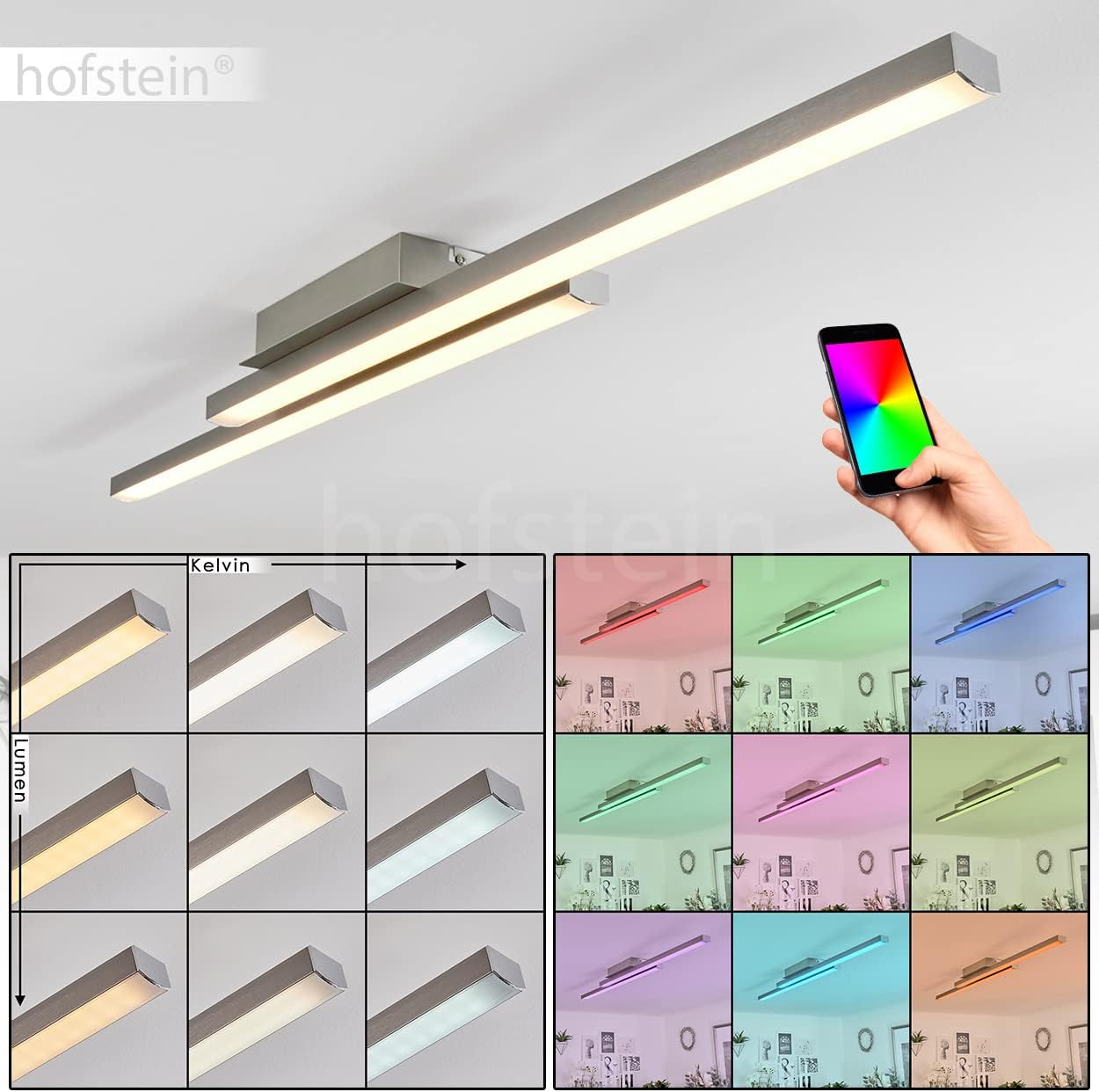
Image: Hofstein Tamizat LED Ceiling Light installed in a room.
5. Operating Instructions
The Hofstein Tamizat LED Ceiling Light can be controlled via the included remote control or a smart app.
5.1. Basic Operation (Remote Control)
- Power On/Off: Press the ON/OFF button to turn the light on or off.
- Brightness Adjustment: Use the DIM UP and DIM DOWN buttons to increase or decrease the light intensity.
- Color Temperature Adjustment: Use the WARM and COOL buttons to cycle through color temperatures from 2700K (warm white) to 6500K (cool white).
- RGB Color Selection: Press the RGB button to activate color mode. Use the color wheel or specific color buttons on the remote to select your desired color.
- Scene Modes: Some remotes may include pre-set scene buttons for quick access to different lighting moods.

Image: Demonstrating Kelvin and Lumen adjustments.

Image: RGB color options of the LED ceiling light.
6. Smart Home Integration
The Hofstein Tamizat LED Ceiling Light is compatible with Smart Home systems, specifically EGLO-Connect, and can be controlled via a dedicated smart app and Bluetooth.
6.1. Connecting to the Smart App
- Download App: Download the EGLO-Connect Smart App from your device's app store (iOS/Android).
- Enable Bluetooth: Ensure Bluetooth is enabled on your smartphone or tablet.
- Pairing: Follow the in-app instructions to pair your Hofstein Tamizat light. This typically involves turning the light off and on at the main switch a few times to enter pairing mode, then searching for the device within the app.
- Control: Once paired, you can control brightness, color temperature, RGB colors, and set schedules or scenes directly from the app.

Image: Smart app control of the Hofstein Tamizat LED Ceiling Light.
7. Maintenance
- Cleaning: Disconnect power before cleaning. Wipe the fixture with a soft, dry, or slightly damp cloth. Do not use abrasive cleaners or solvents.
- LEDs: The integrated LED light sources are designed for a long lifespan (approximately 25,000 hours) and are not replaceable.
- Inspection: Periodically check the fixture for any signs of damage or loose connections.
8. Troubleshooting
| Problem | Possible Cause | Solution |
|---|---|---|
| Light does not turn on. | No power supply; loose wiring; faulty switch. | Check circuit breaker. Verify wiring connections. Test switch. |
| Remote control not working. | Dead batteries; remote not paired. | Replace remote batteries. Re-pair remote with the light (refer to remote manual). |
| Smart App cannot connect. | Bluetooth off; light not in pairing mode; app issue. | Ensure Bluetooth is on. Cycle power to the light to enter pairing mode. Restart app. |
| Light flickers or dims unexpectedly. | Unstable power supply; loose connection. | Consult a qualified electrician to check power supply and connections. |
9. Specifications
| Feature | Detail |
|---|---|
| Model Number | H3650929 |
| Dimensions (L x W x H) | 105.5 cm x 12 cm x 6.5 cm |
| Material (Fixture) | Aluminum |
| Material (Shade) | Plastic |
| Color (Fixture) | Matte Nickel |
| Color (Shade) | White |
| Light Source | Integrated LED (2x17 Watt) |
| Luminous Flux | 4600 Lumen |
| Color Temperature | 2700K - 6500K (Adjustable) |
| Color Rendering | RGB Color Change |
| Dimmable | Yes (via App/Remote) |
| Average Lifespan | 25,000 hours |
| Operating Voltage | 230 Volt |
| Protection Rating | IP20 |
| Protection Class | II |
| Smart Home System | EGLO-Connect |
| Control Methods | Smart App, Remote Control, Bluetooth |

Image: Energy Efficiency Label.
10. Warranty and Support
For warranty information or technical support, please refer to the retailer's policy or contact Hofstein customer service. Keep your proof of purchase for any warranty claims.